p.1 #1 · Negative Lab Pro Settings: Your preferences
I recently tried Negative Lab Pro for the first time, and I've noticed that even though the settings resemble what I'm used to in Lightroom, they don't act the same way. I understand that the effectiveness of settings can vary based on exposure, film, and the overall look you're going for. Here are my default settings:
CONVERT:
•Color Mode: I've been sticking with "None" and achieving good results so far. It seems to work well for my purposes.
EDIT:
•ToneProfile: I'm using the default LAB - Standard, but there are other options. I'd like to know what you prefer and why.
•Other setting sliders: I usually go with default settings. What about you? Do you leave the Sharpen setting as it is?
ADVANCE:
I typically stick with the default settings here as well. However, I'm curious about CurvePoints and the other advanced settings. Any tips or preferences you'd like to share?
There is a great guide here but I really wanted to learn from your experience, so please feel free to share your settings. Thanks!
p.1 #2 · Negative Lab Pro Settings: Your preferences
I use Noritsu for the initial colour conversion.
Border buffer 5% if I want a small border in the conversion. But I find it converts better if I crop out all the border and set border buffer to 0% then convert.
Tones - lab standard as default. If there are some serious highlights - or it is a B&W image - cinematic rich and see how it looks. The beautiful thing is you can tweak this in LR afterwards.
WB - Auto Neutral, but I may select NONE if there is a predominant colour in the scene.
Never even clicked on the Advance tab. I ain't kickin that hornets' nest!
p.1 #3 · Negative Lab Pro Settings: Your preferences
Desmolicious wrote:
I use Noritsu for the initial colour conversion.
Border buffer 5% if I want a small border in the conversion. But I find it converts better if I crop out all the border and set border buffer to 0% then convert.
Tones - lab standard as default. If there are some serious highlights - or it is a B&W image - cinematic rich and see how it looks. The beautiful thing is you can tweak this in LR afterwards.
WB - Auto Neutral, but I may select NONE if there is a predominant colour in the scene.
Never even clicked on the Advance tab. I ain't kickin that hornets' nest! ...Show more →
I will try Noritsu and compare the difference. Thanks for the feedback.
Aside from this, it looks like you are using the default settings.
p.1 #5 · Negative Lab Pro Settings: Your preferences
Here's my NLP workflow:
1. Select a batch of images from the same shoot in LR
2. Convert in NLP using:
Color Model - Basic (unless it looks wonky, then None) or B&W
Pre-Saturation - 3 (default)
Border Buffer - 2%
3. Adjust one image in NLP
Cycle through all the tones using the little circular arrow, I usually end up using Linear Gamma or Cinematic Rich, but will sometimes find another one I like better. Linear is sometimes best if you want to make a lot of adjustments later in LR.
I Rarely use the sliders, sometimes contrast or exposure.
If WB looks off, cycle through the options to see if something is better.
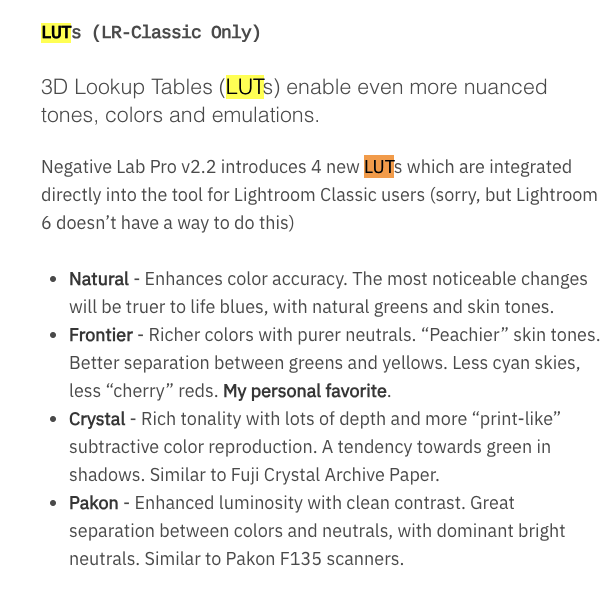
Cycle through LUTs, I tend to like Frontier, Natural or None
4. Sync Settings
5. Check all the other images to see if they need any tweaking
6. Apply with Make Copy checked
7. Finish processing the .tiff in LR/PS - basically the same as digital at this point, except for removing dust spots
p.1 #6 · Negative Lab Pro Settings: Your preferences
Like OregonSun I image in batches, rarely use the sliders, image one representative image, and get an excellent color conversion copy to finish in PS or LR.
IMO, Nate at NLP is a genius, because his color profiles are as close to perfect as I have ever seen for color negative conversions using default settings. I noticed NLP conversions here on FM by dean001, and the excellent color conversions he got were obvious to me. He shared his process on the manual focus Nikkor thread. I'm not likely to upgrade beyond my current NLP v2.x, because "if it ain't broke - don't fix it". Back in 1994 the Associated Press re-wrote the acquire plugin/firmware for the first portable professional digital camera - the NC2000, and getting good color after that became a nightmare.
p.1 #7 · Negative Lab Pro Settings: Your preferences
OregonSun wrote:
Here's my NLP workflow:
1. Select a batch of images from the same shoot in LR
2. Convert in NLP using:
Color Model - Basic (unless it looks wonky, then None) or B&W
Pre-Saturation - 3 (default)
Border Buffer - 2%
3. Adjust one image in NLP
Cycle through all the tones using the little circular arrow, I usually end up using Linear Gamma or Cinematic Rich, but will sometimes find another one I like better. Linear is sometimes best if you want to make a lot of adjustments later in LR.
I Rarely use the sliders, sometimes contrast or exposure.
If WB looks off, cycle through the options to see if something is better.
Cycle through LUTs, I tend to like Frontier, Natural or None
4. Sync Settings
5. Check all the other images to see if they need any tweaking
6. Apply with Make Copy checked
7. Finish processing the .tiff in LR/PS - basically the same as digital at this point, except for removing dust spots ...Show more →
Great info! I tried Linear Gamma/Cinematic Rich on my images and prefer the results compared to default.
I also checked WB from Auto Neutral to Auto AVG and prefer that too.
Where is the LUTs section?
p.1 #8 · Negative Lab Pro Settings: Your preferences
Fred Miranda wrote:
Great info! I tried Linear Gamma/Cinematic Rich on my images and prefer the results compared to default.
I also checked WB from Auto Neutral to Auto AVG and prefer that too.
Where is the LUTs section?
I believe you'll only get LUT options if using Basic, Noritsu, or Frontier color models. Once you choose one, you can adjust its effect with a slider at the top of the develop module (where you'd normally select a color profile).
p.1 #9 · Negative Lab Pro Settings: Your preferences
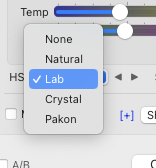
I believe I have the latest version of NLP, and the setting is not labeled as LUT. In my version, it's referred to as HSL, and Frontier is not available as an option.
Perhaps the previous Frontier is now called "LAB".
p.1 #10 · Negative Lab Pro Settings: Your preferences
Fred Miranda wrote:
I believe I have the latest version of NLP, and the setting is not labeled as LUT. In my version, it's referred to as HSL, and Frontier is not available as an option.
Perhaps the previous Frontier is now called "LAB".
Yeah, my workflow above is for v2.
Thanks for the reminding me I need to make the move to v3. Curious to see what's new.
p.1 #11 · Negative Lab Pro Settings: Your preferences
Fred Miranda wrote:
I believe I have the latest version of NLP, and the setting is not labeled as LUT. In my version, it's referred to as HSL, and Frontier is not available as an option.
Perhaps the previous Frontier is now called "LAB".
Ahh, I didn't know we were on v3!
Purchased and installed, just need to dive into it later today.
p.1 #12 · Negative Lab Pro Settings: Your preferences
Be sure to make positive images in LR once you’re done and if you are syncing with collections as I have found Nate’s profile doesn’t reliably sync with the rest of my others.
p.1 #16 · Negative Lab Pro Settings: Your preferences
I've noticed something in Lightroom: when I use the white balance picker on the black border of the film before starting NLP, the white balance changes dramatically depending on where I place the picker. Has anyone else noticed this? Any tips for getting more precise white balance from the film border?
p.1 #17 · Negative Lab Pro Settings: Your preferences
Fred Miranda wrote:
I've noticed something in Lightroom: when I use the white balance picker on the black border of the film before starting NLP, the white balance changes dramatically depending on where I place the picker. Has anyone else noticed this? Any tips for getting more precise white balance from the film border?
You say you're using a black border, but the area you balance off of should be an unexposed area of the film, which in a pre-inverted scan will be orange (or orange-ish). It will be grey-ish blue after balancing, and then black after inversion. It doesn't really matter where you sample from within that unexposed area, it pretty much always lands in the 2100-2400k range.
Any chance you're using the black of your film holder? I tried WB'ing off that, and I did get very different results depending on where I selected.
p.1 #18 · Negative Lab Pro Settings: Your preferences
OffTrail wrote:
You say you're using a black border, but the area you balance off of should be an unexposed area of the film, which in a pre-inverted scan will be orange (or orange-ish). It will be grey-ish blue after balancing, and then black after inversion. It doesn't really matter where you sample from within that unexposed area, it pretty much always lands in the 2100-2400k range.
Any chance you're using the black of your film holder? I tried WB'ing off that, and I did get very different results depending on where I selected.
You're absolutely correct. I was taking samples from the border of the film holder. It got a bit confusing because everything looks black there.
With my setup, when I sample from the unexposed part of the film, I consistently get a temperature of 2900 and a tint of -22. This remains the same for all my frames since the LED backlighting is consistent when scanning the film. Thanks for saving me from the hassle of adjusting the white balance after the conversion!
p.1 #19 · Negative Lab Pro Settings: Your preferences
Do you edit entire rolls of film at once, or do you edit image by image? Personally, I find that my images often require different settings for WB and LUT, so I prefer editing them individually.
p.1 #20 · Negative Lab Pro Settings: Your preferences
Fred Miranda wrote:
Do you edit entire rolls of film at once, or do you edit image by image? Personally, I find that my images often require different settings for WB and LUT, so I prefer editing them individually.
I convert all shots from one shooting session (i.e. same location/lighting) at the same time. I adjust one image from that batch, sync settings across the batch, then adjust individual images as needed. I often don't need to make any additional adjustments to the individual images.
I do usually end up fine tuning each image to a greater or lesser degree in LR once the conversion is done.