fredmiranda.com
Login

Moderated by: Fred Miranda
  New fredmiranda.com Mobile Site
  New Feature: SMS Notification alert
  New Feature: Buy & Sell Watchlist
  

FM Forums | Post-processing & Printing | Join Upload & Sell

       2       end
  

Archive 2023 · New Mac and PC Lightroom Benchmarking


jhapeman
Offline
• • • •
Upload & Sell: On
p.1 #1 · New Mac and PC Lightroom Benchmarking


I have the luxury of having multiple Macs and PCs that are used in my business so last year I posted some comparisons on some common Lightroom and Topaz tasks. With the release of the AI-denoise in LR Classic v 12.3 I have now moved on to that product, so I am adding a chart for that here although I did also update the Topaz chart. I also am not putting in some charts I did before where almost all of the computers performed very similarly. Finally, we added a nice laptop for the CAD designers to use here, so I added that to the matrix for the PC users. It's not 100% top of the line, but pretty high end, with a discrete Nvidia RTX 3070 GPU. Observations as follows:

1) The Apple Silicon does an impressive job with many tasks, but Adobe's Denoise really sticks out. This result is particularly impressive as right now Adobe is not using the Apple neural engines as there's a bug in MacOS Ventura that causes issues, so they have disabled them until Apple fixes it. That will only increase the performance on Apple Silicon, and Adobe has stated it will be significantly faster. Right now the M2 Ultra has the fastest scores there, even beating out an Nvidia RTX 4080 GPU. It's likely an Nvidia RTX 4090 would do a little better, but that's the top of the line on Nvidia, so Apple can go toe-to-toe, which IMO is pretty surprising. It's good to note that Adobe's denoise is optimized for the tensor cores in the Nvidia GPUs so Apple is handicapped in comparison at the moment. One final note on the Adobe denoise is that it showed one of the biggest jumps in performance on the M2 vs. M1 generation comparison on Apple Silicon. In addition, Apple has advertised that the neural engines are 40% faster on M2 vs. M1 so I expect an even bigger boost when Adobe is able to leverage those after Apple's bug fix.

2) UPDATE: I felt the M2 Ultra numbers were odd so I uninstalled and reinstalled Topaz and rebooted and voila, much different and much more expected--the M2 Ultra is much faster overall and the current "champion" out of all of these. BTW, I also checked to see what's happening on the processor level and Topaz does not use the Neural engines, only the GPU.

3) Preview render times are pretty self-explanatory. The big old 2019 Mac Pro does well here because LR mostly uses the CPU for preview rendering, and it's got more cores and those cores run at a faster base clock speed. The odd scores here at the two AMD Threadrippers which *should* do better, but don't for some reason. Watching the CPU utilization its clear they are stalling out and not fully utilizing the cores. It must have something to do with the AMD architecture on these processor models, but I don't know enough to speculate more. What is obvious is that core count is mostly king here--the more you have and the faster they are, the faster it goes.

4) Finally, jpeg export. This is another area where core count matters, but here it's both CPU and GPU as Adobe uses both. The M2 Max laptop didn't perform as well as one might expect here, and I think that's a clear case of thermal throttling--Apple isn't letting the SoC run as wild as it can in say a Mac Studio. I think the numbers the Ultra Studios post are very impressive considering the competition they are stacked up against here. These are powerful expensive PC workstations.

The M2 wasn't intended to be an M1 replacement, just the next iteration in the cycle of releases, but Apple has integrated some fixes into it that help with GPU and media engine scaling. I've seen some early benchmarks on video processing that show huge performance gains. I'm photography oriented so that matters less to me. If you have an M1 you have nothing to worry about with the M2 release. I do think we will see a big jump with the M3 as that is moving to a new processing node and the rumor is the it will bring hardware raytracing to the GPU.

I am eager to see Apple get the software bug in Ventura fixed so we can fully utilize the power of the neural engines on Apple Silicon. As more and more software becomes AI-optimized I think Apple is going to have an edge here with that technology already tried and tested and with access to the same pool of memory at the same speed as the CPU and GPU.

One other observation: The 12.4 release of LR really did improve the overall fluidity of browsing the filmstrip, but even so this is an area where the Ultras (M1 and M2) just seem to shine, probably because of the GPU core count--it's just super fluid browsing, even if I have not rendered previews beforehand. Between the performance updates by Adobe and the performance of these machines I can say LR Classic has never felt so fluid and enjoyable to use.
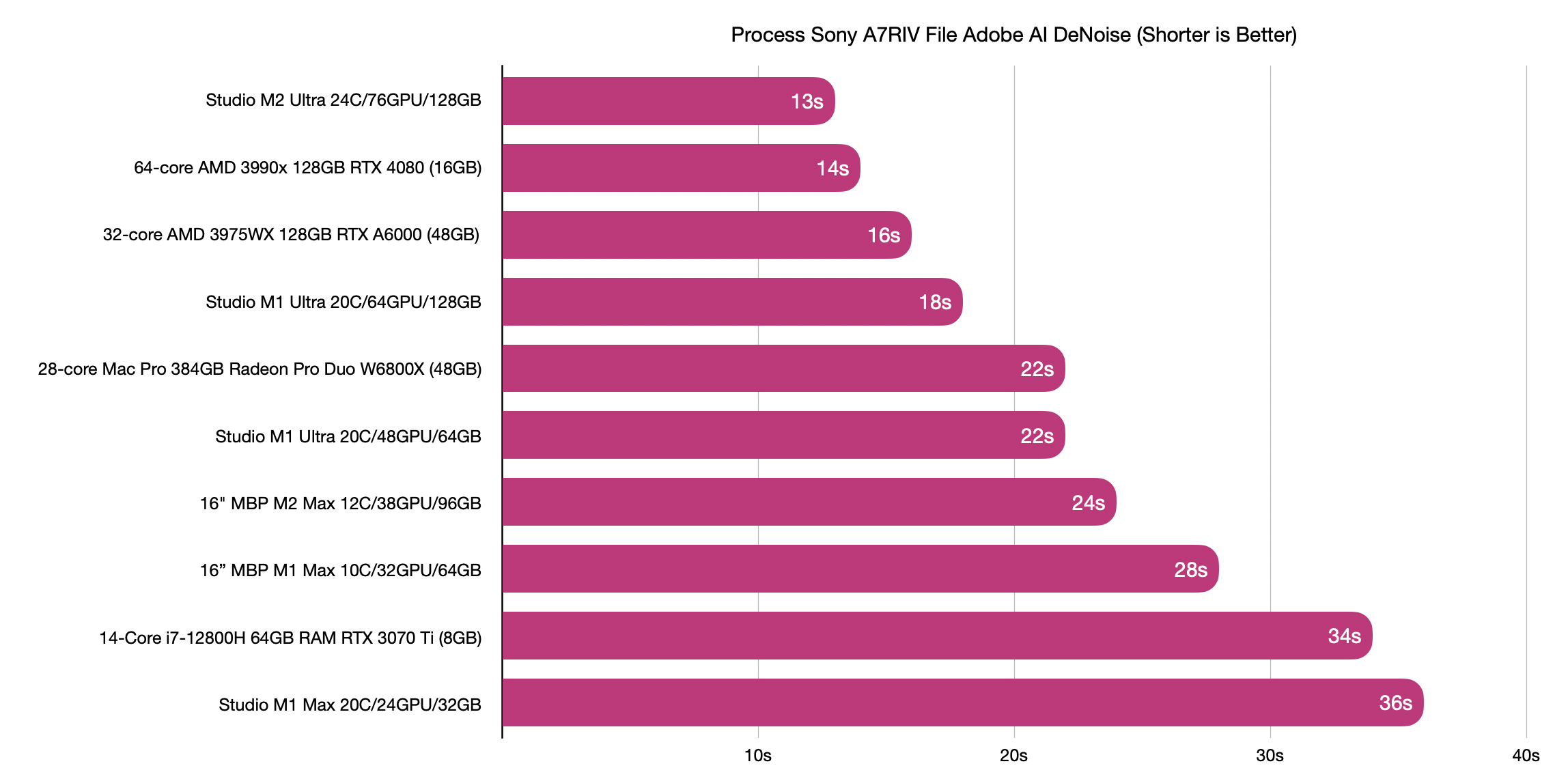


Adobe Denoise
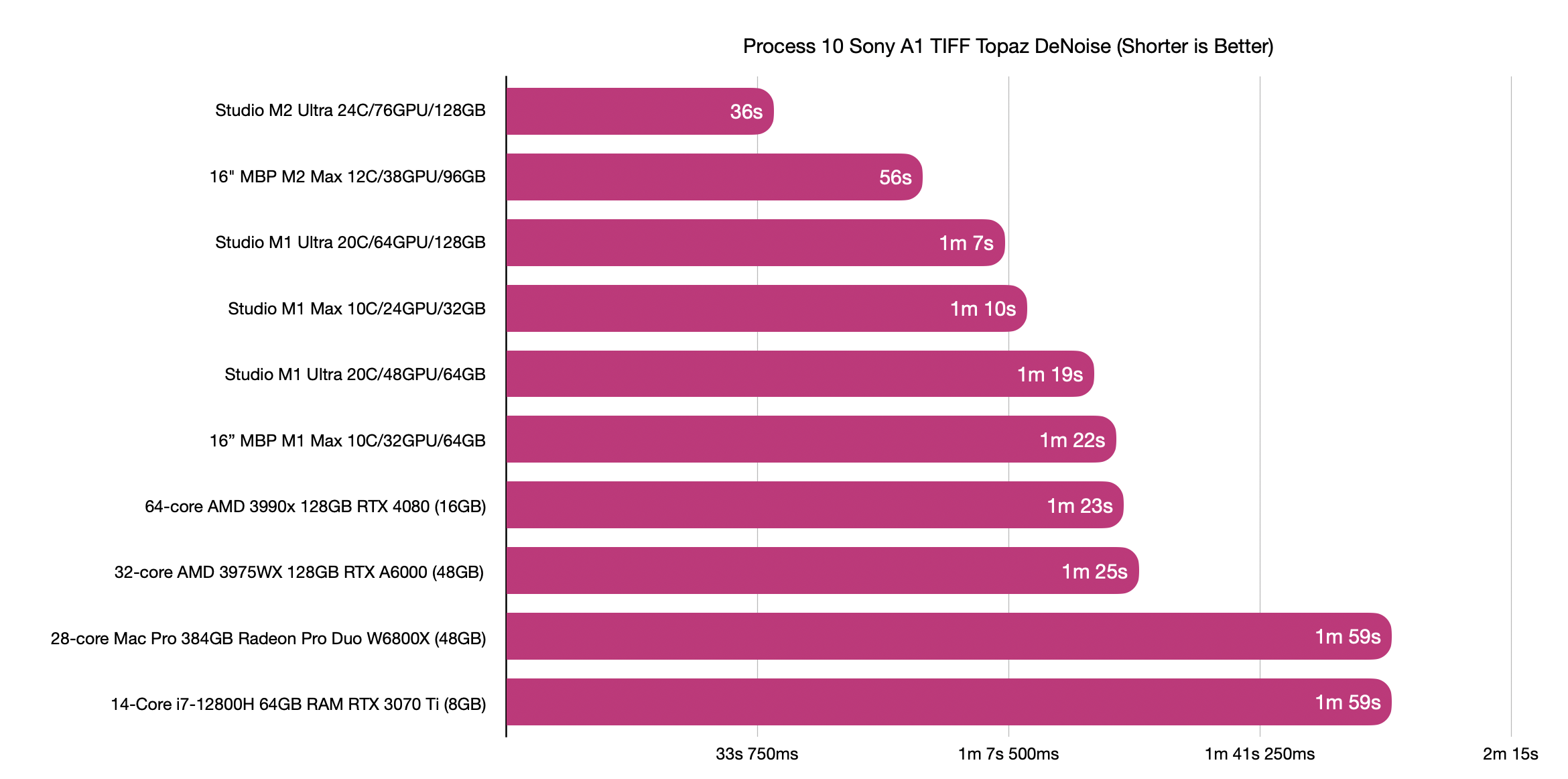


Topaz Denoise
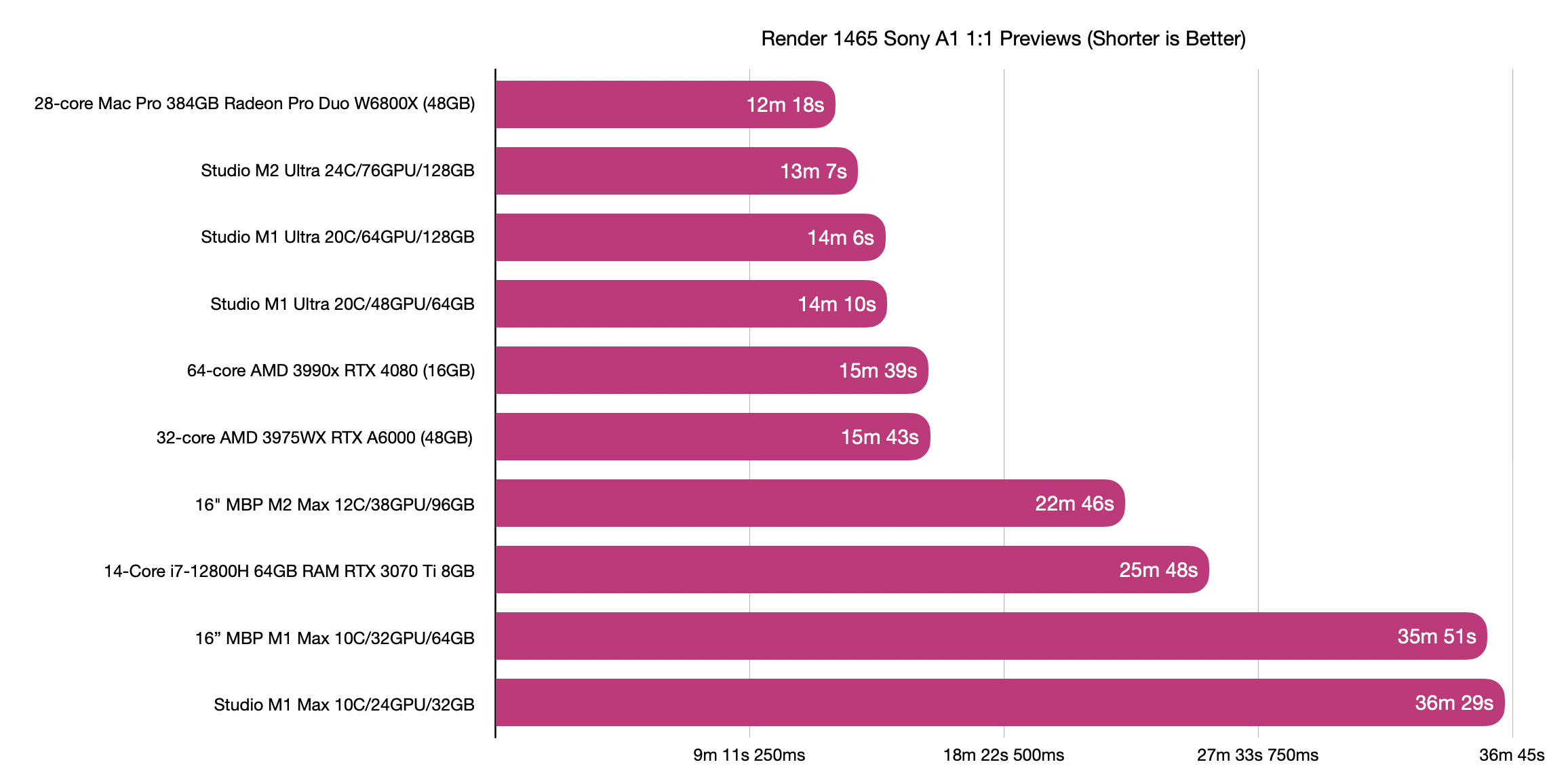


Render 1:1 Previews


Bulk JPEG Export


Edited on Jun 16, 2023 at 07:09 AM · View previous versions


Jun 15, 2023 at 12:56 PM
mcbroomf
Offline
• • • • •
Upload & Sell: Off
p.1 #2 · New Mac and PC Lightroom Benchmarking


Nice work Jeff. I can also add 61 seconds for Denoise with an M1 Pro MBP with 16 GPU cores.


Jun 15, 2023 at 01:06 PM
jhapeman
Offline
• • • •
Upload & Sell: On
p.1 #3 · New Mac and PC Lightroom Benchmarking


mcbroomf wrote:
Nice work Jeff. I can also add 61 seconds for Denoise with an M1 Pro MBP with 16 GPU cores.


When Adobe is able to use the neural engines in Denoise it will be interesting to see what happens. The base M1/2 through M1/2 Max all have the same number of neural engine cores (16), and only the Ultra doubles that. Presumably they will use a mix of the GPU and ANE for denoise, much as they use the variety of cores say the Nvidia cards, but that does mean the Ultras should see a bigger boost no matter what.


Jun 15, 2023 at 01:25 PM
mcbroomf
Offline
• • • • •
Upload & Sell: Off
p.1 #4 · New Mac and PC Lightroom Benchmarking


I updated the Mac table here.
https://www.fredmiranda.com/forum/topic/1804640/14#16267791

You can see the times follow the GPU count. Interestingly the M1 Ultras efficiency is lower than the rest. Could be the interposer between the 2 M1 Max chips was not working as well as with the M2 Max chips for the M2 Ultra. (Apple said that the Ultra is effectively seen as a single chip)


Jun 15, 2023 at 03:12 PM
exdeejjjaaaa
Offline
• • •
Upload & Sell: Off
p.1 #5 · New Mac and PC Lightroom Benchmarking


jhapeman wrote:


you sure that Adobe AI NR numbers are correct ? if this is just for 1 raw file they seem to be too much ... my lowly RTX4070 (not Ti even) does one such raw file in 15 sec ... can't be that better machines in your table are that slow ?


Jun 16, 2023 at 05:14 PM
mcbroomf
Offline
• • • • •
Upload & Sell: Off
p.1 #6 · New Mac and PC Lightroom Benchmarking


exdeejjjaaaa wrote:
you sure that Adobe AI NR numbers are correct ? if this is just for 1 raw file they seem to be too much ... my lowly RTX4070 (not Ti even) does one such raw file in 15 sec ... can't be that better machines in your table are that slow ?


What file are you using? The collection linked below lists the 4070 as 20 seconds using the linked testfile. Slight slower than the 4070 Ti and 4080, both with more cores.
https://www.fredmiranda.com/forum/topic/1804640/14#16267282


Jun 16, 2023 at 05:37 PM
jhapeman
Offline
• • • •
Upload & Sell: On
p.1 #7 · New Mac and PC Lightroom Benchmarking


exdeejjjaaaa wrote:
you sure that Adobe AI NR numbers are correct ? if this is just for 1 raw file they seem to be too much ... my lowly RTX4070 (not Ti even) does one such raw file in 15 sec ... can't be that better machines in your table are that slow ?


Yes, you have to use the same file to compare systems. I'm using an A7RIV raw file that was shared elsewhere so accurate comparisons can be made. Smaller files process much faster.


Jun 16, 2023 at 06:27 PM
chiron
Online
• • • • •
Upload & Sell: On
p.1 #8 · New Mac and PC Lightroom Benchmarking


jhapeman wrote:
IIf you have an M1 you have nothing to worry about with the M2 release. I do think we will see a big jump with the M3 as that is moving to a new processing node and the rumor is the it will bring hardware raytracing to the GPU.


Just to be clear here for the less engineering-inclined among us, who may struggle to catch your nuances--are you saying that those who have a well-specced M1 Studio have no reason to go for the M2 Studio, either Max or Ultra?


Jun 16, 2023 at 08:55 PM
jhapeman
Offline
• • • •
Upload & Sell: On
p.1 #9 · New Mac and PC Lightroom Benchmarking


chiron wrote:
Just to be clear here for the less engineering-inclined among us, who may struggle to catch your nuances--are you saying that those who have a well-specced M1 Studio have no reason to go for the M2 Studio, either Max or Ultra?


Correct. Unless you are using it for work where time = $$. The gains are actually quite good for a generation to generation chip update but for regular light use most folks won't notice it. It is good to see the GPU changes are really scaling up well--the Adobe Denoise result shows that the M2 Ultra scales up vs. an M2 Max much better than the M1 Ultra did. For example, if you're doing batch denoise processing on hundreds of images then you would definitely see some significant time savings.


Jun 16, 2023 at 08:58 PM
exdeejjjaaaa
Offline
• • •
Upload & Sell: Off
p.1 #10 · New Mac and PC Lightroom Benchmarking


mcbroomf wrote:
What file are you using? The collection linked below lists the 4070 as 20 seconds using the linked testfile. Slight slower than the 4070 Ti and 4080, both with more cores.
https://www.fredmiranda.com/forum/topic/1804640/14#16267282


That raw file too = 15 sec... it does not matter much which raw file the differences will be microscopical I am yet to find a A7R4 raw that will be more than 1 sec faster or 1 sec slower ...

PC W10x64 i7-9700K/64Gb ( so this is a quite ancient computer ) + ASUS TUF Gaming GeForce RTX 4070 12GB GDDR6X OC Edition ... a very minor OC applied ( above OEM overclocking )


Jun 17, 2023 at 10:36 AM
exdeejjjaaaa
Offline
• • •
Upload & Sell: Off
p.1 #11 · New Mac and PC Lightroom Benchmarking


jhapeman wrote:
Yes, you have to use the same file to compare systems. I'm using an A7RIV raw file that was shared elsewhere so accurate comparisons can be made. Smaller files process much faster.


that same raw file is the same speed, 15 sec ... you are not implying that I mix A7M4 with A7R4 - are you ? because I did not ...


Jun 17, 2023 at 10:42 AM
jhapeman
Offline
• • • •
Upload & Sell: On
p.1 #12 · New Mac and PC Lightroom Benchmarking


exdeejjjaaaa wrote:
That raw file too = 15 sec... it does not matter much which raw file the differences will be microscopical I am yet to find a A7R4 raw that will be more than 1 sec faster or 1 sec slower ...


Are you timing it with a stopwatch and not just using the estimate; the estimates are usually better than the actual time when you carefully time it with a stopwatch? Because there are other people out there testing the same file, and no one gets the same speed with a 4070 that you are. My RTX 4080 isn't even that fast. Or are you using a 4070 that's an overclocked gaming version?


Jun 17, 2023 at 10:44 AM
jhapeman
Offline
• • • •
Upload & Sell: On
p.1 #13 · New Mac and PC Lightroom Benchmarking


exdeejjjaaaa wrote:
That raw file too = 15 sec... it does not matter much which raw file the differences will be microscopical I am yet to find a A7R4 raw that will be more than 1 sec faster or 1 sec slower ...

PC W10x64 i7-9700K/64Gb ( so this is a quite ancient computer ) + ASUS TUF Gaming GeForce RTX 4070 12GB GDDR6X OC Edition ... a very minor OC applied ( above OEM overclocking )


Our posts crossed on the Internet; there it is, you're using an overclocked 4070. The age of the computer is irrelevant; the denoise is using the GPU, not the CPU.

I personally never use overclocked settings on any of my PC hardware as my use is at work and stability is key. Most of the PCs I use the workstation cards for this reason as they are clocked a bit lower to maximize stability. You can't really compare stock devices with overclocked ones.


Jun 17, 2023 at 10:58 AM
Ho1972
Offline
• • • •
Upload & Sell: Off
p.1 #14 · New Mac and PC Lightroom Benchmarking


^ I don't consider a factory OC* to be an OC in the traditional sense. Not than anyone asked.

*OC mode: 2580 MHz (OC mode)/ 2550 MHz (Default mode) i.e. practically nothing.


Jun 17, 2023 at 11:32 AM
jhapeman
Offline
• • • •
Upload & Sell: On
p.1 #15 · New Mac and PC Lightroom Benchmarking


Ho1972 wrote:
^ I don't consider a factory OC* to be an OC in the traditional sense. Not than anyone asked.

*OC mode: 2580 MHz (OC mode)/ 2550 MHz (Default mode) i.e. practically nothing.


Except its not "factory" in that Nvidia doesn't sell it like that. The OEM that buys the chip makes that decision, and clearly it's not one made by Nvidia. In addition, the other poster has indicated that they have bumped up the frequency a bit more than this as well. Given that they are seeing pretty good increases in the speed vs. a stock 4070, the apparently minor increases in frequency yield results that are not as minor in comparison.

OC is OC, period. If I tune my car to run a few HP faster, it's not stock and not to manufacturer's spec, no matter how minor I think it is.


Jun 17, 2023 at 11:47 AM
exdeejjjaaaa
Offline
• • •
Upload & Sell: Off
p.1 #16 · New Mac and PC Lightroom Benchmarking


Are you timing it with a stopwatch and not just using the estimate


I repeated that basketball court raw file w/ a stopwatch - the worst time is ~15.8 sec


I did more - a batch of 40 such raws ( latest Adobe ACR, latest nVidia gaming drivers )... GPU runs @ 67C @ 2910 MHz - processing is exactly @ 4 raws a minute ( no fingers - OS recorded time ) -> which is as I said 15 sec... may be it is a high time for you to check how you setup your system and not trying to find errors on my side

Edited on Jun 18, 2023 at 08:43 AM · View previous versions


Jun 18, 2023 at 08:27 AM
mcbroomf
Offline
• • • • •
Upload & Sell: Off
p.1 #17 · New Mac and PC Lightroom Benchmarking


Ho1972 wrote:
^ I don't consider a factory OC* to be an OC in the traditional sense. Not than anyone asked.

*OC mode: 2580 MHz (OC mode)/ 2550 MHz (Default mode) i.e. practically nothing.


Nvidia list the base clock speed of the 4070 at 1.92GHz vs boost at 2.48GHz. I'd hazard a guess that the 20 secs in the table for the 4070 was for the base Nvidia clock speed, so the lower time is for bigger boost difference, whether 2.48, 2.55 or 2.58GHz.
https://www.nvidia.com/en-us/geforce/graphics-cards/40-series/rtx-4070-4070ti/

Either way I wish I had that card instead of my 3060 at a lowly (long) 38 secs ...


Jun 18, 2023 at 08:43 AM
exdeejjjaaaa
Offline
• • •
Upload & Sell: Off
p.1 #18 · New Mac and PC Lightroom Benchmarking


Ho1972 wrote:
^ I don't consider a factory OC* to be an OC in the traditional sense. Not than anyone asked.

*OC mode: 2580 MHz (OC mode)/ 2550 MHz (Default mode) i.e. practically nothing.


I just run a batch test w/ 40 x A7R4 raw files- my RTX clocks steady / MSI AfterBurner / temp = 67C, core = 2910 Mhz and fans are locked @ 30% static rotation


Jun 18, 2023 at 08:45 AM
mcbroomf
Offline
• • • • •
Upload & Sell: Off
p.1 #19 · New Mac and PC Lightroom Benchmarking


exdeejjjaaaa wrote:
I just run a batch test w/ 40 x A7R4 raw files- my RTX clocks steady / MSI AfterBurner / temp = 67C, core = 2910 Mhz and fans are locked @ 30% static rotation


Sweet .. so it's running a LOT faster than the base Nvidia list at 1.92GHz


Jun 18, 2023 at 08:49 AM
jhapeman
Offline
• • • •
Upload & Sell: On
p.1 #20 · New Mac and PC Lightroom Benchmarking


exdeejjjaaaa wrote:
I repeated that basketball court raw file w/ a stopwatch - the worst time is ~15.8 sec

I did more - a batch of 40 such raws ( latest Adobe ACR, latest nVidia gaming drivers )... GPU runs @ 67C @ 2910 MHz - processing is exactly @ 4 raws a minute ( no fingers - OS recorded time ) -> which is as I said 15 sec... may be it is a high time for you to check how you setup your system and not trying to find errors on my side


You are overclocking. No one is looking for errors; you are getting an expected result if you overclock. Not sure why this so hard for you to understand. While this is a common thing for gamers, most normal users like photographers do not overclock their GPUs.

The published numbers that @mcbroomf has shared and my numbers for an RTX 4080 are for the default base speeds Nvidia has designed and specced the cards for, not overclocked speeds.


Jun 18, 2023 at 09:04 AM
       2       end


FM Forums | Post-processing & Printing | Join Upload & Sell

       2       end


Welcome back
Log in to your account