This topic is in the 2022 archive. You can read it and like its posts here. It is read only.
Archive 2022Focus bracketing app (Shutter : for iOS only)
p.2 #1Focus bracketing app (Shutter : for iOS only)
I did some tinkering with the app using my A1, iPhone 13 and iPad Pro. The Shutter app works well and has a lot of nice functionality and a nice user interface. The focus stacking works as you would expect, so it seems to be a good solution to the focus stacking problem. I believe the app easily worth the $20 price.
Here are a few notes about issues that I encountered:
1. The frame rate capturing focus frames is a bit slow. It seems to be about 3-5 seconds per frame. That's not a big issue if the subject is static, but doing macro shots of insects could be a problem. This is similar to what I saw when I tested my CamRanger, https://www.fredmiranda.com/forum/topic/1610723/1.
2. The number of frames captured between near focus and far focus is limited. The app computes a High, Medium and Low, but allows the user to set Other. Other is limited to by High and Low. If you want more that high, I see no way. Probably not an issue, but we will see.
3, Setting the near and far focus points can be a bit difficult. There are adjustments for the near and far with a small button to focus the camera. That’s easy and works OK but the display is a bit low res for critical focus. You can also set the focus distances using the lens manual focus. That works OK, and if you have manual focus assist to get a magnified view it’s better, but you need to use the touch LCD on the camera to move the view point, and the LCD or the EVF to get a high resolution view for critical focus. The peaking display to assist manual focusing does not show on the iPhone or iPad. Regardless of these minor limitations it works well enough.
4. The main aggravation is getting the camera and iPhone/IPad connected via Wi-Fi. The “Tap to connect” does not always work. The manual connection works but requires a few steps. The only reason that is much of an aggravation is that if you turn off the camera, you need to re-establish the connection. When re-establishing the WiFi connection, the “Tap to connect” rarely worked. I believe this is probably due to the camera, not the app.
5. Using the camera’s Wi-Fi runs down the battery fast! After only an hour of WiFi, no photos or anything else, the battery was down to less than 60%. The iPhone/iPad battery was fine. I see that the A7IV has an option to use Blue Tooth. Maybe that will be available for other Sony cameras and provide a more reliable connection that has smaller impact on the battery.
Even with these issues the app is very useful for focus and/or exposure bracketing. The impact on the battery would cause me to hesitate to use it just for remote shutter. My Sony blue tooth remote shutter is too convenient for that and has little or no impact on the battery.
Here are a few notes about issues that I encountered:
1. The frame rate capturing focus frames is a bit slow. It seems to be about 3-5 seconds per frame. That's not a big issue if the subject is static, but doing macro shots of insects could be a problem. This is similar to what I saw when I tested my CamRanger, https://www.fredmiranda.com/forum/topic/1610723/1.
2. The number of frames captured between near focus and far focus is limited. The app computes a High, Medium and Low, but allows the user to set Other. Other is limited to by High and Low. If you want more that high, I see no way. Probably not an issue, but we will see.
3, Setting the near and far focus points can be a bit difficult. There are adjustments for the near and far with a small button to focus the camera. That’s easy and works OK but the display is a bit low res for critical focus. You can also set the focus distances using the lens manual focus. That works OK, and if you have manual focus assist to get a magnified view it’s better, but you need to use the touch LCD on the camera to move the view point, and the LCD or the EVF to get a high resolution view for critical focus. The peaking display to assist manual focusing does not show on the iPhone or iPad. Regardless of these minor limitations it works well enough.
4. The main aggravation is getting the camera and iPhone/IPad connected via Wi-Fi. The “Tap to connect” does not always work. The manual connection works but requires a few steps. The only reason that is much of an aggravation is that if you turn off the camera, you need to re-establish the connection. When re-establishing the WiFi connection, the “Tap to connect” rarely worked. I believe this is probably due to the camera, not the app.
5. Using the camera’s Wi-Fi runs down the battery fast! After only an hour of WiFi, no photos or anything else, the battery was down to less than 60%. The iPhone/iPad battery was fine. I see that the A7IV has an option to use Blue Tooth. Maybe that will be available for other Sony cameras and provide a more reliable connection that has smaller impact on the battery.
Even with these issues the app is very useful for focus and/or exposure bracketing. The impact on the battery would cause me to hesitate to use it just for remote shutter. My Sony blue tooth remote shutter is too convenient for that and has little or no impact on the battery.
Dec 02, 2022 at 04:55 PM
p.2 #3Focus bracketing app (Shutter : for iOS only)
I purchased the app today and used the focus bracketing with my a1. Probably user error but it was slow to take successive shots. I stopped it after a while. Will keep working with it.
Dec 02, 2022 at 05:56 PM
p.2 #4Focus bracketing app (Shutter : for iOS only)
I wasn't aware of this app until I saw this thread. I'd use it just to get focus bracketing with my A1. @gswirski, a couple of users commented that it takes some seconds between frames when focus bracketing. If this is the case, are you able to optimize to make that time shorter? I frequently focus bracket for landscapes, typically 3 or 4 frames, but subject movement caused by wind would be an issue.
Dec 02, 2022 at 09:41 PM
p.2 #5Focus bracketing app (Shutter : for iOS only)
I modified the title to add the App name and that it's Mac only. I saw on SAR in the discussion a pointer to an Android app that has focus bracketing called Camoodoo. I'll start another thread.
Dec 03, 2022 at 08:20 AM
p.2 #6Focus bracketing app (Shutter : for iOS only)
mcbroomf wrote:
I modified the title to add the App name and that it's Mac only. I saw on SAR in the discussion a pointer to an Android app that has focus bracketing called Camoodoo. I'll start another thread.
You should not say Mac. It's iPhone/iPad only.
I modified the title to add the App name and that it's Mac only. I saw on SAR in the discussion a pointer to an Android app that has focus bracketing called Camoodoo. I'll start another thread.
You should not say Mac. It's iPhone/iPad only.
Dec 03, 2022 at 10:16 AM
p.2 #7Focus bracketing app (Shutter : for iOS only)
Seems to work well but could really use an owners manual for the app. Or maybe I’m just not intuitive enough to figure somethings out!
If somethings not intuitive, it's definitely my fault, not yours! I'll try to add more guides to our website. In the meantime, if you are not sure how to use a feature, please feel free to contact me via "Contact Us" button in the app.
I did some tinkering with the app using my A1, iPhone 13 and iPad Pro. The Shutter app works well and has a lot of nice functionality and a nice user interface. The focus stacking works as you would expect, so it seems to be a good solution to the focus stacking problem
Thank you @dclark@ for a detailed writeup and feedback! A few additional comments:
1. focus bracketing frame rate will be dependent on your lens and aperture selection but I continue working on making it faster. There is a lot of guesswork involved in making the lens focus where we need it to. Having said that, it's always going to closer to ~seconds than ~miliseconds.
2. We can reliably make adjustments of up to 1 percentage point of lens' focusing range. This means 101 photos for the entire range from the closest focusing distance to infinity. If your subject is small and doesn't cover the whole range, you'll get fewer photos.
3. I definitely recommend setting near and far points in camera. I think all cameras that support our focus bracketing should show you a zoomed in view while rotating focus ring, and you also have an option to enable focus peaking. If you want to be extra safe, you can always change the "near point" to be a little closer (by subtracting 1-2 percentage points) and the far point to be a little further (by adding 1-2 percentage points) in the app.
4. Yeah, if you are getting "Unable to join the Wi-Fi network", that's iOS not being able to join the Wi-Fi fast enough. If that happens to you, I would recommend following "How to connect manually" instructions and simply joining camera's Wi-Fi in iOS Settings. When you are already connected to the Wi-Fi, Shutter will recognize the connection immediately.
Probably user error but it was slow to take successive shots. I stopped it after a while. Will keep working with it.
Could you send me a diagnostic report from the app? You can do so by going to "Help & Support" -> "Share diagnostic report" and emailing files to help @ shutter . dev (with a comment that you are a FM user). I'll look into the cause of the slowness.
a couple of users commented that it takes some seconds between frames when focus bracketing
As above, I'm continue working on making it faster but it will always we within a second or two bounds.
I modified the title to add the App name and that it's Mac only.
As @dclark@ mentioned, it should be iPhone/iPad only.
If somethings not intuitive, it's definitely my fault, not yours! I'll try to add more guides to our website. In the meantime, if you are not sure how to use a feature, please feel free to contact me via "Contact Us" button in the app.
I did some tinkering with the app using my A1, iPhone 13 and iPad Pro. The Shutter app works well and has a lot of nice functionality and a nice user interface. The focus stacking works as you would expect, so it seems to be a good solution to the focus stacking problem
Thank you @dclark@ for a detailed writeup and feedback! A few additional comments:
1. focus bracketing frame rate will be dependent on your lens and aperture selection but I continue working on making it faster. There is a lot of guesswork involved in making the lens focus where we need it to. Having said that, it's always going to closer to ~seconds than ~miliseconds.
2. We can reliably make adjustments of up to 1 percentage point of lens' focusing range. This means 101 photos for the entire range from the closest focusing distance to infinity. If your subject is small and doesn't cover the whole range, you'll get fewer photos.
3. I definitely recommend setting near and far points in camera. I think all cameras that support our focus bracketing should show you a zoomed in view while rotating focus ring, and you also have an option to enable focus peaking. If you want to be extra safe, you can always change the "near point" to be a little closer (by subtracting 1-2 percentage points) and the far point to be a little further (by adding 1-2 percentage points) in the app.
4. Yeah, if you are getting "Unable to join the Wi-Fi network", that's iOS not being able to join the Wi-Fi fast enough. If that happens to you, I would recommend following "How to connect manually" instructions and simply joining camera's Wi-Fi in iOS Settings. When you are already connected to the Wi-Fi, Shutter will recognize the connection immediately.
Probably user error but it was slow to take successive shots. I stopped it after a while. Will keep working with it.
Could you send me a diagnostic report from the app? You can do so by going to "Help & Support" -> "Share diagnostic report" and emailing files to help @ shutter . dev (with a comment that you are a FM user). I'll look into the cause of the slowness.
a couple of users commented that it takes some seconds between frames when focus bracketing
As above, I'm continue working on making it faster but it will always we within a second or two bounds.
I modified the title to add the App name and that it's Mac only.
As @dclark@ mentioned, it should be iPhone/iPad only.
Dec 03, 2022 at 10:36 AM
p.2 #8Focus bracketing app (Shutter : for iOS only)
dclark wrote:
You should not say Mac. It's iPhone/iPad only.
Yes, I guess for a single word I should say Apple (or I could use iOS). Edited to Apple.
mcbroomf wrote
I modified the title to add the App name and that it's Mac only. I saw on SAR in the discussion a pointer to an Android app that has focus bracketing called Camoodoo. I'll start another thread.Yes, I guess for a single word I should say Apple (or I could use iOS). Edited to Apple.
Dec 03, 2022 at 10:42 AM
p.2 #9Focus bracketing app (Shutter : for iOS only)
iOS would be the most accurate.
mcbroomf wrote:
dclark wrote
mcbroomf wrote
I modified the title to add the App name and that it's Mac only. I saw on SAR in the discussion a pointer to an Android app that has focus bracketing called Camoodoo. I'll start another thread.Dec 03, 2022 at 11:09 AM
p.2 #10Focus bracketing app (Shutter : for iOS only)
Thanks for the support. Let me do more testing first.
gswirski wrote:
If somethings not intuitive, it's definitely my fault, not yours! I'll try to add more guides to our website. In the meantime, if you are not sure how to use a feature, please feel free to contact me via "Contact Us" button in the app.
Thank you @dclark@@ for a detailed writeup and feedback! A few additional comments:
1. focus bracketing frame rate will be dependent on your lens and aperture selection but I continue working on making it faster. There is a lot of guesswork involved in making the lens focus where we need it to. Having said that, it's always...Show more →
gswirski wrote:
Earlier quote
Seems to work well but could really use an owners manual for the app. Or maybe I’m just not intuitive enough to figure somethings out!Earlier quote
I did some tinkering with the app using my A1, iPhone 13 and iPad Pro. The Shutter app works well and has a lot of nice functionality and a nice user interface. The focus stacking works as you would expect, so it seems to be a good solution to the focus stacking problem1. focus bracketing frame rate will be dependent on your lens and aperture selection but I continue working on making it faster. There is a lot of guesswork involved in making the lens focus where we need it to. Having said that, it's always...Show more →
Earlier quote
Probably user error but it was slow to take successive shots. I stopped it after a while. Will keep working with it.Earlier quote
a couple of users commented that it takes some seconds between frames when focus bracketingEarlier quote
I modified the title to add the App name and that it's Mac only.Dec 03, 2022 at 06:19 PM
p.2 #11Focus bracketing app (Shutter : for iOS only)
I tried the app today. My overall thoughts are it is promising but still needs much work. My comments below are for the benefit of gswirski to move this up to the "killer app" range.
Camera: Sony A1
Lens: Batis 135mm which is a very fast focusing lens (rated 20 fps on the A1).
Camera settings were manual exposure (no Auto ISO), ISO 400, f9.5, 1/60 sec
Focus: MF
Drive: Single shot
Shutter: Electronic
IS: off, camera on tripod
I was doing a landscape test in my yard with near flowers at 5 feet, mid range plants at 10 feet, and infinity trees across the street.
I set the near-far focus points in camera, and chose 6 steps.
The focus stacking app worked but slowly. The time between shots ranged from 3 seconds all the way up to 6-7 seconds. The entire stacking process could take 20-30 seconds, for only 6 steps. This is not really a usable speed for landscape use where there might be minor subject movement like clouds or plants in a breeze. I also noticed that the lens sometimes seemed to "hunt" focus within the steps, which was confusing because once the app calculates the steps the lens should just move there.
I could not get the app to combine focusing stacking with exposure bracketing. Within the focus stacking controls, there is a control to add exposure bracketing. I set this to 3 shots one stop apart. It would never register and the exposure bracketing control stayed "off" no matter what I did within the focus bracketing app. When I tried the separate exposure bracketing feature (bracketing only, not within the focus stack app) it worked fine--but would not work when using it within focus stacking. I tried changing the Drive Setting to BKT but that did not make any difference.
I would also note that the exposure bracketing is pretty slow standing alone, but not nearly as slow as the focus stacking.
Some clarification from the creator, who has been fantastically responsive, would be helpful if I am doing something wrong in combining these functions.
If the exposure bracketing could be gotten to work within focus stacking that would be fantastic. But, the entire process is way, way too slow for landscape work where there might be some movement going on. With the speed of the A1 and the lens I would expect the 18 shots (6 focus steps x 3 exposure brackets) to be done in about two seconds. And if just focus stacking, 6 steps should be a half second. This would be workable for most landscapes.
Right now, I can manually do the focus stacking using peaking, and with the drive on high and exposure bracketing set as above, I can go through the whole stack including exposure bracketing far faster than the app can do it. Probably about 6-8 seconds for the entire process, as opposed to 30 seconds.
So, some clarification on how to get the exposure bracketing working within focus stacking, and a dramatic increase in speed, are needed to make the app a true stand-out.
Camera: Sony A1
Lens: Batis 135mm which is a very fast focusing lens (rated 20 fps on the A1).
Camera settings were manual exposure (no Auto ISO), ISO 400, f9.5, 1/60 sec
Focus: MF
Drive: Single shot
Shutter: Electronic
IS: off, camera on tripod
I was doing a landscape test in my yard with near flowers at 5 feet, mid range plants at 10 feet, and infinity trees across the street.
I set the near-far focus points in camera, and chose 6 steps.
The focus stacking app worked but slowly. The time between shots ranged from 3 seconds all the way up to 6-7 seconds. The entire stacking process could take 20-30 seconds, for only 6 steps. This is not really a usable speed for landscape use where there might be minor subject movement like clouds or plants in a breeze. I also noticed that the lens sometimes seemed to "hunt" focus within the steps, which was confusing because once the app calculates the steps the lens should just move there.
I could not get the app to combine focusing stacking with exposure bracketing. Within the focus stacking controls, there is a control to add exposure bracketing. I set this to 3 shots one stop apart. It would never register and the exposure bracketing control stayed "off" no matter what I did within the focus bracketing app. When I tried the separate exposure bracketing feature (bracketing only, not within the focus stack app) it worked fine--but would not work when using it within focus stacking. I tried changing the Drive Setting to BKT but that did not make any difference.
I would also note that the exposure bracketing is pretty slow standing alone, but not nearly as slow as the focus stacking.
Some clarification from the creator, who has been fantastically responsive, would be helpful if I am doing something wrong in combining these functions.
If the exposure bracketing could be gotten to work within focus stacking that would be fantastic. But, the entire process is way, way too slow for landscape work where there might be some movement going on. With the speed of the A1 and the lens I would expect the 18 shots (6 focus steps x 3 exposure brackets) to be done in about two seconds. And if just focus stacking, 6 steps should be a half second. This would be workable for most landscapes.
Right now, I can manually do the focus stacking using peaking, and with the drive on high and exposure bracketing set as above, I can go through the whole stack including exposure bracketing far faster than the app can do it. Probably about 6-8 seconds for the entire process, as opposed to 30 seconds.
So, some clarification on how to get the exposure bracketing working within focus stacking, and a dramatic increase in speed, are needed to make the app a true stand-out.
Dec 18, 2022 at 10:30 AM
p.2 #12Focus bracketing app (Shutter : for iOS only)
I had a similar experience w/ the app re: very slow process for 3 shots using A74 and 35GM
Dec 18, 2022 at 12:23 PM
p.2 #13Focus bracketing app (Shutter : for iOS only)
For those of you lucky enough to have android phones, please see my identical test of the Camoodoo app in the other thread. Right now that app is a better and truly excellent focus stacking solution.
I have an iPhone on IOS 15 which I no longer use but it can still use the Shutter app because the app only needs wifi, and a new Samsung running Android 12. So, I have been able to test both apps.
I have an iPhone on IOS 15 which I no longer use but it can still use the Shutter app because the app only needs wifi, and a new Samsung running Android 12. So, I have been able to test both apps.
Dec 18, 2022 at 01:50 PM
p.2 #14Focus bracketing app (Shutter : for iOS only)
Thank you for the feedback @guyharrison@ and @offtraildog
I'm actually working on a new version that makes focus bracketing work a little differently (hopefully better for your use cases). If you would like to give it a try, please email me using "Contact Us" button in the app or the official support email: "help at shutter . dev", and I will send you a test version.
About combining focus bracketing and exposure bracketing - I realized that it doesn't work on the Sony a1 due to the mechanical dial that controls dial mode. The workaround that you mentioned should work though ("I tried changing the Drive Setting to BKT but that did not make any difference"). I'll see how I can fix that.
> I would expect the 18 shots (6 focus steps x 3 exposure brackets) to be done in about two seconds
@guyharrison@ - is this what you can get with the Camoodoo? In my experience, even though the camera is extremely fast and has a large buffer, it only accepts remote commands when it's done processing.
I'm actually working on a new version that makes focus bracketing work a little differently (hopefully better for your use cases). If you would like to give it a try, please email me using "Contact Us" button in the app or the official support email: "help at shutter . dev", and I will send you a test version.
About combining focus bracketing and exposure bracketing - I realized that it doesn't work on the Sony a1 due to the mechanical dial that controls dial mode. The workaround that you mentioned should work though ("I tried changing the Drive Setting to BKT but that did not make any difference"). I'll see how I can fix that.
> I would expect the 18 shots (6 focus steps x 3 exposure brackets) to be done in about two seconds
@guyharrison@ - is this what you can get with the Camoodoo? In my experience, even though the camera is extremely fast and has a large buffer, it only accepts remote commands when it's done processing.
Dec 19, 2022 at 06:16 AM
p.2 #15Focus bracketing app (Shutter : for iOS only)
hi gswirski,
To answer the last question first, no the Camoodoo does not go as fast as I would like. It moves one focus step per second (including the three-exposure bracket at each step). I still think it could be faster but maybe not as fast as the camera running full speed.
As for an optimal version--here is the "wish." In the app, using touch screen of the phone/pad, set the near and far focus points. Then, the app, beginning from the near, calculates the number of steps needed, based on lens focal length and aperture, to obtain a fully sharp image. This will involve optical mathematics based on the circle of confusion at the given aperture, etc, which is beyond me but hopefully can be done. And, the focus steps can be exposure bracketed either through the app, or by setting the drive mode to BKT (through the app would be preferable).
so, in practice, the process is to pre-set your preferred exposure bracket, then 1. focus near 2. focus far, and 3. push the button! The math magic is done behind the scenes and automatically sets the number and the distance of the steps.
The alternative would be to drop the the more complex math magic, and just have the user set the number of steps. So the process is 1. set near 2. set far 3. set number of steps and 4. push the button. There would still be some math involved to make sure the number of steps covers the range--so automatic sizing of the steps or some similar process.
I will check again to see if setting the drive to BKT can be made to work on my A1. Maybe I missed something in the set-up.
To answer the last question first, no the Camoodoo does not go as fast as I would like. It moves one focus step per second (including the three-exposure bracket at each step). I still think it could be faster but maybe not as fast as the camera running full speed.
As for an optimal version--here is the "wish." In the app, using touch screen of the phone/pad, set the near and far focus points. Then, the app, beginning from the near, calculates the number of steps needed, based on lens focal length and aperture, to obtain a fully sharp image. This will involve optical mathematics based on the circle of confusion at the given aperture, etc, which is beyond me but hopefully can be done. And, the focus steps can be exposure bracketed either through the app, or by setting the drive mode to BKT (through the app would be preferable).
so, in practice, the process is to pre-set your preferred exposure bracket, then 1. focus near 2. focus far, and 3. push the button! The math magic is done behind the scenes and automatically sets the number and the distance of the steps.
The alternative would be to drop the the more complex math magic, and just have the user set the number of steps. So the process is 1. set near 2. set far 3. set number of steps and 4. push the button. There would still be some math involved to make sure the number of steps covers the range--so automatic sizing of the steps or some similar process.
I will check again to see if setting the drive to BKT can be made to work on my A1. Maybe I missed something in the set-up.
Dec 19, 2022 at 12:09 PM
p.2 #16Focus bracketing app (Shutter : for iOS only)
@gswirski - email sent .. happy to help
interested in having the focus bracketing work first .. for me, if i did an exposure bracket, i would just bracket on the backgrond (as in the video below) and can easy do with the built-in Sony Exposure bracketing
This video, starting @6:00 describes his approach to both focus and exposure bracketing. He does his focus bracketing and then does exposure braceting on the background element of the scene only.
@guyharrison - is this the approach you use?
agree the app should automatically calculate the number of shots and interval between them.
Nikon camera https://onlinemanual.nikonimglib.com/z9/en/15_menu_guide_02_33.html
Sony A7R5 https://helpguide.sony.net/ilc/2230/v1/en/contents/TP0002911191.html & https://helpguide.sony.net/ilc/2230/v1/en/contents/TP1000669436.html
Sony A7R5 focus bracketing explained start @ 7:26
Helicon calculates this based on the image below and the video link .. start @2:00
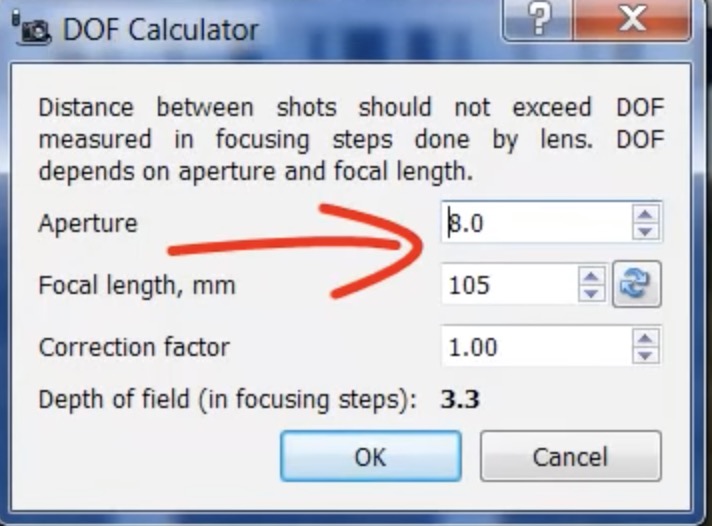
helicon
interested in having the focus bracketing work first .. for me, if i did an exposure bracket, i would just bracket on the backgrond (as in the video below) and can easy do with the built-in Sony Exposure bracketing
This video, starting @6:00 describes his approach to both focus and exposure bracketing. He does his focus bracketing and then does exposure braceting on the background element of the scene only.
@guyharrison - is this the approach you use?
agree the app should automatically calculate the number of shots and interval between them.
Nikon camera https://onlinemanual.nikonimglib.com/z9/en/15_menu_guide_02_33.html
Sony A7R5 https://helpguide.sony.net/ilc/2230/v1/en/contents/TP0002911191.html & https://helpguide.sony.net/ilc/2230/v1/en/contents/TP1000669436.html
Sony A7R5 focus bracketing explained start @ 7:26
Helicon calculates this based on the image below and the video link .. start @2:00
helicon
Dec 19, 2022 at 03:45 PM
p.2 #17Focus bracketing app (Shutter : for iOS only)
Interesting! It looks like the Nikon and Sony systems are my "option two" process above except they just keep shooting until they reach infinity and then they stop. This is also how it works om my Panasonic S1R. If the app did this that would be OK as well. I see that Helicon is the only one does my preferred "option one", but you must be tethered, there is limited camera support, and it is extremely slow.
An app that works like Helicon, but taking advantage of the speed of stacked sensors and e-shutter, would be the ideal.
I note the Nikon can do the focus stack at 5 frames per second. That is what I expect could be done on Sony as well. Adding exposure bracketing would take longer, of course.
As far as exposure bracketing, I first focus stack each exposure (dark, normal, light) to end up with three focus stacked images--one dark, one normal, one light. Then merge the exposures and edit as preferred. I had not though of only bracketing the background, but you then have unsharp foreground. That would not work if you have complex lighting changes throughout the scene, not just a bright background/dark foreground scene. But in a straightforward scene like he illustrated I can see it as a time saver and will keep in in mind.
An app that works like Helicon, but taking advantage of the speed of stacked sensors and e-shutter, would be the ideal.
I note the Nikon can do the focus stack at 5 frames per second. That is what I expect could be done on Sony as well. Adding exposure bracketing would take longer, of course.
As far as exposure bracketing, I first focus stack each exposure (dark, normal, light) to end up with three focus stacked images--one dark, one normal, one light. Then merge the exposures and edit as preferred. I had not though of only bracketing the background, but you then have unsharp foreground. That would not work if you have complex lighting changes throughout the scene, not just a bright background/dark foreground scene. But in a straightforward scene like he illustrated I can see it as a time saver and will keep in in mind.
Dec 20, 2022 at 09:45 AM
p.2 #18Focus bracketing app (Shutter : for iOS only)
Hoping the developer still checks in here - tried this out for macro shooting with the Sony 90 2.8 G Macro and A7IV - worked fine but is far too slow. After playing with it for a couple of days I got it refunded from Apple.
Potential, but needs to be sped up.
Potential, but needs to be sped up.
Jan 21, 2023 at 02:59 AM