p.2 #3 · C-One goodbye. Now LR, On1, DXO or Luminar?
Sometimes the grass is not greener on the other side, but if you decide to move from C1 consider:
Topaz has a lot of products, but if you have the De-Noise & Sharpening plugin's you can start your workflow by running your raw file through De-noise. The 9.99 a month Adobe charge for LR & PS is not that bad considering what you get. Some people dont even use LR and run there files first in ACR then PS if needed. Other's like LR for cataloging, others prefer Bridge.
Cant speak to On1 or DXO PL6 or Skylum Neo, as what offers the most and is better and at what price. Never really did a comparison. (Plenty of videos on U-tube of A vs B vs C to do the research)
If you decide to go the Adobe route, strongly consider Tony Kuyper's TK Panel for PS, and Sean Bagshaw offers a tutorial of how to use it. https://goodlight.us/writing/TK8/tk8.html
Also Joy of Editing with Dave Kelly & Sean Bagshaw has lots of free tuts on U-tube for the TK panel.
Additionally also consider Mark Metternich channel of U tube to learn all about Linear Profiles. He also talks about 32 & 64 bit raw files in PS.
I use: LR & PS Topaz or DXO just for De-noise. Linear Profiles added in LR.
Plug in add on's Nik & Neo
p.2 #5 · C-One goodbye. Now LR, On1, DXO or Luminar?
Watching Anthony's video. I've only ever had one catalogue. When I travel I take my laptop and create a new catalogue. Let's call it Rome. The catalogue is on the HD and my files are in a portable EHD.
When I get home I copy the catalogue to the EHD and plug it into my iMac. I use the "Import from another catalogue" command and it merges my travel catalogue into the main catalogue. It moves all the folders/files to my chosen location and all my edits are retained. Works like a breeze. I've never had an issue. Would not hurt to back up your files and catalogue but I've never done it.
p.2 #6 · C-One goodbye. Now LR, On1, DXO or Luminar?
Zenon Char wrote:
Watching Anthony's video. I've only ever had one catalogue. When I travel I take my laptop and create a new catalogue. Let's call it Rome. The catalogue is on the HD and my files are in a portable EHD.
When I get home I copy the catalogue to the EHD and plug it into my iMac. I use the "Import from another catalogue" command and it merges my travel catalogue into the main catalogue. It moves all the folders/files to my chosen location and all my edits are retained. Works like a breeze. I've never had an issue. Would not hurt to back up your files and catalogue but I've never done it. ...Show more →
I do exactly the same. I can do as much or as little PP on the road as I want and it all goes over into my desktop and I can continue where I left off when I get home or just print files that are finished. I've done this with both a Windows laptop and now a Mac (M1 MBP) going to a Windows desktop. Seamless.
p.2 #7 · C-One goodbye. Now LR, On1, DXO or Luminar?
Zenon Char wrote:
The handy thing about one button processing. I shot a few charities this summer and I really do no want to spend a lot of time processing. LrC's Auto was trained by thousands of professional edits which really does the basics. Black and White clipping, shadows. Between it and ISO Adaptive I edited 500 files in just over an hour. Most were just cropping and levelling. A huge time saver. I put the time into my own edits.
I've never felt hindered at any level with LrC's catalogue system. The only purpose of importing is to let the catalogue where your files are located. I control their location. If I move a folder using LrC the move is also made in OS. I have opened other developers, accessed the OS for existing files, edited those files and it did not affect LrC's edits. I know some don't like catalogues but there is nothing to them. I can't remember the last time I was worried about where a folder may be located. I've done upgrades since LR5 which included catalogue upgrades and have never had single issue. ...Show more →
p.2 #10 · C-One goodbye. Now LR, On1, DXO or Luminar?
DaveFP wrote:
Thanks - I've never seen that feature. Interesting.
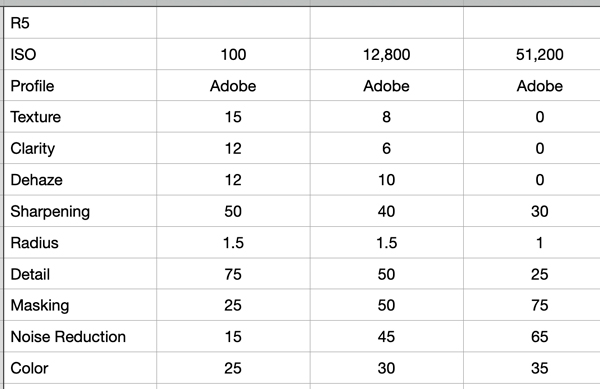
I have mine set so Texture, Clarity, Dehaze, Sharpening, Detail, Masking and NR all Auto apply during import. Each file is adjusted individually based on ISO. Lens Corrections also applies.
p.2 #11 · C-One goodbye. Now LR, On1, DXO or Luminar?
I don't use Auto ISO but I also have an import preset based on the body I'm using. I have Vibrance and Saturation in my list as well. All starting points of course but closer to what I'll finish with. I sometimes (rarely though) hit the reset button to take me to defaults if I'm working on a very different or difficult image.
p.2 #12 · C-One goodbye. Now LR, On1, DXO or Luminar?
Zenon Char wrote:
I have mine set so Texture, Clarity, Dehaze, Sharpening, Detail, Masking and NR all Auto apply during import. Each file is adjusted individually based on ISO. Lens Corrections also applies.
p.2 #13 · C-One goodbye. Now LR, On1, DXO or Luminar?
It is and excellent time saver. One example is the few charities I shot. For Auto to apply for multiple files select the ones you want and flip the switch to Auto Sync. Each file is analyzed individually. I wish they had ISO Adaptive and Auto (that worked)10 years ago. I did 500 files in just over an hour which was for our local marathon.
I have another preset to place many things back to zero before sending a file to Topaz using "Edit In" because there is an option to retain LrC edits. When the file comes back you lose access to all the colour profiles so I have to choose one before it goes.
However if I choose to use it, Photo AI can now be opened as a plug-in and edited as a RAW file. As a RAW file it does not recognize any LrC edits so it comes back to LrC with Adobe's default settings, Adobe Standard and Sharpening set to 40. That is about it. Since that is a hobby file I prefer working on it myself. I'll use Auto as a starting point but correct as necessary.
DXO PureRaw is the same. Opens as RAW, back as a DNG and you have access to the colour profiles.
p.2 #16 · C-One goodbye. Now LR, On1, DXO or Luminar?
I used or use extensively LR, C1 and DXO. I have also Luminar neo, that I don't use a lot.
The first thing I have to say is that I agree with RustyBug. Do you need to change even if you don't want to upgrade ? If your workflow is efficient and your results please you right now, is that mandatory to look elsewhere ? If you don't plan to use a new camera that is not currently in the C1 database, it may not be a bad idea to just stay with C1 22.
But if I try to answer. You say landscape and travel. I would say that travel means everything and its opposite. It could be nature, cities, low light, harsh light, soft light, wide angle, tele.
The new masking tools of LR will be very useful for every kind of photography, you will probably like it, even if they are focused on people, but not only (select sky, select object). The content aware remove feature will be nice as well in any kind of photography. I'm afraid that the layers of LR are now becoming better than the layers in C1.
I did an extensive review of DXO here on this forum. I would say that its main strength, for any kind of photography, will be Deep Prime. Even on low iso pictures, it will allow you far more tonal adjustments than C1 before noise become a real threat. The way DXO handles color profiles is very interesting as well
But the highlights/shadows sliders and the rudimentary curve tool will be a hassle. You will have to rely more on control points and control lines to adjust the shadows and highlights. It works, but I find frustrating to rely on some masking tool while I can do the same thing in other softwares just by using better sliders.
I would not use Luminar Neo for anything serious, but I'm not a specialist of this software.
Both LR and DXO allow free trial of course, so you can try for yourself to see which one fits you better.
p.2 #17 · C-One goodbye. Now LR, On1, DXO or Luminar?
Thanks to all who have replied to this post. The responses have been very useful to me.
I am certainly not abandoning C1. I have perpetual license for Ver22 and it is a great RAW processor. I was just disappointed that there was little of use or interest in V23 for me and the masking and layers functions in LRc look very attractive as you have mentioned Ayoul. And the C1 upgrade cost in Australian dollars is immense.
So I plan to dive in deeper with LR and see where it takes me. Since I already have the Adobe Photo subscription it is in a sense "free".
p.2 #18 · C-One goodbye. Now LR, On1, DXO or Luminar?
The changes to LR (or differences to C1 if you've not used it) are pretty significant and to my mind not all that intuitive, so I would recommend watching some tutorials, especially about masking.
I thoroughly recommend these about masking (LRC and PS/ACR) from Julieanne Kost
p.2 #19 · C-One goodbye. Now LR, On1, DXO or Luminar?
mcbroomf wrote:
The changes to LR (or differences to C1 if you've not used it) are pretty significant and to my mind not all that intuitive, so I would recommend watching some tutorials, especially about masking.
I thoroughly recommend these about masking (LRC and PS/ACR) from Julieanne Kost
p.2 #20 · C-One goodbye. Now LR, On1, DXO or Luminar?
steve g wrote:
So I plan to dive in deeper with LR and see where it takes me. Since I already have the Adobe Photo subscription it is in a sense "free".
You may have a conflict if you let LrC or C1 or both edit or relocate the photo files. So decide which is the master program and whether or not to have a second copy of photo files for the other program to play with. Make sure you set LrC to leave the photo files where they are and to not write any metadata or changes back to the photo files. i.e. use only a stand-alone LrC catalog to hold all edit info. That way C1 and any other software will not get confused. Use import/add when importing into LrC rather than import/move.
To be fair to LrC, you should not have C1 or anything else make changes directly to the image files.
Also ensure the catalog is optimized and backed up (preferably compressed) at the end of every session. Then have your general computer backup system backup those compressed catalogs routinely. Delete them manually as they get too stale to be useful.
Personally, I use DownLoader Pro to rename photo files when first copied from camera card, and put them where I want them - usually separated according to camera in case I want to use Nikon or Canon software on them. Then I use LrC in "look but don't touch" mode.