fredmiranda.com
Login

Moderated by: Fred Miranda
  New fredmiranda.com Mobile Site
  New Feature: SMS Notification alert
  New Feature: Buy & Sell Watchlist
  

FM Forums | Post-processing & Printing | Join Upload & Sell

       2       3       end
  

Archive 2022 · C-One goodbye. Now LR, On1, DXO or Luminar?


steve g
Offline
• • • •
Upload & Sell: Off
p.1 #1 · C-One goodbye. Now LR, On1, DXO or Luminar?


For the first time in perhaps 20 years I have decided not to upgrade to the next version of Capture One. The (few) new features and the cost, I have decided, do not make it worthwhile. Sad to leave an old friend but the competition just seems to have so many inviting features that seem to be leaving C1 in the dust (at least for a non professional, non-tethered, non-portrait photographer).

So I am looking at LR, On1, DXO PL6 and Luminar Neo. My interests are in Landscape and Travel

At one stage or another I have tried all these and until now stuck with C1. But the divorce is nigh. The features in these new versions appear very compelling...if they work well, and the RAW conversion quality is great.

Cost is not an issue. I have old versions of all and will get some discount and the Adobe package of LR with PS. The cost of any is tiny compared to the C1 upgrade.

So I'm interested in other's experience. Or pitfalls. And advice. I know there is no perfect answer. And I know there are trial versions, but FM forum advice is always appreciated and astute.

I'm heavily invested in Topaz stuff which I like. And I cannot live without Photoshop (for now).

So which way should I go?

Or can anyone convince me to stay with my first love, that is C-1? But I fear this last update has rent us asunder. The competition seem to have pursued the AI pathway and that seems to be the future, as I see it.

Thanks so much

Steve


Oct 31, 2022 at 08:51 AM
bjhurley
Offline
• • • •
Upload & Sell: Off
p.1 #2 · C-One goodbye. Now LR, On1, DXO or Luminar?


steve g wrote:
The competition seem to have pursued the AI pathway and that seems to be the future, as I see it


This is exactly why I am sticking with Capture One, at least for now. ON-1 and Luminar seem to focus on quick fix adjustments using AI, which may save time but I don't like those decisions being made for me. I prefer driving standard, not automatic.


Oct 31, 2022 at 09:30 AM
tcphoto
Offline
• • •
Upload & Sell: Off
p.1 #3 · C-One goodbye. Now LR, On1, DXO or Luminar?


I'm not here to convince you, I'd assume that you've thought about it and came to your conclusion. I've used C1 exclusively since '13 and have skipped a few versions. I have been on v12 and recently prepaid for v23 which I think should be released shortly. My Adobe subscription includes LR but I just cannot commit to it, C1 is a great processor, I shoot tethered for 90% of my shoots with CD's, AD's and Stylists looking at the screen for every shot and I'm comfortable using C1. Everyone has their own needs, style and way of doing Sessions, Catalogs and backups. Thankfully, most of those applications you've mentioned have 30 day trials so you can find the one that fits you best.


Oct 31, 2022 at 10:12 AM
mcbroomf
Offline
• • • • •
Upload & Sell: Off
p.1 #4 · C-One goodbye. Now LR, On1, DXO or Luminar?


I have a friend who switched from LR/PS (6) to ON1. She seems to be fraught with issues that I've had to help her with. On1 23 is not getting good press. I've never tried DXO or Luminar. I tried Affinity briefly to see if it was better at astro. Could not figure it out (astro part) it's a swap for PS IMO.

You mention you cannot live without PS so I'd suggest you try the LR/PS Photo plan for the trial period.

I don't think there's much I in AI and I consider any AI option to be a quick starter at best (object or sky selection for example) that needs to be checked and manually tweaked. In fact my own testing with it has just produced fails so for the most part I've stuck with the conventional masking tools.


Oct 31, 2022 at 10:53 AM
anthonysemone
Offline
• • • • •
Upload & Sell: On
p.1 #5 · C-One goodbye. Now LR, On1, DXO or Luminar?


My mileage with ON1 has barely begun to accumulate. Here's an HDR version using that option from the 'Effects' filter drop down menu. Took me about 2' to get this look.


The Iroquois

  OM-1    Olympus M.Zuiko Digital ED 12-100mm f/4.0 IS Pro lens    100mm    f/4.0    1/640s    80 ISO    -0.7 EV  


Oct 31, 2022 at 10:56 AM
Zenon Char
Offline
• • • • • •
Upload & Sell: Off
p.1 #6 · C-One goodbye. Now LR, On1, DXO or Luminar?


Tough choices. DXO makes an excellent product but like people can't stand Adobe I have a deep dislike for DXO. I think going from PL2 to PL3 I kept getting email after email and I finally decided to upgrade. Two weeks later the BF sales came out and they told me too bad. The R5 came out in August. Both Adobe and C1 had RAW support within 6 weeks. DXO conveniently waited until November and made customers pay for the upgrade to use it. I always tell people don't buy anything from DXO until BF.

I've been a long time Adobe user. The new masking, especially LrC 12 is quite astounding. Of course there is the subscription side to it, however it comes with LrC, Lr, PS and a personal website via Portfolio that is integrated with LrC. LrC requires local file storage. If you sync collections to the cloud you can import them into your website. If you sync using LrC you only send Smart Previews, not your actual files so you would never fill 20GB that comes with $9.99 plan. Lr is for mobile applications and it does send your files to the cloud. I don't know anything about it because I never installed it. Adobe is behind with AI noise reduction is many use Topaz or a DXO product like PureRaw or just get the full blown PL. Some people don't like the catalogue system but it is extremely simple. It is just a database that keeps a record of your edits and is independent of your files. It does not move, hide or create folders unless you instruct it to. A little careful planning when you first start it and then it is a breeze.

I tried C1 about 4 times. I really liked it but I just could not press that buy button. Expensive initial and upgrade prices. If I was a pro, especially portraits I'd likely be using it.

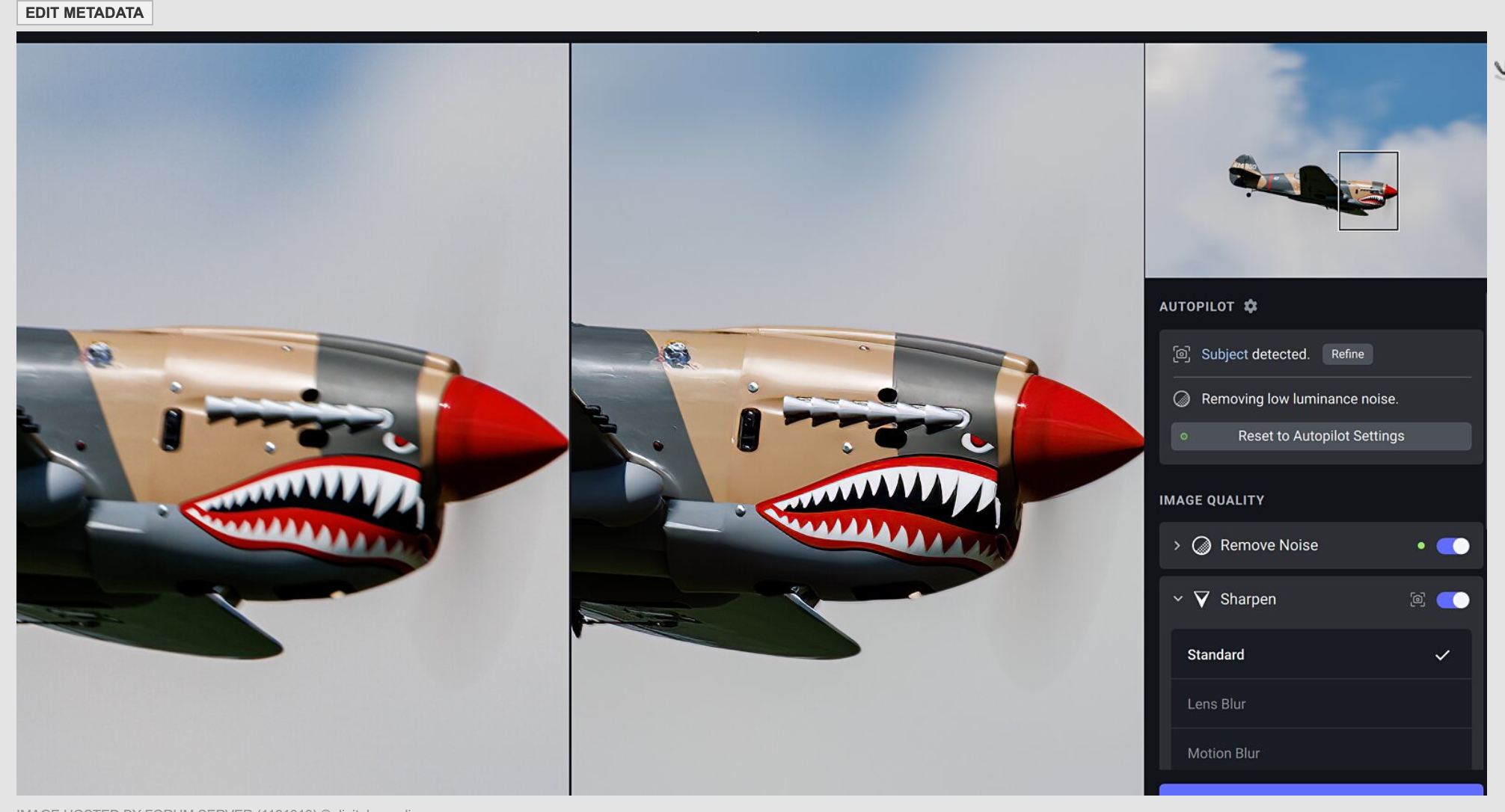
I don't know much about ON1 which currently is in the top of my list off Adobe ever ticks me off. I have read it can be little clunky compared to LrC but that could have been one disgruntled user. It has as DAM and I'm no expert but everything I have read LrC is still better, but that all depends on ones needs. They just upgraded their NoNoise AI to include Tack Sharp which is similar to Topaz AI Sharpen. The plug-in just became available. So you save money not requiring 3rd party apps.


Oct 31, 2022 at 11:28 AM
Abbott Schindl
Offline
• • •
Upload & Sell: Off
p.1 #7 · C-One goodbye. Now LR, On1, DXO or Luminar?


You don't say what you do, so it's hard to tell whether another product would satisfy you. As mentioned above, the options you're considering have trials you could try. Unfortunately, though, complex software may take longer than the trial period to really understand whether it will do what you're looking for. Doing "landscape and travel" doesn't help me much. For example, are HDR, focus stacking, and pano stitching important? Is the ability to smooth skin tones important? What are you doing with your images?

My take on Capture One (I've got a perpetual license): First, you're not forced to update or to buy every new version. The only reasons I upgrade are 1) compelling new features (v23 lacks those for me); 2) you get a new camera that isn't supported in your current version and you don't want to convert to DNG; 3) an OS upgrade breaks you current version—as macOS Ventura may be doing for some users. For me, if none of these reasons are met, I'll skip the upgrade. Frankly, C1 23 is the first one I'm going to skip since I bought my license at v8.

As for cost, Capture One and Adobe's bundle aren't all that different in cost if you're subscribing, and Capture One's less expensive if you have a perpetual license and skip an upgrade every now and then. It just looks bad when you compare C1's annual perpetual upgrade cost with Adobe's monthly subscription charge. That's not apples-to-apples.

But Adobe includes PS. I used to use PS and have found that Affinity Photo does everything I used to do in PS, about equally well, and that Affinity's main drawbacks are its UI and that its workflow is a bit odd for PS users. But if you stick with it, Affinity is pretty darn good. I also bought the other two Affinity apps, and the three together (actually, Photo and Publisher) do more for me than PS used to. But the learning curve can be tough.

I personally prefer perpetual licenses, so Adobe lost me when they went subscription. C1's been great, and you seem happy with it as well—although you also use PS. Also, at least since C1 20, the new features that most interest me are introduced mid-year, and the at-release new features left me cold. Frankly, an important thing holding me back this time is that v23 won't run on the old OS I'll be using at least most of the coming year (I'm waiting to see IF Apple's going to announce a new Mac Pro before deciding which desktop machine to replace my aging ones with).

Of course an immediate question that only you can answer is, "what new features do you feel you need". For me, for example, I want their DAM reworked as it's looking pretty creaky (search, sort, metadata organization, other things), and I think the Print module could use a major overhaul (printer selection isn't saved, dialog screen is overly complex), and handling video (C1 currently still can't even export video files, or add metadata or anything other than catalog them). None of these seem to be important to the developers, and the lack of them isn't a show-stopper for me. You're likely different, but thinking about these sorts of things may help you decide whether your divorce really is nigh, or if you're simply in a state of new feature envy.


Oct 31, 2022 at 11:47 AM
anthonysemone
Offline
• • • • •
Upload & Sell: On
p.1 #8 · C-One goodbye. Now LR, On1, DXO or Luminar?


More ON1. Another Philly Skyline through the back window of where I live (10 floors above ground level FWIW). The two adjustments; Auto Color and Haze to zero to get the effect I wanted. I'm learning I have to be very careful in order to avoid "halo-ing" around the structures. I'm not sure what I'm doing wrong that produces that effect beyond noticing that if I screw around with Haze, under some conditions I cause it. Parenthetically, I'm sick of Adobe myself. It'l soon be gone.


© anthonysemone 2022


Easter Penitentiary Guardhouse

  OM-1    Olympus M.Zuiko Digital ED 12-100mm f/4.0 IS Pro lens    92mm    f/4.0    1/400s    80 ISO    -0.3 EV  


Oct 31, 2022 at 11:53 AM
Zenon Char
Offline
• • • • • •
Upload & Sell: Off
p.1 #9 · C-One goodbye. Now LR, On1, DXO or Luminar?


Abbott Schindl wrote:
You don't say what you do, so it's hard to tell whether another product would satisfy you. As mentioned above, the options you're considering have trials you could try. Unfortunately, though, complex software may take longer than the trial period to really understand whether it will do what you're looking for. Doing "landscape and travel" doesn't help me much. For example, are HDR, focus stacking, and pano stitching important? Is the ability to smooth skin tones important? What are you doing with your images?

My take on Capture One (I've got a perpetual license): First, you're not forced to update
...Show more

I upgraded every year when I had perpetual licenses so in my case I didn't see any difference going subscription. I pay once a year so I don't have to see it every month and I just forget about it. I dropped Zenfolio for Portfolio which also saved money. It's not for everyone and I'm not promoting it.


Oct 31, 2022 at 11:59 AM
Scott Stoness
Offline
• • • • • •
Upload & Sell: On
p.1 #10 · C-One goodbye. Now LR, On1, DXO or Luminar?


I note that you are focussed on Landscape and Travel. I am mostly about wildlife and landscape.

I had been using aperture (apple mac version) for a decade and really liked:
sorting/ranking/culling
easy in and out to photoshop
Not great digital managment but okay (crazy to migrate or look for files out of system)
strong intuitive interface

What I needed was
replacing aperture related to file system and simple editing
sorting/culling/ranking
good editing program
wanted profile correnction

After much back and forth
Rejected Luminaire Neo - does not do ranking and culling well
Concluded that LR, C1, PL, On1, DXO are all pretty much the same - awkward DAM, awkward gui interface. All akward for looking at files in folders. Might as well go with LR as the most likely to survive for a long time.
Decided:
LR for rough processing, lens profiles, file management by event/timeframe
file managment by creating new catalog and referencing (not copying) in folders referenced by LR
PS for fine processing - easily passes back and forth to LR
Adobe Bridge for culling - slow but good for culling and is included in LR subscription
(Use Luminaire Neo for creative stuff, use Giga Pixel for upsizing)

This brings me back to what I had with aperture with profiles. Not as slick as apeturre but okay and with lens profiles.

Scott


Oct 31, 2022 at 12:55 PM
ruthenium
Offline
• • • •
Upload & Sell: On
p.1 #11 · C-One goodbye. Now LR, On1, DXO or Luminar?


Unfortunately, our relationship with both the software and hardware is inherently personal, and can be intensely emotionally charged. There are definitely biases.
I adopted DxO PL (now on v. 6) for my postprocessing about 6 years ago. It works for me, although for culling I use Photo Mechanic as well as FastStone for viewing, cropping, resizing.
Anyone considering DxO may want to be aware of the modular nature of DxO PL. It is incomplete without the other two products FilmPack and ViewPoint. These must be purchased separately. When installed, they add functionality to PL. For one example, FilmPack adds to PL the option of changing contrast selectively in highlights, midtones, or shadows (which, for example, can be useful for selectively softening the out-of-focus background). Thus, if the costs is not an issue, I would recommend testing PL with FilmPack and ViewPoint installed. Another practical point about PL is that it allows one to build a custom "palette" comprising only the tools one uses regularly. I like this better than jumping from one tab to another.
In the last 5-6 years, I tried other PP applications (e.g. C1), yet have not been motivated to switch. This must be personal, and most likely irrational. E.g., I dislike SW products which start by changing some defaults, cataloging pictures, and creating folders on my laptop. I am sure this can be very useful for some, but I happen to have this preference for managing my laptop myself. Other programs have the underlying approach which seems wrong to me - the idea that the program can be smart enough to do PP automatically, at a click of a mouse button. These programs may have a collection of presets which typically produce garish results. My preference is to use no or a minimal preset to begin with, and add corrections the image calls for.
Good luck with your decision making, and enjoy testing the different options!


Oct 31, 2022 at 02:16 PM
Zenon Char
Offline
• • • • • •
Upload & Sell: Off
p.1 #12 · C-One goodbye. Now LR, On1, DXO or Luminar?


The handy thing about one button processing. I shot a few charities this summer and I really do no want to spend a lot of time processing. LrC's Auto was trained by thousands of professional edits which really does the basics. Black and White clipping, shadows. Between it and ISO Adaptive I edited 500 files in just over an hour. Most were just cropping and levelling. A huge time saver. I put the time into my own edits.

I've never felt hindered at any level with LrC's catalogue system. The only purpose of importing is to let the catalogue where your files are located. I control their location. If I move a folder using LrC the move is also made in OS. I have opened other developers, accessed the OS for existing files, edited those files and it did not affect LrC's edits. I know some don't like catalogues but there is nothing to them. I can't remember the last time I was worried about where a folder may be located. I've done upgrades since LR5 which included catalogue upgrades and have never had single issue.


Oct 31, 2022 at 03:28 PM
Zenon Char
Offline
• • • • • •
Upload & Sell: Off
p.1 #13 · C-One goodbye. Now LR, On1, DXO or Luminar?


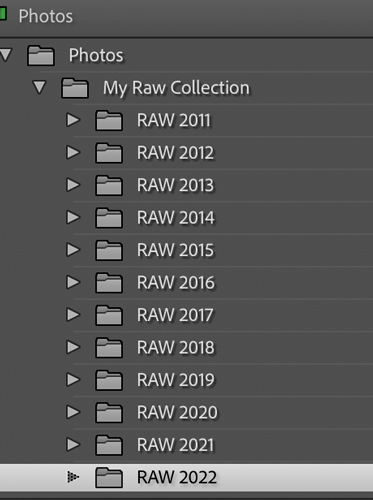
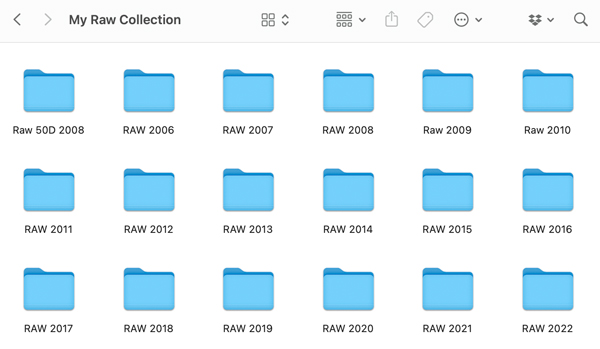
Here is my LrC folder tree and the OS. I like icons. My OS goes back to 2008. I didn't get LR until 2011. The only reason I'm posting this is I have read LrC whisks your files off to some unknown location where Adobe will one day hold your files for ransom. The only thing is once the files are imported LrC needs to know where they are. The easiest solution is to move flies around using LrC which is no more difficult or time consuming that using the OS. If not it's like returning a book to the library, bypassing the librarian and putting it on some random shelf. You can use the OS but then you have to remember to re-establish the link. There is where the problems start. People have good intent but forget and then when catalogue upgrade comes along to can go bad. Using LrC you move the file and forget about it. That is the only caveat using a metadata editor.

If someone is interested knowing all the facts helps with decision making. I wish I had of known a few of these things when I first started. Again I don't care what anyone uses. Lots of good editors out there.


Oct 31, 2022 at 04:10 PM
dclark
Offline
• • • • •
Upload & Sell: On
p.1 #14 · C-One goodbye. Now LR, On1, DXO or Luminar?


anthonysemone wrote:
My mileage with ON1 has barely begun to accumulate. Here's an HDR version using that option from the 'Effects' filter drop down menu. Took me about 2' to get this look.


I would say this was easily worth all the time you put into it.


Edited on Oct 31, 2022 at 05:24 PM · View previous versions


Oct 31, 2022 at 05:14 PM
dclark
Offline
• • • • •
Upload & Sell: On
p.1 #15 · C-One goodbye. Now LR, On1, DXO or Luminar?


ruthenium wrote:
........our relationship with both the software and hardware is inherently personal, and can be intensely emotionally charged. ......


I hope you're kidding.


Oct 31, 2022 at 05:18 PM
Zenon Char
Offline
• • • • • •
Upload & Sell: Off
p.1 #16 · C-One goodbye. Now LR, On1, DXO or Luminar?


LrC with ISO Adaptive presets and Auto. Took a few seconds.


Oct 31, 2022 at 05:32 PM
RustyBug
Offline
• • • • • • •
Upload & Sell: On
p.1 #17 · C-One goodbye. Now LR, On1, DXO or Luminar?


Given that one of the attractive things about C1 (for some) is the ability to NOT UPGRADE (i.e. non-subscription), I realize you have upgraded routinely, but ... is it really necessary to abandon C1, even if you don't feel like upgrading? Pretty sure you can "skip" and still use what you've got.

AI ... I suppose it'll keep getting better over time, but every time I've demo'd an AI oriented product, I found that I had to be on the lookout for unwanted AI issues. No thanks, for me.

Imo, it sounds a bit like you're chasing the Magic Beans, there Jack.

A couple years back, I didn't care for ACR, and went with C1 / PS. ACR raised their bar a bit after that. I'm on ACR (Bridge or LR) / PS now.

After all your years of using C1, can't help but think a jump to DXO or other will have its share of learning curve disappointments ... and, for what ... AI with artifacts and mistakes from what you really want.

I'm thinking you just skip out on this generation of C1 ... keep using your current C1 ... and wait to see what C1 brings to the table along with its getting things together for Apple's M chips. They might be slow to bring it to the table, but with 20 years invested in C1, might not want to toss the baby out with the bathwater, just yet.

Of course, if you're just curious to play with new toys ... that's a whole 'nother matter.

You mention the cost of upgrade is high with C1 ...
The cost of giving up a well-learned tool, and going with a new learning curve is likely even higher.

steve g wrote:
Or can anyone convince me to stay with my first love, that is C-1?


... if they work well, and the RAW conversion quality is great.

Depends on your definition of great quality, and what you're going to do with it.

With the options available to you, what is it that C1 does NOT CURRENTLY give you in terms of working well, and providing a great RAW conversion quality?

I found the conversion quality in C1 better than ACR prior to a recent ACR upgrade. Imo, ACR closed the gap (enough for me) that the integration with PS was more convenient for my current usage. But, I can still use C1 as desired.

So, if you're using the CC version of PS, you've already got ACR / LR in your bundle. Otherwise, you're looking at the requirement to subscribe to PS (i.e. annual cost) to get the latest version of PS (and whatever new bells / whistles come with that).


Oct 31, 2022 at 10:09 PM
Zenon Char
Offline
• • • • • •
Upload & Sell: Off
p.1 #18 · C-One goodbye. Now LR, On1, DXO or Luminar?


Lot of darktable fans out there which is open source.


Nov 01, 2022 at 06:45 AM
mkuznicki
Offline
• • •
Upload & Sell: On
p.1 #19 · C-One goodbye. Now LR, On1, DXO or Luminar?


How much do you value your time (to research and learn something new that may or may not improve your images)?

What is your current version of C1 lacking? Is there really a need to upgrade?

What is this "AI pathway" of which you speak? The very term "AI" is about as useful and defining as "military grade" or "aerospace aluminum". Great marketing tools, but ...


Nov 01, 2022 at 07:30 AM
Zenon Char
Offline
• • • • • •
Upload & Sell: Off
p.1 #20 · C-One goodbye. Now LR, On1, DXO or Luminar?


Is it not useful? I will never try to depend on it but in a pinch. I'll take a guess that some of our top photogs here use it.


Nov 01, 2022 at 09:33 AM
       2       3       end


FM Forums | Post-processing & Printing | Join Upload & Sell

       2       3       end


Welcome back
Log in to your account