In the 1.3.0.0 firmware the highlight weighted metering in rangefinder mode often caused strong overexposure to the point of being around 3EV brighter than an average metered exposure.
Firmware 1.4.0.0 is a good step in the right direction for all the other bugs, but Highlight Weighted metering isn't something I can use in its current form.
I'll also be testing it some more, but I'm not going to spend too much time on it. Hopefully Leica squashed all or most of the usability bugs and I can concentrate on taking images.
I could really use that GPS feature on the Leica Fotos app. I have no interest in the apps other features.
An example of highlight weighted metering not protecting highlights.
hmzimelka wrote:
In the 1.3.0.0 firmware the highlight weighted metering in rangefinder mode often caused strong overexposure to the point of being around 3EV brighter than an average metered exposure.
Firmware 1.4.0.0 is a good step in the right direction for all the other bugs, but Highlight Weighted metering isn't something I can use in its current form.
I'll also be testing it some more, but I'm not going to spend too much time on it. Hopefully Leica squashed all or most of the usability bugs and I can concentrate on taking images.
I could really use that GPS feature on the Leica Fotos app. I have no interest in the apps other features.
An example of highlight weighted metering not protecting highlights.
Highlight-weighted metering even in the SL2-S never fully protected the highlights – it can be fooled by a spike on the histogram far to the right caused by a bright area concentrated on an edge of the frame. It's not a metering mode based off the histogram, it's an evaluative mode similar to Multi-field. At least now after FW 1.4.0.0, Highlight-weighted is exposing consistently and giving a lower exposure than Multifield – before this update, it was exposing exactly the same as Multifield.
My preference for Highlight-weighted metering would be to have a second variant of it based on the histogram, not allowing overexposure except for specular highlights. But we need to keep the current version since it's more usable for everyday shooting without maxing out the exposure comp +3 stops to brighten up the exposure when needed.
Note that currently if the brightest areas of an image are anywhere near the central 1/3 of the frame, Center-weighted metering still gives the lowest exposure and best protects the highlights. IMO, it's the most versatile metering mode, allowing me to shoot everything from sunset landscapes to indoor portraits while providing a good exposure base.
Update: 1.4.0.0's Highlight-weighted meter is useless for Live View shooting for me (with exposure preview on and using any auto mode such as Auto ISO or Auto Shutter). When moving the frame around in high-contrast light, the meter/exposure/preview alternates between settings so rapidly that it makes the screen appear to flicker badly. To use this metering mode, I would have to turn off exposure preview completely.
highdesertmesa wrote:
Update: 1.4.0.0's Highlight-weighted meter is useless for Live View shooting for me (with exposure preview on and using any auto mode such as Auto ISO or Auto Shutter). When moving the frame around in high-contrast light, the meter/exposure/preview alternates between settings so rapidly that it makes the screen appear to flicker badly. To use this metering mode, I would have to turn off exposure preview completely.
Same here; A lot of flickering at times when lighting changes a little.
At least now we can eagerly anticipate FW 1.5.0.0 with the same level of excitement and perhaps its not too long until the M11 comes out of its public beta testing phase.
hmzimelka wrote:
Same here; A lot of flickering at times when lighting changes a little.
At least now we can eagerly anticipate FW 1.5.0.0 with the same level of excitement and perhaps its not too long until the M11 comes out of its public beta testing phase.
I got motivated and tested and compared the M11 and Sony A1 Highlight vs Multi modes, latest firmware on both. Nothing IMO could be more boring waste of time Ha Ha. Particularly since I tend to adjust camera settings to protect highlights or shadows as needed and then close any gaps/missteps one way or the other in post. So this is probably one of my least used features in any camera.
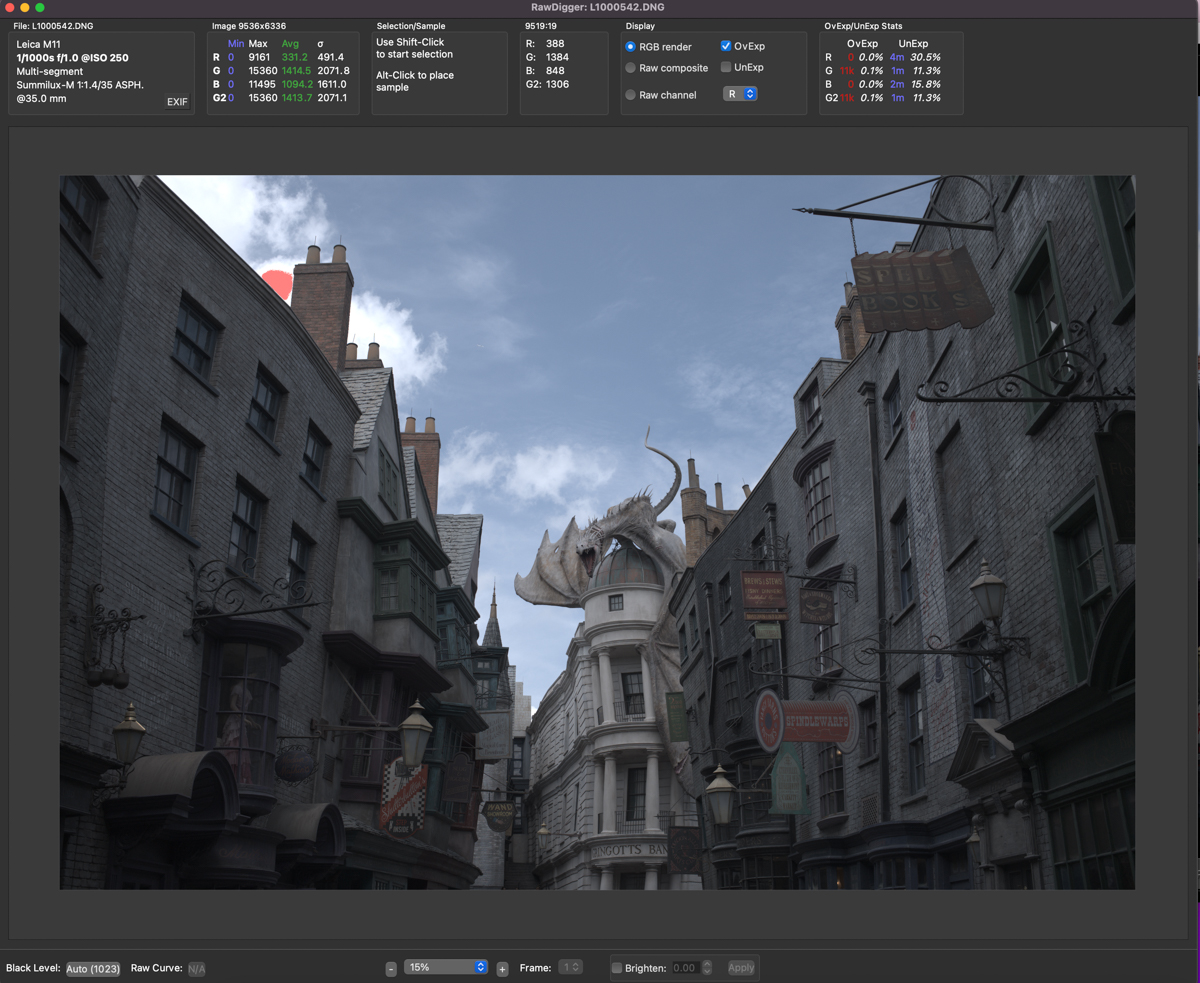
However, loading up the DNG and RAW compare test shots into RawDigger 3 ( trial version), I noticed RawDigger pushes exposure significantly upon import so I'm not ready to post the compares yet. Is there some setting in RawDigger I am not aware of that is pushing the exposure so much upon import?
Also, what's this about flickering? Is this something you experience during LiveView ?
LBJ2 wrote:
I got motivated and tested and compared the M11 and Sony A1 Highlight vs Multi modes, latest firmware on both. Nothing IMO could be more boring waste of time Ha Ha. Particularly since I tend to adjust camera settings to protect highlights or shadows as needed and then close any gaps/missteps one way or the other in post. So this is probably one of my least used features in any camera.
However, loading up the DNG and RAW compare test shots into RawDigger 3 ( trial version), I noticed RawDigger pushes exposure significantly upon import so I'm not ready to post the compares yet. Is there some setting in RawDigger I am not aware of that is pushing the exposure so much upon import?
Also, what's this about flickering? Is this something you experience during LiveView ? ...Show more →
Raw Digger doesn’t modify file, but sometimes the highest number on the right will vary by camera, so you make sure you’re looking at the numbers along the bottom and not just how far to the right the exposure appears to go.
The flickering is in LV, yes, so it’s an LCD/EVF issue and only when using exposure preview.
highdesertmesa wrote:
Raw Digger doesn’t modify file, but sometimes the highest number on the right will vary by camera, so you make sure you’re looking at the numbers along the bottom and not just how far to the right the exposure appears to go.
The flickering is in LV, yes, so it’s an LCD/EVF issue and only when using exposure preview.
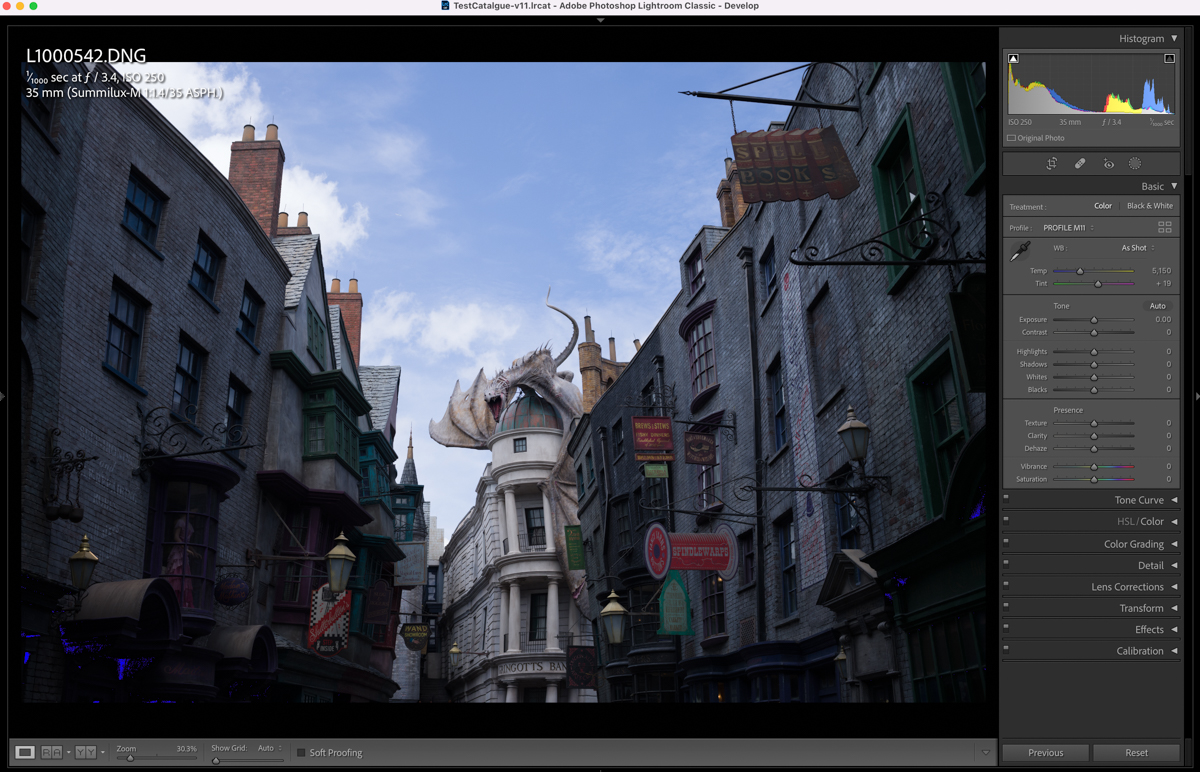
When I upload M11 DNG or Sony A1 RAW files into the RawDigger 3 app all the images look heavily exposed/ pushed, compared to what I see in LRC and Sony's RAW editing apps which both look normal expected for the same files.
I'm on macOS Monterey and downloaded mac version RawDigger app ( trial version) so maybe it's an OS thing.
Either way, I'm happy with what I am getting out of both cameras as is and if I feel I need to protect shadows or highlights either beyond what the auto settings can/can't do it's super easy to do what I've always done with the other manual camera settings as needed.
LBJ2 wrote:
When I upload M11 DNG or Sony A1 RAW files into the RawDigger 3 app all the images look heavily exposed/ pushed, compared to what I see in LRC and Sony's RAW editing apps which both look normal expected for the same files.
I'm on macOS Monterey and downloaded mac version RawDigger app ( trial version) so maybe it's an OS thing.
Either way, I'm happy with what I am getting out of both cameras as is and if I feel I need to protect shadows or highlights either beyond what the auto settings can/can't do it's super easy to do what I've always done with the other manual camera settings as needed....Show more →
Raw Digger shows you the true RAW exposure. Is Raw Digger showing clipped highlights when you switch to the view that shows the clipping warning overlaid on the actual image?
What you see in Lightroom is the histogram of the image after the profile has been applied.
highdesertmesa wrote:
I had seen it a little before, too, but now I get much more rapid flickering.
I checked this out too, with M11 Exposure Preview set to, Permanent. I scanned the camera across a large window during daylight. The faster I scanned/moved the faster I saw what you describe as flicker in LV. Leaving the camera stationary pointing at the same well lit window, I didn't see any flicker or light changes in the LCD. When I set the M11 Exposure Preview to "shutter button" I didn't see any changes/Flicker in LV when scanning across the window.
FWIW, using the Sony A1 LCD and scanning across the same large window I did see light change in the Sony LCD, but the rate of change was much slower maybe twice or thrice during one scan across the window.
LBJ2 wrote:
Yes. Profile applied is the difference. I'm just surprised how washed-out the same image in RawDigger. But its the numbers that matter as you say.
Screen Shot:
M11 image taken at F5.6 Auto ISO/AP. High-Light Weighted applied in camera:
Pretty sure Raw Digger applies a linear tone curve.
In Adobe DNG profile editor, if I choose linear tone curve, it should look similar.
I'm not sure what Adobe is up to with M11 files. In my files, the channels can be clipped but Adobe doesn't adequately display the clipping warning correctly. It seems more than just channel needs to be clipped before the blinkies are engaged.
I also feel like Adobe's tone curve for the M11, which includes the M11 profile, crushes the blacks.
LBJ2 wrote:
I checked this out too, with M11 Exposure Preview set to, Permanent. I scanned the camera across a large window during daylight. The faster I scanned/moved the faster I saw what you describe as flicker in LV. Leaving the camera stationary pointing at the same well lit window, I didn't see any flicker or light changes in the LCD. When I set the M11 Exposure Preview to "shutter button" I didn't see any changes/Flicker in LV when scanning across the window.
FWIW, using the Sony A1 LCD and scanning across the same large window I did see light change in the Sony LCD, but the rate of change was much slower maybe twice or thrice during one scan across the window....Show more →
Yes, the M11 in other metering modes can flicker on occasion, but in Highlight-weighted it can flicker so much that is looks like a choppy, low-FPS video feed. Additionally, Highlight-weighted flickers badly in LED lighting even without moving the frame around, but other metering modes on the M11 are not like that.
I also checked out your M11 Bifurcation issues you reported earlier in this thread. First time I am hearing about this.
Thankfully none of my M camera images I looked through showed any signs of sensor stitching. But what you wrote pushed me to google and learn about something I'd never heard of or seen before.
Lots of info about stepper and sensor stitching and why it's done at the fab. Very interesting. Apparently some fabs do it better than others. Not sure if that's still the case, regardless something to be aware of across brands from FF to MF sensor cameras.
Interesting illustration here:
"In the past, the steppers used in sensor photolithography couldn’t cover a 24×36 mm area, and full frame sensors were often stitched using two exposures per sensor during each photolithography step. "
" The line you are seeing on the Leica M10M is the stitching line and more apparent because of the lack of CFA, AA and the debayering which would smooth things out. "
From what I have seen so far, I have no concerns. But I did want to check this out with my own gear and shooting scenarios and more often than not I tend to learn when investigating on-line camera/lens complaints. Better to know strengths and weakness and work accordingly.
Apparently no matter how much I spend, my quest for the perfect camera continues! And even if there are some nits here and there, I am still very pleased at the pace of firmware updates Leica is pushing out for the M11 and SL2 series--very exciting and more to come with M11 GPS+ FOTOS hopefully not too far into the future.
P.S. The SL2/S SL APO lens aperture control bug was not a nit, but Leica jumped on it right away and so far that quick fix seems to have solved the issue.