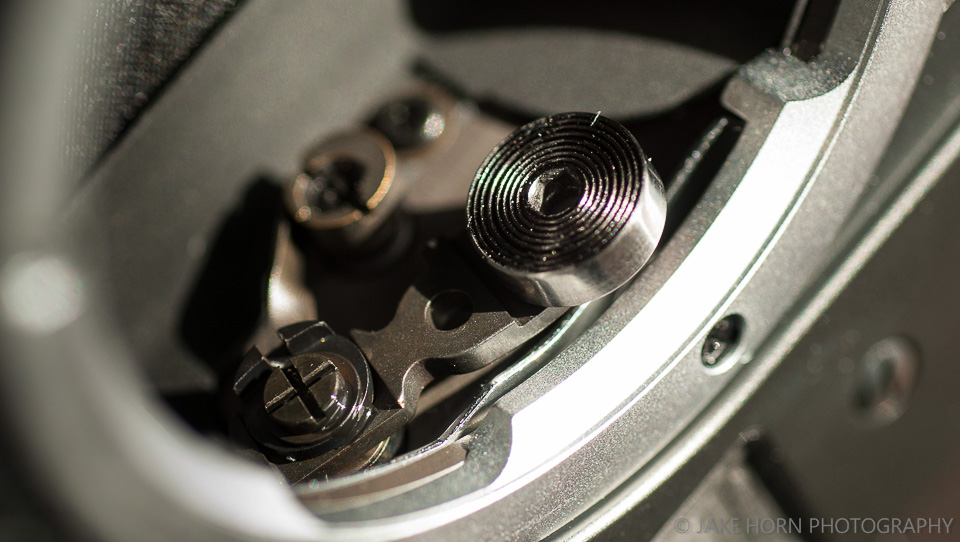
On my M10-P there is what looks like the head of a flat head screw instead of a red dot. I am wondering if the is actually a screw that can be removed, or only a dummy that is glued in place of the Red Logo Dot? I cannot find any information on this in the manual. I hope it is a functional screw as this should make adjusting both directions of the Range Finder Calibration easy.
hmzimelka wrote:
This is what Leica wrote me after sending them DNG files where the line was slightly visible even in unedited images...
on the image you are referring to as showing a fault, you can see an effect caused by the production process of the sensor. Due to the sensor size, the photolithographic structuring of the surface takes place in two separate exposure steps, one each for the left and right half of the sensor. Therefore, minimal deviations in the behaviour of the treated areas are inevitable and a property of a large image sensor. The tolerances are set so that this is not visible in "normal" photography and image editing. However, the effect may appear especially when using high ISO numbers combined with strong brightening of underexposed image areas in post-processing.[/I]
They said it was within tolerances just by inspecting the DNG files.
The only way around this is to exchange the camera until it's perfect. Leica isn't always on our side when it comes to quality assurance.
I was, for the lack of a better word, a little devastated to return my M10M. ...Show more →
It is sad to see how Leica is handling this issue, and you are right to dump them if they can't make you happy. I was in the market for a monochrome body recently, and the M10M sensor bifurcation issue was a major thing I was looking out for. Of the 4 people I had contacted, 3 provided raw files, which to my eyes were perfectly clean. I am not sure why the 4th person did not want to share a single sample image. Strange move when trying to sell a ~$7k camera, but then again I am thankful when the red flags are that obvious.
At any rate, if my sampling is of any value, the sensor bifurcation is more of an exception than a rule. Of course this does not help those who are stuck with a bad copy, and again, shame on Leica for letting bad copies reach the customer, and for not fixing it.
1bwana1 wrote:
On my M10-P there is what looks like the head of a flat head screw instead of a red dot. I am wondering if the is actually a screw that can be removed, or only a dummy that is glued in place of the Red Logo Dot? I cannot find any information on this in the manual. I hope it is a functional screw as this should make adjusting both directions of the Range Finder Calibration easy.
On my M-P (240), I removed the screw ... only to find out, I didn't need to in order to perform the adjustment. See Fred's comment about 2mm wrench inside the lens mount. No need to do anything with the screw, if the M10-P is anything like my M-P (240).
RustyBug wrote:
On my M-P (240), I removed the screw ... only to find out, I didn't need to in order to perform the adjustment. See Fred's comment about 2mm wrench inside the lens mount. No need to do anything with the screw, if the M10-P is anything like my M-P (240).
I think you do need to remove the screw or the entire top if you want to adjust both horizontal and vertical alignment.
1bwana1 wrote:
I think you do need to remove the screw or the entire top if you want to adjust both horizontal and vertical alignment.
Yes, the top adjustment screw is for vertical alignment. It can be accessed by removing the red dot or outside screw in the case of "P" models.
For the horizontal adjustment, which many call "infinity" or RF focus adjustment, the screw located is inside the camera mount.
"The roller on the end of the rangefinder coupling arm is held on with an eccentric screw. First get a screwdriver that fits exactly and when making the adjustment ONLY apply turning force."
image showing the horizontal adjustment screw (2mm allen key) at the center of the roller. One must turn that screw to adjust the rangefinder but it should not be pushed in
The eccentric screw hasn't been used since the M9 series. All modern digital Leica's use a 2mm Allen key for both adjustments. Vertical and infinity. There is a third adjustment not available to end users (the focus throw length) because it really does require specialist equipment to adjust. It's quite rare for it to shift even with modest impact.
If you have a screw instead of a dot be careful. It's brass and is both easy to damage and cross thread. Ask me how I know! Some electrical tape over a very fine screwdriver works well.
To remove a red dot without damage the easiest is to heat the glue by holding your finger on the dot for a few minutes and then rotate the dot back and forward slowly.
flash wrote:
The eccentric screw hasn't been used since the M9 series. All modern digital Leica's use a 2mm Allen key for both adjustments. Vertical and infinity. There is a third adjustment not available to end users (the focus throw length) because it really does require specialist equipment to adjust. It's quite rare for it to shift even with modest impact.
If you have a screw instead of a dot be careful. It's brass and is both easy to damage and cross thread. Ask me how I know! Some electrical tape over a very fine screwdriver works well.
To remove a red dot without damage the easiest is to heat the glue by holding your finger on the dot for a few minutes and then rotate the dot back and forward slowly.
+1 the screw is soft and easy to mar. The electrical tape is a nice tip for both protection and to secure the fit. Wish I'd have thought of it, but certainly will remember it. Even with a good selection of screwdrivers, none seemed to be the right size.
Mark Sisco wrote:
What were your symptoms of vertical misalignment? Focus issues, visual misalignment of the top/bottom of the rangefinder patch, or something else?
The latter.
Visual vertical misalignment of the rangefinder. For example: If you focus on a geometrical shape like a circle or triangle, the RF patch won't align perfectly at the top/bottom edges even when the subject is in focus.
I find vertical alignment to be very critical for many uses where you can't focus on linear elements. Very often I will focus on texture - tree bark, rocks etc or with portraits I look for catchlights in eyes. None of these work well if vertical alignment is off. Very easy to check on the fly, just pan across the horizon or any horizontal element and see if it staggers as it enters and leaves the focus patch. Should be a continuous smooth line through the patch.
Adjustment is easy, but luck and trial and error are in play. FYI starting with the M4-2 through all film cameras (pretty sure) the vertical adjustment requires a special tool that involves a locating pin and cam to leverage a sliding friction assembly inside (not a threaded cam on these), that is held in adjustment by a locktite or similar type of glue. This needs to be softened with solvent or heat to make the adjustment. This is best done with the top removed. Fortunately, my M6s have been bullet proof! Also the special tool does not fit through the hole on the newer MPs and MAs. The M3 - M4 series used a small screw diver and work exactly as the digitals with their Allen screw.
Rob L wrote:
I find vertical alignment to be very critical for many uses where you can't focus on linear elements. Very often I will focus on texture - tree bark, rocks etc or with portraits I look for catchlights in eyes. None of these work well if vertical alignment is off. Very easy to check on the fly, just pan across the horizon or any horizontal element and see if it staggers as it enters and leaves the focus patch. Should be a continuous smooth line through the patch.
Adjustment is easy, but luck and trial and error are in play. FYI starting with the M4-2 through all film cameras (pretty sure) the vertical adjustment requires a special tool that involves a locating pin and cam to leverage a sliding friction assembly inside (not a threaded cam on these), that is held in adjustment by a locktite or similar type of glue. This needs to be softened with solvent or heat to make the adjustment. This is best done with the top removed. Fortunately, my M6s have been bullet proof! Also the special tool does not fit through the hole on the newer MPs and MAs. The M3 - M4 series used a small screw diver and work exactly as the digitals with their Allen screw....Show more →
I agree, vertical alignment is very important for critical focus but the horizontal alignment is absolutely crucial to get the subject in focus.
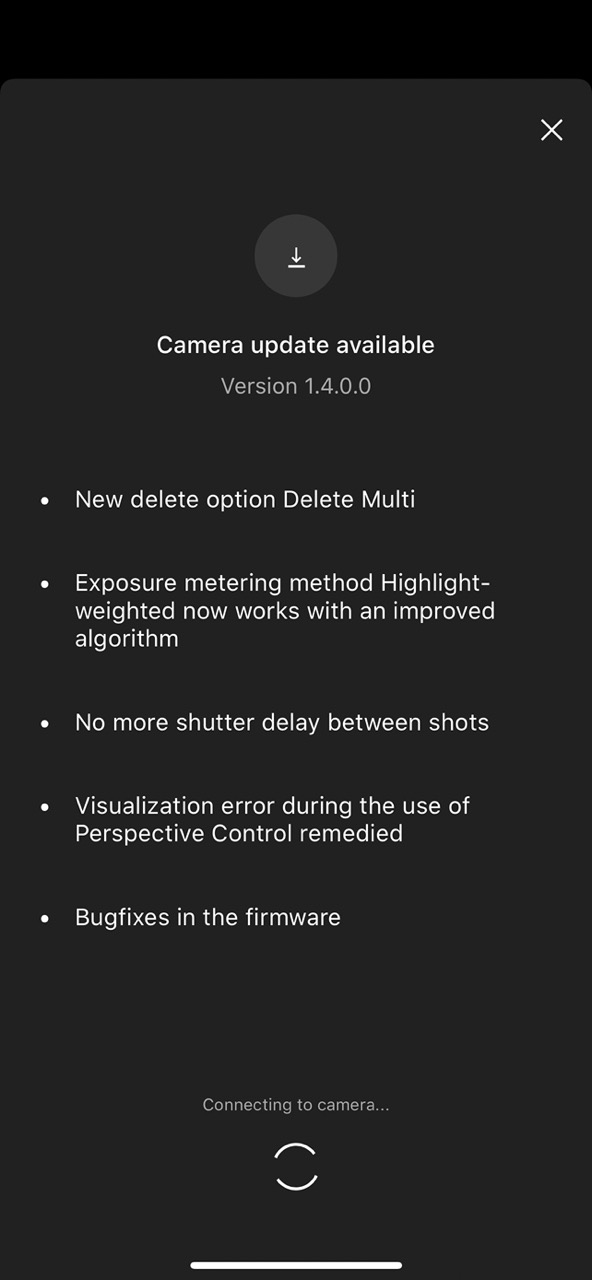
Seems to fix most bugs, but at least my initial observation is Highlight Weighted Metering still isn't working as it should. I can still easily photograph a scene and clip all three channels. Seems to be heavily centre biased.
Seems to fix most bugs, but at least my initial observation is Highlight Weighted Metering still isn't working as it should. I can still easily photograph a scene and clip all three channels. Seems to be heavily centre biased.
Busy days for the Leica firmware team with aperture control bug fix updates for SL2/S SL APO lenses yesterday and now new firmware for M11 and the Fotos app. I think I like all this firmware attention 😎 Hoping to see GPS for the M11 + Fotos App soon too. GPS with the SL2 + Fotos App seems to be working much better now as of firmware version 4.0
How are you testing the M11 update to Highlight Weighted Metering? With something like RawDigger app? How do you think it should work?
I was just testing is around the house and on random stuff.
Compared to the SL2, the highlight metering would protect bright highlights to the point where it wouldn't clip or at least be recoverable (usually). This is also how I am used to it with the D850, where it works very reliably.
I'm just observing the DNG files in Lightroom. Don't even need to consider looking in RawDigger to know that all channels are clipped in those situations.
I've had situations where multi-segment metering has underexposed a scene more than highlight weighted metering. Also, with highlight weighted metering, and a strongly backlit scene, moving the central area of the frame past a black object would rapidly change the exposure to brighten the scene. So I think there is some strong central frame bias here for highlight weighted metering.
I appreciate Leica working on squashing bugs. The camera works more reliably now, and it seems multi-segment metering is more reliable now for my use case. I would use highlight weighted metering a lot if it works. It was very useful and well implemented on the Nikon D850 and Z6II.
hmzimelka wrote:
I was just testing is around the house and on random stuff.
Compared to the SL2, the highlight metering would protect bright highlights to the point where it wouldn't clip or at least be recoverable (usually). This is also how I am used to it with the D850, where it works very reliably.
I'm just observing the DNG files in Lightroom. Don't even need to consider looking in RawDigger to know that all channels are clipped in those situations.
I've had situations where multi-segment metering has underexposed a scene more than highlight weighted metering. Also, with highlight weighted metering, and a strongly backlit scene, moving the central area of the frame past a black object would rapidly change the exposure to brighten the scene. So I think there is some strong central frame bias here for highlight weighted metering.
I appreciate Leica working on squashing bugs. The camera works more reliably now, and it seems multi-segment metering is more reliable now for my use case. I would use highlight weighted metering a lot if it works. It was very useful and well implemented on the Nikon D850 and Z6II....Show more →
I am going to take a closer look at this with the new algorithm too, was wondering about best scenarios to test and approach to analyze results.
Previous to this latest firmware, I compared and frankly didn't see much difference in my typical compositions, but I probably wasn't scrutinizing using extreme lighting scenarios where the effect might be more pronounced. If I'm feeling very motivated I might also compare with the Sony A1's Highlight metering mode.