This thread will be dedicated on user experience about z9 autofocus. What works best in different scenarios. Please share your experiences so far and which af mode work best for specific scenarios!
Thanks for starting this thread. There's going to be a lot of discussion on the Z9 AF for sure. I have used the camera for about 5 days now and here is what I feel about the AF modes:
My most preferred AF mode so far has been the Wide Area L mode. This has resulted in the most reliable focus acquisition in challenging situations. I also like it because the AF box size seems to be just about right and the AF sensitivity settings (tracking with lock-on) can be set to delayed (4 or 5) to remain sticky.
3D AF area is very good for perched subjects, slow moving subjects or even for most of the action scenes but struggles when there are foreground/background distractions or reflections and also erratic subjects like swallows, pigeons, diving terns etc.
I never even bothered to test the auto area AF initially as I just assumed it wouldn't be as good as the 3D but after trying it for a couple of sessions trying to track swallows and diving terns, it is an amazing mode for unpredictable action. the AF is more responsive than 3D. Page 600 of Nikon's manual says that the AF tracking with lock-on setting on the Z9 will be set to a default of 3 in case of 3D tracking vs 1-3 for Auto area tracking. This could explain why Auto area is more responsive vs 3D.
EDIT: My mistake here. pg 600 of Nikon manual says 3D defaults to sticky setting of 3 whereas Auto area can be 3, 4 or 5. Its just that when 1 or 2 is selected, it defaults to 3. My apologies!
As to the wide area L mode - I noticed that it worked much better than any other AF area modes when there are distractions/ bright light sources. With 3D tracking or Auto area, the moment the camera picks the background, it is very difficult to reacquire focus and the box goes all over the place.
After reviewing many images, particularly frame filling birds i notice that the focus is sharp starting from the bird's eyes to all the way back to the tail but there were some frames where the beak is a bit soft and in situations like that i'd prefer an AF mode with close subject priority (Group area AF on Nikon DSLRS) So I found a workaround that seems to do the trick so far which is to use Recall Shooting Functions (RSF) to set subject detection to off (while the default setting for subject detection is set to Animal eye AF). I have assigned the RSF override to the lens fn button to turn off subject detection. When a bird approaches, i track the bird using wide area-L with subject detection on and the moment the bird fills the frame, i press the lens-fn button to temporarily disable subject detection. When i do this, the wide area L seems to work based on close subject priority (just like the group AF).
The other challenge i had was on how to have an override for lock on settings (1 to 5) in case i want to instantly override my default. RSF can be used to have a different lock-on values but Z9 only allows one RSF override at one point in time so my priority was to use it for subject detection off. Now, here's the interesting workaround for this lock-on setting problem.
I use Wide area AF on the shutter button. Remember this is the AF mode where i want to be able to keep the subject detection to on or off depending on my needs and hence the assignment to shutter button (Unfortunately, subject detection off on RSF override does not work on any other AF area modes assigned via custom control options). My default lock-on setting is 5 (sticky) so when i use shutter button with wide area L, i have a sticky AF setting.
I use AF-On button for Auto area mode - Now, regardless of what AF sensitivity setting i use as default (5 in my case) the camera always uses 1-3, so that's a responsive setting
Joy stick button is assigned with the 3D AF mode - Again, this uses an AF sensitivity of 3
Front fn1 button is set to Dynamic AF area - Subject detect doesn't apply for this AF area mode plus the default AF sensitivity setting of 5 would take effect here.
Front fn2 button set to single point AF - Again, no subject detect and sensitivity of 5
This way, i feel i pretty much have all possible permutations covered between fully automatic, semi-automatic and a total manual override :-)
EDIT: My mistake here. pg 600 of Nikon manual says 3D defaults to sticky setting of 3 whereas Auto area can be 3, 4 or 5. Its just that when 1 or 2 is selected, it defaults to 3. My apologies!
Today, i was photographing fast flying/diving terns and i had maximum success when i started my tracking with wide area L for the initial focus acquisition and the moment the bird approaches closer and is very erratic, it is difficult to keep using the wide area L mode so i instantly switch to Auto area mode so that the AF box can track throughout the frame and this works very well. Focus point persistence must be set to Auto so that the camera knows that when i switch from one AF mode to another by pressing the button, the camera must seamlessly take over the AF box.
So typically when i start tracking a tern, its slightly far and using auto area or 3d mode could result in jumpy AF box as the camera tracks the whole scene with a lot of distractions. If i use Wide area L (with sensitivity setting of 5), initial acquisition is more sure footed and also doesn't get distracted or stick to foreground/background obstructions. As the bird approaches closer, say more than 50% of the frame i just press my AF-on button (Auto area AF) and it instantly takes over and tracks very well. By the time the bird fills 50% of the frame, my background is creamy at 500/700mm focal length and it doesn't jump over that frequently.
All these are just my initial understanding and this may need a lot more testing in a lot of different situations.
gannis wrote:
Today, i was photographing fast flying/diving terns and i had maximum success when i started my tracking with wide area L for the initial focus acquisition and the moment the bird approaches closer and is very erratic, it is difficult to keep using the wide area L mode so i instantly switch to Auto area mode so that the AF box can track throughout the frame and this works very well. Focus point persistence must be set to Auto so that the camera knows that when i switch from one AF mode to another by pressing the button, the camera must seamlessly take over the AF box.
So typically when i start tracking a tern, its slightly far and using auto area or 3d mode could result in jumpy AF box as the camera tracks the whole scene with a lot of distractions. If i use Wide area L (with sensitivity setting of 5), initial acquisition is more sure footed and also doesn't get distracted or stick to foreground/background obstructions. As the bird approaches closer, say more than 50% of the frame i just press my AF-on button (Auto area AF) and it instantly takes over and tracks very well. By the time the bird fills 50% of the frame, my background is creamy at 500/700mm focal length and it doesn't jump over that frequently.
All these are just my initial understanding and this may need a lot more testing in a lot of different situations....Show more →
Thanks for the tips Gannis.
I will get my loaner 500pf and 1.4xTC tomorrow and will likely go out Tuesday or Wednesday. Will remember these helpful pointers as I haven’t been birding for a couple years now. Last time I bird was with a gripped D850 and 600F4.
When you say you instantly switch to certain AF mode, do you mean you assign one of the FN button to that mode and you have to hold that button?
Also, does anyone know how to switch shooting mode and custom mode bank at the same time. I have one of the fn button to switch my shooting mode from people(bank A) to bird(bank B) that set up my AF mode for people eye and animnal eye, auto iso with minimum shutter speed. In my custom mode, I have my bank A that limit the burst rate and such and my bank B has the highest burst rate and an unlimited shots in burst mode.
I would like to switch both shooting mode and custom mode at the same time.
gannis wrote:
After reviewing many images, particularly frame filling birds i notice that the focus is sharp starting from the bird's eyes to all the way back to the tail but there were some frames where the beak is a bit soft and in situations like that i'd prefer an AF mode with close subject priority (Group area AF on Nikon DSLRS) So I found a workaround that seems to do the trick so far which is to use Recall Shooting Functions (RSF) to set subject detection to off (while the default setting for subject detection is set to Animal eye AF). I have assigned the RSF override to the lens fn button to turn off subject detection. When a bird approaches, i track the bird using wide area-L with subject detection on and the moment the bird fills the frame, i press the lens-fn button to temporarily disable subject detection. When i do this, the wide area L seems to work based on close subject priority (just like the group AF).
Thanks for this write-up. I’ve been experimenting with these same things and I’m a bit confused by what you say above. When you say “some frames where the beak is a bit soft and in situations like that I’d prefer an AF mode with close subject priority”—does that mean the eye is not sharp and you find turning subject detection off improves that? I’m a big user of Group AF from the D850, and the only thing I would want more than close subject priority is eye priority. My understanding of subject detection is that if it can find an eye it focuses there, if not then on the head, then torso/body, and if none of those, it prioritizes close proximity. It seems to me this is the exact order one usually wants, since it should give the best chance of the eye being sharp. Certainly in general the eye is more likely to be sharp if the focus point is on the head or even body than a wing closest to the camera. I guess it is just not clear to me if both the beak and eye are not sharp why turning off subject detection helps you get the eye (since I’m assuming you don’t care about the beak if the eye is sharp, which would be a DOF issue anyway). Am I misunderstanding your point? Thanks!
Yes, I have assigned 5 different AF area modes to different buttons using f2 (Custom controls - shooting). Shutter for Wide-Area L, AF-On for Auto area, Joystick for 3D tracking. With Fn1 and Fn2, i am alternating between Dynamic M, Wide area S and Single point but i am not fully decided yet. I don't use Fn3 in horizontal mode as i want it to act like Fn1 when i use vertical shooting so i simply duplicate Fn3 to what i set on Fn1.
this is me wrote:
Thanks for the tips Gannis.
I will get my loaner 500pf and 1.4xTC tomorrow and will likely go out Tuesday or Wednesday. Will remember these helpful pointers as I haven’t been birding for a couple years now. Last time I bird was with a gripped D850 and 600F4.
When you say you instantly switch to certain AF mode, do you mean you assign one of the FN button to that mode and you have to hold that button?
Nope, with the wide-area L mode, the problem i have when the bird fills the frame at 500/700mm is that the tracking box generally is in and around the bird's head/eye. For a diving or approaching bird this keeps the eyes sharp and the sharpness extends all the way up to the tail but i find in some cases (not always) the beak to be a bit soft. I guess this is mostly due to a bit of back-focus although the focus box is near the head/eye. So, i tried with the slightly tweaked approach whereby i just hold on to the lens fn button to turn off subject tracking when the bird fills the frame. By doing this, I am able to get the beak also in perfect focus so I am assuming the Wide area L mode behaves very similar to group area AF with close subject priority.
What i am unable to confirm is whether this is happening very frequently or if it is just the AF box that's lying, so more testing may be needed on this one.
nextlife1 wrote:
Thanks for this write-up. I’ve been experimenting with these same things and I’m a bit confused by what you say above. When you say “some frames where the beak is a bit soft and in situations like that I’d prefer an AF mode with close subject priority”—does that mean the eye is not sharp and you find turning subject detection off improves that? I’m a big user of Group AF from the D850, and the only thing I would want more than close subject priority is eye priority. My understanding of subject detection is that if it can find an eye it focuses there, if not then on the head, then torso/body, and if none of those, it prioritizes close proximity. It seems to me this is the exact order one usually wants, since it should give the best chance of the eye being sharp. Certainly in general the eye is more likely to be sharp if the focus point is on the head or even body than a wing closest to the camera. I guess it is just not clear to me if both the beak and eye are not sharp why turning off subject detection helps you get the eye (since I’m assuming you don’t care about the beak if the eye is sharp, which would be a DOF issue anyway). Am I misunderstanding your point? Thanks!...Show more →
I've been using Wide-L with animal detect for birds.
I tend to shoot smaller birds in brushy areas.
The Wide-L seems fine with birds in flight and birds that are perched with no branches or items in the way.
For the more complicated subjects with branches in the way I had the joystick press programmed to go to single point AF + AF-On. Unfortunately the joystick is so soft to move side to side that I had to stop using it because I kept moving the focusing point when I didn't intend to. This was mostly with gloves on in the cold but was extremely frustrating and (I think) caused me to miss shots.
Today I have disabled the joystick press functionality and have moved the single point AF + AF-On functionality to FN1 and FN3 on the front of the body (I have to do both so I have the same button in both landscape and portrait orientation). I think these will be easier to manipulate with gross motor skills (e.g. with gloves on).
I wish the direction pad and joystick were just a touch stiffer. They are too easy to select for side-to-side movement. On the direction pad when I accidentally move the focus point I would try and hit the center of the direction pad to re-center the focus point and I would end up also moving the focus point. Again this was with thin gloves on, but come on.
When I used the D850 for this type of shooting I always used single point AF so the eye AF being usable some of the time is definitely an upgrade.
The Z9 hasn't improved on the D850 when it comes to grabbing focus on the correct item through branches and brush and I still often have to manually focus to get the focus near proper focus and then the AF will finish the job. The Z9 does seem more accurate with focus than the D850. Maybe a size of the focus point helps and/or the fact it is focusing on the imaging sensor rather than a separate sensor.
All this is with the 600 f/4E with and without the 1.4TCIII. So I am having to heft quite a bit of weight with left arm and hand while performing the other manipulations with the body jammed up against my face with my right hand to provide a second point of contact.
These birds are generally so small that I always feel like I could use more focal length but of course the longer focal length makes pointing more challenging and the max aperture smaller can cause higher ISOs.
gannis wrote:
Yes, I have assigned 5 different AF area modes to different buttons using f2 (Custom controls - shooting). Shutter for Wide-Area L, AF-On for Auto area, Joystick for 3D tracking. With Fn1 and Fn2, i am alternating between Dynamic M, Wide area S and Single point but i am not fully decided yet. I don't use Fn3 in horizontal mode as i want it to act like Fn1 when i use vertical shooting so i simply duplicate Fn3 to what i set on Fn1.
I see what you’re doing here. You assigned your FN button with conjunction of custom shooting bank. Thanks. I think this will work if I only shoot birds and wildlife. But I do a lot of people shooting as well. What eye detect you have on? I find that when shooting people, with the auto eye detect setting, it will bounce a lot more than human eye detect and vice versa.
I will go out when my 500pf arrive and hopefully there’s something to shoot out there. It’s cold and cloudy and has been raining all week.
I set it to animal detect AF. Actually, i never tried Auto subject detect as i thought it would be easier for the camera to decide if i narrowed down the subject type. However, i am so happy there are no separate modes for Animal and Birds.
I have my Video button set to access My menu and have listed the next in line important features (lock-on settings, subject tracking, Raw type etc.) there for quick access. I find this much easier compared to using the i button.
this is me wrote:
I see what you’re doing here. You assigned your FN button with conjunction of custom shooting bank. Thanks. I think this will work if I only shoot birds and wildlife. But I do a lot of people shooting as well. What eye detect you have on? I find that when shooting people, with the auto eye detect setting, it will bounce a lot more than human eye detect and vice versa.
I will go out when my 500pf arrive and hopefully there’s something to shoot out there. It’s cold and cloudy and has been raining all week.
I must go back through these last several postings and absorb what you all are saying.
You might like this small contribution I make tonight (still waiting for my Z9...but real soon now ):
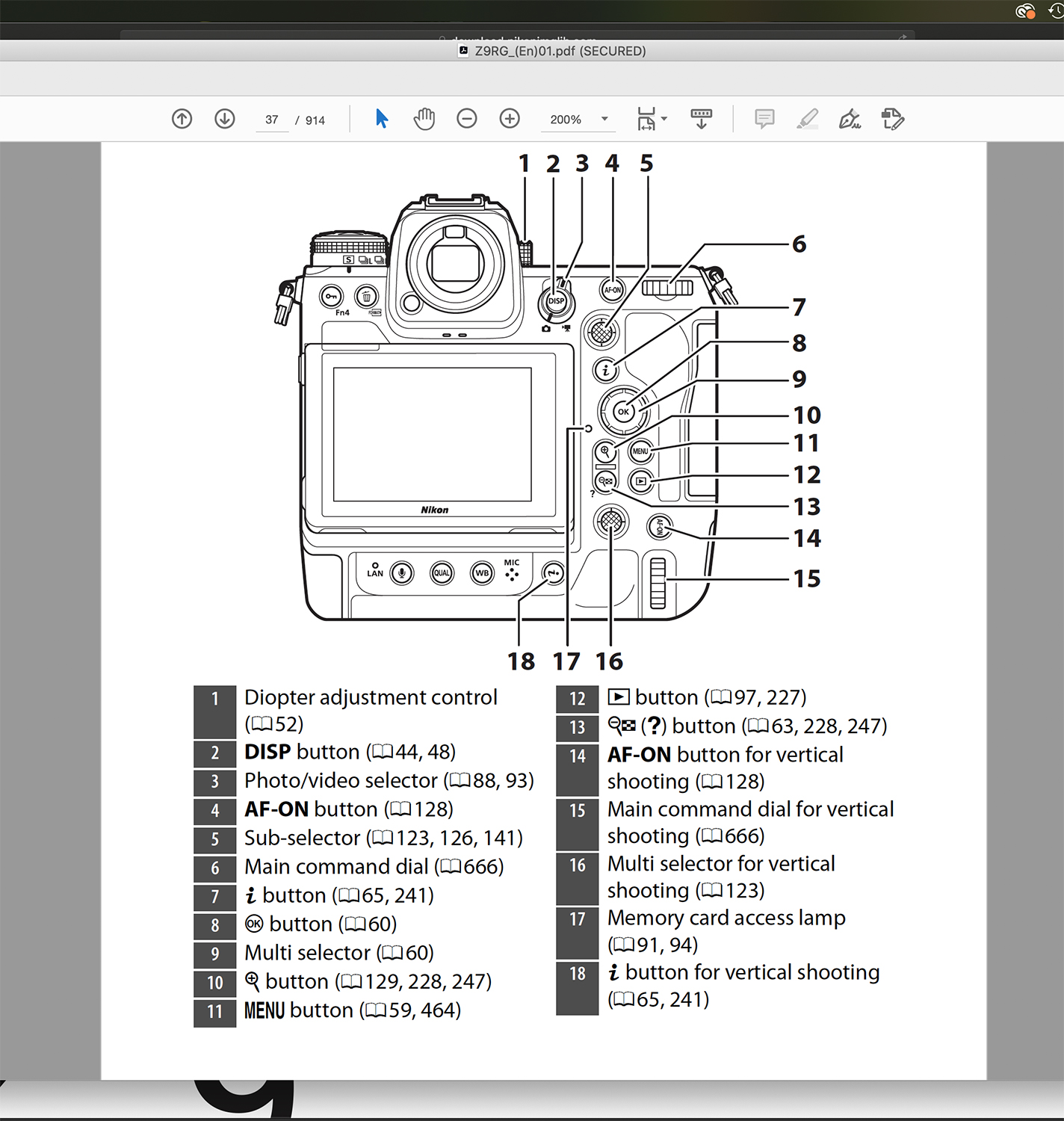
In the PDF of the Z9 User Manual, I screenshot the several drawings of the Z9 body, that name all the buttons. Then, I moved them to PS and printed them out. So now, I can read what you guys are suggesting and have a better idea of which buttons to go to.
Just looking at the User Manual now. I must adapt to the names "Auto-area AF" and "AF-area mode". They are enough alike that I am confused.... but not for long
When Auto-area AF is selected for the AF-area mode, will sharp focus remain on the eye, if (after acquisition) I recompose.
Here is another way of asking this: In Auto-area AF, will the AF point stick to the eye, even as I recompose before shooting?
bs kite wrote:
Just looking at the User Manual now. I must adapt to the names "Auto-area AF" and "AF-area mode". They are enough alike that I am confused.... but not for long
When Auto-area AF is selected for the AF-area mode, will sharp focus remain on the eye, if (after acquisition) I recompose.
Here is another way of asking this: In Auto-area AF, will the AF point stick to the eye, even as I recompose before shooting?
Thanks ahead
As long as you hold the AF-ON button down the focus point should stick to the eye as you move the camera around. Even if the subject left the viewfinder for a bit and come back.
this is me wrote:
As long as you hold the AF-ON button down the focus point should stick to the eye as you move the camera around. Even if the subject left the viewfinder for a bit and come back.
Please see screenshots. I know that the button under the right thumb is the one you are referring to. Just wanted to make sure by showing the backside of Z9.
Across from #4 you will see it refers to p. 128, which is the 2nd image. There, it says that when the AF-ON button is pressed, it stays on, until it is pressed again to turn it off. Would you please check that?
Because that would be different than the D850 and D500.
bs kite wrote:
Just looking at the User Manual now. I must adapt to the names "Auto-area AF" and "AF-area mode". They are enough alike that I am confused.... but not for long
When Auto-area AF is selected for the AF-area mode, will sharp focus remain on the eye, if (after acquisition) I recompose.
Here is another way of asking this: In Auto-area AF, will the AF point stick to the eye, even as I recompose before shooting?
Thanks ahead
If you have the Subject Detect Enabled then IF it can find the eye it will track it all over the frame (~90%). If it doesn't find the eye it may find the head or body and will track that all over also.
In the Wide-Area AF modes (S, M, L) it will track the eye/head/body etc just within the demarcated area of the Wide Area size you choose.
In Dynamic and Single and Pinpoint there is no eye-tracking. Pinpoint doesn't work in AF-C.
In 3D mode you use a center square to aim at what you want tracked and then it will track all over the frame. In Auto-area AF the camera makes the decision of what it sees worth tracking. Auto feels like giving up too much control but as you know on the DSLRs it was amazing how it worked. We shall see how well it works on the Z9.
arbitrage wrote:
Auto feels like giving up too much control but as you know on the DSLRs it was amazing how it worked. We shall see how well it works on the Z9.
Which mode do you typically use on Sony, Geoff? For anything in flight, I'd use wide and felt that even on R4, the camera was pretty smart and capable at knowing what to focus on.
I don't feel that way about my Nikon in any fashion in Auto mode. The camera often feels overwhelmed by auto mode and jumps all around nonsensically. I'm sure the Z9 is more surefooted than the Z7ii, but still...shocking.
RoamingScott wrote:
Which mode do you typically use on Sony, Geoff? For anything in flight, I'd use wide and felt that even on R4, the camera was pretty smart and capable at knowing what to focus on.
I don't feel that way about my Nikon in any fashion in Auto mode. The camera often feels overwhelmed by auto mode and jumps all around nonsensically. I'm sure the Z9 is more surefooted than the Z7ii, but still...shocking.
I use Wide on Sony (which is essentially the same idea as Nikon's Auto-AF) for 80% of BIF. I use Zone the other 20%.
Auto on my D500/D850 was a go to mode for any fast BIF and Group otherwise. Auto on my Z7 (only had for 2 weeks and returned) and my Z50 was, as you say, a jumping around, neurotic mess. Only good if backgrounds were totally clear and OOF.
I'm hoping Z9 has improved on that but from what I see in the EVF recordings all over YT I don't think it has as much as I had hoped. But that is what I really need to see in person in my own hands and I need to spend my time experimenting with combinations of Auto, 3D and Wide-Area L. On the R5 the Auto type mode was pretty good but lost it to complicated backgrounds after starting to track just fine. What it also lacked was the uncanny Sony ability to see a moving subject and pick it up in Wide even against complicated backgrounds and to hold a subject as it moved from simple to complicated backgrounds. R5 was helped by using Zone to initially acquire a BIF and then switch over to full Auto tracking. This sounds like what some members are now doing on their Z9s (like gannis) with Wide-Area L to acquire and then Auto or 3D to track from there.