Just got back from first trip, first real use of R5. Prior to going out I sort of ignored the IBIS setting on the camera (unfortunately), and then once I saw the results (a couple days in), I turned IBIS off, though was confounded in one case by the C1-C3 settings.
Anyway, to make a long story short, long exposures on a tripod show rotational trailing of stars, which I have to assume is IBIS trying to stabilize the image, for some reason rotating the sensor? Couple of odd things:
1) The first shot in a sequence (pano row) often does not show this behavior, but images after do.
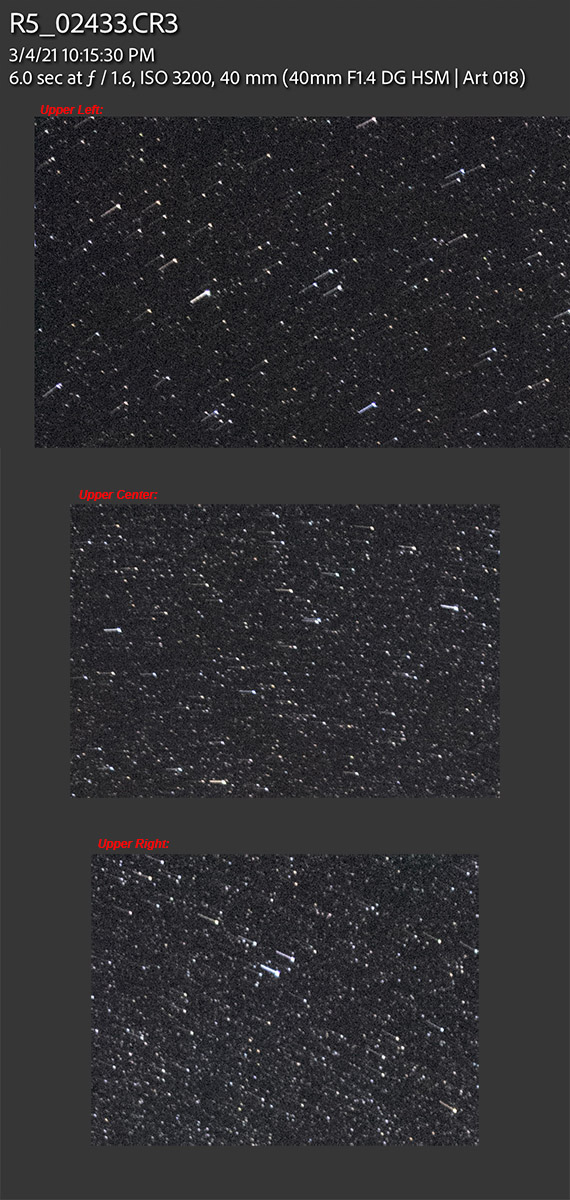
2) In this 6-sec exposure, the star is quite bright, which suggests to me that the bulk of the exposure is being recorded correctly, with only a small percentage of the time interval exhibiting the sensor movement (i.e., the sensor is stationary for ~95% of the 6 seconds, and then 'rapidly' shifts).
Screenshot below of top quadrants showing the movement.
OK, I get the fact that perhaps IBIS needs to be manually shut off in my usage case, but you'd think that the R5 would be programmed to quit trying to use it at some point, and should know if a camera is tripod-mounted. Yes, I need to get my act together with learning the camera and the potential effects of moving between 'manual' modes and the C1-C3 settings, but having to turn off IBIS for Manual mode is a bit of a kludge, as it is a mode I'd often want 'on', but also need the ability to shoot long exposures in manual. In daytime 6-second images I'd assume this would be very difficult to see specific effects of, though would result in a soft image.
Anyway, will probably shoot this to Canon to see what they say, as it just doesn't seem right, unless anyone here can enlighten me on this being a 'feature' not a 'bug'.
I’ve had distortion issues that I believe were caused by the IBIS as well but in normal exposures. I was shooting Green Herons last summer and when I got home as I was scrolling through a few shots of a stationary bird that I had shot in a burst, I noticed significant distortion where the image seemed to be stretched in different directions in each shot. I think with this camera if you’re stabilized on a tripod, you should turn IS off completely.
Huh. I have never seen this when shooting tripod mounted on my R5 or R6. I shoot a fair amount at speeds of 1-30 seconds, and often forget to shut off IS, and have never had an issue...the camera seems to sense that the camera is on a tripod. I'm wondering if you're getting some minor slippage of your head...like if you forgot to lock down the panning knob or something (but you're right it is rotating), or it's just recording star trails bizarrely (though at 6 seconds and 40mm, you wouldn't expect to see much movement.)
What do the non-star like areas look like in the image, because if it's sensor rotation, the earth portions should be blurry.
I definitely try to have IBIS off when on a tripod, but I've never seen issues from leaving it on. Is your Sigma 40's lens firmware up to date? Sometimes third party lenses don't fully integrate well with the IBIS until they get a firmware update. My Tamron lenses (17-35 and 35/1.4) both needed an update to properly work with IBIS, though my Sigma lenses are bizarre....my 135/1.8 works great on the latest firmware, as does my 150-600mm. My 12-24mm f/4, though was a little odd. On initial firmware, it worked with IBIS (though I tend to leave IBIS off on extreme ultra-wides because it's almost impossible to get sharp edges when it needs to kick in due to the extreme change in geometry with small movements). However, after updating to the latest firmware on that lens (which fixed some odd optical behavior when zooming), that lens no longer works with IBIS at all (it's not even an option to turn it on). Wonder if some Sigma lenses don't have full compatibility, such that it won't shut off the IBIS automatically when on a tripod.
Could be an anomaly from using an adapted 3rd party lens. I'd be curious to see if this happens with both native RF glass as well as adapted EF glass.
I've not yet pointed my R5 at the stars but may try some test shots with my EF glass as well as my manual Rokinon 14mm lens one of these days.
But, it doesn't really matter as the IS should be turned off for this type work anyhow.
I think in my case it was due to the head moving, since I had my 600 on a gimbal the lens was moving as I was shooting so I think that’s why IBIS was engaged.
Jman13 wrote:
1) I'm wondering if you're getting some minor slippage of your head...like if you forgot to lock down the panning knob or something (but you're right it is rotating), or it's just recording star trails bizarrely (though at 6 seconds and 40mm, you wouldn't expect to see much movement.)
2) What do the non-star like areas look like in the image, because if it's sensor rotation, the earth portions should be blurry.
3) I definitely try to have IBIS off when on a tripod, but I've never seen issues from leaving it on. Is your Sigma 40's lens firmware up to date? Sometimes third party lenses don't fully integrate well with the IBIS until they get a firmware update. ...Show more →
1 = No way, rotation is about the center of the image circle, perpendicular to the plane of the sensor.
2 = Too hard to tell if you can see it with night images, I suspect it'd be hard to see.
3 = I'm guessing this could be related.
I'm still puzzled by it not showing up in the first image of a sequence (thus my suggestion as a bug), when all other things are the same, other than the extra time between sequences compared to the time between frames in a sequence.
lighthound wrote:
Could be an anomaly from using an adapted 3rd party lens. I'd be curious to see if this happens with both native RF glass as well as adapted EF glass.
I've not yet pointed my R5 at the stars but may try some test shots with my EF glass as well as my manual Rokinon 14mm lens one of these days.
But, it doesn't really matter as the IS should be turned off for this type work anyhow.
Yes it should be (with a strong suggestion that this electronic wonder of a camera should know it's on a tripod), but if it weren't a bug, you'd think the 'trail' would be of consistent brightness throughout the duration of the capture, and would appear in every frame that is identically captured.
Going back and forth between Manual and the C1/2 settings is what allowed this to rear its head initially, as moving from C1 to Manual and back re-set the (errant) IBIS setting when returning to C1. Even after setting the C setting parameters to 'hold' the settings changed, it continued to occur, so I need to dig into the menus a bit more and try to find why this is.
And regardless, for people who shoot bracketed HDR images (perhaps with an ND filter), this behavior is aberrant, and the daytime results may be much harder to notice, nevertheless present. I've only been home for 12 hours and getting on a plane to morrow morning, so will have some time to research this a bit further.
Thanks for all the input, I guess I need to order a Sigma dock with all these Sigma Art lenses now...
Tony5787 wrote:
I’ve had distortion issues that I believe were caused by the IBIS as well but in normal exposures. I was shooting Green Herons last summer and when I got home as I was scrolling through a few shots of a stationary bird that I had shot in a burst, I noticed significant distortion where the image seemed to be stretched in different directions in each shot. I think with this camera if you’re stabilized on a tripod, you should turn IS off completely.
That distortion can also be caused by the electronic shutter. But I have also suspected that shutter vibrations from high speed shooting (even with EFCS) can "bump" the IBIS around and cause an occasional hiccup. EFCS can almost eliminate shutter shock for a single image, but there has to be some resonant vibration caused by the rear curtain that could affect subsequent shots in a series, perhaps when the waves of vibration align with the exposure and IBIS in certain way.
p.1 #10 · R5 Long Exposure IBIS sensor rotation???
That was my initial impression but I’d think with rolling shutter and a stationary subject that it would be consistently distorted across those frames. In my case it was distorted in a different way each time and always seemed stretched towards one of the corners as if the sensor was moved just a tiny bit during exposure.
p.1 #11 · R5 Long Exposure IBIS sensor rotation???
Jeff wrote:
Going back and forth between Manual and the C1/2 settings is what allowed this to rear its head initially, as moving from C1 to Manual and back re-set the (errant) IBIS setting when returning to C1. Even after setting the C setting parameters to 'hold' the settings changed, it continued to occur, so I need to dig into the menus a bit more and try to find why this is.
And regardless, for people who shoot bracketed HDR images (perhaps with an ND filter), this behavior is aberrant, and the daytime results may be much harder to notice, nevertheless present. I've only been home for 12 hours and getting on a plane to morrow morning, so will have some time to research this a bit further.
Thanks for all the input, I guess I need to order a Sigma dock with all these Sigma Art lenses now......Show more →
It must be IBIS the dock wont be of any help for that . The dock is for MA the lens on a DSLR and firmware update for the lens. If there is a firmware available for that specific lens it will be posted on the Sigma site beside that Dock doesn't do much .
Some lens the way that they are made can be more prone to star trails than the others .
Francois.
Mar 12, 2021 at 11:10 AM
AmbientMike Offline • • • • • • [X]
p.1 #12 · R5 Long Exposure IBIS sensor rotation???
Doesn't look too much different from what I'd expect as far as star trails on a 40mm lens at 6 sec? Assuming this is a heavy crop
p.1 #13 · R5 Long Exposure IBIS sensor rotation???
AmbientMike wrote:
Doesn't look too much different from what I'd expect as far as star trails on a 40mm lens at 6 sec? Assuming this is a heavy crop
Um, no, it looks fundamentally different.
If it were star trails, the brightness would be uniform across the trail. The effect observed is as if the IBIS was stationary for 5.5-seconds of the 6-sec exposure, the other 1/2-second of which the sensor trailed off quickly. In other words, you wouldn't see stars with a slight trail, you'd just see trails and no stars.
p.1 #14 · R5 Long Exposure IBIS sensor rotation???
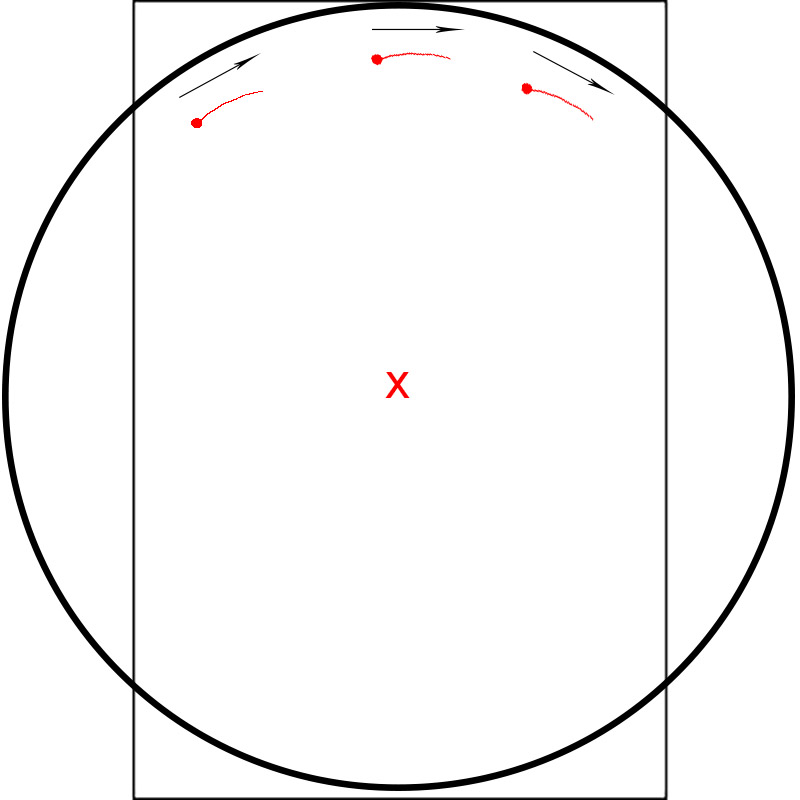
Perhaps I'm having a spatial brain-fart this morning but I don't see how sensor rotation could cause the angle of the star trails to be different on the left side of the frame vs the right. Assuming the camera is pointed in an east or west direction, a level camera will produce horizontal trails, while a rotated camera will produce trails of the same angle across the frame (ie, if rotated clockwise the trails will have a positive slope and if rotated counter-clockwise will have a negative slope). For example, a clockwise rotation: https://photos.smugmug.com/photos/i-9b559sW/1/f4dcf96d/O/i-9b559sW.jpg
You said this only occurs on the secondary shots of your pano sequence. If your pano shifts the camera direction from an east/west orientation to a more north orientation then that would explain why the trails are taking on the circular orientation for the secondary shots of the pano sequence. (ie, stars with a positive trail slope on the left and a negative trail slope on the right). That of course would be due to the perpendicular orientation of the northern stars vs the earth's rotation.
p.1 #15 · R5 Long Exposure IBIS sensor rotation???
snapsy wrote:
Perhaps I'm having a spatial brain-fart this morning but I don't see how sensor rotation could cause the angle of the star trails to be different on the left side of the frame vs the right. Assuming the camera is pointed in an east or west direction, a level camera will produce horizontal trails, while a rotated camera will produce trails of the same angle across the frame (ie, if rotated clockwise the trails will have a positive slope and if rotated counter-clockwise will have a negative slope). For example, a clockwise rotation: https://photos.smugmug.com/photos/i-9b559sW/1/f4dcf96d/O/i-9b559sW.jpg
You said this only occurs on the secondary shots of your pano sequence. If your pano shifts the camera direction from an east/west orientation to a more north orientation then that would explain why the trails are taking on the circular orientation for the secondary shots of the pano sequence. (ie, stars with a positive trail slope on the left and a negative trail slope on the right). That of course would be due to the perpendicular orientation of the northern stars vs the earth's rotation....Show more →
Perhaps I'm having a brain fart, but it seems to me that your drawing depicts a diagonal translation of the sensor along a vector. What I'm imagining is the sensor being rotated about its center:
p.1 #16 · R5 Long Exposure IBIS sensor rotation???
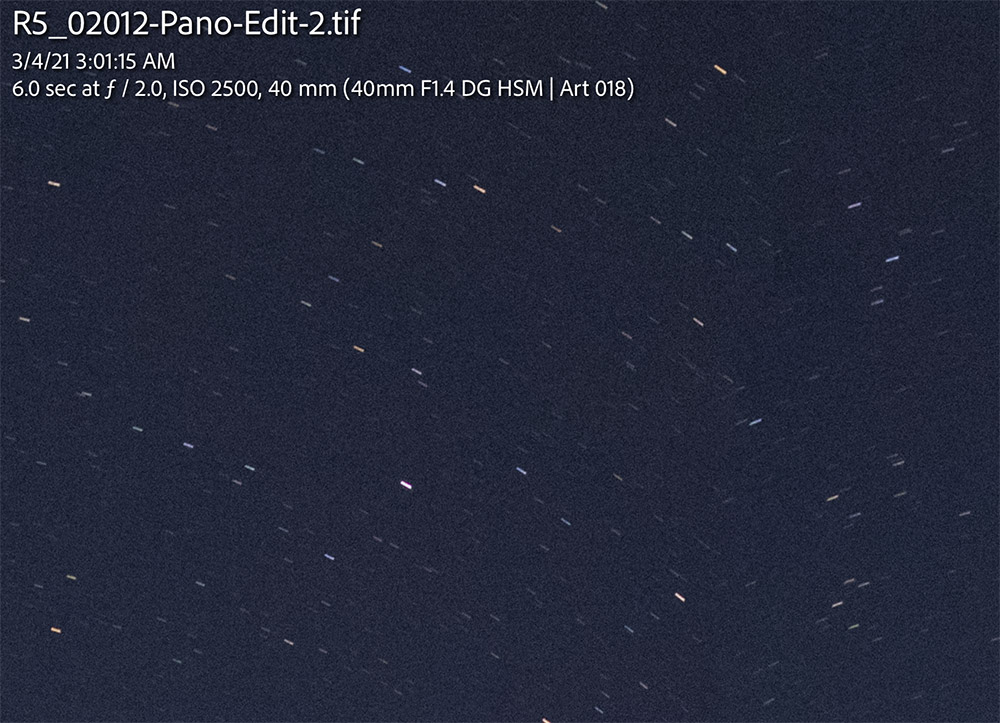
For a different take on this issue, here is a 1:1 crop showing the seam where two images within a panorama were joined (by LR). Yes, one might think these are star trails, they look very much like them, but they are not, as this occurs on every seam. Still digging into this, and notably in this case the sensor seems to have moved throughout the entire exposure (compared to the first example, coincidentally the shutter speed is the same 6s).
p.1 #17 · R5 Long Exposure IBIS sensor rotation???
Also, note that there seems to be no consistency to how much the sensor shifts in any given exposure; note the difference in lengths of the trails between two successive frames.
EDIT: Added additional example; trailing happened on first and last image in a row (second screenshot image below is the left-most seam, e.g. shot one and two of a row of six). Different lens, slightly different exposure. Again, seemingly no rhyme or reason to when/why this occurs.
p.1 #18 · R5 Long Exposure IBIS sensor rotation???
Conventional wisdom says that you don't need IS (or MLU) for long exposures, certainly for those minutes long, and so the artifacts you show are certainly caused by the camera, in some manner.
I've noticed that my M5 and M6 Canon mirrorless cameras have in-lens IS active all of the time, unless it's explicitly shut off. OTOH, all of my many EOS DSLR are quite happy to let the IS shut down, when appropriate. I wonder if the R-series cameras have this tendancy to leave IS active (when not shut off). If this tendancy is also followed for in-body IS (when it's not explicitly set off), then uncorrected sensor-drift (i.e. integration error) could cause issues.
p.1 #19 · R5 Long Exposure IBIS sensor rotation???
Jeff wrote:
Perhaps I'm having a brain fart, but it seems to me that your drawing depicts a diagonal translation of the sensor along a vector. What I'm imagining is the sensor being rotated about its center:
I was depicting a center rotation but assuming the sensor rotation occurred fast enough to not leave a visible trail from the rotation itself. For example, the exposure starting with 0° rotation and holding it there for the majority of the exposure (bright dot, ie star), then the sensor rotating clockwise fast enough so that the stars wouldn't be perceptible for that duration and thus no visible sensor-induced trail (for example, a sensor movement that took 1/250), and then holding its rotated position for the remaining shorter portion of the exposure, expecting dim, uni-directional slanted trails. This assumed the visible trails in the photo were actual star trails rather than sensor-movement induced trails. Thinking now, my assumption was clearly wrong because if the trails were actual star trails we would see a bright trail for the non-rotated portion of the exposure (rather than a bright dot) and a shorter trail for the rotated portion of the exposure (or a trail of the same length but dimmer). In other words, the bright dot in your photo represents close to what the real star trail would be (effectively no trail) since that represents the majority of the exposure time.
I think we might be able to induce why the IBIS is rotating the sensor by figuring out what motion the IBIS thinks it is sensing, since the speed and degree of the sensor movement should correlate to the speed and degree of the movement IBIS is sensing (that's how it would yield sharp images in a normal hand-holding scenario). To figure out the speed and degree of sensor movement I think we first have to establish what percentage of the exposure time represents the sensor stationary vs in rotation. We can figure that out by comparing the exposure of the star vs the exposure of its sensor-rotation-induced trail. Accomplishing this would require exposing the photo so that the stars are below saturation clipping, with the hope that the trail would still be visible at that exposure. If so, we can compare the relative brightness of the trail (using the linear data in the raw, not gamma corrected) to extrapolate the linear exposure delta between stationary and rotation.
Some questions...when this occurs do you always see the tail to the left of the star? That would indicate the same sensor rotation direction each time the issue occurs (assuming the rotation occurs at the same part of the exposure, ie near beginning vs near end). Also, have you tried reversing the direction of the pano and see if that affects where the tail is relative to the star? This might be the case if the motion the IBIS is incorrectly acting on is related to you directly moving the camera between exposures (seems unlikely since you're probably waiting at least a second after each pano movement before starting an exposure, but still something easy to check). I'd guess its more likely IBIS is sensing and reacting to a resonating vibration on your head/tripod from the pano movement, as that is likely to survive much longer.
p.1 #20 · R5 Long Exposure IBIS sensor rotation???
snapsy wrote:
Some questions...
1) when this occurs do you always see the tail to the left of the star? That would indicate the same sensor rotation direction each time the issue occurs (assuming the rotation occurs at the same part of the exposure, ie near beginning vs near end).
2) Also, have you tried reversing the direction of the pano and see if that affects where the tail is relative to the star? This might be the case if the motion the IBIS is incorrectly acting on is related to you directly moving the camera between exposures (seems unlikely since you're probably waiting at least a second after each pano movement before starting an exposure, but still something easy to check). I'd guess its more likely IBIS is sensing and reacting to a resonating vibration on your head/tripod from the pano movement, as that is likely to survive much longer. ...Show more →
1 = Yes, it always seems to rotate in the same direction, though obviously in the bottom half of the image the tail would be on the opposite side.
2 = No, I always shoot panos from left to right so that LR Grid view makes sense to my brain. If there were a remaining resonant vibration in the tripod head, I'd think that it would be somewhat random, at least in relation to the center of the frame being observed to be the point of rotation. It is this latter observation that leads me to believe that it's some kind of bug in the software, as there is really no way to have a resonant vibration that acts about the center of the sensor, perpendicular to the plane of it. At least, not with any head I possess.
Looking through more shots this morning, there is little consistency to it, other than the first shot of several sequences not having the trailing. Many shots do not show any trailing whatsoever (what would seem to me to be the 'correct' outcome, regardless of whether IBIS was inadvertently set to 'on' or not). I'd think the camera should know, at some point, that it needs to turn IBIS off for long exposures, and it's the inconsistency of it that leads me to believe that one or the other outcome is unintended.
Lastly, I still need to dig into whether the IBIS is a discrete setting for each separate camera mode (i.e. Manual, Av, Tv, etc.), or whether the setting should 'stick' for all modes except for whatever is dictated for the C1-C3 modes. It sure seems like it came back on after I'd turned it off, and I need to try and discover the source of that behavior.
Now, all this being said, the fact that this IBIS system was able to produce such an error gives me hope that perhaps Canon will someday implement the star-tracking feature as Pentax has. Clearly the hardware is capable of it...