jcolwell wrote:
Conventional wisdom says that you don't need IS (or MLU) for long exposures, certainly for those minutes long, and so the artifacts you show are certainly caused by the camera, in some manner.
I've noticed that my M5 and M6 Canon mirrorless cameras have in-lens IS active all of the time, unless it's explicitly shut off. OTOH, all of my many EOS DSLR are quite happy to let the IS shut down, when appropriate. I wonder if the R-series cameras have this tendancy to leave IS active (when not shut off). If this tendancy is also followed for in-body IS (when it's not explicitly set off), then uncorrected sensor-drift (i.e. integration error) could cause issues. ...Show more →
I wonder as well! If there weren't nearly 1000 pages to the two manuals I might have gotten through it all, but the robust menu system options makes it all hard to keep straight...
Jeff wrote:
1 = Yes, it always seems to rotate in the same direction, though obviously in the bottom half of the image the tail would be on the opposite side.
2 = No, I always shoot panos from left to right so that LR Grid view makes sense to my brain. If there were a remaining resonant vibration in the tripod head, I'd think that it would be somewhat random, at least in relation to the center of the frame being observed to be the point of rotation. It is this latter observation that leads me to believe that it's some kind of bug in the software, as there is really no way to have a resonant vibration that acts about the center of the sensor, perpendicular to the plane of it. At least, not with any head I possess.
Looking through more shots this morning, there is little consistency to it, other than the first shot of several sequences not having the trailing. Many shots do not show any trailing whatsoever (what would seem to me to be the 'correct' outcome, regardless of whether IBIS was inadvertently set to 'on' or not). I'd think the camera should know, at some point, that it needs to turn IBIS off for long exposures, and it's the inconsistency of it that leads me to believe that one or the other outcome is unintended. ...Show more →
It does appear random though, based on how you don't always see the phenomena on the secondary shot(s) of the pano sequence. That randomness would be introduced by the variation of how much force you apply to the pano head each time you move it (assuming it's not motorized), and the variation in how much time you take to trigger the next exposure after completing each pano head movement (settlement time). The fact it never occurs on the first exposure and intermittently occurs on the secondary ones means it has to somehow be correlated to movement variations of the camera/setup and the downstream effects thereof. There is no other possibility unless you're doing something different with a camera function in how you shoot the first and secondary exposures (including temporal differences like always triggering the first exposure x seconds after powering it on, etc...)
There are some straightforward experiments which should easily elucidate the matter if you're game and curious (I know I am!). For example, waiting a few more seconds after each pano movement before triggering the exposure and see if the phenomena still occurs.
There is a lot of precedent for vibrations affecting the operation of camera/lens stabilization systems. For example, the original A7r's shutter vibration was strong enough to be sensed by the IS unit on some Canon lenses and trigger them to perform unwanted corrective movements. I demonstrated this issue myself here. This was caused by the second shutter curtain before the start of an exposure (the A7r didn't support EFCS or electronic shutter). Due to to lags in the shutter rearming process the resonating vibration affecting the lens was occurring hundreds of milliseconds after the shutter movement that originally started the vibration.
If by bug you mean this is unwanted behavior then I certainly agree. But since it only occurs after movement of the pano head it's not a bug that just randomly occurs any time the camera takes an exposure - there has to be physical movement by you to trigger it. While you can easily work around this by turning IBIS off, the fact there is enough resonating vibration in your setup to be sensed by IBIS means there is enough vibration to affect the sharpness of your photos - many IBIS units operate at pixel-level precisions. It may not affect the sharpness of these long exposures but it could affect shorter exposures.
1) I found at least one example of sensor rotation in the opposite direction
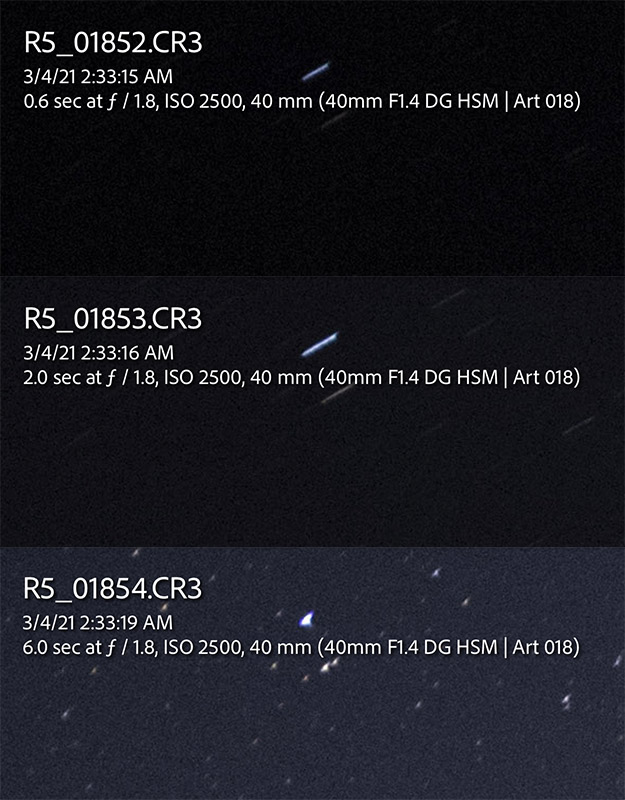
2) It's certainly not pano head-related; note in the first set of screenshots below that brackets exhibit the trailing at 0.6s, 2s, but not at 6s (this is consistent amongst quite a few shots). I'd think any vibration should have calmed down by the second shot, and certainly the trails of said shot wouldn't be longer if it were tripod/head-induced movement. Ironically, in this case the longer shot is the good one, and if shot within a bracketed sequence the 6s exposure never shows the trailing.
3) Ditto the above, but even more distressing is the impact upon the foreground (disregard the noise from the 3-stop push just to be able to see better).
4) Both the Sigma Art 14/1.8 and 40/1.4 have exhibited this; have not found a single instance of the 85/1.4 exhibiting it, but I've admittedly used it less.
5) For the record, I'm using EFCS.
#2 above again suggests to me that this may be a bug in Canon's IBIS implementation, as 6 second exposures sometimes exhibit this behavior when not shot as part of a bracket, but do not when it is shot as the third shot in a bracket. This inconsistency obviates the possibility of it being simply that they forgot to tell the camera to turn off IBIS for exposures longer than X seconds, it's clearly more complicated than that.
EDIT: And, if the camera were actually trying to counteract some sort of resonant vibration, it certainly would not be only rotating the sensor about its center each time, it would be translating/moving it however it had to to nullify the actual movement detected.
Jeff wrote:
I'm certainly open to testing once I'm back home.
Couple things:
1) I found at least one example of sensor rotation in the opposite direction
2) It's certainly not pano head-related; note in the first set of screenshots below that brackets exhibit the trailing at 0.6s, 2s, but not at 6s (this is consistent amongst quite a few shots). I'd think any vibration should have calmed down by the second shot, and certainly the trails of said shot wouldn't be longer if it were tripod/head-induced movement. Ironically, in this case the longer shot is the good one, and if shot within a bracketed sequence the 6s exposure never shows the trailing.
3) Ditto the above, but even more distressing is the impact upon the foreground (disregard the noise from the 3-stop push just to be able to see better).
4) Both the Sigma Art 14/1.8 and 40/1.4 have exhibited this; have not found a single instance of the 85/1.4 exhibiting it, but I've admittedly used it less.
5) For the record, I'm using EFCS.
#2 above again suggests to me that this may be a bug in Canon's IBIS implementation, as 6 second exposures sometimes exhibit this behavior when not shot as part of a bracket, but do not when it is shot as the third shot in a bracket. This inconsistency obviates the possibility of it being simply that they forgot to tell the camera to turn off IBIS for exposures longer than X seconds, it's clearly more complicated than that.
EDIT: And, if the camera were actually trying to counteract some sort of resonant vibration, it certainly would not be only rotating the sensor about its center each time, it would be translating/moving it however it had to to nullify the actual movement detected. ...Show more →
Thanks, great data. Until now I hadn't heard you've seen this outside your pano setup so that adds some very useful data points. Regarding a sample you found exhibiting opposite rotation, it's hard to determine the rotation on a given image since we don't know which part of the exposure the rotation is occurring on in a given photo. For a clockwise rotation, the star will on the right side of the trail if the rotation occurs later in the exposure and on the left side of the trail if the rotation occurs at the beginning of the exposure. For a counter-clockwise rotation, the opposite is true - star will be on the left side of the trail if the rotation occurs later in the exposure and on the right side if the rotation occurs at the beginning of the exposure.
I agree that based on the bracketed sequence causing the phenomena without any pano movement the pano movement can't be the cause. With EFCS there wouldn't be any shutter vibration on the first image of the bracket but there would be on subsequent shots since the shutters have to cycle after an EFCS exposure. But since you see the phenomena on the very first shot of a bracket with EFCS that would also mean shutter vibration is also eliminated as a potential cause.
I would guess IBIS's detection of tripod use is determined by a specific signature of gyro readings (ie, lack of movement relative to some calibrated baseline) rather than a fixed formula like one based on exposure time. People use long exposures hand-held too. It's certainly possible the bug is related to failing to deactivate IBIS. It's not clear though whether the IBIS needs to be deactivated, ie if the design is supposed to work and not perform any adverse movements in a tripod setup. I don't own an R5 but I just downloaded a raw and see the EXIF contains a stabilization field that may have more than just two binary values of enabled/disabled. It would be interesting to see if that field is different for the various images you've exhibited.
Btw, how are you triggering the shutter for all the examples you discussed, both the pano shots and the brackets? What is your R5's "Still Photo IS" setting configured to (one-shot vs always/continuous)? It would be interesting to try the alternate of the setting you're using and see how that alters the frequency.
Jeff wrote:
Lastly, I still need to dig into whether the IBIS is a discrete setting for each separate camera mode (i.e. Manual, Av, Tv, etc.), or whether the setting should 'stick' for all modes except for whatever is dictated for the C1-C3 modes. It sure seems like it came back on after I'd turned it off, and I need to try and discover the source of that behavior.
Now, all this being said, the fact that this IBIS system was able to produce such an error gives me hope that perhaps Canon will someday implement the star-tracking feature as Pentax has. Clearly the hardware is capable of it......Show more →
At least with adapted EF and 3rd party glass, you can not simply turn IBIS off in camera. If you have IS turned on your lens IBIS will always be on. The only way to turn IBIS off is to turn off IS on your lens. You either have both at the same time or none at all. I'm not sure if this is true when shooting native RF lenses however.
I was out shooting 30 second night exposures this weekend using my 24-70 f/4. I obviously had turned off IS/IBIS for this type work and I see zero issues even zoomed in to 800%. I did see a few of my shots had a slight movement caused by the wind.
+1 for a future FW update that allows us to use IBIS as a tracker like Pentax has done. That would be fantastic. That would be the ONLY time to actually turn on IS/IBIS for long exposures. Till then though, we gotta hit that IS OFF switch on the lens.
Jeff wrote:
I'm certainly open to testing once I'm back home.
Couple things:
1) I found at least one example of sensor rotation in the opposite direction
2) It's certainly not pano head-related; note in the first set of screenshots below that brackets exhibit the trailing at 0.6s, 2s, but not at 6s (this is consistent amongst quite a few shots). I'd think any vibration should have calmed down by the second shot, and certainly the trails of said shot wouldn't be longer if it were tripod/head-induced movement. Ironically, in this case the longer shot is the good one, and if shot within a bracketed sequence the 6s exposure never shows the trailing.
3) Ditto the above, but even more distressing is the impact upon the foreground (disregard the noise from the 3-stop push just to be able to see better).
4) Both the Sigma Art 14/1.8 and 40/1.4 have exhibited this; have not found a single instance of the 85/1.4 exhibiting it, but I've admittedly used it less.
5) For the record, I'm using EFCS.
#2 above again suggests to me that this may be a bug in Canon's IBIS implementation, as 6 second exposures sometimes exhibit this behavior when not shot as part of a bracket, but do not when it is shot as the third shot in a bracket. This inconsistency obviates the possibility of it being simply that they forgot to tell the camera to turn off IBIS for exposures longer than X seconds, it's clearly more complicated than that.
EDIT: And, if the camera were actually trying to counteract some sort of resonant vibration, it certainly would not be only rotating the sensor about its center each time, it would be translating/moving it however it had to to nullify the actual movement detected. ...Show more →
Could you possibly PM me the full size raws for RS_01903.CR3 through RS_01905.CR3? I've built a programmatic model in After Effects to simulate how different IBIS x/y/rotation movements and exposure times per movement affect the image. . I'd like to see the full images to tweak the model. Here's how the model looks against the unaffected image (RS_01905.CR3) you posted, reproducing the star trails:
snapsy wrote:
Btw, how are you triggering the shutter for all the examples you discussed, both the pano shots and the brackets? What is your R5's "Still Photo IS" setting configured to (one-shot vs always/continuous)? It would be interesting to try the alternate of the setting you're using and see how that alters the frequency.
Triggering using shutter button, but will probably transition to a shutter release at some point. It's just one more thing to fumble around with in the dark, so I've resisted it.
Re: the R5's "Still Photo IS" setting, here's where I am lost by Canon's implementation, and it has most certainly worked into how these errors even became 'a thing'. For those 'reminding' me (term used loosely) that IS is not appropriate when using a tripod, I know that. This is where Canon–I feel–messed up with the menu system, as it seems like I don't have any control over it. For example, right now the Tamron 35/1.4 lens is attached via a Canon adapter, and if I go to the 'IS (Image Stabilizer) mode' menu item, it reads: "Not available with the attached lens" (i.e. it is greyed out), and I appear to have no control over it.
How am I supposed to turn off IBIS if this option is greyed out?
This is where the error reared its ugly head, as I assume that the setting being unavailable meant that IBIS is OFF, but apparently that is not necessarily what it means. At this point I'm not even sure whether or not IBIS is off for non-RF lenses, and I cannot even remember how I ever accessed that menu! If I'm not mistaken, the only way to access the menu is to attach an RF lens that does not have built-in IS. [Not even the Advanced PDF manual describes this behavior with different lenses.]
Now that's just stupid, in my opinion. Seriously, I just have to be missing something about this implementation!
I just mounted the 50/1.8, and now the menu has magically appeared. If any of you who know the R5 well can lend some insight here, I'm all ears. Makes me glad I shelled out for the 50/1.8, so I can access the menu.
snapsy wrote:
Could you possibly PM me the full size raws for RS_01903.CR3 through RS_01905.CR3? I've built a programmatic model in After Effects to simulate how different IBIS x/y/rotation movements and exposure times per movement affect the image. . I'd like to see the full images to tweak the model. Here's how the model looks against the unaffected image (RS_01905.CR3) you posted, reproducing the star trails:
I'll shoot you a PM with a Dropbox link. Thanks for getting involved in this thread, I learned a lot about sensors back in the day with some of the work you've done in the past, and the R5 sensor being new makes me wish you had one... lol
jcolwell wrote:
Conventional wisdom says that you don't need IS (or MLU) for long exposures, certainly for those minutes long, and so the artifacts you show are certainly caused by the camera, in some manner.
I've noticed that my M5 and M6 Canon mirrorless cameras have in-lens IS active all of the time, unless it's explicitly shut off. OTOH, all of my many EOS DSLR are quite happy to let the IS shut down, when appropriate. I wonder if the R-series cameras have this tendancy to leave IS active (when not shut off). If this tendancy is also followed for in-body IS (when it's not explicitly set off), then uncorrected sensor-drift (i.e. integration error) could cause issues. ...Show more → Jeff wrote:
I wonder as well! If there weren't nearly 1000 pages to the two manuals I might have gotten through it all, but the robust menu system options makes it all hard to keep straight...
And now, this is becoming the crux of the aberrant behavior for me, just WTH is the IBIS system doing, and how can I control it?
Regarding the IS menu item being unavailable to me most of the time, here is what I experience:
RF lens attached, lens IS on: IS menu is unavailable
RF lens attached, lens IS turned off: IS menu is unavailable
non-Canon lens (w/out IS) attached using Canon adapter: IS menu is available
non-Canon w/lens IS attached via Canon adapter (IS on or off): IS menu is unavailable
Canon EF lens w/IS attached via Canon adapter (IS on or off): IS menu is unavailable
Canon RF lens w/out IS attached: IS menu is available
Again, I seriously must be missing something here with Canon's implementation! Instead of the menu option telling me "IS setting is unavailable with lens attached", why not tell me the status of the two systems, i.e. "Lens IS is ON, IBIS is OFF", or whatever. I really have no idea what the camera is actually doing.
For all the people who suggested I turn IBIS 'off', I'd be thrilled if you can tell me:
1) How to turn IBIS 'off' with the 5 lens classes listed above; and
2) How to tell if IBIS is indeed turned on or off, via the camera menu system (or EXIF info, after the fact).
Again, I'm all ears.
Having to purchase the Canon RF50/1.8 lens in order to access the menu seems to me to be a bug, not a feature. However, Canon did end up selling one more lens, even though I didn't actually buy it for that purpose...
EDIT: Updated bulleted item list to be correct (based upon others suggesting firmware updates in case of Tamron 35/1.4; could not get the Tamron 15-30/2.8 to communicate via the Tap-In console).
p.2 #10 · R5 Long Exposure IBIS sensor rotation???
Jeff wrote:
Triggering using shutter button, but will probably transition to a shutter release at some point. It's just one more thing to fumble around with in the dark, so I've resisted it.
Re: the R5's "Still Photo IS" setting, here's where I am lost by Canon's implementation, and it has most certainly worked into how these errors even became 'a thing'. For those 'reminding' me (term used loosely) that IS is not appropriate when using a tripod, I know that. This is where Canon–I feel–messed up with the menu system, as it seems like I don't have any control over it. For example, right now the Tamron 35/1.4 lens is attached via a Canon adapter, and if I go to the 'IS (Image Stabilizer) mode' menu item, it reads: "Not available with the attached lens" (i.e. it is greyed out), and I appear to have no control over it.
How am I supposed to turn off IBIS if this option is greyed out?
This is where the error reared its ugly head, as I assume that the setting being unavailable meant that IBIS is OFF, but apparently that is not necessarily what it means. At this point I'm not even sure whether or not IBIS is off for non-RF lenses, and I cannot even remember how I ever accessed that menu! If I'm not mistaken, the only way to access the menu is to attach an RF lens that does not have built-in IS. [Not even the Advanced PDF manual describes this behavior with different lenses.]
Now that's just stupid, in my opinion. Seriously, I just have to be missing something about this implementation!
I just mounted the 50/1.8, and now the menu has magically appeared. If any of you who know the R5 well can lend some insight here, I'm all ears. Makes me glad I shelled out for the 50/1.8, so I can access the menu.
I'll shoot you a PM with a Dropbox link. Thanks for getting involved in this thread, I learned a lot about sensors back in the day with some of the work you've done in the past, and the R5 sensor being new makes me wish you had one... lol ...Show more →
I agree, the way many cameras handle the IS/IBIS settings for the various types of lenses is pretty obtuse. The EXIF indicates the IBIS was on, which is obvious from the photos but I just checked to be sure the camera itself thought IBIS was on.
Thanks for the files - I'll be working with them on the model to get a better idea of the sensor movement and times.
Here's a quick PNG animation from the affected vs non-affected images, providing a quick visualization of the sensor movement. Brightness has been normalized, so the trails image has more noise:
p.2 #11 · R5 Long Exposure IBIS sensor rotation???
Jeff wrote:
And now, this is becoming the crux of the aberrant behavior for me, just WTH is the IBIS system doing, and how can I control it?
Regarding the IS menu item being unavailable to me most of the time, here is what I experience:
RF lens attached, lens IS on: IS menu is unavailable
RF lens attached, lens IS turned off: IS menu is unavailable
non-Canon lens (w/out IS) attached using Canon adapter: IS menu is unavailable
non-Canon w/lens IS attached via Canon adapter (IS on or off): IS menu is unavailable
Canon EF lens w/IS attached via Canon adapter (IS on or off): IS menu is unavailable
Canon RF lens w/out IS attached: IS menu is available
Again, I seriously must be missing something here with Canon's implementation! Instead of the menu option telling me "IS setting is unavailable with lens attached", why not tell me the status of the two systems, i.e. "Lens IS is ON, IBIS is OFF", or whatever. I really have no idea what the camera is actually doing.
For all the people who suggested I turn IBIS 'off', I'd be thrilled if you can tell me:
1) How to turn IBIS 'off' with the 5 lens classes listed above; and
2) How to tell if IBIS is indeed turned on or off, via the camera menu system (or EXIF info, after the fact).
Again, I'm all ears.
Having to purchase the Canon RF50/1.8 lens in order to access the menu seems to me to be a bug, not a feature. However, Canon did end up selling one more lens, even though I didn't actually buy it for that purpose......Show more →
I can understand the IBIS setting not being available for IS lenses - that is typical for most camera systems. It avoids conflicts in the lens vs camera IS settings. But the IBIS setting not available for non-IS lenses via EF to RF adapter with Canon or third-party lens tells me the body is assuming the lens *may* have IS and so makes the option unavailable, as if the adapter is unable to communicate to the camera whether or not the attached non-RF lens actually has IS.
Btw, I checked the R5 manual and on page 252 it says:
"IS (Image Stabilizer) mode is not displayed in Fv, P, Tv, Av, M, or Bulb shooting mode when an IS-equipped lens is attached."
At first I thought that covered all shooting modes but the R5 also has an A+ (automatic) mode. It's probably just be an oversight that mode wasn't included in the mode list above but just in case, try A+ mode and see if the IS option is available.
p.2 #12 · R5 Long Exposure IBIS sensor rotation???
Jeff wrote:
I'll shoot you a PM with a Dropbox link. Thanks for getting involved in this thread, I learned a lot about sensors back in the day with some of the work you've done in the past, and the R5 sensor being new makes me wish you had one... lol
Here is my IBIS model rendition of the normal image (R501905) with the model parameters set to match the trails image (R501904). My model used 32 layers, with a per-layer IBIS rotation of 0.008 degrees (ending rotation = 31x0.008 = 0.248 degrees) and zero X/Y IBIS movement. The image starts to get pretty cruddy in After Effects with this many layers (some posterization). I didn't attempt to match the exposure. You'll see more trails in the IBIS model image since it's based on the OOC normal image, which has a higher exposure. I applied a USM against the model image to match the sharpness of the Original Trails Image.
p.2 #13 · R5 Long Exposure IBIS sensor rotation???
Your Tamron 35/1.4 needs a firmware update. It works with IBIS, but didn't until the latest update. Update that and your menu options will no longer be greyed out. Thing is, if it is greyed out, IBIS should be off by default. that's how it is on my Sigma 12-24/4...I have no IBIS on that lens. I do with all my other third party glass (Tamron 17-35, 35/1.4, sigma 135/1.8)...
FTR I have not seen this issue on any lens that has this greyed out with longer exposures (Tamron 17-35 before the firmware update, Sigma 12-24).
p.2 #14 · R5 Long Exposure IBIS sensor rotation???
I think you're getting too hung up on the in camera menu for the IBIS. That menu option is only available when you have a native RF non IS lens attached. With such a lens you can not flick the IS switch OFF on the lens because there isn't one. Therefore you have the option of turning off IBIS in camera when needed.
The only odd ball one I'm not sure about is your #3 item. I would have thought that any non IS lens would then allow you to turn the IBIS ON/OFF in camera using that menu, but that's apparently not the case from your findings. I wonder if there might be a communication issue happening between the body+adapter+3rd party lens. Perhaps a lens firmware update needed?
As I mentioned earlier. With all other lenses you either have both IBIS & lens IS working in tandem by turning on the IS switch on the lens or you turn that lens switch off and have nothing at all.
With that said, I agree that it's odd that Canon doesn't allow us to use either/or at our choosing. Personally, I'd like to see what just the IBIS could do without IS turned on. I'm not sure if it would be better or worse than the lens IS for BIF type work.
p.2 #15 · R5 Long Exposure IBIS sensor rotation???
Jman13 wrote:
...Thing is, if it is greyed out, IBIS should be off by default. that's how it is on my Sigma 12-24/4...
FTR I have not seen this issue on any lens that has this greyed out with longer exposures (Tamron 17-35 before the firmware update, Sigma 12-24).
lighthound wrote:
I think you're getting too hung up on the in camera menu for the IBIS. That menu option is only available when you have a native RF non IS lens attached...
As I mentioned earlier. With all other lenses you either have both IBIS & lens IS working in tandem by turning on the IS switch on the lens or you turn that lens switch off and have nothing at all.
With that said, I agree that it's odd that Canon doesn't allow us to use either/or at our choosing. Personally, I'd like to see what just the IBIS could do without IS turned on. I'm not sure if it would be better or worse than the lens IS for BIF type work....Show more →
I guess I'm getting hung up on the menu because it is the only, single thing I can find on the R5 that relates to this (important) system. As far as I know there is no icon in the viewfinder/screen that indicates that IBIS is on or off.
I believe you guys, but where has Canon written any of this? Have they released a White Paper or anything? The two manuals say virtually nil about this complex system, the behavior of which seems to be not sanely predictable, at least based upon my experiences.
I've been turning IS off on lenses for more than a decade, I get it. I don't get how the IBIS system could be either on or off based upon camera settings/lenses attached, and there is nowhere in the menu system I can go to confirm it. I can certainly learn to infer it from whether the menu is greyed out or not, but I've seen nothing from Canon that describes any of this (other than the one note that Snapsy quoted).
p.2 #16 · R5 Long Exposure IBIS sensor rotation???
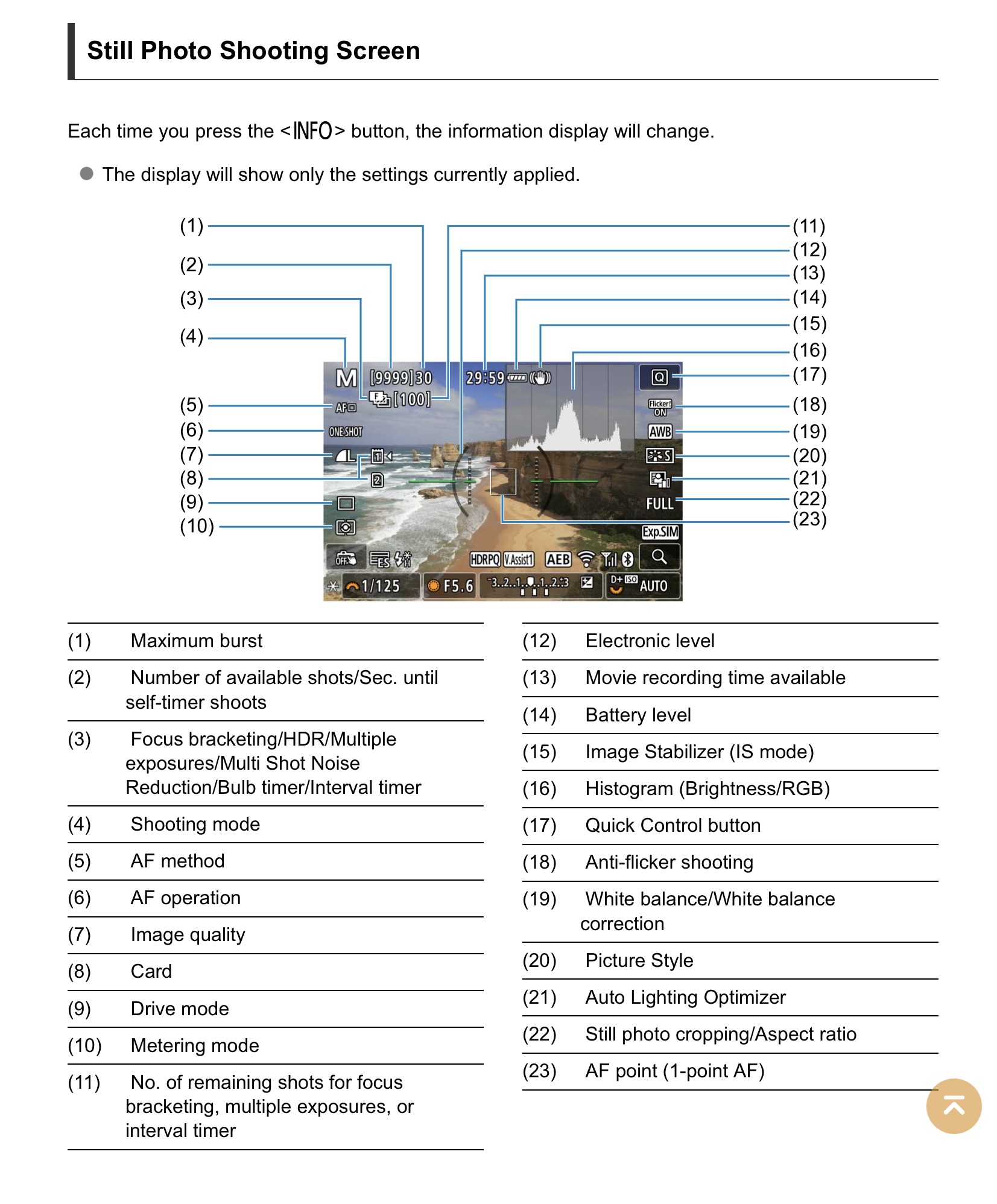
There should be an icon on the screen showing IS status. It’s a Hand with parentheses around it. It’ll say OFF over the hand when off. It’s #15 on this diagram:
p.2 #17 · R5 Long Exposure IBIS sensor rotation???
And it is also on the q-menu screen at the bottom. I just verified with a Canon EF lens and with a Sigma EF lens that the icon shows the IS turns on and off for both lenses according to the setting of the switch on the lens.
p.2 #18 · R5 Long Exposure IBIS sensor rotation???
Jman13 wrote:
There should be an icon on the screen showing IS status. It’s a Hand with parentheses around it. It’ll say OFF over the hand when off. It’s #15 on this diagram:
Hey, thanks for that, that icon does look familiar now!
p.2 #19 · R5 Long Exposure IBIS sensor rotation???
kylebarendrick wrote:
And it is also on the q-menu screen at the bottom. I just verified with a Canon EF lens and with a Sigma EF lens that the icon shows the IS turns on and off for both lenses according to the setting of the switch on the lens.
Now that sounds more consistent, I'll try that as well, esp. w/ the lens(es) that don't make sense. Thanks!
p.2 #20 · R5 Long Exposure IBIS sensor rotation???
I updated the bullet-list above based upon the suggestions of several to update firmware on the Tamron 35/1.4 lens; it now shows the IBIS menu item as being active (thanks!). I could not get the Tamron 15-30/2.8 to communicate via the Tap-In console, so not sure about that one (it has in-lens IS); looks like maybe only the G2 version is compatible with the console, and might need to be sent to Tamron for a firmware upgrade.