fredmiranda.com
Login

Moderated by: Fred Miranda
  New fredmiranda.com Mobile Site
  New Feature: SMS Notification alert
  New Feature: Buy & Sell Watchlist
  

FM Forums | Canon Forum | Join Upload & Sell

1       2              end
  

Archive 2021 · R5 Long Exposure IBIS sensor rotation???


lighthound
Offline
• • • • • •
Upload & Sell: Off
p.3 #1 · R5 Long Exposure IBIS sensor rotation???


Jeff wrote:
I updated the bullet-list above based upon the suggestions of several to update firmware on the Tamron 35/1.4 lens; it now shows the IBIS menu item as being active (thanks!). I could not get the Tamron 15-30/2.8 to communicate via the Tap-In console, so not sure about that one (it has in-lens IS); looks like maybe only the G2 version is compatible with the console, and might need to be sent to Tamron for a firmware upgrade.


Sweet! That's good news, glad you got that lens working at least. Now you know how to tell if the IBIS & IS is on or not and also which lenses you can turn IBIS on/off with using the menu function and which ones you simply have to switch the IS off on the lens.

Now I'm curious if your OP lens (Siggy 40mm) that caused your original issues might need a FW update so you can shut off IBIS in camera using the menu. Or perhaps such a lens FW update that would allow the camera to disable the IBIS when it senses you have it mounted on legs. I wouldn't trust that for the type of work you are doing though.


Mar 17, 2021 at 01:27 PM
numbertwo
Offline
• • •
Upload & Sell: Off
p.3 #2 · R5 Long Exposure IBIS sensor rotation???


I recently bought an R5, and doing some tests these days, ibis included.

I realised that when keeping ibis on all the time, the first picture after focus produces a twist in the sensor after taking it (if you look carefully at the screen, after the blackout, when the screen shows the live view again, there is a quick twist). Then if you take successive pictures without refocusing (keeping the shutter half pressed) the rest are fine. This happens very often, and when zooming in to check sharpness, specially outside the center, you can see that first picture blurred (outside the center, near corner etc).
With ibis set for shoot only, this never happens.

Could this be a bug?

But then in other tests I’ve run (shooting sets of 5 with every mode, then comparing) there is not significant different in sharpness between both modes (same percentage of sharp/slightly blurred shots).

Lenses tested:
Canon Ef 50 1.2 L
Sigma 35 1.4 art
Sigma 85 1.4 art
Tamron 17-35 (just updated and working with ibis )
Tamron 35-150

The ibis in the R5 is magnificent. The best result I could get in Sony (a73) at 17mm was 1/4s sharp picture all over, 1/2s with slightly blurred corners. With the R5, despite the double resolution, I can get 1/5s sharp all over, and up to 2s with slightly blurred corners. This is effectively 2 stops better than Sony with the same lens and same focal length.

An annoying thing, why 0.5s is the maximum for the electronic shutter?


Mar 19, 2021 at 09:44 PM
numbertwo
Offline
• • •
Upload & Sell: Off
p.3 #3 · R5 Long Exposure IBIS sensor rotation???


I continued doing more tests and the only lens where it’s not happening is the 35-150 (my only lens with OIs).
Nobody else has similar experience?
Slow shutter speed, ibis always on, first picture (after focusing) blurred most of the time. The rest of the pictures are good, or if ibis is set for on shot only, all are good.


Mar 23, 2021 at 06:15 AM
Jeff
Offline
• • • • • •
Upload & Sell: On
p.3 #4 · R5 Long Exposure IBIS sensor rotation???


numbertwo wrote:
I continued doing more tests and the only lens where it’s not happening is the 35-150 (my only lens with OIs).
Nobody else has similar experience?
Slow shutter speed, ibis always on, first picture (after focusing) blurred most of the time. The rest of the pictures are good, or if ibis is set for on shot only, all are good.


I'd suggest you report your results with Canon: Canon USA Feedback

Link is in upper left corner. They actually get back to you pretty quickly, and it was a technical person I interacted with.

My particular issue was forwarded up the flagpole (despite it being 'normal' behavior, as far as Canon is concerned). Most of my conversation with them revolved around two things:

1) The R5 likely has a gyro as part of the IBIS system, therefore Canon should be able to detect when the camera is on a stable mount. Thus, they should write the appropriate commands into the IBIS controller software to prevent this from occurring. I focused upon the inconsistency of the IBIS system to similar conditions (first pic good, 2nd blurry, 3rd good, 4th/5th blurry); clearly some flaky code in there somewhere.

2) The 1200+ pages of manuals do not actually say to turn off IBIS in the Stills section where one would look (perhaps one reference is under 'Lens IS', but it's buried somewhere?), they only really specifically reference that it should be turned off while tripod-mounted within the Movies section. The difference between the info presented in these two sections is stark; seems like the manual was written using a very Movie-centric approach.

I also suggested they write a White Paper on the system (IBIS vs. lens IS, various combinations with different types of lenses, etc.), since most info out there is anecdotal/experience-based.

Having reviewed some of my daytime shooting, this problem can indeed rear its head for daylight shooters who are tripod-mounted, although the effects can be harder to see (e.g. a 'soft' image here and there, for no apparent reason). The fact that it is inconsistent (some shutter speeds, not others; some identical frames, not others; some sequential, others not), tells me that at the very least something needs to be fixed in firmware, if not actually solving the issue using hardware detection.


Mar 23, 2021 at 09:12 AM
numbertwo
Offline
• • •
Upload & Sell: Off
p.3 #5 · R5 Long Exposure IBIS sensor rotation???


Jeff wrote:
I'd suggest you report your results with Canon: Canon USA Feedback

Link is in upper left corner. They actually get back to you pretty quickly, and it was a technical person I interacted with.

My particular issue was forwarded up the flagpole (despite it being 'normal' behavior, as far as Canon is concerned). Most of my conversation with them revolved around two things:

1) The R5 likely has a gyro as part of the IBIS system, therefore Canon should be able to detect when the camera is on a stable mount. Thus, they should write the appropriate commands into the IBIS controller
...Show more

O honestly think it’s a software issue, but in dpreview they’re encouraging me to contact Canon service (hk in my case) so I’ll do it tomorrow.
My thread there
https://www.dpreview.com/forums/thread/4563082

In my case, it’s only the first image the one with blur, and only when ibis is set to always on.
500x500px crop near the corner
Sin título by Juanma Herrera, en Flickr


Mar 23, 2021 at 10:38 AM
numbertwo
Offline
• • •
Upload & Sell: Off
p.3 #6 · R5 Long Exposure IBIS sensor rotation???


I went to Canon service.
Long story short, same issue in all the cameras there. Also tested with rf 50 1.8 and happening as well.
So most probably software issue.
I’ll wait for an update and use ibis only for shot in the meantime


Mar 24, 2021 at 06:32 AM
Jman13
Offline
• • • • • •
Upload & Sell: On
p.3 #7 · R5 Long Exposure IBIS sensor rotation???


This is very interesting. I have never noticed any issues while on a tripod as in the original post, but I have definitely noticed the rotation of the sensor following an initial shot, visible in the viewfinder, and I always assumed that I was just particularly unstable on those shots...but you're right, and it's reproducible. I hate to lose the stable viewfinder, as it's one of the nice things about IBIS, but, if it helps gets more shots sharp, I'm fine with it. Checked on my Sigma 135/1.8 at like 1/10s, and sure enough...first shot has edges blurred a bit, subsequent shots do not. Turned it to 'only for shot' and no issues.

Crazy. Hope Canon is aware and it makes it into the firmware update for April.


Mar 24, 2021 at 08:02 AM
numbertwo
Offline
• • •
Upload & Sell: Off
p.3 #8 · R5 Long Exposure IBIS sensor rotation???


Jman13 wrote:
This is very interesting. I have never noticed any issues while on a tripod as in the original post, but I have definitely noticed the rotation of the sensor following an initial shot, visible in the viewfinder, and I always assumed that I was just particularly unstable on those shots...but you're right, and it's reproducible. I hate to lose the stable viewfinder, as it's one of the nice things about IBIS, but, if it helps gets more shots sharp, I'm fine with it. Checked on my Sigma 135/1.8 at like 1/10s, and sure enough...first shot has edges blurred a bit,
...Show more

If you notice at 135mm, imagine at 17mm. It’s very obvious that after the first picture, when you get the image back in the screen, it quickly rotates, and then after the tests, you keep seeing the same as before fully pressing the shutter...

Maybe the 1.3 update is taking this long because Canon is working on fixing this?

It could be interesting if someone with another firmware version could reproduce the bug...


Mar 24, 2021 at 08:30 AM
Jman13
Offline
• • • • • •
Upload & Sell: On
p.3 #9 · R5 Long Exposure IBIS sensor rotation???


numbertwo wrote:
If you notice at 135mm, imagine at 17mm. It’s very obvious that after the first picture, when you get the image back in the screen, it quickly rotates, and then after the tests, you keep seeing the same as before fully pressing the shutter...

Maybe the 1.3 update is taking this long because Canon is working on fixing this?

It could be interesting if someone with another firmware version could reproduce the bug...


Oh, I've already noticed that IBIS on ultra-wides hasn't been all that great, and have noticed the rotation in the viewfinder on many occasions with many lenses. Of course, it doesn't do it with lenses that have optical IS.


Mar 24, 2021 at 09:06 AM
numbertwo
Offline
• • •
Upload & Sell: Off
p.3 #10 · R5 Long Exposure IBIS sensor rotation???


Jman13 wrote:
Oh, I've already noticed that IBIS on ultra-wides hasn't been all that great, and have noticed the rotation in the viewfinder on many occasions with many lenses. Of course, it doesn't do it with lenses that have optical IS.


Maybe that’s why people say it’s not great?
In my tests, aside this issue, at 17mm (tamron 17-35) is 2 stops better the Sony a73 I had before. But I don’t have anything wider than that.


Mar 24, 2021 at 09:28 AM
snapsy
Online
• • • • • •
Upload & Sell: On
p.3 #11 · R5 Long Exposure IBIS sensor rotation???


numbertwo wrote:
I continued doing more tests and the only lens where it’s not happening is the 35-150 (my only lens with OIs).
Nobody else has similar experience?
Slow shutter speed, ibis always on, first picture (after focusing) blurred most of the time. The rest of the pictures are good, or if ibis is set for on shot only, all are good.


It's interesting how the rotation doesn't occur with an OIS lens. OIS can only correct for pitch and yaw, where's IBIS can correct for X, Y, roll, and a subset of pitch and yaw by using X/Y correction. If Canon's IBIS works like other dual stabilization systems, the camera will delegate pitch and yaw correction to the lens, leaving IBIS to correct X, Y, and roll. The fact the rotation issue only occurs with a non-OIS lens implies the problem may be related to the initial pitch and yaw correction performed by IBIS when the continuous IS mode is used. What's strange is those pitch and yaw IBIS corrections don't rely on roll correction, so it's not clear why IBIS thinks it needs to roll the sensor when it's handling those corrections.


Mar 24, 2021 at 09:48 AM
Jman13
Offline
• • • • • •
Upload & Sell: On
p.3 #12 · R5 Long Exposure IBIS sensor rotation???


numbertwo wrote:
Maybe that’s why people say it’s not great?
In my tests, aside this issue, at 17mm (tamron 17-35) is 2 stops better the Sony a73 I had before. But I don’t have anything wider than that.


Oh, indeed...overall, I've found the IBIS to be incredibly good. Easily 2-3 stops better than I got on Sony. I found it to be fine with the Tamron 17-35 as well, but on wider lenses (14mm and wider), it's less effective at the edges than on longer focal lengths...perhaps somewhat due to this.


Mar 24, 2021 at 10:01 AM
snapsy
Online
• • • • • •
Upload & Sell: On
p.3 #13 · R5 Long Exposure IBIS sensor rotation???


numbertwo wrote:
I continued doing more tests and the only lens where it’s not happening is the 35-150 (my only lens with OIs).
Nobody else has similar experience?
Slow shutter speed, ibis always on, first picture (after focusing) blurred most of the time. The rest of the pictures are good, or if ibis is set for on shot only, all are good.


Another possibility of why the rotation issue doesn't occur with OIS lenses is that the IBIS uses the lense's gyros to detect the initial rotation instead of the IBIS's gyros, assuming the lense's gyros actually detect rotation, for the sole purpose of feeding that info to IBIS since the lens itself can't correct for any rotation it would detect. This seems much less likely.


Mar 24, 2021 at 10:07 AM
Jeff
Offline
• • • • • •
Upload & Sell: On
p.3 #14 · R5 Long Exposure IBIS sensor rotation???


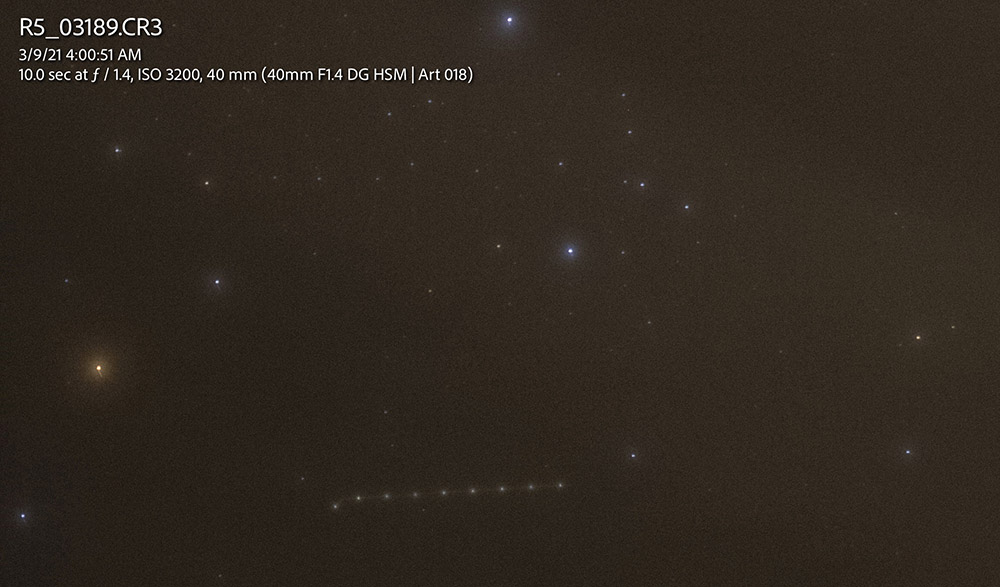
Here's another interesting one; plane moving left to right, thus the sensor movement occurred at the beginning of the exposure, but did not continue throughout the exposure. The two prior frames did not show any translation of the airplane trail, even though the sensor was rotating.


Mar 29, 2021 at 03:10 PM
Jeff
Offline
• • • • • •
Upload & Sell: On
p.3 #15 · R5 Long Exposure IBIS sensor rotation???


OK, so here's another tidbit I just discovered that makes no sense whatsoever, on Canon's part:

Upon first going down this path, I wondered if IBIS settings were mode-dependent, i.e. perhaps the IBIS on/off setting was saved for each mode (i.e. Av, Tv, etc.). They are not; set it for Av, and it is set the same for Tv, M, P, etc.

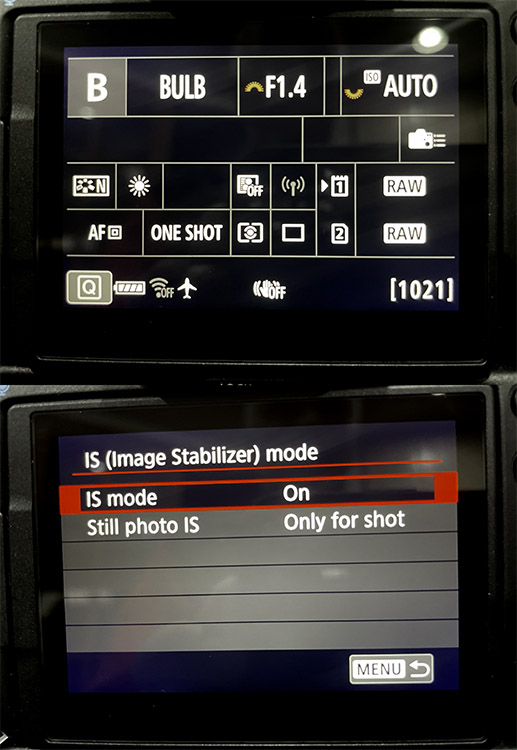
Except... sorta not for BULB; apparently Canon has shut it off for BULB mode (under the hood). Within the "Q" menu, IBIS is shown as being 'OFF'. But go to the settings menu, and IBIS is shown as set to 'ON', with the ability to edit the setting... even though you really can't. Well, I am assuming now, because it seems that what the menu says is going on isn't, necessarily (I assume the "Q" menu icon is correct, but did not test). I currently have a Sigma Art lens attached; I didn't mount an RF lens to see if same, but if the behavior is any different, it still makes little sense to me.

Again, Canon's approach to this issue is inconsistent. 'BULB' mode is traditionally used for exposures longer than 30 seconds, but can be used for exposures <1sec if you want/need to shoot it that way. Canon seems to know that their IBIS system goes wonky with long exposures on a solid footing, so why not automatically turn it off when the camera is mounted to a tripod? Or give us a setting to automatically turn IBIS off for exposures >x seconds?

I admit it's interesting to see if one can handhold shots around 1+ seconds, but I'd never rely on that shotgun approach, I'd put the camera on a tripod. Or a table. Or a fence rail, whatever. Having IBIS remain 'on' for exposures beyond a second or two simply causes more problems than that ability is worth, and their IBIS controller software is clearly inconsistent on several levels (witness the other thread about 'first shot always out of focus if IBIS is set to full time').

[/rant]


Mar 30, 2021 at 01:48 PM
Jeff
Offline
• • • • • •
Upload & Sell: On
p.3 #16 · R5 Long Exposure IBIS sensor rotation???


So, after an 8-day trip fully knowing about this IBIS-on-tripod issue, I became absolutely religious about ensuring IBIS was off. I especially made sure that when registering C1-C3 settings, the IBIS was set to OFF, while a Sigma (non-IS) lens was attached.

Magically, two days into my trip, IBIS became re-initiated on the C1 setting, through no doing of my own. I haven't sat down to try and reproduce the conditions under which this might happen, as I don't even know where I'd start. [The only thing I can think of is perhaps mounting an RF (or other?) lens with IS while in the C1 mode obviates the prior overt setting, since said setting was registered with a non-IS lens?]

Going back to the original occurrences that prompted this thread, several times I thought I'd turned it off, only to find IBIS back on, again through no apparent action attributable to me.


Apr 19, 2021 at 10:46 AM
Jeff
Offline
• • • • • •
Upload & Sell: On
p.3 #17 · R5 Long Exposure IBIS sensor rotation???


Jeff wrote:
Magically, two days into my trip, IBIS became re-initiated on the C1 setting, through no doing of my own. I haven't sat down to try and reproduce the conditions under which this might happen, as I don't even know where I'd start.


I did try to reproduce the C1-C3 behavior, but only partially confirmed:


  1. Mount non-IS lens, set IBIS to 'off' in menu, register settings via C1-C3 (ensure that cahnges don't 'stick' in the C1-C3 menu);
  2. Check settings, confirm that IBIS still set to 'off' with same non-IS lens attached.
  3. Change lenses, in the case I tried, to an RF lens with IS;
  4. With the IS switch on the lens set to 'off', IBIS is 'off';
  5. Switch the lens IS to 'on', and IBIS is now set to 'on';
  6. Change to a different mode, then back to the C1-C3 setting, IBIS remains 'on' (even though the C1-C3 registered setting should dictate it be set to 'off').


Although I somewhat understand this behavior, it also does not make much sense, as you cannot register C1-C3 settings with multiple lenses, thus you'd think a given lens-dependent setting should revert to 'as registered' in the C1-C3 settings. I think Canon has a chicken-and-egg going with IBIS and on-lens IS, and I really think they need to make a 'master' IBIS-off setting which is regardless of the on-lens IS setting, if present.

I did then try re-mounting the Sigma lens, and IBIS was indeed still 'off', even though in the field it had somehow come back on, through no doing of my own. I did not, however, try this multiple times to see if I would get a different result, as the 'IBIS-rotation-on-a-tripod' is completely random, with no rhyme or reason as to when or why it does (and does not) occur. As in Juan's confirmation, with longer exposures on a tripod it is never just the first shot, nor do successive shots show any repeatable behavior. Nor can I see any manifestation of the 'tripod logic' that Juan makes mention of, except perhaps for the fact that some images come out correctly, with no sensor rotation.

I'm glad CanonRumors is suggesting that Canon is working on a fix via firmware update, I just hope it captures the plethora of manifestations of the aberrant IBIS behavior. And thanks to @numbertwo for floating this over on DPR, and ultimately CR...

-Jeff


Apr 28, 2021 at 08:55 PM
Jeff
Offline
• • • • • •
Upload & Sell: On
p.3 #18 · R5 Long Exposure IBIS sensor rotation???


So, I have not installed v1.5.0 yet, but in testing the Sigma Art28/1.4 two nights ago, I can confirm that the R5 will still rotate the sensor about its sensor for exposures shorter than about 4 seconds. Once the exposure goes above ~4-5 seconds, IBIS apparently shuts off, and the exposure shows no trailing. (Since v1.4.0 I have not had the C1 settings magically change by themselves, so that's a good thing.)

Yes, I know I should have had IBIS set to off, but since I was in the city doing a quick test, it was too light to use my C1 settings for astro from dark sites, and I forgot. That being said, I think Canon needs to address how they are programming this subsystem to not do odd things that make no sense. I'd be curious to know why they think that IBIS should rotate the sensor (for zero reason) when tripod-mounted for shorter exposures, but not longer? Either way it makes no sense, as the camera has the ability to know that it is on a tripod.

I guess I'll download v1.5.0 once its widely available and find out if they fixed it, but considering how long Canon has known about this error, I'm not going to continue holding my breath...


Dec 03, 2021 at 09:55 AM
IndyFab
Offline
• • • • •
Upload & Sell: Off
p.3 #19 · R5 Long Exposure IBIS sensor rotation???


2 ways to turn off Ibis 1) turn off IS on lens if it has it 2) using MF lenses, you need to go to shooting menu pg 7 and go to IS (image stabilization). and turn off

Here's the kicker, you wont see it if you have your IS turned on lens that has IS, then it's grayed out on pg 7

&ab_channel=TheJPEGExperience

Thanks Jeff for bringing your issue up, it definitely would have caught me off guard


Dec 03, 2021 at 08:43 PM
IndyFab
Offline
• • • • •
Upload & Sell: Off
p.3 #20 · R5 Long Exposure IBIS sensor rotation???


Tony5787 wrote:
I’ve had distortion issues that I believe were caused by the IBIS as well but in normal exposures. I was shooting Green Herons last summer and when I got home as I was scrolling through a few shots of a stationary bird that I had shot in a burst, I noticed significant distortion where the image seemed to be stretched in different directions in each shot. I think with this camera if you’re stabilized on a tripod, you should turn IS off completely.


One other possibility is rolling shutter in ES


Dec 03, 2021 at 09:02 PM
1       2              end


FM Forums | Canon Forum | Join Upload & Sell

1       2              end


Welcome back
Log in to your account