fredmiranda.com
Login

Moderated by: Fred Miranda
  New fredmiranda.com Mobile Site
  New Feature: SMS Notification alert
  New Feature: Buy & Sell Watchlist
  

FM Forums | Canon Forum | Join Upload & Sell

1       2       3       4              6       7       end
  

Archive 2020 · R5/R6 - Battery / Coupler / Charging in the field - lessons & questions


JoeTomasone
Offline

Upload & Sell: Off
p.5 #1 · R5/R6 - Battery / Coupler / Charging in the field - lessons & questions


Flowernut wrote:
Has anyone tried the Watson LP-E6NH Lithium-Ion Battery Pack? Rated to have more mAh than original canon e6nh battery.


FYI, I have tested (via instrumentation) a number of 3rd party batteries and NONE have actually had the rated/labeled capacity.


Nov 26, 2020 at 11:35 AM
arbitrage
Offline
• • • • • • •
Upload & Sell: On
p.5 #2 · R5/R6 - Battery / Coupler / Charging in the field - lessons & questions


EverLearning wrote:
I echo lighthound's comment. 'Damn' and 'thank you'. I was hoping the BM batteries would be a suitable alternative to the insanely priced Canon batteries, but as somebody who photographs wildlife and will do so with MS and no grip, these batteries just won't cut it.

It will be interesting to see what other folks find with other third party batteries going forward.


Yeah if you want 12FPS and not 9FPS then these aren't the answer. If you are happy with 9FPS then they seem to not drop to flashing white until the last 10% or so.


Nov 26, 2020 at 02:57 PM
Bruce n Philly
Offline
• • •
Upload & Sell: Off
p.5 #3 · R5/R6 - Battery / Coupler / Charging in the field - lessons & questions


So.... kind of an odd question then...... So, as of this moment, you need an NH Canon battery to get the full potential from this machine... a Canon battery that is inserted into the battery compartment (w/or without a grip)..... I wonder .... why this is so difficult for these alt makers? I bring it back to the external battery..... you can get the full potential with an external battery via the USB port, provided the battery is powerful enough.

Why is one achievable but the other not? Odd.

I know it sounds like I am pushing Joe's and my approach, I am not actually, I started my effort to just have a complete solution.

Peace
Bruce in Philly


Nov 26, 2020 at 03:10 PM
EverLearning
Offline
• • • •
Upload & Sell: Off
p.5 #4 · R5/R6 - Battery / Coupler / Charging in the field - lessons & questions


Arbitrage, I did have an interesting thought. I don't have my R5 yet (#5 on list now. Yay!) so I couldn't check and i couldn't find anything online, so I don't know if MS is a fixed 12fps (like ES is fixed at 20) or if it can be set to a lower fps rate by the user. I just bought a Godox v860IIC flash. Its cycle time is .1 seconds to 1.5 seconds. I plan on using it mostly for wildlife fill flash. If MS burst speed is not customizable, then BM batteries bringing it down to 9fps may actually be advantageous - no/fewer burst shots without the flash firing, depending on degree of fill used.

Anyway, I am buying one OEM battery for now. Two should be sufficient until I am actually going on a trip. Hopefully by then a lot more will be known about all 3rd party batteries and one or more will rise to the top.


Nov 26, 2020 at 03:23 PM
Bruce n Philly
Offline
• • •
Upload & Sell: Off
p.5 #5 · R5/R6 - Battery / Coupler / Charging in the field - lessons & questions


EverLearning wrote:
Arbitrage, I did have an interesting thought. I don't have my R5 yet (#5 on list now. Yay!) so I couldn't check and i couldn't find anything online, so I don't know if MS is a fixed 12fps (like ES is fixed at 20) or if it can be set to a lower fps rate by the user. I just bought a Godox v860IIC flash. Its cycle time is .1 seconds to 1.5 seconds. I plan on using it mostly for wildlife fill flash. If MS burst speed is not customizable, then BM batteries bringing it down to 9fps may
...Show more

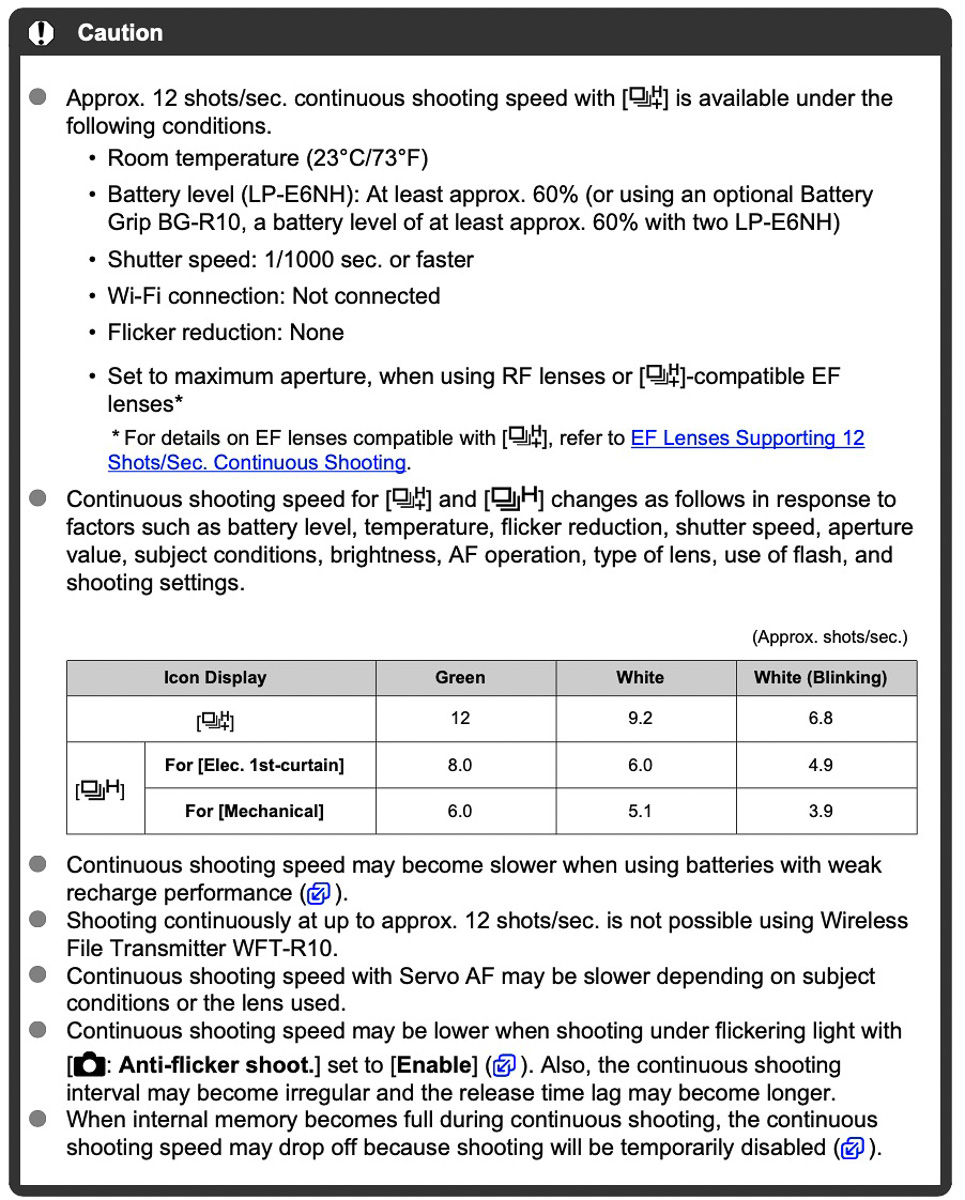
You can throttle down with mechanical shutter (and 1st curtain).... you have three options, for mechanical: H+ @ 12/fps, H@ 6/fps , and continuous @ 3/fps. Plus with mechanical you get more dynamic range with a higher bit file. Electronic 1st curtain differs from mechanical in H only @ 8 / fps. but you get a lower bit file with this shutter option (I think, others correct me here).

Electronic shutter is all 20 / fps

Of course, battery juice has an impact on the above.... the manual is a bit confusing about this one and will sometimes show a green H, a white H, or a flashing white H.

So for me, if I don't need 20 / fps, it is mechanical all the way for me. I don't care about the added noise and want the full bit files... just cause why take less?

Some say shutter shock with mechanical is evil, but how is that any different than any other Canon DSLR? Heck, the R5 doesn't have a mirror flipping up and down so what is the big deal? So, for me, unless I am doing crazy birds in flight, like snapping eagles picking up fish or fighting, I will use mechanical and be able to select my fps speed.

See page 910 for shutter speed table.

Peace
Bruce in Philly


Nov 26, 2020 at 04:04 PM
EverLearning
Offline
• • • •
Upload & Sell: Off
p.5 #6 · R5/R6 - Battery / Coupler / Charging in the field - lessons & questions


Thanks for the info Bruce. Kind of disappointing though. 12/8/4 or 12/9/6 or something like that would have made more sense, I think. I can't think of uses for 3fps, but I guess maybe somebody else can.


Nov 26, 2020 at 09:51 PM
arbitrage
Offline
• • • • • • •
Upload & Sell: On
p.5 #7 · R5/R6 - Battery / Coupler / Charging in the field - lessons & questions


EverLearning wrote:
Arbitrage, I did have an interesting thought. I don't have my R5 yet (#5 on list now. Yay!) so I couldn't check and i couldn't find anything online, so I don't know if MS is a fixed 12fps (like ES is fixed at 20) or if it can be set to a lower fps rate by the user. I just bought a Godox v860IIC flash. Its cycle time is .1 seconds to 1.5 seconds. I plan on using it mostly for wildlife fill flash. If MS burst speed is not customizable, then BM batteries bringing it down to 9fps may
...Show more

Bruce answered it well. FWIW here is the table from the manual that explains it all:


Nov 26, 2020 at 09:54 PM
Bruce n Philly
Offline
• • •
Upload & Sell: Off
p.5 #8 · R5/R6 - Battery / Coupler / Charging in the field - lessons & questions


Three frames per second is actually quite useful, for me at least.... a pro photographer friend gave me a tip... he said if you want really sharp shots, take two of each with one shutter push. Your muscles are always least stable when you squeeze.

So, when I shoot protraits etc.... I always shoot two frames each... and wouldn't you know, the second one is always the sharpest.

Peace
Bruce in Philly


Nov 26, 2020 at 10:21 PM
EverLearning
Offline
• • • •
Upload & Sell: Off
p.5 #9 · R5/R6 - Battery / Coupler / Charging in the field - lessons & questions


Great point. Makes sense. Thx.


Nov 26, 2020 at 10:50 PM
arbitrage
Offline
• • • • • • •
Upload & Sell: On
p.5 #10 · R5/R6 - Battery / Coupler / Charging in the field - lessons & questions


Another update on the BM battery. First day out actually using them real world. Stuck one OEM and one BM in the BG. Was shooting just a few mins and noticed icon had gone to white? Powered off and on, back to green, shortly after back to white?? Both batteries were still in the 90s at that point. Not sure what is going on?? Also had two instances of errors when USB-C charging. Once in grip, once sans grip. Grip would just flash the green light. Camera said err on top LCD.

End of day update: Really wacky behaviour with these batteries...green to white is unpredictable. Tried just the BM in the camera without the grip. Saw it drop down to White at 83%...then went back to green after a power cycle and stayed green all the way down to 73%...

Bottom line: They are a better backup then old LP-E6 clones that only give flashing white icon no matter what. But they aren't a good replacement if you are after high FPS in MS.

Glad that my Canon OEM is in the mail due to arrive next week. My plan will be to run my two OEMs in the grip and only resort to the BMs if I really need to. I think I will keep the BMs because they at least get me 9.2FPS all the time vs my other older clones giving me the flashing white.


Nov 27, 2020 at 03:02 PM
arbitrage
Offline
• • • • • • •
Upload & Sell: On
p.5 #11 · R5/R6 - Battery / Coupler / Charging in the field - lessons & questions


Saturday update: so today everything worked as I had originally expected it to. Green icon stayed on all day until the Canon OEM got to 45% (the BM was about 53% at that time) and then it switched down to white icon 9.2FPS.

I'm not sure what the difference was. Today was sunny, fast SS. Yesterday was gloomy, SS slower than the 1/1000 Canon references in the manual. Not sure if that has anything to do with it? I'm also not sure if I was using the same BM battery yesterday and today.

Tomorrow if it is sunny I will try out the other BM (I noted which one was used today). If cloudy I might just try the battery I used today to see if slow SS makes it drop??

I'm not sure if Canon's reference to 1/1000 would actually cause the icon to change color or if it is just a warning that you may not realize the current icon's rated frame rate?? You can drop to a slow SS (I did a number of times today) and nothing changed.


Nov 28, 2020 at 09:08 PM
Bruce n Philly
Offline
• • •
Upload & Sell: Off
p.5 #12 · R5/R6 - Battery / Coupler / Charging in the field - lessons & questions


Arbitrage, anything new to report?

My RavPower 60W PD battery is doing really well. The most I used it up was in one day of heavy shooting for about 7 hours. I have virtually all the power saver modes off or at their longest so the camera did not go to sleep in that 7 hours and the back screen was on the whole time. It looks like I burned up less than 1/2 the charge in that battery (and never tapped the internal NH). Wow.

Peace
Bruce in Philly


Dec 10, 2020 at 05:26 PM
arbitrage
Offline
• • • • • • •
Upload & Sell: On
p.5 #13 · R5/R6 - Battery / Coupler / Charging in the field - lessons & questions


Bruce n Philly wrote:
Arbitrage, anything new to report?

My RavPower 60W PD battery is doing really well. The most I used it up was in one day of heavy shooting for about 7 hours. I have virtually all the power saver modes off or at their longest so the camera did not go to sleep in that 7 hours and the back screen was on the whole time. It looks like I burned up less than 1/2 the charge in that battery (and never tapped the internal NH). Wow.

Peace
Bruce in Philly


I didn't drain my batteries much last weekend as I was also using my Sony camera at the same time. It wasn't dropping off of green at the 80-90 range like it did that very first day.
I should have more time to shoot the R5 this weekend so will watch the Green icon and see when it drops. Last weekend I didn't go low enough to have it drop.


Dec 10, 2020 at 08:34 PM
SSO-Images
Offline
• •
Upload & Sell: Off
p.5 #14 · R5/R6 - Battery / Coupler / Charging in the field - lessons & questions


I've been using the RAVPower 26800mAh 30W PD power bank since 2017 (at that time, it cost $79.99; today, it's $59.99). Thinking that 30W isn't enough to power the R5 and needing another one anyway, I ordered the RAVPower 20000mAh 60W PD power bank specifically for the R5. I received it yesterday, and here are some of my initial findings, using the Canon OEM batteries:

Applies identically to both with the grip and without the grip:

1) Both the 30W and the 60W do power the R5 when turned on with full functionality (in stills mode; haven't tried in video mode), as well as charge when turned off. With the camera off, the grip's green light goes on and the top LCD turns to the bolt icon, indicating the charge.

2) In both the Mechanical and the Electronic shutter modes, neither achieves the green H+, just white H+, indicating 9.2 fps. I'm a bit surprised here with the Electronic shutter mode, as I was expecting to see the green H+. Interestingly, too, once in awhile the white H+ flickers to green, as if to say, it could turn fully and consistently to the green H+ if there's more wattage. But, again, this finding is identical whether 30W or 60W. I'll be interested to find out whether a 90W power bank would make any difference.

3) When the camera is turned on and in use with the power bank connected via USB-C, the Battery Info displays the same with green indicators. The power % indicator stays the same, however, and the battery level icon inside the viewfinder greys out, signifying that the camera does not draw power from the batteries, only from the power bank..

4) The 60W version is smaller in overall dimension but much thicker (so is 60W Anker version, so I'm assuming it's difficult to make slimmer power bank in high W) than the 30 W. This can be important for those who want to use a power bank clamp mount. The 60W has the thickness of just about a full inch, and it'd be difficult to find a clamp with the mouth that can bite such thickness.

5) I'm not knowledgeable with voltages, wattages, amperages and whatnot, so I don't know whether the 30W with 26,800 mAh will last me longer on the R5 or the 60W with 20,000 mAh, so I'm hoping someone with knowledge in such matters can chime in. In my limited knowledge, I think it's the former with more mAh, but I'll make my decision as to which one to use and which one as a backup upon getting some feedback.

I'm very satisfied with the initial findings even without the green H+ as I'm one of those who actually don't want to shoot in max 12/20 fps so I don't spend my life away sorting through dozens of similar images along with hundred others in post. I rely on economical yet efficient shooting rather than going Rambo with every shutter press. The solid white H+, signifying 9.2 fps, is just fine with me. Even then, I'm economical until a situation calls for the max fps.

I'm now awaiting a set of Neewer LP-E6NH batteries and a dual charger. I'll report on my findings with these and see if they behave about the same as the BM batteries that Arbitrage reported above thread.


Edited on Dec 28, 2020 at 10:54 AM · View previous versions


Dec 23, 2020 at 03:01 PM
EB-1
Offline
• • • • • • •
Upload & Sell: Off
p.5 #15 · R5/R6 - Battery / Coupler / Charging in the field - lessons & questions


Does anyone have scope traces of the voltage at the camera in use? Reading all this again, I'm not so convinced that the power supply setup is optimal or even reliably safe in the long term. The USB power banks are not designed for the purpose being implemented. I'm especially interested in the transient response as the load changes.

EBH


Dec 26, 2020 at 09:28 PM
Jesse Evans
Offline
• • • •
Upload & Sell: On
p.5 #16 · R5/R6 - Battery / Coupler / Charging in the field - lessons & questions


EB-1 wrote:
Does anyone have scope traces of the voltage at the camera in use? Reading all this again, I'm not so convinced that the power supply setup is optimal or even reliably safe in the long term. The USB power banks are not designed for the purpose being implemented. I'm especially interested in the transient response as the load changes.

EBH


What exactly is your concern? There isn’t a great deal of difference between the cells and controllers used in a battery bank and those in a camera battery other than the number of cells at play (but keep in mind cameras have usually 2 individual cells). A battery bank is not really all that special. A PD device can be used to power a MacBook and it will have similar fluctuations in power draw as you change tasks.

The LP-E6NH can only support 7.2V at its maximum, a far cry from the 12V that these banks can support for Qualcomm QC 3.0 or 20V/3A supported by the RavPower unit.

https://www.ifixit.com/Teardown/Canon+LP-E6+battery+pack+Teardown/133243

https://beastdevices.com/?p=508

Most likely the biggest risk is to your USB-C port, as it may be physically damaged / snapped off if the camera is handled incorrectly or dropped.


Dec 26, 2020 at 10:05 PM
EB-1
Offline
• • • • • • •
Upload & Sell: Off
p.5 #17 · R5/R6 - Battery / Coupler / Charging in the field - lessons & questions


I'd like to see what it is the Gonine.

EBH


Dec 27, 2020 at 07:23 PM
Bruce n Philly
Offline
• • •
Upload & Sell: Off
p.5 #18 · R5/R6 - Battery / Coupler / Charging in the field - lessons & questions


Regarding snapping the port... yes, it is a risk... but that is why Canon provides a strain relief clamp. I use it all the time with my power brick... I have not taken it off the camera since. (It is provided free in the box.)

Regarding understanding the demand from the camera.... the load put on the battery. Good desire.... I would like to see that too. Poster Joe Tomasone measured the amp draw and discovered the power threshold for a battery to run the camera or just charge it .. maybe he is around to report.

I see on Amazon there are a ton of these devices... I am going to order one tonight and report back.

However, the job of managing power to all the computing and mechanical devices in the camera is not the job of the battery. It is the job of the camera's internal power supply. Batteries are fickle, untrustworthy devices. They change as soon as they start to dissipate and then change as they age. Further, they fizzle out... as per their design.... and the camera must handle that wacky, dying delivery. The power supply board inside the camera charges up capacitors and such and then re-distributes "conditioned", consistent, and appropriate power to all the internal functions.

But yes, I am curious too. I do not have a dog in this hunt... I only want truth. And I don't want to blow hundreds of dollars on a Canon solution(s) when a $50 battery brick will do a perfectly fine job (and it is doing just that day after day for me). And remember, the Canon R5's USB C port is designed for this... despite a poor description in the manual. It notes the camera will run from this port. Further, the battery icon switches to greyed out when the camera is operating directly from the USB port. Per the manual and my experience. In other words, the camera appears designed for this.

So I am ordering one of those devices tonight... cheap... about $20. Done, I ordered this one... I hope it is a good one! https://www.amazon.com/gp/product/B07JYVPLLJ/

Peace
Bruce in Philly


Dec 27, 2020 at 09:17 PM
SSO-Images
Offline
• •
Upload & Sell: Off
p.5 #19 · R5/R6 - Battery / Coupler / Charging in the field - lessons & questions


Given an inch thickness of the 60W RavPower PD power bank, I wasn't sure whether this UURig R010 Clamp Mount would have big enough mouth to clamp onto the power bank. Well, it does and quite firmly at that. Also given that the RavPower's length and width are similar to the BG-R10 grip, I'd say the perfect place for the RavPower is directly underneath the grip:


For anyone interested in the clamp:

https://www.amazon.com/dp/B07V6WDKXS/?coliid=I3IWPABO12FKRA&colid=3H5LRX20WOEUJ&psc=1&ref_=lv_ov_lig_dp_it


Dec 28, 2020 at 01:14 PM
Bruce n Philly
Offline
• • •
Upload & Sell: Off
p.5 #20 · R5/R6 - Battery / Coupler / Charging in the field - lessons & questions


Wow, that is cool.

I am using long velcro cable straps.... cheap, effective, but fiddly every time I go out in the field.

Hmm.... gotta figure how to get that onto my Gitzo/Wimberly combo......

I have an "arca swiss" track bracket always attached to the underside of my R5... rather not take that off... hmmm........

Peace
Bruce in Philly


Dec 28, 2020 at 02:15 PM
1       2       3       4              6       7       end


FM Forums | Canon Forum | Join Upload & Sell

1       2       3       4              6       7       end


Welcome back
Log in to your account