This topic is in the 2020 archive. You can read it and like its posts here. It is read only.
Archive 2020Lightroom Classic 10.0 is out, adds color grading wheels
p.2 #1Lightroom Classic 10.0 is out, adds color grading wheels
Look at this. I opened the file and did a screen shot before it loaded. Image 2 is after it loaded. I didn't touch anything.
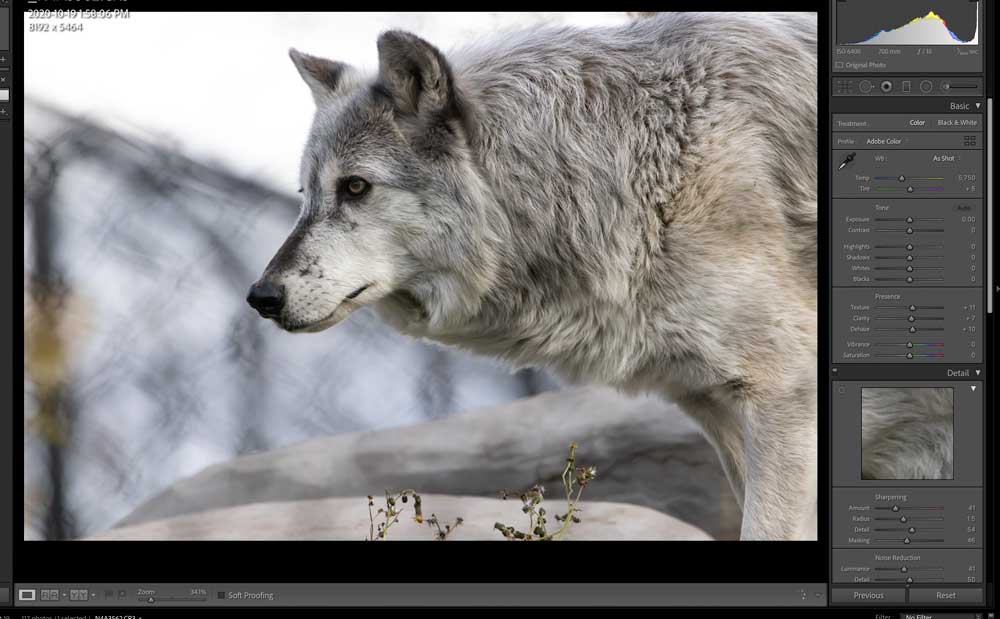
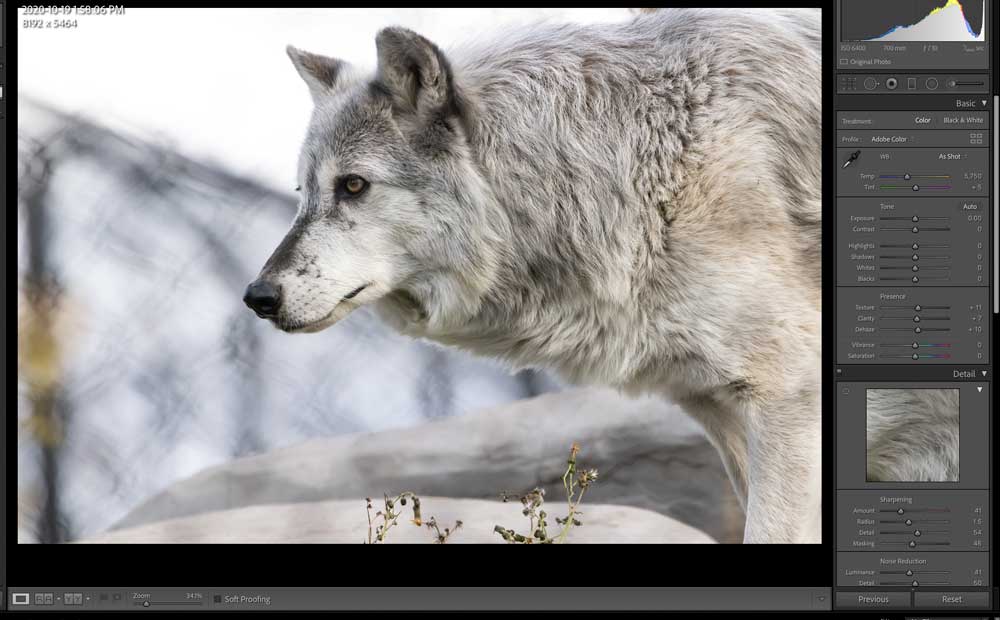
Oct 20, 2020 at 02:18 PM
p.2 #2Lightroom Classic 10.0 is out, adds color grading wheels
So far so good with a version 10 install.
I skipped 9.4 because of the arrow key problem. It's fixed in 10. I'm already loving the changes to the zoom tool.
I skipped 9.4 because of the arrow key problem. It's fixed in 10. I'm already loving the changes to the zoom tool.
Oct 20, 2020 at 04:01 PM
p.2 #3Lightroom Classic 10.0 is out, adds color grading wheels
Good with the install here. Enjoying the color grading wheels too!
Oct 20, 2020 at 05:56 PM
p.2 #4Lightroom Classic 10.0 is out, adds color grading wheels
Zenon Char wrote:
Look at this. I opened the file and did a screen shot before it loaded. Image 2 is after it loaded. I didn't touch anything.
So before it loads is likely the embedded jpeg. Seems to be lightening it too much, no?
Oct 20, 2020 at 06:50 PM
p.2 #5Lightroom Classic 10.0 is out, adds color grading wheels
It seemed like it at first but these are exports from both LR and PS with no edits. The LR version is after it self corrected.
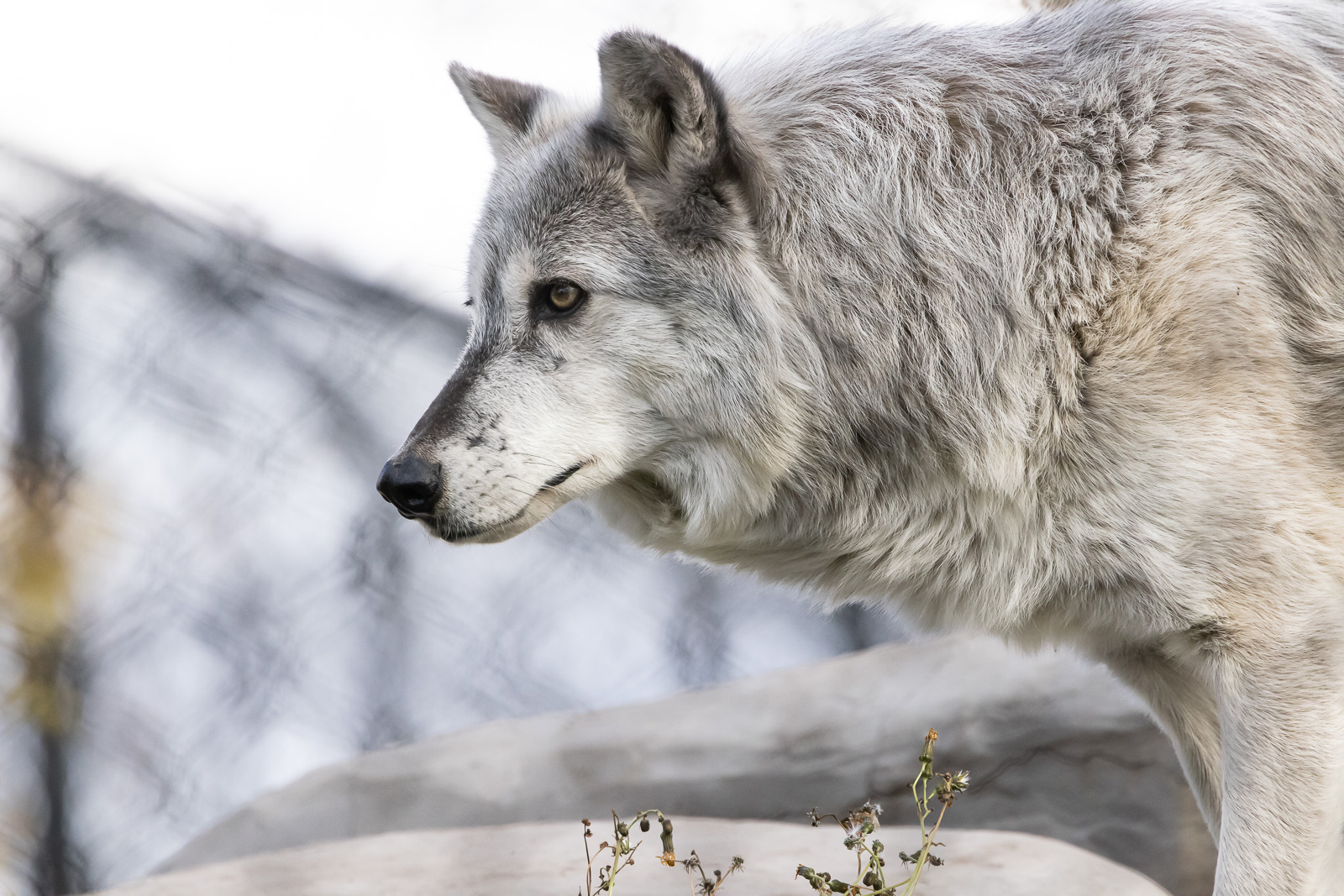
LR
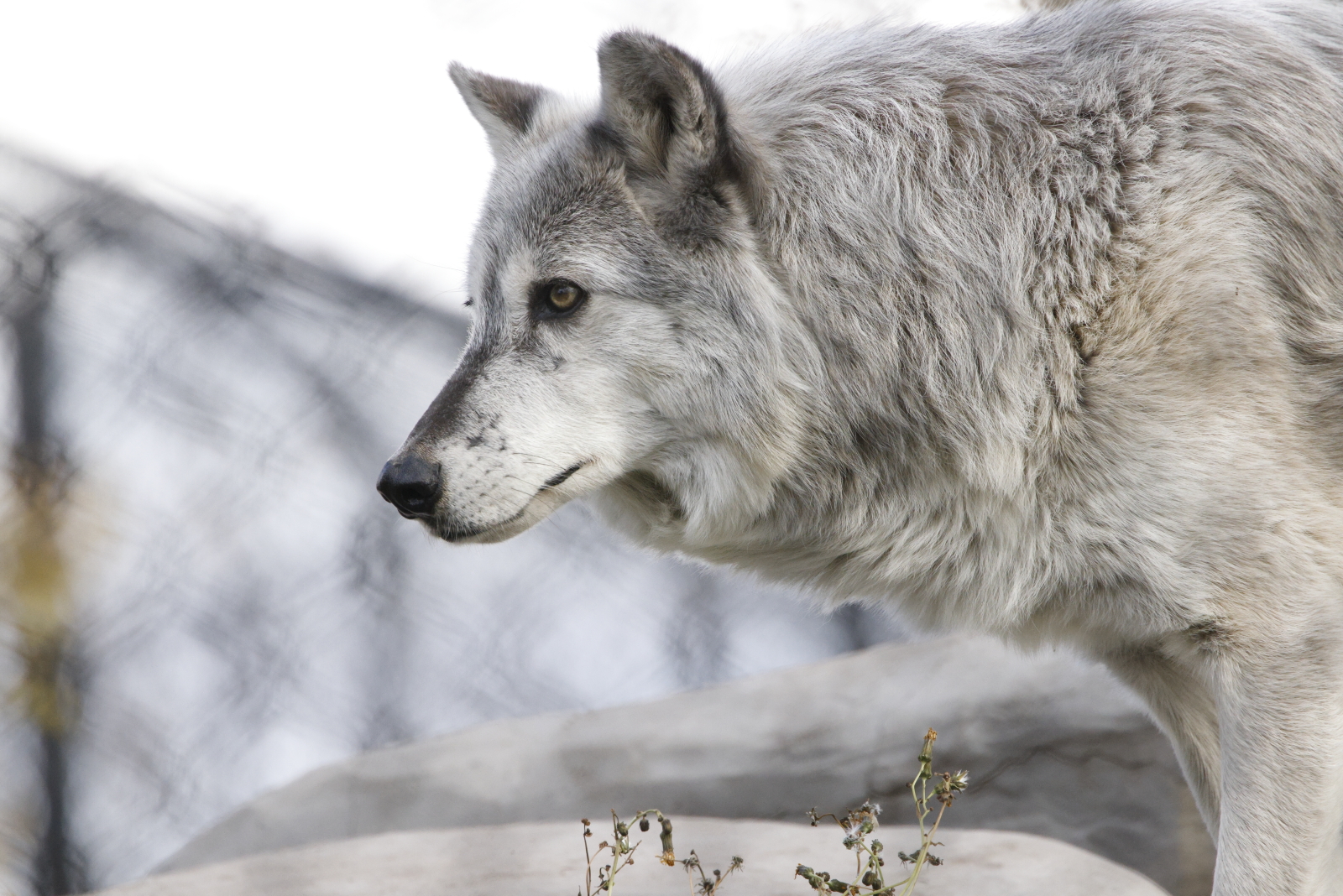
DPP
LR
DPP
Oct 20, 2020 at 07:51 PM
p.2 #6Lightroom Classic 10.0 is out, adds color grading wheels
Still paying for LR but for now sticking with C1.
Oct 20, 2020 at 07:51 PM
p.2 #7Lightroom Classic 10.0 is out, adds color grading wheels
"Tether Tools has introduced a new version of its Smart Shooter application that adds a plug-in for Sony cameras so they can tether directly into Adobe’s Lightroom Classic."
Anybody try this yet? For me C1's Sony tethering capability was the only reason to hang on to a C1 license, but I'm not doing much tethering these days so I'm all Adobe.
https://www.dpreview.com/news/6619619146/tether-tools-smart-shooter-4-adds-sony-tethering-to-lightroom-classic
Anybody try this yet? For me C1's Sony tethering capability was the only reason to hang on to a C1 license, but I'm not doing much tethering these days so I'm all Adobe.
https://www.dpreview.com/news/6619619146/tether-tools-smart-shooter-4-adds-sony-tethering-to-lightroom-classic
Oct 21, 2020 at 05:51 AM
p.2 #8Lightroom Classic 10.0 is out, adds color grading wheels
Zenon Char wrote:
It seemed like it at first but these are exports from both LR and PS with no edits. The LR version is after it self corrected.
But what is PS doing to process?...PS uses CameraRaw which is the same engine as LR and likely got fixed via the update yesterday to CameraRaw. So I would think those two would match exactly before any adjustments.
Or is your PS shot a Tiff from DPP? That would be a way to compare.
I'm seeing just the very slightest more brightness in the LrC 10 file under Adobe Color vs the DPP. But it is so close I may be imagining things. Regardless the issue seems fixed from the 1/3-1/2 stop darkening in LrC 9.X.
The histograms between LrC 9.x vs 10 once opened in Develop under Adobe Color are different with the latest update. But they aren't shifted to the left or right noticeably. I probably need to look at a few more files with different levels of DR to see for sure.
Oct 21, 2020 at 08:00 AM
p.2 #9Lightroom Classic 10.0 is out, adds color grading wheels
LBJ2 wrote:
"Tether Tools has introduced a new version of its Smart Shooter application that adds a plug-in for Sony cameras so they can tether directly into Adobe’s Lightroom Classic."
Anybody try this yet? For me C1's Sony tethering capability was the only reason to hang on to a C1 license, but I'm not doing much tethering these days so I'm all Adobe.
https://www.dpreview.com/news/6619619146/tether-tools-smart-shooter-4-adds-sony-tethering-to-lightroom-classic
Yes I've been testing it. Works fine and the speed is much better because you don't need a watched folder. I just so wish I could get live view natively within LR! It's not really a full comparison to Capture One though. It's a somewhat different beast. Two programs working in conjunction rather than a 1 stop solution. That said C1 is a power user software. It's not particularly user friendly.
Oct 21, 2020 at 08:07 AM
p.2 #10Lightroom Classic 10.0 is out, adds color grading wheels
arbitrage wrote:
But what is PS doing to process?...PS uses CameraRaw which is the same engine as LR and likely got fixed via the update yesterday to CameraRaw. So I would think those two would match exactly before any adjustments.
Or is your PS shot a Tiff from DPP? That would be a way to compare.
I'm seeing just the very slightest more brightness in the LrC 10 file under Adobe Color vs the DPP. But it is so close I may be imagining things. Regardless the issue seems fixed from the 1/3-1/2 stop darkening in LrC 9.X.
The histograms between LrC 9.x vs 10...Show more →
I don't know. I don't use PS to open RAW files but yes it is the same engine. What I'm seeing using LR is after I select a file there is no histogram as it loads. Once it loads the file becomes brighter but there is no previous histogram for reference. My only guess is PS and LR are simply correcting themselves from the previous bug. I don't think it was actually underexposed because that comes from camera. It just looked darker.
Before version 10 LR/PS was definitely darker than DPP. It may not be perfect now but it is much better and acceptable as far as I'm concerned. Another thing to check is do you have DPP's DLO activated. I think it is on in the camera by default. DLO will change the exposure. I think this is why people were saying LR/PS was underexposed by 2 stops when it was actually about ⅔.
Zenon Char wrote
It seemed like it at first but these are exports from both LR and PS with no edits. The LR version is after it self corrected.Or is your PS shot a Tiff from DPP? That would be a way to compare.
I'm seeing just the very slightest more brightness in the LrC 10 file under Adobe Color vs the DPP. But it is so close I may be imagining things. Regardless the issue seems fixed from the 1/3-1/2 stop darkening in LrC 9.X.
The histograms between LrC 9.x vs 10...Show more →
I don't know. I don't use PS to open RAW files but yes it is the same engine. What I'm seeing using LR is after I select a file there is no histogram as it loads. Once it loads the file becomes brighter but there is no previous histogram for reference. My only guess is PS and LR are simply correcting themselves from the previous bug. I don't think it was actually underexposed because that comes from camera. It just looked darker.
Before version 10 LR/PS was definitely darker than DPP. It may not be perfect now but it is much better and acceptable as far as I'm concerned. Another thing to check is do you have DPP's DLO activated. I think it is on in the camera by default. DLO will change the exposure. I think this is why people were saying LR/PS was underexposed by 2 stops when it was actually about ⅔.
Oct 21, 2020 at 09:09 AM
p.2 #11Lightroom Classic 10.0 is out, adds color grading wheels
Zenon Char wrote:
But what is PS doing to process?...PS uses CameraRaw which is the same engine as LR and likely got fixed via the update yesterday to CameraRaw. So I would think those two would match exactly before any adjustments.
Or is your PS shot a Tiff from DPP? That would be a way to compare.
I'm seeing just the very slightest more brightness in the LrC 10 file under Adobe Color vs the DPP. But it is so close I may be imagining things. Regardless the issue seems fixed from the 1/3-1/2 stop darkening in LrC 9.X.
The histograms between LrC 9.x vs 10 once opened in Develop under Adobe Color are different with the latest update. But they aren't shifted to the left or right noticeably. I probably need to look at a few more files with different levels of DR to see for sure.I don't know. I don't use PS to open RAW files but yes it is the same engine. What I'm seeing using LR is after I select a file there is no histogram as it loads. Once it loads the file becomes brighter but there is no previous histogram for reference. My only guess is PS and LR are simply correcting themselves from the previous bug. I don't think it was actually underexposed because that comes from camera. It just looked darker.
Before version 10 LR/PS was definitely darker than DPP. It may not be perfect now but...Show more →
What LR is doing is applying its process and the Adobe Color profile which depending on your computer's specs can be pretty much instant or a second or two. That is when it shows the histogram corresponding to its develop settings.
But the way you are comparing with DPP seems like the easiest way.
Because I have a few computers and only updated LrC on one of them so far, I'm using Screen Sharing to view LrC 9.x vs LrC 10 to see the differences with the LrC 10 update.
What I will do before updating my other computers to LrC 10 is to export some jpegs from both LrC versions and compare with a jpeg from DPP. I'll view all of those in Finder/Preview so no other processing is applied. I'm not sure if opening a jpeg from DPP into LR will apply any settings or not?
I was only finding less than 1/2 stop difference between DPP and LrC 9.x anyways. Probably based on my in camera Picture Style settings which is what DPP uses and what the embedded jpeg in LR uses when I use Embedded+Sidecar for import.
arbitrage wrote
Zenon Char wrote
It seemed like it at first but these are exports from both LR and PS with no edits. The LR version is after it self corrected.Or is your PS shot a Tiff from DPP? That would be a way to compare.
I'm seeing just the very slightest more brightness in the LrC 10 file under Adobe Color vs the DPP. But it is so close I may be imagining things. Regardless the issue seems fixed from the 1/3-1/2 stop darkening in LrC 9.X.
The histograms between LrC 9.x vs 10 once opened in Develop under Adobe Color are different with the latest update. But they aren't shifted to the left or right noticeably. I probably need to look at a few more files with different levels of DR to see for sure.
Before version 10 LR/PS was definitely darker than DPP. It may not be perfect now but...Show more →
What LR is doing is applying its process and the Adobe Color profile which depending on your computer's specs can be pretty much instant or a second or two. That is when it shows the histogram corresponding to its develop settings.
But the way you are comparing with DPP seems like the easiest way.
Because I have a few computers and only updated LrC on one of them so far, I'm using Screen Sharing to view LrC 9.x vs LrC 10 to see the differences with the LrC 10 update.
What I will do before updating my other computers to LrC 10 is to export some jpegs from both LrC versions and compare with a jpeg from DPP. I'll view all of those in Finder/Preview so no other processing is applied. I'm not sure if opening a jpeg from DPP into LR will apply any settings or not?
I was only finding less than 1/2 stop difference between DPP and LrC 9.x anyways. Probably based on my in camera Picture Style settings which is what DPP uses and what the embedded jpeg in LR uses when I use Embedded+Sidecar for import.
Oct 21, 2020 at 09:17 AM
p.2 #12Lightroom Classic 10.0 is out, adds color grading wheels
arbitrage wrote:
But what is PS doing to process?...PS uses CameraRaw which is the same engine as LR and likely got fixed via the update yesterday to CameraRaw. So I would think those two would match exactly before any adjustments.
Or is your PS shot a Tiff from DPP? That would be a way to compare.
I'm seeing just the very slightest more brightness in the LrC 10 file under Adobe Color vs the DPP. But it is so close I may be imagining things. Regardless the issue seems fixed from the 1/3-1/2 stop darkening in LrC 9.X.
The histograms between LrC 9.x vs 10 once opened in Develop under Adobe Color are different with the latest update. But they aren't shifted to the left or right noticeably. I probably need to look at a few more files with different levels of DR to see for sure.I don't know. I don't use PS to open RAW files but yes it is the same engine. What I'm seeing using LR is after I select a file there is no histogram as it loads. Once it loads the file becomes brighter but there is no previous histogram for reference. My only guess is PS and LR are simply correcting themselves from the previous bug. I don't think it was actually underexposed because that comes from camera. It just looked darker.
Before version 10 LR/PS was definitely darker than DPP. It may not be perfect now but it is much better and acceptable as far as I'm concerned. Another thing to check is do you have DPP's DLO activated. I think it is on in the camera by default. DLO will change the exposure. I think this is why people were saying LR/PS was underexposed by 2 stops when it was actually about ⅔.What LR is doing is applying its process and the Adobe Color profile which depending on your computer's specs can be pretty much instant or a second or two. That is when it shows the histogram corresponding to its develop settings.
But the way you are comparing with DPP seems like the easiest way.
Because I have a few computers and only updated LrC on one of them so far, I'm using Screen Sharing to view LrC 9.x vs LrC 10 to see the differences with the LrC 10 update.
What I will do before updating my other computers to LrC 10 is...Show more →
It is a second or less. It took several tries before I could get my eyes to move fast enough between the file and the histogram to see what was going on. Yep I agree - only about ½ a stop.
Zenon Char wrote
arbitrage wrote
Zenon Char wrote
It seemed like it at first but these are exports from both LR and PS with no edits. The LR version is after it self corrected.Or is your PS shot a Tiff from DPP? That would be a way to compare.
I'm seeing just the very slightest more brightness in the LrC 10 file under Adobe Color vs the DPP. But it is so close I may be imagining things. Regardless the issue seems fixed from the 1/3-1/2 stop darkening in LrC 9.X.
The histograms between LrC 9.x vs 10 once opened in Develop under Adobe Color are different with the latest update. But they aren't shifted to the left or right noticeably. I probably need to look at a few more files with different levels of DR to see for sure.
Before version 10 LR/PS was definitely darker than DPP. It may not be perfect now but it is much better and acceptable as far as I'm concerned. Another thing to check is do you have DPP's DLO activated. I think it is on in the camera by default. DLO will change the exposure. I think this is why people were saying LR/PS was underexposed by 2 stops when it was actually about ⅔.
But the way you are comparing with DPP seems like the easiest way.
Because I have a few computers and only updated LrC on one of them so far, I'm using Screen Sharing to view LrC 9.x vs LrC 10 to see the differences with the LrC 10 update.
What I will do before updating my other computers to LrC 10 is...Show more →
It is a second or less. It took several tries before I could get my eyes to move fast enough between the file and the histogram to see what was going on. Yep I agree - only about ½ a stop.
Oct 21, 2020 at 09:25 AM
p.2 #13Lightroom Classic 10.0 is out, adds color grading wheels
Actually if anyone is using Color Fidelity profiles the author corrected for LR's underexposure. Now I see they are about ½ stop too bright compared to LR/DPP. I read the author is aware and working on an update.
Oct 21, 2020 at 09:28 AM
p.2 #14Lightroom Classic 10.0 is out, adds color grading wheels
ACR has another update.
Oct 21, 2020 at 11:55 AM
p.2 #15Lightroom Classic 10.0 is out, adds color grading wheels
Zenon Char wrote:
ACR has another update.
I wonder if this one is less buggy in crop than the last one.
EDIT: Nope, still broken
Edited on Oct 22, 2020 at 06:14 AM · View previous versions
ACR has another update.
I wonder if this one is less buggy in crop than the last one.
EDIT: Nope, still broken
Edited on Oct 22, 2020 at 06:14 AM · View previous versions
Oct 22, 2020 at 01:51 AM
p.2 #16Lightroom Classic 10.0 is out, adds color grading wheels
I'm excited to try out the color grading tools, the panels look pretty intuitive.
Oct 22, 2020 at 02:47 AM
p.2 #17Lightroom Classic 10.0 is out, adds color grading wheels
I can't get my upgrade. Using a MacBook Pro. Mac OS Catalina 10.15.7. Every time I click on the Adobe Creative Cloud icon I get an error message saying "Unable to reach Adobe servers. Check your firewall settings, ensure that the time settings on your computer are correct, and try again." Have done all of the above multiple times without luck, including turning off my firewall completely. Have never had this problem with upgrading before.
Anyone else experiencing this? Any suggestions? Thx.
Anyone else experiencing this? Any suggestions? Thx.
Oct 22, 2020 at 08:26 AM
p.2 #18Lightroom Classic 10.0 is out, adds color grading wheels
lunar module wrote:
I can't get my upgrade. Using a MacBook Pro. Mac OS Catalina 10.15.7. Every time I click on the Adobe Creative Cloud icon I get an error message saying "Unable to reach Adobe servers. Check your firewall settings, ensure that the time settings on your computer are correct, and try again." Have done all of the above multiple times without luck, including turning off my firewall completely. Have never had this problem with upgrading before.
Anyone else experiencing this? Any suggestions? Thx.
Someone on another site had issues with the VPN. Not sure if you use that.
Oct 22, 2020 at 08:45 AM
p.2 #19Lightroom Classic 10.0 is out, adds color grading wheels
I'll check it out. I have a commercial VPN app on my computer but it is turned off. I'll check to see if the Apple OS VPN might be turned on. Thanks.
I think I have probably found a workaround. I went to the Adobe web site using my Chrome browser and logged in to my Adobe account without problem. Then went to the Creative Cloud download page and am reinstalling ACC as we speak. Only half way done, but seems to be installing/updating apps normally so far. Weird.
Edit/follow up: VPN not on. The download from the Adobe web site completed successfully and I have now upgraded Lightroom Classic, Photoshop and Camera Raw. Have no idea why the usual upgrade pathway didn't work. Thanks for the help.
Oct 22, 2020 at 08:56 AM
p.2 #20Lightroom Classic 10.0 is out, adds color grading wheels
I like it, but still don’t think it handles color as well C1. This is completely unscientific and subjective, but my thought is that while it is easier to fine tune than with the split toning tool, it still feels like it’s applying a filter OVER the image rather than adjusting color IN the image to me. Now I imagine that may have to do with my lack of experience fine tuning the tonal ranges where the adjustments are being applied with LR, but that’s my take for now.
RoamingScott wrote:
For those that use a mix of C1 and LR, I'll be curious to hear your thoughts on Lightroom 10's new color grading tools. I've been badgering them to add this every survey that they send to me, I'm glad they are finally "catching up" to C1 in terms of color control with these new grading tools and the new hue brush from 9.4. The GPU improvements for brush edits will hopefully be good too, the R4 files with 10 brushes really start to chug on version 9.4
https://www.dpreview.com/news/8793158963/adobe-lightroom-classic-10-0-released-includes-color-grading-and-more
https://2.img-dpreview.com/files/p/E~TS590x0~articles/8793158963/lightroom-classic-10-color-grading-screenshot-v2.jpg
Oct 23, 2020 at 06:01 AM