BlueBomberTurbo wrote:
So here's an idea I just thought of: since the cards get so hot that Canon had to put a warning inside the card door, is there a way to attach a heatsink/pipe in a way that it would insert into a card slot without shorting it? Maybe dummy pins connected by thermal pads? Being so hot, drawing heat away from the card slots should be great for directing heat out of the body. Then a fan could be added. Not great for hybrid work without a bit of finagling, but fine for video-only.
The cards are the devices that generate heat in the slots. (Think about the heat from M.2 NVMe SSDs.) Maybe there is some internal camera body heat that escapes through the slot, but that would be minimal in comparison.
Here's Jon Low's review of the R6. I believe he said he continued to shoot stills over an hour after the warning light came on. I believe he said that was a warning that it would not shoot movies. He starts speaking about the overheating issue around five or five and a half minutes. I believe around six minutes and forty five seconds he shows the blinking warning. Jon was shooting in hot Malaysia.
BlueBomberTurbo wrote:
So here's an idea I just thought of: since the cards get so hot that Canon had to put a warning inside the card door, is there a way to attach a heatsink/pipe in a way that it would insert into a card slot without shorting it? Maybe dummy pins connected by thermal pads? Being so hot, drawing heat away from the card slots should be great for directing heat out of the body. Then a fan could be added. Not great for hybrid work without a bit of finagling, but fine for video-only.
A concern: I don't remember how my EOS R's card door operated, but at least my 5D II disables the camera when the door is open. Is this true of the R5, as well? If so, a workaround (dummy door frame, cutting a hole in the door) would be necessary to get the above idea to work.
Another concern: does the camera need a card inserted to record video externally? If not, dual heatsinks/pipes can be installed for twice the cooling. That, along with offloading a good amount of work to the external recorder, should remedy a lot of the shutdown situations...Show more →
I saw it mentioned in one review (I think it was Gerald Undone's) that the camera shuts off when card door is opened.
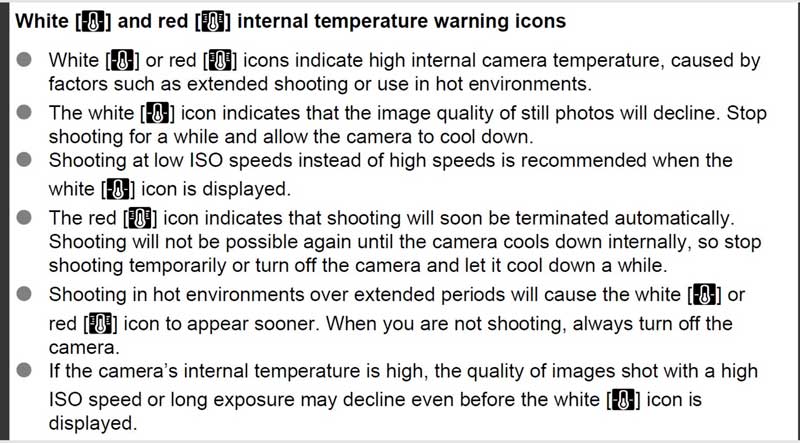
I stand corrected. On page 284 of the Advanced User's Guide it indicates the red flashing thermometer icon is a warning that the camera will shut down. Sorry I don't know how to paste that page here. It also has a white icon that precedes the red icon and that means that image quality will be reduced and they encourage you to use a lower ISO.
Greg Futral wrote:
I stand corrected. On page 284 of the Advanced User's Guide it indicates the red flashing thermometer icon is a warning that the camera will shut down. Sorry I don't know how to paste that page here. It also has a white icon that precedes the red icon and that means that image quality will be reduced and they encourage you to use a lower ISO.
There is a video-specific temperature warning that is different from the simpler white and red thermometer icons described above.
The video-specific temperature warning includes a camera icon next to the thermometer. My understanding is that the video-specific temperature warning only affects video recording and it is still possible to use the photo features of the camera when this warning is displayed:
Yes I believe when Andrew J had his shut down in stills mode with the super hot battery that it was the non-video warning. The warning we see in all the overheating tests is the movie recording one. The movie recording one is looking like a "cripple hammer" feature more than anything...hmmm...Canon is releasing a new RF mount Cinema camera soon...who'd have thunk it https://www.canonrumors.com/rf-mount-rumored-cinema-camera-specifications-cr2/
The other non video warning is likely more serious and is a warning that something is well out of operating range like with Andrew's hot battery.
Couple of points that may have been covered. Inside the R5 has far, far less air space and way more components than the R.
The magnesium chassis material does not transfer heat well, nor is it a heat sink of any note. It's structurally strong at a light weight, but sucks at transferring heat.
Not sure what some of you are doing to make the camera overheat just shooting stills. I just shot a wedding on Saturday, 6 hours 2700 images on 2 batteries and another 1200 on fresh batteries after I swapped them out at 15%. Camera was not and has never been hot. CFExpress card does get warm, but not hot and never has my overheat warning light turned on. Camera is amazing for weddings along with the RF glass.
I shot over 7,000 images in four days on the R5 and never had the camera overheat or lock me out of 4K120 recording mode. At one point it did get down to 2:00 with a red warning that it was getting close to the heat threshold. But it actually worked its way back up to 4:00 and 5:00 while still shooting photos. So I was very happy to see that shooting photos no longer appears to have a major impact on recording times - at least it never locked me out.
I think we all got a little ahead of ourselves here and started freaking out looking to make the cameras overheat. You can even trick yourself by saving 4K120/4KHQ/8K stored as your C3 custom shooting mode you will visually get the warning while shooting photos.
Shot 2,600 images in 3 hours outdoors in San Diego. Temperature in mid 70s F. No overheating warning.
No sign of over-heating. Had two new NH batteries in
the grip.
magnesium itself isn't an insanely poor heat conductor but:
* most of the hull IS rubberized, now that is a good insulator
* there seems to be no proper heat conductance from the main heat sources (DigicX, RAM) to the hull besides a very thin aluminium sheet without proper thermal coupling to the components and only narrow mounts to the hull
* The IBIS sensor can't have an effective large cross section heat bridge to the hull since it needs to move freely. Sony implicated on some of their ?t=298" target="_blank" rel="nofollow">A7S3 slides that they have at least thought of the thermal model some more, also indicated dedicated heat dissipation clamps (?) for the floating IBIS sensor.
I think Canon simply never went all in in order to engineer any significant heat management into this camera. They wanted to maintain this smaller body size and focused on a photo camera. By the looks of other's tear downs that was the only viable conclusion I could jump to.
This problem is not just about video and true overheating indicators or shut downs, it is also about photos and the image quality. We have analyzed some long time exposures (up to 10 minutes) and the dark noise is accumulating to a much higher level than the EOS R, 5D4 (no IBIS). Current Sony and Nikon cameras performed much better there, I'm talking a noise floor of tens of percent of the saturation level. This was especially obvious if the sensor had gotten warm. Take a five minute video (no overheat warning) and then do a long-time exposure image. Sadly the image quality turns out to be abysmal then!
RCicala wrote:
The magnesium chassis material does not transfer heat well, nor is it a heat sink of any note. It's structurally strong at a light weight, but sucks at transferring heat.
My R5 teardown will be up Monday or Tuesday.
Roger
What alloy did they make that managed to make this the case? Pure magnesium is around 2/3 the thermal conductivity of aluminum. Many magnesium alloys have higher thermal conductivity than most aluminum alloys.
I’m curious how you came to the conclusion that it is poor at transferring heat.
Obviously it is not as good at transferring heat as something with copper heat pipes or something else.
@Jesse Evans,
I also agree, the magnesium will not be the issue, no matter the alloy. Roughly 7-10W of heat being released during video recording if the record times (2h) and battery capacity (15Wh) hold up. However, most of the hull is coated in a thick rubber AND there is a total lack of proper heat conductance from the electronics to the magnesium hull.
From what I've seen in the tear down videos which were posted some weeks back, even if the hull wasn't rubberized, the lack of heat bridging inside and the max thermal power of maybe 10W+ is plenty for components to overheat, no doubt!
magnesium itself isn't an insanely poor heat conductor but:
* most of the hull IS rubberized, now that is a good insulator
* there seems to be no proper heat conductance from the main heat sources (DigicX, RAM) to the hull besides a very thin aluminium sheet without proper thermal coupling to the components and only narrow mounts to the hull
* The IBIS sensor can't have an effective large cross section heat bridge to the hull since it needs to move freely. Sony implicated on some of their ?t=298" target="_blank" rel="nofollow">A7S3 slides that they have at least thought of the thermal model some more, also indicated dedicated heat dissipation clamps (?) for the floating IBIS sensor.
I think Canon simply never went all in in order to engineer any significant heat management into this camera. They wanted to maintain this smaller body size and focused on a photo camera. By the looks of other's tear downs that was the only viable conclusion I could jump to.
This problem is not just about video and true overheating indicators or shut downs, it is also about photos and the image quality. We have analyzed some long time exposures (up to 10 minutes) and the dark noise is accumulating to a much higher level than the EOS R, 5D4 (no IBIS). Current Sony and Nikon cameras performed much better there, I'm talking a noise floor of tens of percent of the saturation level. This was especially obvious if the sensor had gotten warm. Take a five minute video (no overheat warning) and then do a long-time exposure image. Sadly the image quality turns out to be abysmal then!
I just took the case off the camera, heated the inside, and took the temperature of the outside of the case and of areas away from the heat source on the inside. I don't know much about thermal qualities, so I just thought I'd see if it transferred heat. Short answer was not very well :-)
RCicala wrote:
I just took the case off the camera, heated the inside, and took the temperature of the outside of the case and of areas away from the heat source on the inside.
very interesting, didn't know the case could be 'taken off', thought you'd have to dismantle everything for that. Anyways, how did you heat it from the inside and how did you measure temperature? With 'optical temperature measurements' one always needs to pay attention with metal, even if anodized/black, it might be highly reflective in the infrared spectrum where those mostly pyrometers measure. In that case all you'll get is false readings.
I don't know the specificities of these camera bodies, would have to have access to a camera to equip it with a bunch of thermocouple sensors from the inside for proper testing .... BUT, a good guess is definitely not worthless, so let's do some quick math in order to back up my hypothesis that the magnesium is definitely not the culprit ;-)
the heat flux in one dimension is defined as q = -lambda*deltaTemperature/thicknessOfMaterial ... per square meter cross section area. Putting in the numbers for magnesium, let's be conservative with 100W/mK, a magnesium thickness of two millimeters and a surface area of 100cm², external temperature of 20°C and 35°C internally this yields..... q = 7500W.
Seven and a half kilowatts. ;-) Now that magnesium hull would need the camera to empty the battery in 7.2 seconds. In order to not be able to conduct the heat away. So the Mg is NOT going to be the limiting factor here by a long shot, which was to be expected, I defnitely expect the mounting of the PCB and sensor to be the culprit, probably featuring very bad heat connection to the Mg frame.
As I mentioned, I take the rubberized surface of the Mg hull to be a big issue in thermal conductivity. If the entire hull would be covered in 1mm thick rubber (lambda = 0.1) this would yied a heat flux of only 7.5Watts!! which is pretty close to the cameras
Obviously things aren't so simple. Convection is the primary cooling mechanism externally but people have tested the overheating with fans without it making a difference, so external heat accumulation on the hull should be a non issue at this point, as long as the air is moving!
actual power consumption.
There is a youtube video stating that he could pretty much endlessly record in 4kHQ while outside at an ambient air temperature of 20°C with a slight breeze.
This would actually indicate that at least with firmware 1.1, external cooling could be a limiting factor in order to suggest to the cameras heat model using its three internal sensors, that it is cool enough outside to continue running.
Apparently by pointing a fan toward the ports on the left side of the R5 running the 1.1 firmware, you can now record 4K HQ or 8K up to 90 minutes (and perhaps indefinitely) without overheating, at least indoors. Recovery times also improve even with brief fan cooling between recordings: https://www.jodumedia.com/blog/eos-r5-with-firmware-11-is-now-a-video-beast
This approach doesn't seem to help as much in hotter outdoor environments, though.
Andrew J wrote:
I am reporting extreme overheating just shooting stills. I had the camera shut down and the Canon battery that came out was extremely hot. This was a 90d Canon battery so not a high discharge version that ships with the R5. I am going to guess most stills shooters will want 3 spare R5 OEM batteries just to shoot stills for fun. For work I would believe many more.
Any chance this is a defective one? Have others replicated this? I'd think it would still be under warranty. Maybe send it in.