This topic is in the 2020 archive. You can read it and like its posts here. It is read only.
Archive 2020Do Topaz products help the m43 user?

p.1 #1Do Topaz products help the m43 user?
In another thread I posted the incredible noise reduction achieved by Topaz DeNoise AI. Now there are other products that also work, and I am not claiming that Topaz DeNoise is the best, but it is very useful and quick for me. I especially like the batch processing feature. Another product that they have released is Topaz Mask AI. This allows one – amongst other things - to blur the background very quickly and conveniently. Those are two of the primary complaints for m43...(1) greater noise and (2) lack of subject isolation due to greater DOF. I have tried quite a few programs and masking an image to blur the background is very time consuming and the magic select tool often selects the wrong portions of the image. When that happens there is a lot of manipulation to get the mask just right. However, Topaz Mask AI is quite fast for many shots. Below is an example. Steps are:
(1) Import image into Topaz Mask AI. The whole image is shaded in green at first. Green is the color one uses to select portions of the shot that are unaltered.
(2) Next trace around the part of the image that you want to keep with the blue pen tool. Make sure that the blue line or path includes part of the image you want to keep unaltered and the part that you want to blur. You can control the thickness of the blue pen tool.
(3) Use the red bucket fill tool to fill in the part of the image you want to change. Remember blue creates the separation between the parts of the image to be altered vs kept.
(4) Use the green bucket fill tool to designate parts of the image you want unaltered
(5) Click the compute mast button
(6) Click on the background tab
(7) At this point you can blur the background, color the background or import another image to use as the background
Other programs start to fail when the algorithms cannot tell the difference between the background and the part of the image that you want unaltered. That is where this program shines for me. Varying the size of green, blue and red pens allows one to really fine-tune the process of masking and direct the program to keep certain parts of the image vs. the background. Below are some examples from one shot. The first image is the original shot, the second shows a coloring of the image before the mask is calculated. The last shows the background blurred. This shot took me less than 2 minutes to blur. If you look carefully there are a few parts of the final image that need cleaning up. One could do that in PS, Affinity photo etc...or just fine tune the green, red and blue parts of the image with finer width pens. It is quite fast once you get use to it.
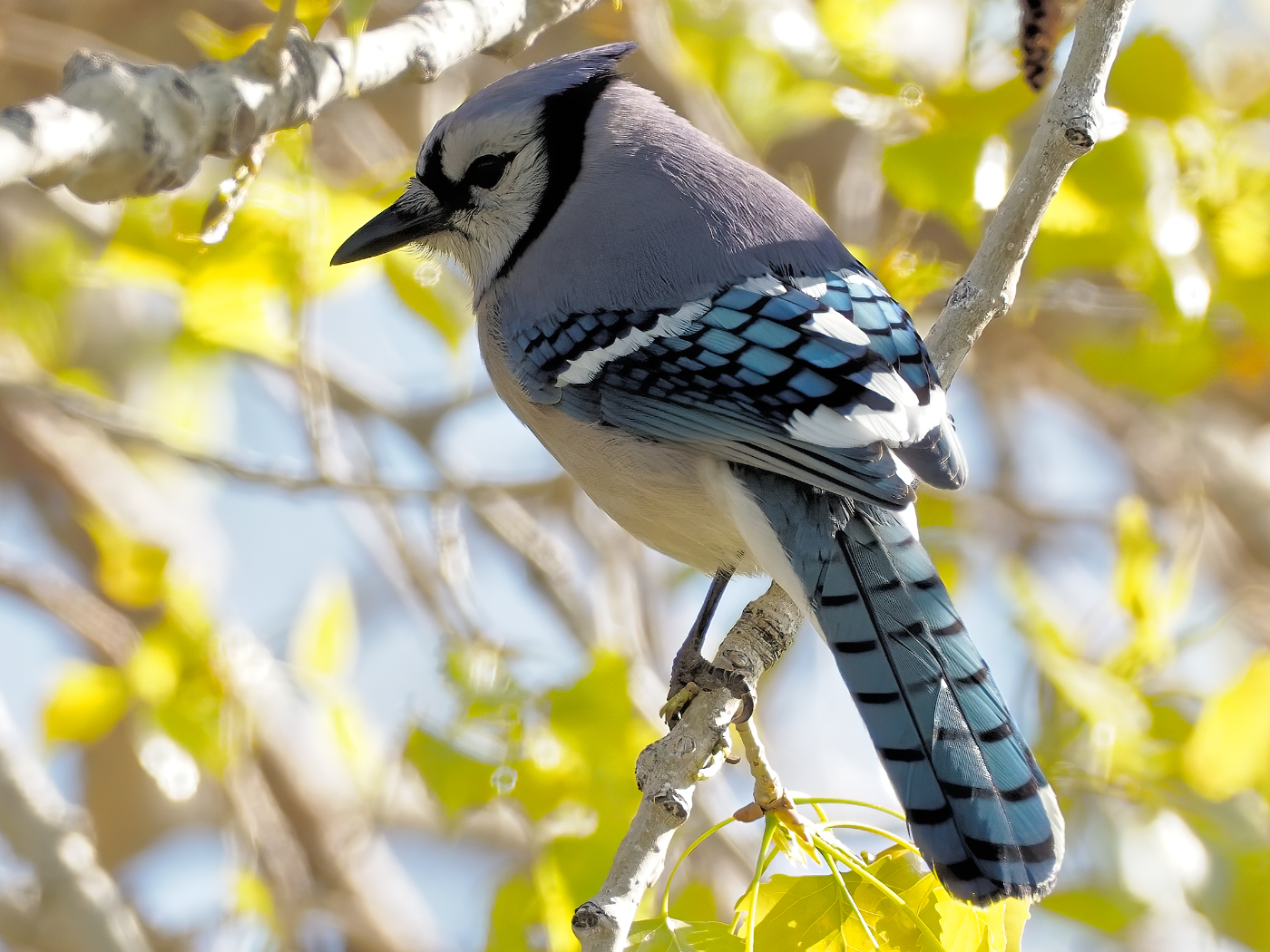
Original
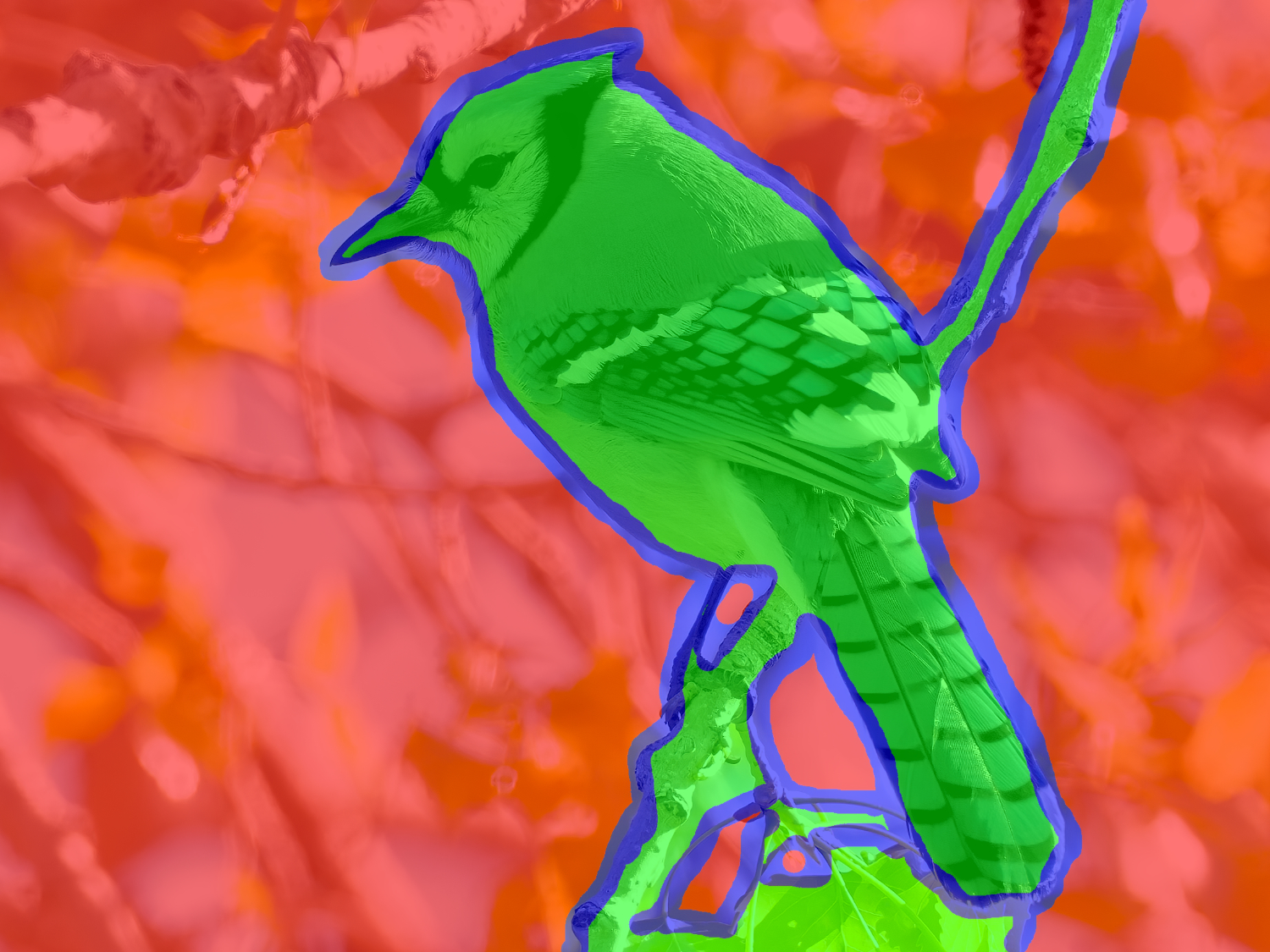
Color map prior to mask calculation
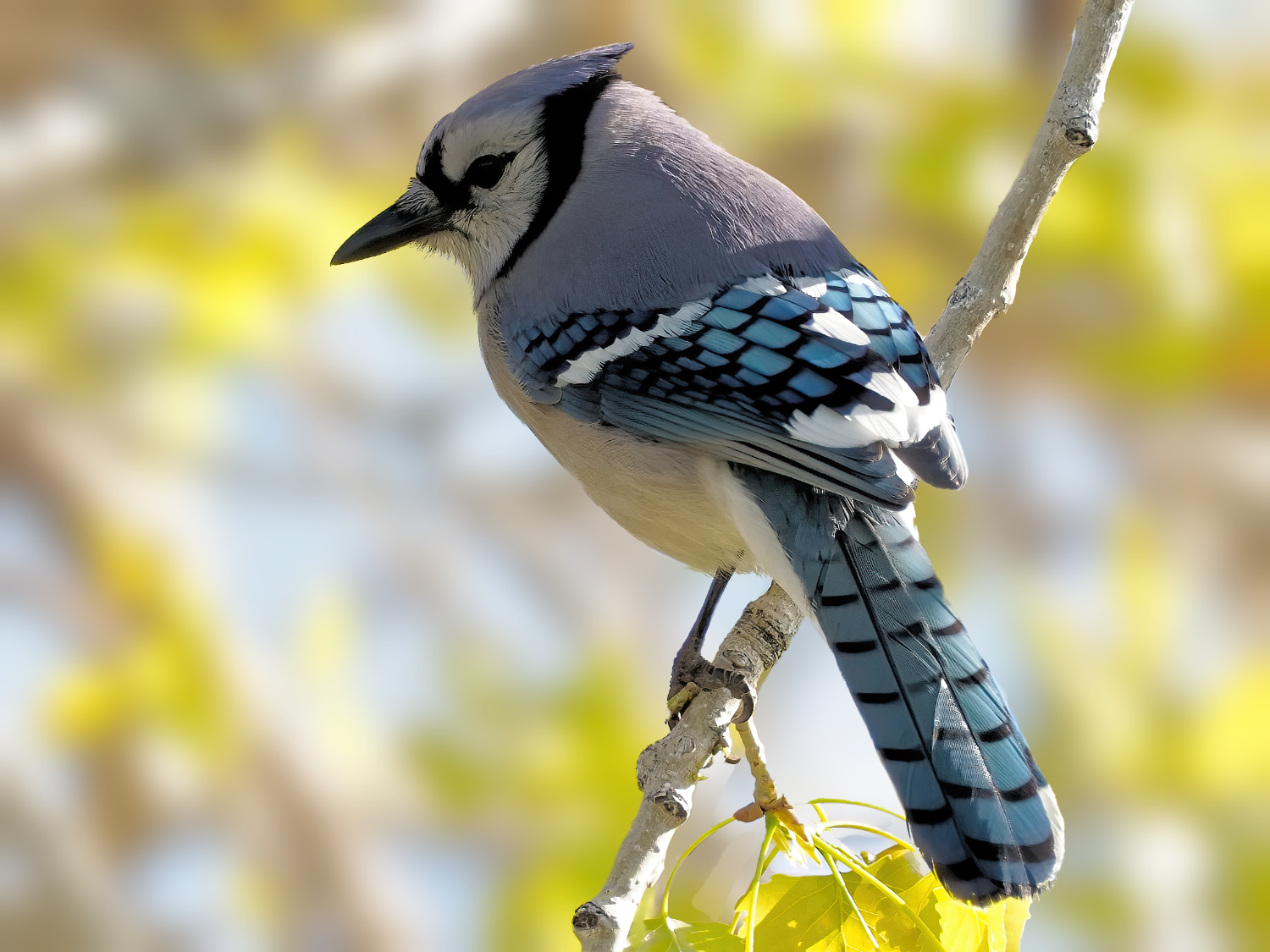
Blurred background
Edited on May 16, 2020 at 11:38 PM · View previous versions
(1) Import image into Topaz Mask AI. The whole image is shaded in green at first. Green is the color one uses to select portions of the shot that are unaltered.
(2) Next trace around the part of the image that you want to keep with the blue pen tool. Make sure that the blue line or path includes part of the image you want to keep unaltered and the part that you want to blur. You can control the thickness of the blue pen tool.
(3) Use the red bucket fill tool to fill in the part of the image you want to change. Remember blue creates the separation between the parts of the image to be altered vs kept.
(4) Use the green bucket fill tool to designate parts of the image you want unaltered
(5) Click the compute mast button
(6) Click on the background tab
(7) At this point you can blur the background, color the background or import another image to use as the background
Other programs start to fail when the algorithms cannot tell the difference between the background and the part of the image that you want unaltered. That is where this program shines for me. Varying the size of green, blue and red pens allows one to really fine-tune the process of masking and direct the program to keep certain parts of the image vs. the background. Below are some examples from one shot. The first image is the original shot, the second shows a coloring of the image before the mask is calculated. The last shows the background blurred. This shot took me less than 2 minutes to blur. If you look carefully there are a few parts of the final image that need cleaning up. One could do that in PS, Affinity photo etc...or just fine tune the green, red and blue parts of the image with finer width pens. It is quite fast once you get use to it.
Original
Color map prior to mask calculation
Blurred background
Edited on May 16, 2020 at 11:38 PM · View previous versions
May 16, 2020 at 11:16 PM
p.1 #2Do Topaz products help the m43 user?
My main point is that software is helping the m43 user to get the most out of select shots, and in some cases emulate what can be achieved with much heavier more expensive full frame gear. Topaz is my favorite, but there are others. You can see that I was quite sloppy with my blue pen tool above. An extra 5 or so minutes would deliver an image that needed no cleanup.
May 16, 2020 at 11:33 PM
p.1 #3Do Topaz products help the m43 user?
Thanks for this tutorial Mike! I have been quite happy with AI Clear but I will check out DeNoise AI.
May 17, 2020 at 12:27 AM
p.1 #4Do Topaz products help the m43 user?
Nice to hear that the new Remask is working well for you.
I agree that new gen software is beneficial to m43. The latest 20mp sensors with no AA filters produce very nice files, with the most obvious limitations being noise & resolution. Denoise AI seems to work well on most files (also works on files from larger format sensors, but a 42mp Sony sensor doesn't produce as much noise for a given ISO in the first place).
Gigapixel AI can also produce excellent results for resizing files, but you have to watch for the creation of artifacts. In my case, artifacts were no longer an issue after turning off the "Use GPU" feature in settings. Resize in On1 RAW also produces very good results.
Brian
May 17, 2020 at 09:01 AM
p.1 #5Do Topaz products help the m43 user?
Topaz edge detection is so great. I'm enjoying using M43 because the software available now easily closes the gap for most imaging needs.
May 17, 2020 at 10:01 PM
p.1 #6Do Topaz products help the m43 user?
galenapass wrote:
My main point is that software is helping the m43 user to get the most out of select shots, and in some cases emulate what can be achieved with much heavier more expensive full frame gear. Topaz is my favorite, but there are others. You can see that I was quite sloppy with my blue pen tool above. An extra 5 or so minutes would deliver an image that needed no cleanup.
Very remarkable software with great results, but at the same time it makes me a little sad, knowing so many images I thought were due to great photography skills, good fieldcraft, patience and perseverance were really nothing more than just buying some new software...
May 18, 2020 at 09:05 AM
p.1 #7Do Topaz products help the m43 user?
Quick question, Mike. Can you use Mask AI to reduce background noise?
May 18, 2020 at 09:41 AM
p.1 #8Do Topaz products help the m43 user?
New version of Remask working great for me. Using it to seperate the sky from the background so that I can darken it. The last half dozen times I've used it I have had little or no hand work to do, usable straight out of the box.
May 18, 2020 at 01:15 PM
p.1 #9Do Topaz products help the m43 user?
molson wrote:
Very remarkable software with great results, but at the same time it makes me a little sad, knowing so many images I thought were due to great photography skills, good fieldcraft, patience and perseverance were really nothing more than just buying some new software...
Hey Ansel Adams was a pioneer in the PP field. Sometimes a great photograph IS a combination of all that you mentioned.
galenapass wrote
My main point is that software is helping the m43 user to get the most out of select shots, and in some cases emulate what can be achieved with much heavier more expensive full frame gear. Topaz is my favorite, but there are others. You can see that I was quite sloppy with my blue pen tool above. An extra 5 or so minutes would deliver an image that needed no cleanup.Hey Ansel Adams was a pioneer in the PP field. Sometimes a great photograph IS a combination of all that you mentioned.
May 18, 2020 at 01:26 PM
p.1 #10Do Topaz products help the m43 user?
bobbytan wrote:
Quick question, Mike. Can you use Mask AI to reduce background noise?
Hi, no not so far. The just added a selective feature for Topaz Sharpen AI, which allows you to brush over parts of the image that you want sharpened and leave the rest alone. I would not be surprised if this selective approach made its way into their other products. You could always save the foreground and background as different files and work on those selectively, then combine again in something like Affinity Photo, but that is a little too much effort for me.
May 18, 2020 at 01:32 PM
p.1 #11Do Topaz products help the m43 user?
Lleuallen wrote:
New version of Remask working great for me. Using it to seperate the sky from the background so that I can darken it. The last half dozen times I've used it I have had little or no hand work to do, usable straight out of the box.
Cool, I will check it out. [Edit]- Remask is a Topaz product that looks like a precursor to Mask.
May 18, 2020 at 01:33 PM
p.1 #12Do Topaz products help the m43 user?
galenapass wrote:
Very remarkable software with great results, but at the same time it makes me a little sad, knowing so many images I thought were due to great photography skills, good fieldcraft, patience and perseverance were really nothing more than just buying some new software...Hey Ansel Adams was a pioneer in the PP field. Sometimes a great photograph IS a combination of all that you mentioned.
Adjusting developing times and burning and dodging to adjust the contrast range of an image is pretty much all he did... pretty trivial compared to the digital manipulation we see nowadays.
Then again, maybe [I]Moonrise, Hernandez, New Mexico[/I] would be improved by selectively blurring out the church, or adding some eagles and giraffes to the night sky...
molson wrote
galenapass wrote
My main point is that software is helping the m43 user to get the most out of select shots, and in some cases emulate what can be achieved with much heavier more expensive full frame gear. Topaz is my favorite, but there are others. You can see that I was quite sloppy with my blue pen tool above. An extra 5 or so minutes would deliver an image that needed no cleanup.Adjusting developing times and burning and dodging to adjust the contrast range of an image is pretty much all he did... pretty trivial compared to the digital manipulation we see nowadays.
Then again, maybe [I]Moonrise, Hernandez, New Mexico[/I] would be improved by selectively blurring out the church, or adding some eagles and giraffes to the night sky...
May 18, 2020 at 01:52 PM
p.1 #13Do Topaz products help the m43 user?
galenapass wrote:
Cool, I will check it out. [Edit]- Remask is a Topaz product that looks like a precursor to Mask.
I'll have to amend my declaration. I had a fail last nigtht with Remask AI. It will not handle large panos. There is a limit on the number of pixels it can work on, 8000 I think? The preview is all pixilated so it is impossible to work on. Luckly I still have Remask 5 on my computer and it did the job. Unfortunately the image was not worth working on.
Lleuallen wrote
New version of Remask working great for me. Using it to seperate the sky from the background so that I can darken it. The last half dozen times I've used it I have had little or no hand work to do, usable straight out of the box.I'll have to amend my declaration. I had a fail last nigtht with Remask AI. It will not handle large panos. There is a limit on the number of pixels it can work on, 8000 I think? The preview is all pixilated so it is impossible to work on. Luckly I still have Remask 5 on my computer and it did the job. Unfortunately the image was not worth working on.
May 19, 2020 at 06:34 AM
p.1 #14Do Topaz products help the m43 user?
I can blur the background and reduce the noise in LR with the Adjustment Brush, so I won't invest in Mask AI. I did download the Trial Version though. I do have to say that I am happy with AI Clear - and going to the Enhanced mode if I need to. I rarely use DeNoise, as AI Clear (with the option of the Enhanced mode) can do a good job most of the time, and it's not too aggressive - I liken it to Vibrance vs Saturation.
galenapass wrote:
Hi, no not so far. The just added a selective feature for Topaz Sharpen AI, which allows you to brush over parts of the image that you want sharpened and leave the rest alone. I would not be surprised if this selective approach made its way into their other products. You could always save the foreground and background as different files and work on those selectively, then combine again in something like Affinity Photo, but that is a little too much effort for me.
galenapass wrote:
bobbytan wrote
Quick question, Mike. Can you use Mask AI to reduce background noise?May 19, 2020 at 09:11 AM
p.1 #15Do Topaz products help the m43 user?
bobbytan wrote:
I can blur the background and reduce the noise in LR with the Adjustment Brush, so I won't invest in Mask AI. I did download the Trial Version though. I do have to say that I am happy with AI Clear - and going to the Enhanced mode if I need to. I rarely use DeNoise, as AI Clear (with the option of the Enhanced mode) can do a good job most of the time, and it's not too aggressive - I liken it to Vibrance vs Saturation.
Hi, no not so far. The just added a selective feature for Topaz Sharpen AI, which allows you to brush over parts of the image that you want sharpened and leave the rest alone. I would not be surprised if this selective approach made its way into their other products. You could always save the foreground and background as different files and work on those selectively, then combine again in something like Affinity Photo, but that is a little too much effort for me.
Good to know. I am not interested in a subscription plan but it is useful to be aware of the options.
I can blur the background and reduce the noise in LR with the Adjustment Brush, so I won't invest in Mask AI. I did download the Trial Version though. I do have to say that I am happy with AI Clear - and going to the Enhanced mode if I need to. I rarely use DeNoise, as AI Clear (with the option of the Enhanced mode) can do a good job most of the time, and it's not too aggressive - I liken it to Vibrance vs Saturation.
galenapass wrote
bobbytan wrote
Quick question, Mike. Can you use Mask AI to reduce background noise?Good to know. I am not interested in a subscription plan but it is useful to be aware of the options.
May 19, 2020 at 12:02 PM
p.1 #16Do Topaz products help the m43 user?
galenapass wrote:
Hey Ansel Adams was a pioneer in the PP field. Sometimes a great photograph IS a combination of all that you mentioned.
Yeah, but nowadays we have some photographers so much better than him that they capture perfect images SOOC every time they press the shutter button. And despite what some of them think, they have no idea what post-processing methods Adams would use today if he were around now.
Photographers who believe post-processing can't improve many of their images are just narrow-minded.
May 19, 2020 at 03:20 PM
p.1 #17Do Topaz products help the m43 user?
Topaz just released a free update to DeNoise AI. It includes selective (masked) noise reduction and a new, low-light mode.
May 28, 2020 at 02:54 PM
p.1 #18Do Topaz products help the m43 user?
So why don’t you post a link to this free upgrade?
And not to a free trial.
And not to a free trial.
May 28, 2020 at 11:06 PM
p.1 #19Do Topaz products help the m43 user?
The emailed links are specific to each previous owner, those who had purchased the app at some point.
All owners of the app should receive an email with link and the invitation to upgrade.
Brian
All owners of the app should receive an email with link and the invitation to upgrade.
Brian
May 29, 2020 at 06:21 AM
p.1 #20Do Topaz products help the m43 user?
Blueshound wrote:
The emailed links are specific to each previous owner, those who had purchased the app at some point.
All owners of the app should receive an email with link and the invitation to upgrade.
Brian
....or all you have to do is start the program and it automatically upgrades after prompting. I just upgraded mine last night but I have not had a chance to play with it yet.
May 29, 2020 at 08:14 AM