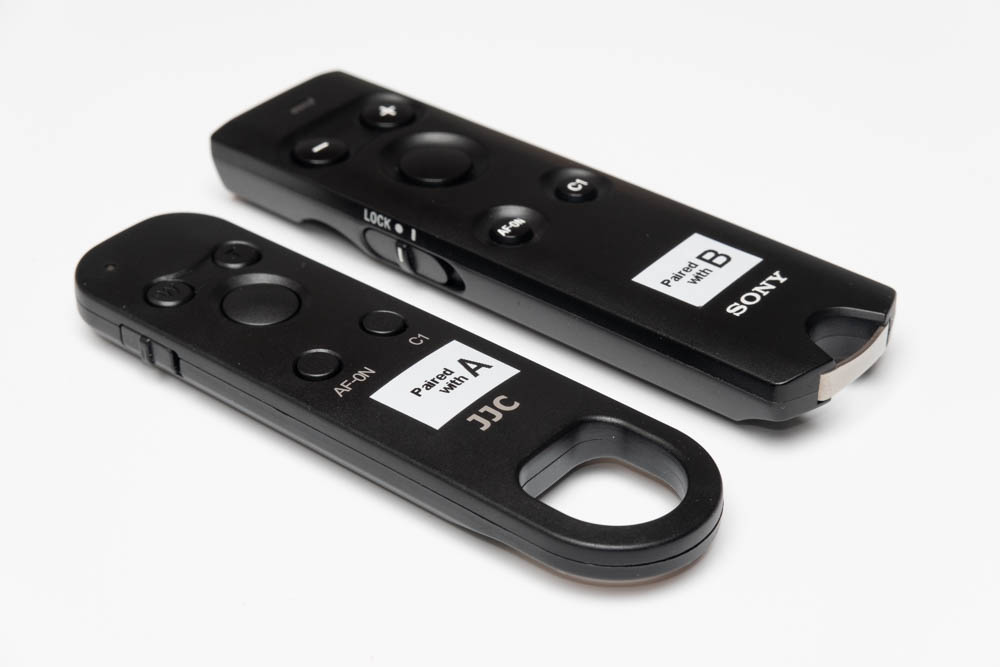
p.1 #1 · Sony RMT-P1BT Remote Third-Party Focus Adjust Compatibility List
The Sony RMT-P1B allows you to rack the focus point forward or back without touching the lens or camera. This feature immensely useful for focus stacking in the field, as it allows you to take focus stacks with less muss and fuss than having to physically and manually adjust the focus.
To set up the system to work this way, you have to set the lens AF/MF switch to "AF" and the camera focus mode to "MF". Then to capture a focus stack:
Manually set focus to the closest distance you want to be in focus by physically turning the focus ring.
Take an exposure (or several, if exposure as well as focus bracketing).
Then press the "+" key 1-3 times to advance focus a bit to the next focal plane
Take another exposure (or several).
Repeat above two steps until you get the focus slices you want (e.g., up to infinity, inclusive).
Very useful in macro as well as landscape photography!
As can be imagined, in works seamlessly and perfectly with OEM Sony FE lenses. Third-party lenses on the other hand, are a little less even. The purpose of this thread is to collect user findings regarding lens compatibility with this feature.
Update 2020-11-01: It Just Works. No muss, no muss, just like a native Sony lens.
This is different from what I previously found, where it worked, but in a weird way: I struggled with this for a while, even speaking to a Sigma engineer who could not get it to work on his end. But then I finally figured out that pressing "AF-ON" after every press of "+" or "-" did get things to work. And then I discovered that focus was actually advancing, but did not register till the shutter was triggered or AF-ON was pressed. Note that the camera needs to be set up in MF focusing mode even though the lens AF/MF switch is the AF position, so AF-On does not actually do anything. Weirdness on top of weirdness ... but it works!
p.1 #4 · Sony RMT-P1BT Remote Third-Party Focus Adjust Compatibility List
mcbroomf wrote:
Thanks for posting this. I wonder if you (or anyone else) might have the chance to test a Batis lens?
Mike
That would be great to know. I recall someone on these forums indicating that it does work, but need to find the post. Hopefully we get some first-person reports.
p.1 #5 · Sony RMT-P1BT Remote Third-Party Focus Adjust Compatibility List
jeetsukumaran wrote:
That would be great to know. I recall someone on these forums indicating that it does work, but need to find the post. Hopefully we get some first-person reports.
p.1 #7 · Sony RMT-P1BT Remote Third-Party Focus Adjust Compatibility List
This is super helpful! This method is really useful with a Sony 90mm macro. Strange how one needs to set the lens to AF and camera body to MF. However, with the Sony RMT-P1BT set to focus mode, I could hold the + or - buttons and watch the focus shift. Don’t know how I missed this feature, but it now makes focus stacking in the field way more simple.
p.1 #8 · Sony RMT-P1BT Remote Third-Party Focus Adjust Compatibility List
Sigma 105mm DG DN macro: works - if you leave the switch located on the lens in AF position and set MF mode in the camera. No need to press AF-On like with the 12-24, it just works.
p.1 #9 · Sony RMT-P1BT Remote Third-Party Focus Adjust Compatibility List
I had to buy that remote as I couldn't control focussing from CaptureOne like I could with my Fuji. Personally I think Sony should implement proper focus stacking into their cameras. But in the mean time, what you suggest should work.
p.1 #11 · Sony RMT-P1BT Remote Third-Party Focus Adjust Compatibility List
Jay Ford wrote:
This rules out any third-party lens without the AF switch completely, like most Samyangs.
The Zeiss Batis lenses do not have an AF/MF switch, and the Batis 135/2.8 is reported to work in this thread. I guess that a lens without a physical AF/MF switch could be considered the same as a lens with a physical AF/MF switch always set to AF.
p.1 #15 · Sony RMT-P1BT Remote Third-Party Focus Adjust Compatibility List
I got the JJ version of the remote and it's not turning out to be very reliable. I wonder if anyone else who has one can comment. Also interested in the reliability of the Sony version.
Mine paired easily enough to an A7R4 1st time, but only when I moved the slider from Still to Video (which the instructions don't mention). After pairing I moved it to Still for focus stacking and using as a remote.
I played with it and it seemed to work OK on a 40mm Batis
The following day outside trying to use it (for focus stacking), it had lost connection to the camera and I could not re-pair it. I had not turned BT off and there is no on/off on the remote.
When I got back home I could still not get it to pair again. I put in a new battery, still no joy. I also tried pairing it to an A7R3, no luck. I put the old battery back in in prep to send it back and I was able to get it paired to the R4.
Following day it was still connected and worked OK.
The day after that it lost connection again and would not pair, again until I pulled the battery and reinserted it.
This one is definitely going back but I wonder if I should get a new one, assuming this is defective, or switch to the Sony. Any other experiences of either remotes?
p.1 #17 · Sony RMT-P1BT Remote Third-Party Focus Adjust Compatibility List
mcbroomf wrote:
This one is definitely going back but I wonder if I should get a new one, assuming this is defective, or switch to the Sony. Any other experiences of either remotes?
I get occasional disconnects with the sony BT remote and my R4. Every once in a while it stops responding, the red light flashes rapidly and I have to try to recycle/restart my camera.
I never had this issue with the IR remotes, but I would always lose those or the battery would die.
p.1 #19 · Sony RMT-P1BT Remote Third-Party Focus Adjust Compatibility List
2nd JJ remote arrived and paired OK. Also still OK overnight. 1st time outside however (slightly below freezing) the focus button locked and drove the focus from near to far after a few presses. This happened several times although stopped eventually. Decided to return it and get the Sony version. Also bought a different 3rd party to try. https://www.amazon.com/gp/product/B08DHS7WX7/ref=ppx_yo_dt_b_asin_title_o00_s01?ie=UTF8&psc=1
Both paired OK, will be testing outside later this week.