This topic is in the 2019 archive. You can read it and like its posts here. It is read only.
Archive 2019Candy World
p.1 #1Candy World
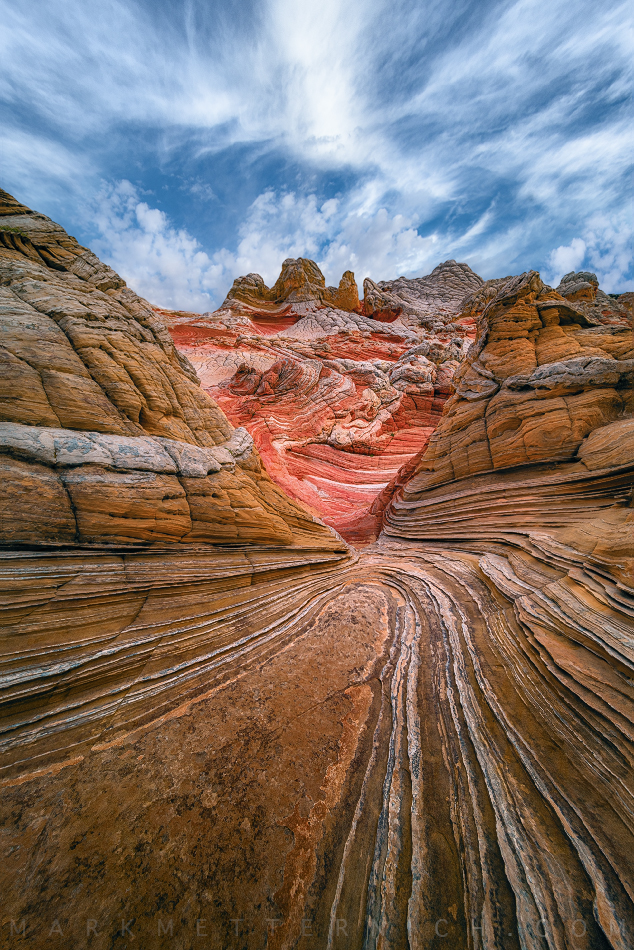
I sure look forward to viewing everyone's work here now that I am home from 4 months of travel.
After maybe over 100 trips here, I love it more than ever!
Btw, PRINT TALK - Ultimate Printing Episode 2 will be on my Youtube page in the next day or so! Enjoy!
A Few Technicals:
This was handheld to demonstrate to my client the potential of the scene with the 11mm ultrawide.
Sony A7R2
Canon 11-24@11mm
f/13
ISO 80 (expansion low)
Single image
Processed using the Gold Standard workflow today (32 bit, Raw Smart Object Layers in Photoshop).
Note, I am leaving Sony to buy the new Panasonic LUMIX S1R Mirrorless (47.3MP)! Robert Park (print guru, owner of Nevada Art Printers and innovator of Lumachrome HD paper) and I have been testing it (including its 187 Megapixel Pixel Shift Modes) and believe it is the best on the market right now. The S1R takes pixel-shift technology a step further than other cameras on the market. It captures eight exposures (almost instantly) and processes them in-camera to a single Raw file, enough to not only get FULL RGB data but also to have incredibly clean crazy high-resolution images (without the lens resolving issues of higher MP cameras) and with EXTRA low noise! You won’t find a full-frame camera that can capture more quality detail than this one. I see higher detail files from this than all the 80+MP Medium Format digital cameras today (I have been doing post-processing/print preparation for photographers and high-end photography galleries for my full time living for over 14 years) and I see EVERY conceivable type of file almost daily, from every camera system). Honestly, I can not see a reason not to buy it. It also takes all lens brands with a converter. Leica, Nikon, Canon and so forth. Sony's weather sealing is pathetic compared to this camera for serious weather landscapes. Also, I love its Vertical and Horizontal flip LCD and so many other awesome things. And no, I do not get paid to say this.
After maybe over 100 trips here, I love it more than ever!
Btw, PRINT TALK - Ultimate Printing Episode 2 will be on my Youtube page in the next day or so! Enjoy!
A Few Technicals:
This was handheld to demonstrate to my client the potential of the scene with the 11mm ultrawide.
Sony A7R2
Canon 11-24@11mm
f/13
ISO 80 (expansion low)
Single image
Processed using the Gold Standard workflow today (32 bit, Raw Smart Object Layers in Photoshop).
Note, I am leaving Sony to buy the new Panasonic LUMIX S1R Mirrorless (47.3MP)! Robert Park (print guru, owner of Nevada Art Printers and innovator of Lumachrome HD paper) and I have been testing it (including its 187 Megapixel Pixel Shift Modes) and believe it is the best on the market right now. The S1R takes pixel-shift technology a step further than other cameras on the market. It captures eight exposures (almost instantly) and processes them in-camera to a single Raw file, enough to not only get FULL RGB data but also to have incredibly clean crazy high-resolution images (without the lens resolving issues of higher MP cameras) and with EXTRA low noise! You won’t find a full-frame camera that can capture more quality detail than this one. I see higher detail files from this than all the 80+MP Medium Format digital cameras today (I have been doing post-processing/print preparation for photographers and high-end photography galleries for my full time living for over 14 years) and I see EVERY conceivable type of file almost daily, from every camera system). Honestly, I can not see a reason not to buy it. It also takes all lens brands with a converter. Leica, Nikon, Canon and so forth. Sony's weather sealing is pathetic compared to this camera for serious weather landscapes. Also, I love its Vertical and Horizontal flip LCD and so many other awesome things. And no, I do not get paid to say this.
Nov 27, 2019 at 09:01 AM
p.1 #2Candy World
Mark,
Fantastic shot brotha! I like the leading lines taking me to candy land...its classic Mark shot. The colors are just awesome, especially the browns.
Fantastic shot brotha! I like the leading lines taking me to candy land...its classic Mark shot. The colors are just awesome, especially the browns.
Nov 27, 2019 at 09:15 AM
p.1 #3Candy World
Mark, glad to see you back posting stunning images and this is no exception. Agree with Sunny about the lines leading the viewers to the subject. Excellent capture and PP. voted👍🏻
Nov 27, 2019 at 09:39 AM
p.1 #5Candy World
Awesome shot! Heading into that area of the country myself here next week and very much looking forward to it. 
Question for you on the S1R's high res mode, how does it do on flowing water?
I've been using the Olympus EM1 Mk2's high res mode, and even in good light with a fast shutter speed, shots of flowing water come out looking like a normal shot, but with a moderate shutter speed. A flow rather than individual droplets. Just curious how the S1R compares.
Nov 27, 2019 at 10:02 AM
p.1 #6Candy World
Wonderful to have your images back! A delightful re-entry...
Nov 27, 2019 at 11:36 AM
p.1 #7Candy World
Great shot, Mark. As usual of course.
BUT, I keep reading you print that you work in a 32bit workflow...
These cameras can hardly output enough data to make use of 14 bits, let alone 16, or even 32. Do you honestly think that your prints have any advantage at all to using a 32 bit workflow?
With all due respect, I think this is getting a ways into the audiophile world of diminishing returns. Even if a print expert can tell the difference by extremely precise analysis, does it make any difference to everyone else?
And, what about your monitor? If you are doing any color correction or other edits to the color and new gradient tones, then your 10 bit monitor isn't going to come close to showing what is actually in your 32 bit file.
To summarize, if your camera is shooting 14bits, then even in a 32 bit workflow, your data is still 14bits. You would only (in theory) see a difference if you added new data to the Photoshop file that was generated in a 32 bit space. If you are adding a color gradient, then this would apply. But even then, 16bit can handle gradients really well.
From what I know, the 32 bit workflow is more for people who are importing 32bit HDR images (made from multiple 14 bit files), and 3D artists also often work in a 32 bit HDR workflow before final rendering. In either case, more data is being added to the file than what can be achieved with single RAW files. For HDR photos, 32 bit is pointless anyway because one would need extreme tone mapping to get a final image that can be seen in print or 8-10 bit monitors. Even single 14 bit files need to be "tone mapped" to show a larger range of light in the photo scene.
Nov 27, 2019 at 12:48 PM
p.1 #8Candy World
JohanEickmeyer wrote:
Great shot, Mark. As usual of course.
BUT, I keep reading you print that you work in a 32bit workflow...
These cameras can hardly output enough data to make use of 14 bits, let alone 16, or even 32. Do you honestly think that your prints have any advantage at all to using a 32 bit workflow?
With all due respect, I think this is getting a ways into the audiophile world of diminishing returns. Even if a print expert can tell the difference by extremely precise analysis, does it make any difference to everyone else?
And, what about your monitor? If you...Show more →
Hi Johan. Thank you for your reply.
I very much appreciate you taking precious time to bring up the issue here because the 32-bit calculations done in ACR are worth exploiting if a photographer wants the highest possible quality files (a future proof, if you will)! We see a large real-world quality difference daily with a Raw Smart Object workflow (Raw Layers in Photoshop) and advocate it as part of the current Gold Standard workflow available today. "Raw Smart Object Layers - The Gold Standard of Photo Editing" Video Tutorial is coming out soon. With that people can see how to easy it is to implement the superior results into their workflow if they want.
I have posted a simple explanation in the next paragraph but I wanted to hear from my copartner in print crime, master printer Robert B Park (Nevada Art Printers - Lumachrome HD) on the matter. I'll quote him below the next paragraph. Maybe worth mentioning is that this is not theory, it is practical application. Real-world results are all that matters. For those who may not know it, when I am not on the road leading workshops, ALL I do about 10-16 hours a day, 5-6 days a week (for almost 14 years now) is post-processing (print post-processing services) producing fine art gallery prints of the highest caliber for both national and international photography galleries, as well as countless individual photographers. I literally spend about 70-80 hours a week behind my computer doing nothing but pushing the envelope/edge of technology (and obsessively testing it) creating master prints of every conceivable size (often files sent to me become 90+ inches, 80", 72", 60", 45", 36", 24", 18", 12" (of all types of print media) and a postcard or calendar too! No wonder I am having lower back problems!
Camera Raw does the computations in 32-bit depth to accommodate the HDR radiance space so the precision is much higher and gives superior adjustments especially when there are large moves or lots of cumulative adjustments (extremely typical of most photographers today). 32-bit floating-point math is the way Camera Raw processes with 32-bit precision and faster speeds. Processors use this type of math internally. The output into Photoshop is 16-bit, however, the adjustments are done in the higher/superior bit depth. Gradients are noticeably much better. Color tonality/fidelity is better. Highlight definition is dramatically better. Artifacts are less. Highlight recovery is probably the most notable and easily seen benefit, and there are others. There is no way to get these results in 16-bit depth. It is in fact one of our many secrets to making very large, very high-resolution images ("The Ultimate Fine Art Printmaking Workshop" - Las Vegas).
This is how Robert explained it to me (some paraphrasing):
It is mistaking the difference between an output in a lower bit depth versus doing the computations for the edits in a high bit depth. To use an audio file term, doing the edits in a higher bit depth is similar to analog being that analog is an infinite bit depth and sampling frequency. Those with recording industry experience know that mastering and mixing are best done in a floating-point math environment. Yes, if you only made one small adjustment the difference might be negligible, however, with the number of adjustments and complexity of edits that we are constantly receiving or making, especially with HUGE layer stacks it becomes far more obvious that the greater the bit-depth the better the final compounded edit will be. Anyone that has seen things like posterization in skies and banding in smooth graduated areas knows that it is pretty easy to damage a file, especially when editing in lower bit depths. The people that do HDR are very well aware of the advantage of 32-bit floating math for making those edits and tone mapping otherwise they would have horrible banding and artifacts. As it is HDR already gets artifacts because of the gross level of manipulation that the edits make and without 32-bit it would be impossible.
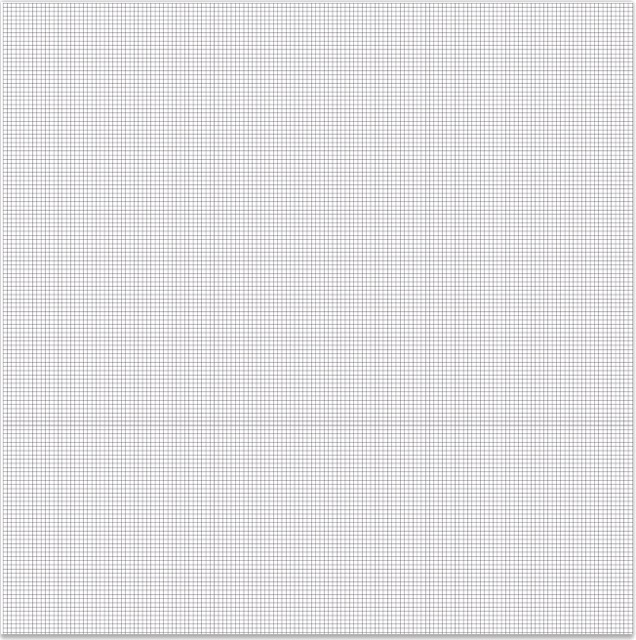
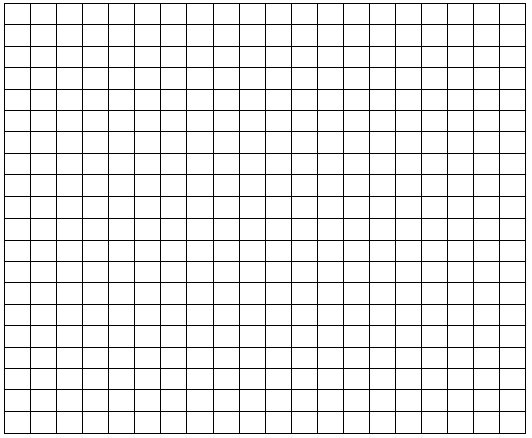
Here might be a simplified way of looking at it. Below images are 2 grids that represent data points in a cartesian graph. Call one 16-bit and the other 32 for simplicity's sake. Remember, color images have a 3rd dimension, however, this is a simplified model. Think of each intersection as a representable color point and the non-intersections are data points that will be moved to the closest intersection when an edit is applied that is slight or not landing on an exact point. Complex edits from many layer stacks done through masks will yield many, MANY data points that are rounded and those rounded data points get applied to the next calculation/edit and so on, and so on for every single pixel in the image. It rapidly becomes obvious why we need a greater number of cells or data points to keep the final result smooth and have higher fidelity. Adobe knows this and it is why Camera Raw edits in 32-bit and the heavy lifting of HDR absolutely demands it.
Great shot, Mark. As usual of course.
BUT, I keep reading you print that you work in a 32bit workflow...
These cameras can hardly output enough data to make use of 14 bits, let alone 16, or even 32. Do you honestly think that your prints have any advantage at all to using a 32 bit workflow?
With all due respect, I think this is getting a ways into the audiophile world of diminishing returns. Even if a print expert can tell the difference by extremely precise analysis, does it make any difference to everyone else?
And, what about your monitor? If you...Show more →
Hi Johan. Thank you for your reply.
I very much appreciate you taking precious time to bring up the issue here because the 32-bit calculations done in ACR are worth exploiting if a photographer wants the highest possible quality files (a future proof, if you will)! We see a large real-world quality difference daily with a Raw Smart Object workflow (Raw Layers in Photoshop) and advocate it as part of the current Gold Standard workflow available today. "Raw Smart Object Layers - The Gold Standard of Photo Editing" Video Tutorial is coming out soon. With that people can see how to easy it is to implement the superior results into their workflow if they want.
I have posted a simple explanation in the next paragraph but I wanted to hear from my copartner in print crime, master printer Robert B Park (Nevada Art Printers - Lumachrome HD) on the matter. I'll quote him below the next paragraph. Maybe worth mentioning is that this is not theory, it is practical application. Real-world results are all that matters. For those who may not know it, when I am not on the road leading workshops, ALL I do about 10-16 hours a day, 5-6 days a week (for almost 14 years now) is post-processing (print post-processing services) producing fine art gallery prints of the highest caliber for both national and international photography galleries, as well as countless individual photographers. I literally spend about 70-80 hours a week behind my computer doing nothing but pushing the envelope/edge of technology (and obsessively testing it) creating master prints of every conceivable size (often files sent to me become 90+ inches, 80", 72", 60", 45", 36", 24", 18", 12" (of all types of print media) and a postcard or calendar too! No wonder I am having lower back problems!
Camera Raw does the computations in 32-bit depth to accommodate the HDR radiance space so the precision is much higher and gives superior adjustments especially when there are large moves or lots of cumulative adjustments (extremely typical of most photographers today). 32-bit floating-point math is the way Camera Raw processes with 32-bit precision and faster speeds. Processors use this type of math internally. The output into Photoshop is 16-bit, however, the adjustments are done in the higher/superior bit depth. Gradients are noticeably much better. Color tonality/fidelity is better. Highlight definition is dramatically better. Artifacts are less. Highlight recovery is probably the most notable and easily seen benefit, and there are others. There is no way to get these results in 16-bit depth. It is in fact one of our many secrets to making very large, very high-resolution images ("The Ultimate Fine Art Printmaking Workshop" - Las Vegas).
This is how Robert explained it to me (some paraphrasing):
It is mistaking the difference between an output in a lower bit depth versus doing the computations for the edits in a high bit depth. To use an audio file term, doing the edits in a higher bit depth is similar to analog being that analog is an infinite bit depth and sampling frequency. Those with recording industry experience know that mastering and mixing are best done in a floating-point math environment. Yes, if you only made one small adjustment the difference might be negligible, however, with the number of adjustments and complexity of edits that we are constantly receiving or making, especially with HUGE layer stacks it becomes far more obvious that the greater the bit-depth the better the final compounded edit will be. Anyone that has seen things like posterization in skies and banding in smooth graduated areas knows that it is pretty easy to damage a file, especially when editing in lower bit depths. The people that do HDR are very well aware of the advantage of 32-bit floating math for making those edits and tone mapping otherwise they would have horrible banding and artifacts. As it is HDR already gets artifacts because of the gross level of manipulation that the edits make and without 32-bit it would be impossible.
Here might be a simplified way of looking at it. Below images are 2 grids that represent data points in a cartesian graph. Call one 16-bit and the other 32 for simplicity's sake. Remember, color images have a 3rd dimension, however, this is a simplified model. Think of each intersection as a representable color point and the non-intersections are data points that will be moved to the closest intersection when an edit is applied that is slight or not landing on an exact point. Complex edits from many layer stacks done through masks will yield many, MANY data points that are rounded and those rounded data points get applied to the next calculation/edit and so on, and so on for every single pixel in the image. It rapidly becomes obvious why we need a greater number of cells or data points to keep the final result smooth and have higher fidelity. Adobe knows this and it is why Camera Raw edits in 32-bit and the heavy lifting of HDR absolutely demands it.
Nov 27, 2019 at 04:12 PM
p.1 #9Candy World
Good explanation, i have to experiment on it, to regular person it does not make a difference, good for pixel peepers i suppose.
Nov 27, 2019 at 05:47 PM
p.1 #10Candy World
Great image! I also appreciate your explanation of the technical details around image quality.
Phil
Phil
Nov 27, 2019 at 05:52 PM

p.1 #12Candy World
Nice image and the S1R is interesting camera for sure. Believe it might (or a similar one) be able to do star tracking for longer night work too. Friends camera has that ability, different type though. Fun tech for sure.
aF
aF
Nov 28, 2019 at 07:49 AM
p.1 #13Candy World
That's funny because I was seriously thinking of buying that camera after years of owning only Canon but having a variety of Leica R lenses, which I could use with that camera quite easily.i finally had a chance to check it out a couple of weeks ago and I was quite surprised how heavy it was for a mirrorless camera. I think its heavier than my Canon 5DSR 50 mp. But mostly, no one here on FM seemed to know much about it and there weren't very many lenses made for it yet which for the price told me it was too new and too expensive, plus I noticed people who reviewed it didnt think Lumix thought out things real well with the body. This might be a mark 1 if it takes off but I cant wait to see the photos you take with i!! Maybe I'll end up switching in the future. Good luck.
Nov 28, 2019 at 09:49 AM
p.1 #14Candy World
Fantastic composition Mark! Breathtaking!!! Thanks for taking the time to educate us! Always appreciate your unselfishness with your knowledge!!
Dan
Dan
Nov 28, 2019 at 09:56 AM
p.1 #15Candy World
great comp and beautiful color work....looks like i'm standing right there
Nov 28, 2019 at 10:31 AM
p.1 #16Candy World
Awesome image, camera and explanation. I own the S1r. It is an amazing camera. Never seen images so clean. With the Sigma adapter ALL my Canon lenses and Zeiss lenses work seamlessly. Mark and Robert have been writing and publishing about this camera technology for some time. They convinced me. Don’t regret switching.
Nov 28, 2019 at 07:08 PM
p.1 #17Candy World
Mark, have you had a chance to test the Sony A7Riv? It would be interesting to hear your thoughts on it compared to the S1r...
Cheers!
Cheers!
Dec 01, 2019 at 08:53 AM
p.1 #18Candy World
Thank you for the technical explanation Mark and once again a great image!
Dec 01, 2019 at 12:47 PM
p.1 #20Candy World
whoa this is an absolute stunner! congrats on a great shot.
Dec 03, 2019 at 11:49 PM