fredmiranda.com
Login

Moderated by: Fred Miranda
  New fredmiranda.com Mobile Site
  New Feature: SMS Notification alert
  New Feature: Buy & Sell Watchlist
  

FM Forums | Sony Forum | Join Upload & Sell

1              3       4       end
  

Archive 2019 · Canon Colors on Sony a7III/A7R3/A9


numbertwo
Offline
• • •
Upload & Sell: Off
p.2 #1 · Canon Colors on Sony a7III/A7R3/A9


Sony jpgs are improving, specially in the third gen series (a9 the best, then a7iii, then the r3) but still canon color science is better in my opinion. People can provide one thousand scientific tests or whatever, I believe what my eyes see, and comparing the Sony side by side to canon, I prefer canon colors all the time. But of course it's a matter of taste.

But yes, the real issue is that the colors are a real mess in Lightroom, but however the Lightroom profiles for Canon are not that bad, still not the same as canon jpg, but very close adjusting a couple of things (from canon raw to canon jpg). For sony files it's more complicated and I think it's impossible to have just one magic key that turns every Sony pic in a Canon pic, because the sensor response is different depending on the lighting conditions, etc, but at least I'm liking the profiles/presets I'm making much more than every other profile I've tested: this includes Mauricio piraccini profiles, huelight profiles, Fred miranda and others tweaks for Lightroom, xrite profiles, lumariver profiles, etc. I've tried many of them, and in my opinion, for my taste, my presets are the best, and I'm sharing them for free with you guys(the eoshd guy asks money for a couple of tweaks in a picture profile in camera, huelight as well (and I paid), etc).

I've used many times capture one, and for a lot of things I find it better and faster than Lightroom, and the default color rendering is much better, but I find the colors in capture one "break" easier and the files are less maleable than in Lightroom. I don't know how to explain it properly, but I find in Lightroom I can tweak things with the picture still looking natural, whereas in CO I'm more limited.

Then one thing I don't understand, is that Lightroom has a ton of lens profiles for manual lens etc that are not available in Lightroom, but then for example for native lens with the profile included, the profile is usable in capture one (for example, my samyang fe 85 1.4), but not in Lightroom. Weird.

Edited on May 26, 2019 at 11:32 PM · View previous versions


May 26, 2019 at 01:36 PM
phototiimo
Offline
• • •
Upload & Sell: Off
p.2 #2 · Canon Colors on Sony a7III/A7R3/A9


So wait, is it possible to concert this to an ICC profile for use in Capture One? I understand that C1 profiles are already pretty good, I just want to compare them.


May 26, 2019 at 04:07 PM
fadeslayer
Offline
• • •
Upload & Sell: Off
p.2 #3 · Canon Colors on Sony a7III/A7R3/A9


numbertwo wrote:
Sony jpgs are improving, specially in the third gen series (a9 the best, then a7iii, then the r3) but still canon color science is better in my opinion. People can provide one thousand scientific tests or whatever, I believe what my eyes see, and comparing the Sony side by side to canon, I prefer canon colors all the time. But of course it's a matter of taste.
.


I would bet that in blind tests it would be funny to see choices... For the most part Canon lovers end choosing Sony pictures the most


May 27, 2019 at 01:21 AM
numbertwo
Offline
• • •
Upload & Sell: Off
p.2 #4 · Canon Colors on Sony a7III/A7R3/A9


fadeslayer wrote:
I would bet that in blind tests it would be funny to see choices... For the most part Canon lovers end choosing Sony pictures the most


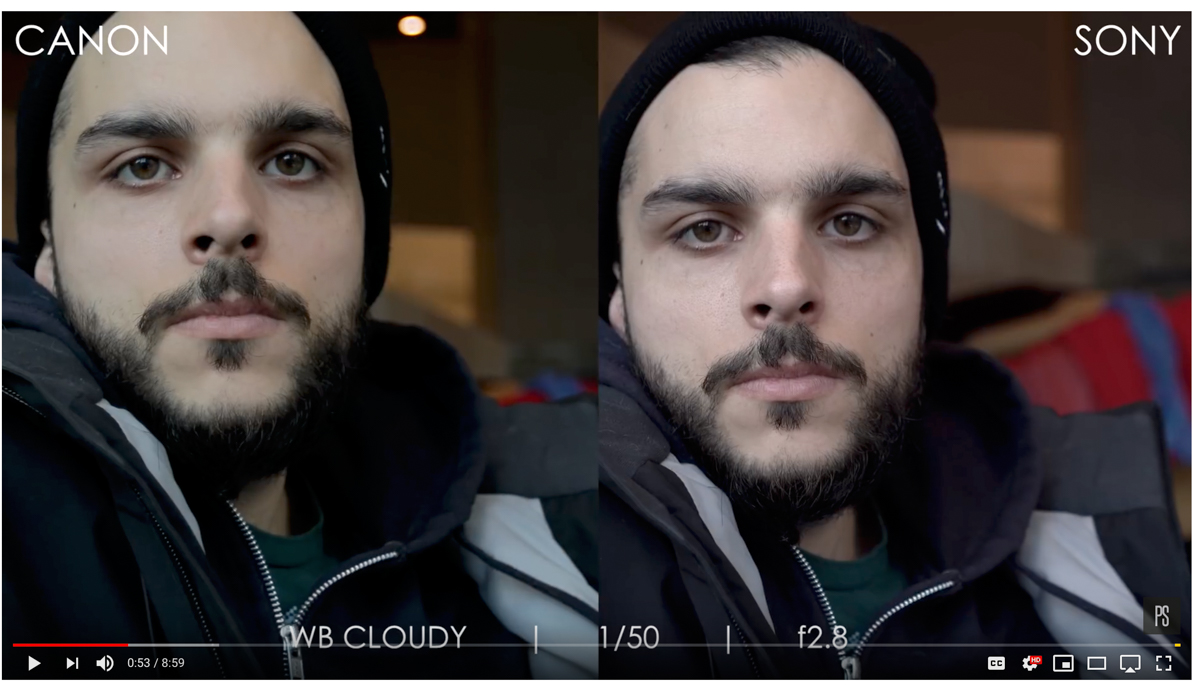
Not a blind test, but look at this video, shot with a grey card and eos R, fuji and a7iii

&t=1s

If you watch others video from the same person, you will see sometimes the canon is warmer, sometimes it's colder, but for me, Canon always have the more natural yet pleasing look.


May 27, 2019 at 01:39 AM
fadeslayer
Offline
• • •
Upload & Sell: Off
p.2 #5 · Canon Colors on Sony a7III/A7R3/A9


numbertwo wrote:
Not a blind test, but look at this video, shot with a grey card and eos R, fuji and a7iii

...

If you watch others video from the same person, you will see sometimes the canon is warmer, sometimes it's colder, but for me, Canon always have the more natural yet pleasing look.


Let me quote a comment


Xing Liu
2 months ago
Well, this is a learning experience for me. At least from this test I know that Sony and Fuji don’t handle grey card well. If I didn’t use grey card across all three, no one will know. And no single method will satisfy everyone. When I use auto white balance, people will have their opinions saying why not grey card. I will continue to experiment and learn thru my way in these tests.


So without grey card things NATIVELY are different, something wrong with gray card calibration flow.

(given I have no idea of how he made this test, I have not seen gray card calibration process in this video, maybe something wrong in his process, if he could film it while doing it things may come out differently :cool


May 27, 2019 at 04:25 AM
numbertwo
Offline
• • •
Upload & Sell: Off
p.2 #6 · Canon Colors on Sony a7III/A7R3/A9


fadeslayer wrote:
Let me quote a comment

So without grey card things NATIVELY are different, something wrong with gray card calibration flow.

(given I have no idea of how he made this test, I have not seen gray card calibration process in this video, maybe something wrong in his process, if he could film it while doing it things may come out differently :cool


He should have used a white card for white balance instead of grey cards. Grey cards are most of the time not accurate enough (except very expensive ones) and should be used only for metering...
Besides, he tried with the grey card because in his previous videos people complained about the differences in colors among the cameras were just due to white balance, so he made this video trying to put this parameter out of the equation, and the results were even worse.

Please check other videos of that guy, in AWB. Sometimes the canon is warmer, sometimes it's colder, but it always look nice and natural. The sony always look like with a grading filter in the whole image. This experience has been my experience shooting side by side with both cameras in different lighting conditions. the Sony is not bad, actually the a7III is quite better than my a7r2 was, but the canon is just at a different level colorwise. In my opinion, under my subjective individual perception.


May 27, 2019 at 05:37 AM
Frogfish
Offline
• • • • •
Upload & Sell: Off
p.2 #7 · Canon Colors on Sony a7III/A7R3/A9


We've seen this issue (nay question) arise time and again. It's almost always from jpg shooters who need to get shots out quickly to editors etc. Because if you are shooting in RAW it's not an issue at all. Create your own presets if you like but the lighting conditions, reflections and overall colour of your surroundings will have far more effect on the skin colours than the camera.

Here is an excellent BLIND test between Canon / Nikon and Sony (however do note is was only between the flagship cameras). Spoiler : most people chose Sony but it was a close run with Canon and Nikon trailing. The comments on the original page are interesting too with many Canon users exclaiming their surprise they chose Sony.


https://www.dpreview.com/videos/9193994762/blind-portrait-shootout-sony-a9-vs-canon-1dx-mark-ii-vs-nikon-d5

As far as those that claim Sony's Colour Science isn't up to spec, these people have been testing cameras since 2017 and as far as fidelity goes there isn't a Canon in the Top 10 (Fuji X-T30 is #1) there are however 4 x Sonys. Ignore their weird numbering and work it out for yourself.

https://www.pdnonline.com/gear/cameras/the-best-cameras-for-color-reproduction-ranked/

There was a long debate here on SCM too :
https://www.fredmiranda.com/forum/topic/1569396/0

BTW with regard to the photograph of the Oriental people posted on Page 1. The original (not that with the preset applied) seems to have skin tones far closer to those of your average Chinese person (there are clearly differences between most Chinese & Japanese or Thai etc. Koreans' skin tones are generally much closer or identical to Northern Chinese (so no surprise there).

After the preset has been applied however you've turned them into your typical white/pink skinned person ! Now they may prefer that (I know my Chinese wife and her friends like me to take some of the 'yellow' out of their skin, but you can't claim colour fidelity with it (it may be a hit at weddings with young Chinese girls though).

The main reason they prefer the lighter look is that darker tones are associated with people from the countryside, typically farmers and that lighter skin with city folk (which is why they often use umbrellas to shield their skin on holidays abroad) and lighter skin tones have always been associated with the Emperor and the wealthy who spent most of their time indoors (interestingly it's also why the Brits (all Northern Europeans actually) prefer a nice tan, because in the 1800s / early 1900s you had to have a lot of money to travel to, typically, the South of France or Italy and acquire a tan. So it was an indicator of your wealth/standing in society) .


May 27, 2019 at 05:45 AM
LBJ2
Offline
• • • • •
Upload & Sell: On
p.2 #8 · Canon Colors on Sony a7III/A7R3/A9


One of the most notable now infamous "Does Canon's color beat Sony's? videos out there. 5D IV vs A7r3. This one just went completely left. Just look at that dull green skin tone ( hint, it's not the Sony)

Regardless, you can be a slave to in-camera color processing and then easily buy the camera brand that pleases you the most and off you go. Or you can learn how to manage your own color and become the master. Can't blame this one on Adobe. Nope.


May 27, 2019 at 06:03 AM
numbertwo
Offline
• • •
Upload & Sell: Off
p.2 #9 · Canon Colors on Sony a7III/A7R3/A9


Frogfish wrote:
We've seen this issue (nay question) arise time and again. It's almost always from jpg shooters who need to get shots out quickly to editors etc. Because if you are shooting in RAW it's not an issue at all. Create your own presets if you like but the lighting conditions, reflections and overall colour of your surroundings will have far more effect on the skin colours than the camera.

Here is an excellent BLIND test between Canon / Nikon and Sony (however do note is was only between the flagship cameras). Spoiler : most people chose Sony but it was
...Show more

I watched that video already, and in some cases I chose the Sony as well, but hey, a9 colors in jpg are quite nice, and sometimes in this blind tests, if you're given different choices, you tend to go for the more "neutral" one, and that one could be the Sony. I'm not saying the Sony is not the most accurate, I say it's not the most pleasing.
Look at this video as well, comparing the a7iii to a 5dMKIII

&t=740s

About the asian in the picture, they're from the Philippines or half philippinos, their skin is not that yellow. I've been living in Hong Kong for more than two years and I know how the taste here is, but even me I look quite yellow most of the time in the sony, or other times too red, other times too green, it's not consistent, the skin just look weird, like not a natural photo but a drawing. Black people usually look less saturated and more greenish in sony, and they're darker, with a more beautiful and vibrant reddish dark brown tone in canon.
But the jpg are not that bad actually, the real problem is raw in lightroom. Adobe profiles are off, and the camera profiles made by adobe as well are even worse.


May 27, 2019 at 06:10 AM
philip_pj
Offline
• • • • • •
Upload & Sell: On
p.2 #10 · Canon Colors on Sony a7III/A7R3/A9


I see loads of images from well-intentioned portraitists who apparently think facial skin of Caucasians living in cool climates or who never see the sun ought to have near blown out skin. Not a technical good look IMO, but can see why they tend that way: a lot of Canon subjects with regular exposure look like northern Euros after an hour in the Indian sun, a pink out. I too photograph a lot of Asians, with an incredible range of skin tones - for example some are mid-dark orange, some very sallow, some 90% chocolate. Can't get too upset re skin colour, just aim for highly acceptable and credible repros.


May 27, 2019 at 06:21 AM
LBJ2
Offline
• • • • •
Upload & Sell: On
p.2 #11 · Canon Colors on Sony a7III/A7R3/A9


Amazed there is yet another thread on this same topic.


May 27, 2019 at 06:27 AM
vdo1
Offline
• • • •
Upload & Sell: Off
p.2 #12 · Canon Colors on Sony a7III/A7R3/A9


Yeah they remind me of the "Portra vs NPH" wars


May 27, 2019 at 08:54 AM
NJPhotographer
Offline
• • •
Upload & Sell: Off
p.2 #13 · Canon Colors on Sony a7III/A7R3/A9


LBJ2 wrote:
One of the most notable now infamous "Does Canon's color beat Sony's? videos out there. 5D IV vs A7r3. This one just went completely left. Just look at that dull green skin tone ( hint, it's not the Sony)

Regardless, you can be a slave to in-camera color processing and then easily buy the camera brand that pleases you the most and off you go. Or you can learn how to manage your own color and become the master. Can't blame this one on Adobe. Nope.


There's something wrong with their test. Canon does not make people green. That goes against all of my experience with Canon. Just look at the Sony settings at 0:04 in the video and you can see that not everything is set to "standard" as they claim. The Sony is set to -2 Saturation, and its DRO is set to LV5. Who knows what else they did that isn't "standard"?


May 27, 2019 at 10:42 AM
vdo1
Offline
• • • •
Upload & Sell: Off
p.2 #14 · Canon Colors on Sony a7III/A7R3/A9


NJPhotographer wrote:
There's something wrong with their test. Canon does not make people green.


Yeah, they're holding it wrong

A different test. The lady starting at 4m00 looks greenish to me:


May 27, 2019 at 11:22 AM
NJPhotographer
Offline
• • •
Upload & Sell: Off
p.2 #15 · Canon Colors on Sony a7III/A7R3/A9


Actually she doesn't look greenish at all. She looks right on compared to reference pics (Kodak Shirley). The Sony is showing her too magenta, but that could just be how the white balance is set.

All of these so-called color science tests are messed up by different white balance settings on different cameras. He is picking the white balance off a grey card, but that means the colors are being reset by the software. He's not actually showing the same settings on both cameras.


May 27, 2019 at 03:26 PM
derKoekje
Offline
• • •
Upload & Sell: Off
p.2 #16 · Canon Colors on Sony a7III/A7R3/A9


Am I one of the few people who can at least appreciate Sony’s jpg’s? There are actually some decent creative styles like Autumn Leaves, which Adobe inexplicably omits from LR. I shoot raw + jpeg though. The jpeg’s for phone sharing. I wish there was some way to get all the creative styles in Lightroom. I made presets but it’s never a true replication.


May 29, 2019 at 09:45 AM
vdo1
Offline
• • • •
Upload & Sell: Off
p.2 #17 · Canon Colors on Sony a7III/A7R3/A9


derKoekje wrote:
Am I one of the few people who can at least appreciate Sony’s jpg’s? There are actually some decent creative styles like Autumn Leaves, which Adobe inexplicably omits from LR. I shoot raw + jpeg though. The jpeg’s for phone sharing. I wish there was some way to get all the creative styles in Lightroom. I made presets but it’s never a true replication.


The in camera "creative styles" are also available in Sony's Imaging Edge RAW converter:

https://support.d-imaging.sony.co.jp/app/imagingedge/en/

Also useful to replicate "Sony jpg colors", by default it will produce images similar to what the in camera jpg converter would produce.


May 29, 2019 at 09:55 AM
numbertwo
Offline
• • •
Upload & Sell: Off
p.2 #18 · Canon Colors on Sony a7III/A7R3/A9


vdo1 wrote:
Yeah, they're holding it wrong

A different test. The lady starting at 4m00 looks greenish to me:


About that video, first thing he uses capture one to develop the raw, no jpg out of camera, no Lightroom, which is the main issue.

He sets the wb with a grey card. Part of the color science thing is about how cameras manage the white balance, but also some cameras might have some small color casts in shadows or highlights that are defining that color science, and depending on the shade of grey you do the white balance, you can alter other parts of the image. For example, look at the machbeth grey patches with canon and with Sony. Depending on the one you do the white balance, in both cameras the rest of the greys will be different, none of them are perfect, and those subtle changes introduce sometimes green in the shadows, or a bit of blue in highlights, etc. I've spent a lot of time tweaking my presets and I know what I'm talking about.

Then, the problem is not that Sony is colder and canon warmer, in that particular case it's like that, but the thing is sometimes Sony is warmer than the Canon, sometimes the Sony is too green, sometimes is too magenta, it's not anything consistent, but what it is consistent is that for me, Canon colors just look better always, the skin looks like skin in the context of the picture, in relation to the rest of the colors in the image. Sony jpgs usually look like drawings, or photos with a filter somehow, and canon just look clean, beautiful and natural.


May 29, 2019 at 12:26 PM
vdo1
Offline
• • • •
Upload & Sell: Off
p.2 #19 · Canon Colors on Sony a7III/A7R3/A9


numbertwo wrote:
[...] Sony jpgs usually look like drawings, or photos with a filter somehow, and canon just look clean, beautiful and natural.


This reminded me of a friend who extensively shot a fisheye lens during a trip. After culling and processing all those images, he mentioned that rectilinear lens images started to look weird to him....


May 29, 2019 at 02:32 PM
Tirpitz666
Offline
• • •
Upload & Sell: Off
p.2 #20 · Canon Colors on Sony a7III/A7R3/A9


phototiimo wrote:
So wait, is it possible to concert this to an ICC profile for use in Capture One? I understand that C1 profiles are already pretty good, I just want to compare them.


Don't know about C1, but I tried to convert them via dpp2icc and then use them in Affinity Photo via a soft proofing layer (as found in another forum) and it doesn't seem to work, I cannot see any difference (which is indeed quite apparent when you apply them in ACR).


May 29, 2019 at 11:14 PM
1              3       4       end


FM Forums | Sony Forum | Join Upload & Sell

1              3       4       end


Welcome back
Log in to your account