p.1 #1 · Film/slide digitizing using Sony 90mm lens and Nikon ES-2
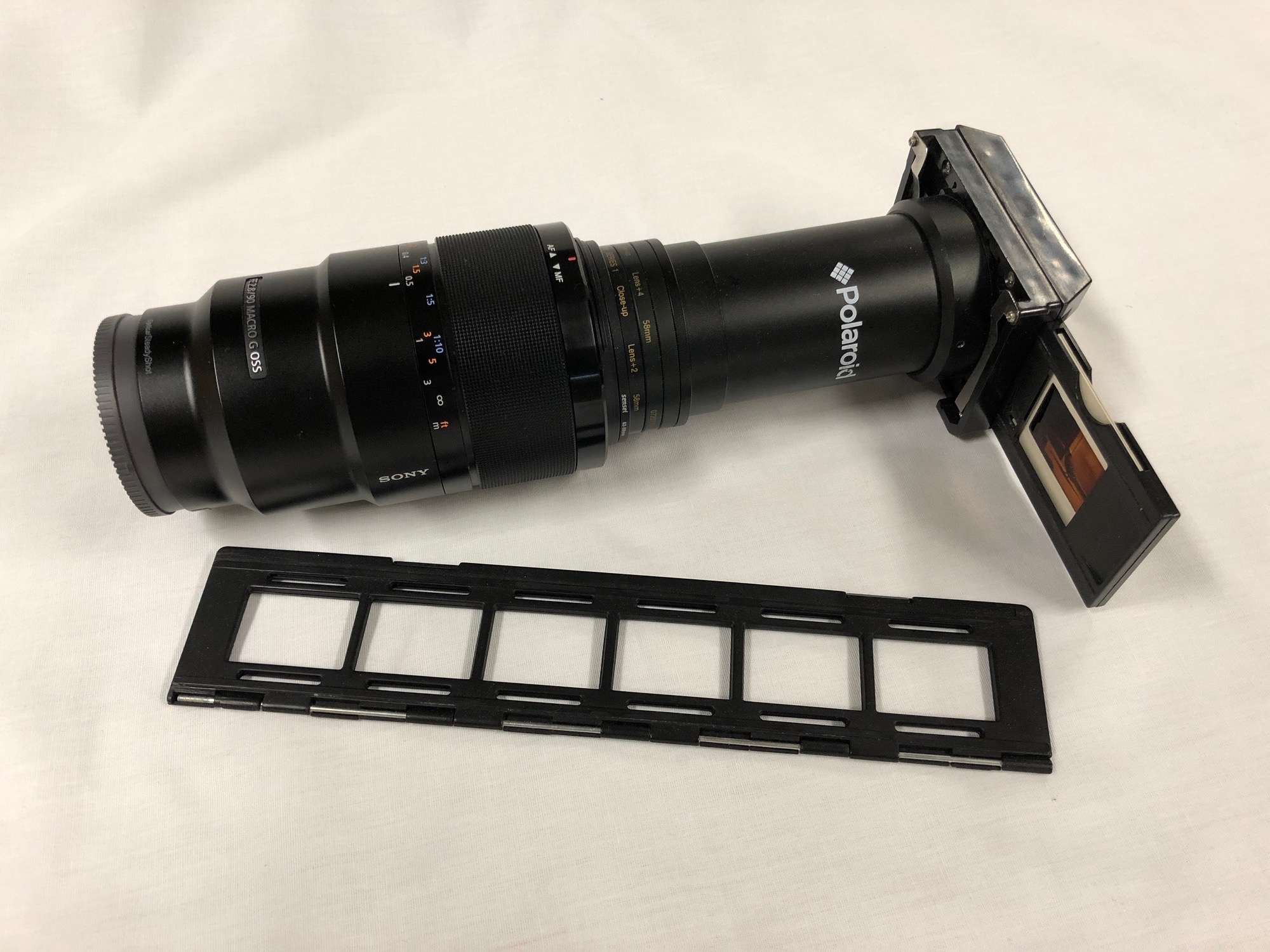
Short note to show how the Nikon ES-2 can be adapted for use with the Sony 90mm lens to get 42MP scans of slides and film (remember them?). The Nikon ES-2 is meant for use with the Nikon 850 and a Nikon 60mm macro lens. It easily attaches to the lens with the 62mm filter thread. The Sony 90mm lens also has a 62mm thread but the ES-2 is too short. I use a set of adapter rings to add the distance required to hold the film at the 1:1 working distance of the 90mm lens. The set up is shown in the picture below.
It works well and makes it quick and easy to get good slide scans. There is also a film strip holder for strips of up to 6 frames. I use and old light box on its side as a light source. Some recommend the Lume Cube for the light source but I have not tried it.
p.1 #2 · Film/slide digitizing using Sony 90mm lens and Nikon ES-2
Looks like a nice easy solution. I’ve been scanning 6x6 medium format film with my A7rii and the Sony 55/1.8 + close-up lens in the setup below. I’m only capturing at 1:3 magnification, and I still get about 16MP (anything above around 1:2 I would have to do frame stitching due to the square frame, and that is way too time consuming). I’m open to better options, but from what I’ve seen I’d have I’d have to spend hundreds of dollars to do better with a dedicated film scanner.
p.1 #4 · Film/slide digitizing using Sony 90mm lens and Nikon ES-2
molson wrote:
I imagine you would have a much more convenient working distance using the Sony FE 50mm f2.8 macro instead of the 90.
I don’t know if the ES-2 can adjust enough to use a 50mm lens instead of a 60mm. The end cap has some adjustment range so it might work. I have the 90 and not the 50 so using the rings to extend was easy and cost effective. I don’t see that 50 vs 90 makes any difference as long as it is 1:1.
p.1 #5 · Film/slide digitizing using Sony 90mm lens and Nikon ES-2
Thanks Dave, just ordered. It will be a little ironic using a Nikon adapter on my Sony camera to digitize my old Kodak and Fuji slides and film shot with Minolta and Canon cameras.
dclark wrote:
Short note to show how the Nikon ES-2 can be adapted for use with the Sony 90mm lens to get 42MP scans of slides and film (remember them?). The Nikon ES-2 is meant for use with the Nikon 850 and a Nikon 60mm macro lens. It easily attaches to the lens with the 62mm filter thread. The Sony 90mm lens also has a 62mm thread but the ES-2 is too short. I use a set of adapter rings to add the distance required to hold the film at the 1:1 working distance of the 90mm lens. The set up is shown in the picture below.
It works well and makes it quick and easy to get good slide scans. There is also a film strip holder for strips of up to 6 frames. I use and old light box on its side as a light source. Some recommend the Lume Cube for the light source but I have not tried it.
Edit: I should also mention that tethering the camera using Sony's Remote/Viewer/Edit software makes the workflow go quickly and smoothly....Show more →
p.1 #6 · Film/slide digitizing using Sony 90mm lens and Nikon ES-2
dclark wrote:
I don’t know if the ES-2 can adjust enough to use a 50mm lens instead of a 60mm. The end cap has some adjustment range so it might work. I have the 90 and not the 50 so using the rings to extend was easy and cost effective. I don’t see that 50 vs 90 makes any difference as long as it is 1:1.
Dave
Historically, the 50/55/60mm macro lenses were designed for copy work (flat field) and they work great with the Nikon ES-1 and ES-2 slide copiers, since they were obviously designed for use with these focal lengths. However, those lenses certainly don't look as impressively large as your setup.
p.1 #7 · Film/slide digitizing using Sony 90mm lens and Nikon ES-2
A similar solution I've used to scan thousands of slides and negs very quickly. Negs are especially fun as it's like having a high rez digital camera back when the images were taken!
I do this horizontally using an LED light source. I have a direct tether from the A7xxx to Capture One. That also allows corrections on the fly, very helpful especially w negatives.
p.1 #8 · Film/slide digitizing using Sony 90mm lens and Nikon ES-2
grahamgibson wrote:
Looks like a nice easy solution. I’ve been scanning 6x6 medium format film with my A7rii and the Sony 55/1.8 + close-up lens in the setup below. I’m only capturing at 1:3 magnification, and I still get about 16MP (anything above around 1:2 I would have to do frame stitching due to the square frame, and that is way too time consuming). I’m open to better options, but from what I’ve seen I’d have I’d have to spend hundreds of dollars to do better with a dedicated film scanner.
I don't understand that set up. Why are you shooting through glass?
My set up is very simple and works great, giving me 6x6 scans that are 5500x5500. 6x9 scans are 8200x5500 (as are 35mm a they fill up the entire frame). Any camera can be used in similar fashion.
Camera on copy stand (works much better than the tripod), light pad, lomo digitliza film holder that uses magnets to hold the film flat.
p.1 #9 · Film/slide digitizing using Sony 90mm lens and Nikon ES-2
Shebco wrote:
A similar solution I've used to scan thousands of slides and negs very quickly. Negs are especially fun as it's like having a high rez digital camera back when the images were taken!
I do this horizontally using an LED light source. I have a direct tether from the A7xxx to Capture One. That also allows corrections on the fly, very helpful especially w negatives.
I had a bit of trouble finding the exact same gear you have, which has the advantage of being less expensive, so I decided to try the Nikon ES-2. They are both basically the same idea. I don't use C1 which is reported to have excellent tethering for Sony cameras. The Sony Remote software is free and I find that it works well for this application. I like to see the image on the computer screen to focus precisely. Remote automatically couples with the View and Edit software for any corrections. My guess is C1 is better.
I would be interested to hear what light source you are using. Using the light box on its side is OK but it is big and bulky. A more compact light source would be good. One of the Nikon ES-2 support videos recommended the Lume Cube, but it is pretty expensive and its CRI (color rendering index) is mediocre. I am still contemplating investing in a couple of them but I need to have other applications before it seems worth the investment.
p.1 #10 · Film/slide digitizing using Sony 90mm lens and Nikon ES-2
I scanned a few thousand slides this past year using my flatbed scanner (Epson Perfection V800 Photo with VueScan software) and have been more than happy with the results. Something to consider if you need to scan more than a few slides at a time, especially if you already have a decent flatbed scanner. Before trying this option I was a bit sceptical that this gear could produce a quality output but I have been pleasantly surprised.
p.1 #11 · Film/slide digitizing using Sony 90mm lens and Nikon ES-2
kimknapp wrote:
Thanks Dave, just ordered. It will be a little ironic using a Nikon adapter on my Sony camera to digitize my old Kodak and Fuji slides and film shot with Minolta and Canon cameras.
One detail I did not mention is that you don't need all the adapter rings in the stack to get the distance right. I use 52-55 through 77-82. You will have a few rings extra.
I hope you don't have the same experience I am having. I now know how bad my old film images are. I need auto focus and auto exposure! The older ones that required that I get it right are pretty bad. Very embarrassing!
p.1 #12 · Film/slide digitizing using Sony 90mm lens and Nikon ES-2
I use an upright 'happy light', spaced about 6-10 inches beyond the slide or transparency plane, depending on the exposure. Got it at Walmart 3 years ago or so. It's relatively small and allows me to mount the camera etc on a tripod table height or just stabilize it on a table. This setup is easier for long capture sessions I have found.
p.1 #13 · Film/slide digitizing using Sony 90mm lens and Nikon ES-2
Desmolicious wrote:
I don't understand that set up. Why are you shooting through glass?
My set up is very simple and works great, giving me 6x6 scans that are 5500x5500. 6x9 scans are 8200x5500 (as are 35mm a they fill up the entire frame). Any camera can be used in similar fashion.
Camera on copy stand (works much better than the tripod), light pad, lomo digitliza film holder that uses magnets to hold the film flat.
The glass on top was an early experiment to hold the film flat until I learned about newton rings.
I just cobbled my setup together from things I already had around the house. Yours has some obvious improvements, I just haven’t wanted to spend more money on it yet. The copy stand seems much easier for dialing in distance. Film holder would be nice too. I use an iPad for light (lol) which is why I space it away from the film, so the pixel pattern doesn’t appear in scans. Not to mention my lens is also not a macro lens so I can’t get quite as close as could be possible.
I've looked into those cheap extension tubes before, but it was hard to find reliable information to pick one. Lots of fake reviews on Amazon, and I question the reliability, mount fit, internal reflections, and whether they'd damage the electronic contacts or anything else. Anyone have recommendations for one they've personally used?
Also, anyone have dust/hair strategies? I picked up an anti-static brush, which has helped but there's still a lot of clone work to be done in post.
Overall, I've been pretty pleased with the results I've been able to obtain with my sub-optimal setup, so I haven't felt it necessary to spend much for the incremental improvements.
p.1 #16 · Film/slide digitizing using Sony 90mm lens and Nikon ES-2
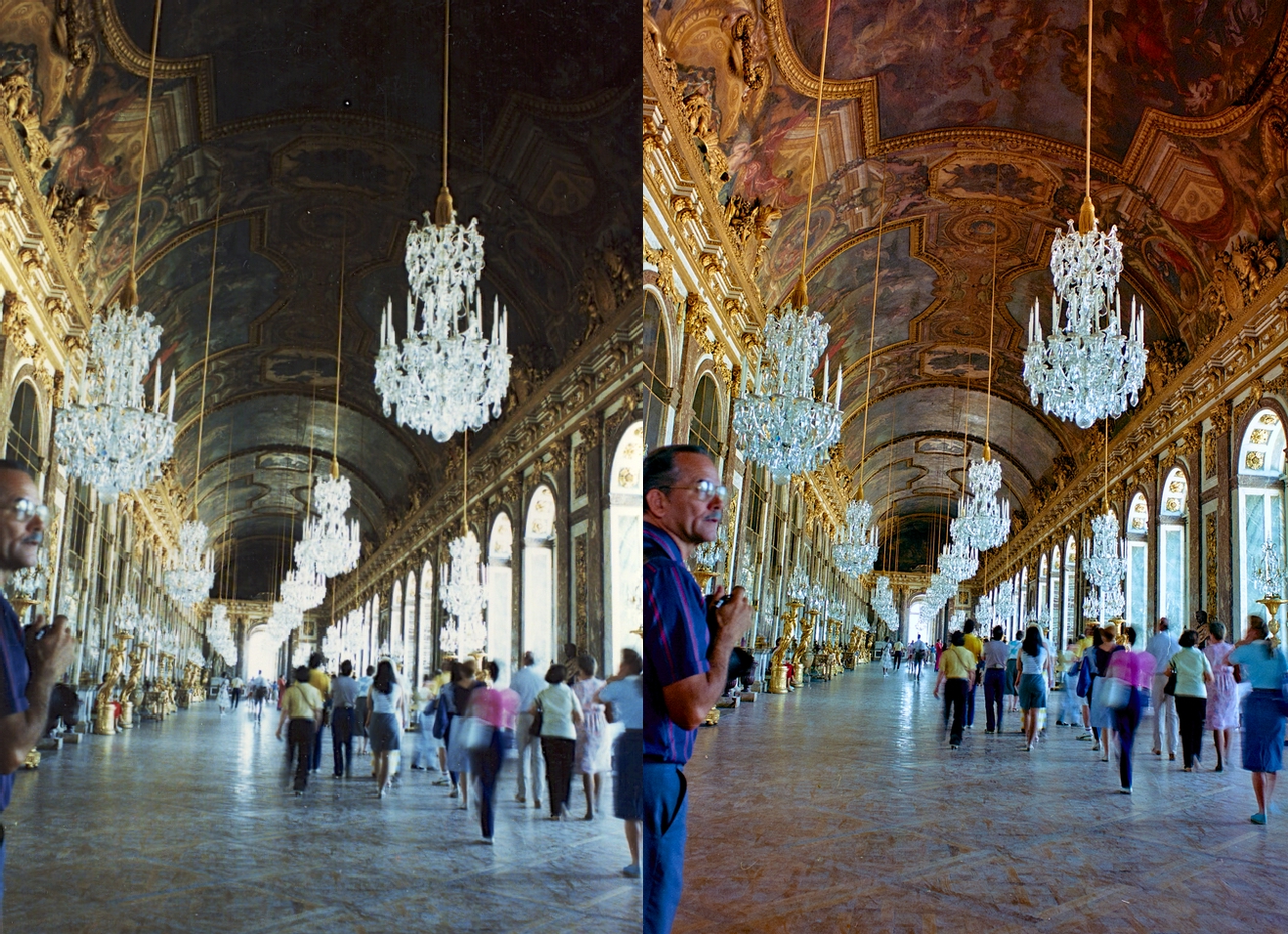
Slide scanning has been incredible but for me the real game changer has been neg scanning. Here's an example of a shot from 1985, print scan vs neg scan.
p.1 #20 · Film/slide digitizing using Sony 90mm lens and Nikon ES-2
vdo1 wrote:
Slide is obvious, but how do you gentlemen process the images of the negatives?
I have scanned negatives using a film scanner and flat bed scanner using Silverfast software. I consider Silverfast to be a capable program but it is a real pain to use. In my opinion it has the worst UI I have ever used. I am looking forward to a better work flow using RAW files from the camera.
I have not started converting negatives from my scans using the A7R3 raw files obtained with the macro lens and ES-2, but I have learned a bit from a brief review of hits produced by a Google search.
B&W negatives are easy. Just use curves to reverse the tone scale and then do normal post processing from there.