This topic is in the 2019 archive. You can read it and like its posts here. It is read only.
Archive 2019Picasa replacement
p.2 #1Picasa replacement
For free options DigiKam or DarkTable are good options.
For paid programs ACDSee is good. Not sure what secret personal info you must give up to them when buying the software that is not already out there.
Do you not do any editing or processing of a file? Just browse?
Canon supplies free software to do just that with their cameras.
For paid programs ACDSee is good. Not sure what secret personal info you must give up to them when buying the software that is not already out there.
Do you not do any editing or processing of a file? Just browse?
Canon supplies free software to do just that with their cameras.
Apr 30, 2019 at 09:54 PM
p.2 #2Picasa replacement
Just browsing. Unfortunately none of these options have what I find the best feature of Picasa - the timeline thumbnail view.
Regarding the ACDSee account - it is the principle that matters. They don't need my name and email address to run software that operates off my hard drive. Take my money, encourage me to register, but don't expect me to log in just so I can run the software locally. If I need to give them access through the firewall for login then I need to know what other data they are pulling.
Regarding the ACDSee account - it is the principle that matters. They don't need my name and email address to run software that operates off my hard drive. Take my money, encourage me to register, but don't expect me to log in just so I can run the software locally. If I need to give them access through the firewall for login then I need to know what other data they are pulling.
Apr 30, 2019 at 10:04 PM
p.2 #4Picasa replacement
GroovyGeek wrote:
Just browsing. Unfortunately none of these options have what I find the best feature of Picasa - the timeline thumbnail view.
Regarding the ACDSee account - it is the principle that matters. They don't need my name and email address to run software that operates off my hard drive. Take my money, encourage me to register, but don't expect me to log in just so I can run the software locally. If I need to give them access through the firewall for login then I need to know what other data they are pulling.
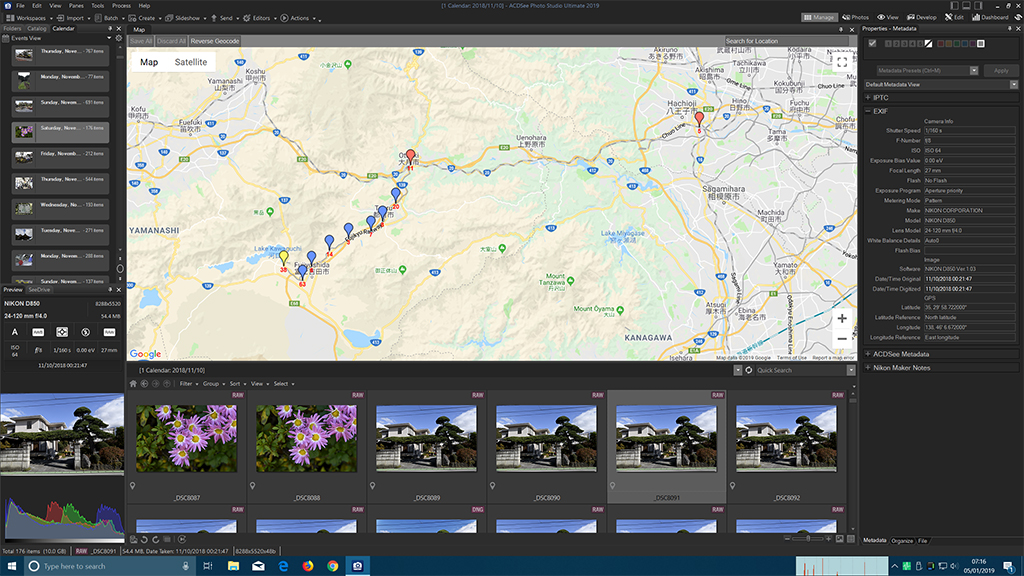
it is a one time event so you can put your pass code in and it gains you access to the map database and they can push update info to you. but you are right maybe this isn't for you.
Just browsing. Unfortunately none of these options have what I find the best feature of Picasa - the timeline thumbnail view.
Regarding the ACDSee account - it is the principle that matters. They don't need my name and email address to run software that operates off my hard drive. Take my money, encourage me to register, but don't expect me to log in just so I can run the software locally. If I need to give them access through the firewall for login then I need to know what other data they are pulling.
it is a one time event so you can put your pass code in and it gains you access to the map database and they can push update info to you. but you are right maybe this isn't for you.
May 01, 2019 at 06:01 AM
p.2 #5Picasa replacement
This thread reminds me how great Picasa was, and how well it integrated with it's online version . It was one of my favorite applications. What was Google thinking when they got rid if it?!!
Anyway, I was just looking at my photos.google.com and see a timeline on the right side of the screen when I scroll through pictures. It's not too bad. Also, my old Picasa albums are still there, although it's kind of dumbed down and clunky to view them. But, no equivalent desktop app, only the mobile phone version.
One question for the original poster: since you are on fredmiranda, you are at least semi-serious about photography. What do you use for raw development? And how do you see a quick photo viewer integrating in with that workflow?
May 01, 2019 at 07:35 AM
p.2 #6Picasa replacement
Workflow is
1) Transfer images from card to scratch SSD with Bridge, rename in the process
2) Mark the obvious rejects as such in bridge
3) High level classification in Bridge in 3 categories - likely keepers, possible keepers, extras. Do additional rejections in the process
4) Over time (sometimes months, lately even pushing into a year plus) work to process the images. I use PS only, no LR, and save the finished images as flattened TIFFs. I don't keep layers around, if I want to redo an image I start from scratch, unless it is minor tonal corrections. In the process I keep refining the classification from step 3.
5) Any image that makes into the keeper category is marked as such and the TIFF is saved also as JPRG. This is an essential element of my Picasa use strategy.
6) At the end of the process any rejects and extras are permanently deleted. I am left with the RAWs for the keepers and maybe's, TIFFs and JPEGs for the keepers. These are geotsgged with GeoSetter from the GPX tracks that I save from most trips.
6) When I am done working on the trip the folder is transferred on HDD at a location that is on Picasa's search path. Picasa is configured to catalog only JPEGs so it only imports the keepers into its thumbnail database. Since these are geotagged the Picasa map conveniently displays their locations
7) I use Picasa exclusively for browsing the timeline, identifying locations I might want to revisit, and sharing images with friends and family. Occasionally I will use its editing features on the JPEGs, but it is exclusively for either rotation corrections or minor brightening or darkening.
8) Over time I will also use Picasa's star ratings on the keepers, to break them down into further groups.
When I decide to revisit the images for a particular trip I use Picasa only to quickly locate the folder that holds the trip. Once I do that I point Bridge to that location so I can see the secondary rankings of images and/or can start reprocessing images, further classification or pruning, etc. This is a rare occurrence.
Edited on May 01, 2019 at 09:15 AM · View previous versions
May 01, 2019 at 08:21 AM
p.2 #7Picasa replacement
in bridge how to you inspect your images for possible rejection. what is your viewer?
my flow is fairly simple.
1- transfer image data folder to desktop (drag and drop)
2- open in ACDsee "light table" aka: Manage
3- rename it (in ACDsee)
4- inspect for oops using Manage and open up in built in viewer aka: View along with image data
5- working from ACDsee's Manage transfer/input individual image for conversion to the appropriate application. in my case choices are DXO, PScc, NX-D, and if I'm really desperate LR.
6- from say DXO I output to PScc in a chosen format for finishing and output.
Edited on May 02, 2019 at 05:14 AM · View previous versions
May 01, 2019 at 09:05 AM
p.2 #8Picasa replacement
Ah, so the jpeg viewer is on the back end, after all the editing and exporting is done. That's usually a loose end for most of us, since the primary repository stays in Lightroom or Bridge. Exported jpegs are rarely viewed again.
When I want to see jpegs, I just use the mac's jpeg view in the finder, same as using Windows Explorer. If I want more EXIF info, I might use Fast Raw Viewer, which has both mac and windows versions and is, as the title suggests, very fast. Fast Raw Viewer can be used on the front end to cull much faster than Bridge.
On linux, I've been experimenting with several viewers. One interesting one is gthumb, which creates catalogs by date and metadata tags without moving any files. Pix is another interesting one, very fast.
But, alas, nothing like Picasa.
May 01, 2019 at 09:21 AM
p.2 #9Picasa replacement
sjms wrote:
in bridge how to you inspect your images for possible rejection. what is your viewer?
---------------------------------------------
My reject process is multi-stage. Initially the Bridge preview itself is used for obvious oopsies - OOF, lack of DOF, composition faux-pas, obvious blown highlights or under-exposures (wish Bridge showed a histogram). Later on, as I open the maybes in ACR I do additional rejects based on more detailed inspection of the image. Overall very similar to the process you describe.
walts.photo wrote:
Ah, so the jpeg viewer is on the back end, after all the editing and exporting is done. That's usually a loose end for most of us, since the primary repository stays in Lightroom or Bridge. Exported jpegs are rarely viewed again.
When I want to see jpegs, I just use the mac's jpeg view in the finder, same as using Windows Explorer. If I want more EXIF info, I might use Fast Raw Viewer, which has both mac and windows versions and is, as the title suggests, very fast. Fast Raw Viewer can be used on the front...Show more →
Yes. Picasa is really nothing more than a very slick JPEG viewer. Its essential features are super fast directory crawling and thumbnail generation; extremely user-friendly timeline view - I can click on the thumbnail and get the geolocation data, scroll years worth of images with the mouse wheel alone; ability to create logical albums regardless of physical location on storage media. For example, I sometimes have a mixture of personal/family photos and "serious" photos from the same trip. In Picasa I send these images to separate logical albums without changing the physical location of the image on the HDD.
Have not found anything else that does all this quite as smoothly. I have not looked at it close enough, but upon superficial inspection neither DigiKam nor ACDsee seem to have a great timeline view, nor logical album definition that is divorced from the physical location of the file on the storage medium.
May 01, 2019 at 09:35 AM
p.2 #10Picasa replacement
I use Picasa for the majority of my editing of jpg's and most of it's other features & have for roughly 10 years. Because I don't rely on it to process RAW's it still does everything I need it to but I don't do any geotagging. Fortunately my newest camera is a 7D2 & Picasa still recognizes it's CR2's. Until I buy a camera is doesn't support I guess I'm still OK sticking with it. I can't recommend anything but am watching with great interest. (My RAW processor is CS 6)
May 01, 2019 at 11:43 AM
p.2 #11Picasa replacement
After 8 hrs of churn DigiKam finally started showing thumbnails, buteven after pre-caching it is kinda slow. I had placed the database on a fast SSD that I use exclusively as a scratch drive, and it was still taking a minute or so to update every folder, with the occasional unexplained freeze. Worst yet, every time I close the program and relaunch it takes some time to reimport the database. I guess for what it costs it does something useful, but it really does not meet my needs.
ACDsee comes A LOT closer to what I am looking for. I only dowloaded the trial for standard, but it is ***lightning fast***, with lots of useful features and oh so close to being not only a viable Picasa replacement but also a Picasa + Bridge in one. Things I wished it did
a) option of copying ACR develop settings between files, but I guess this is a bit too much to ask from a product that aspires to be a LR replacement.
b) Better integration wit Windows Explorer. I should be able to right click on a folder from the folders list and open that in Windows Explorer. Ditto for right-clicking on an image and revealing in Explorer. Alas, ACDsee lets me do a whole bunch of not very useful thing , but not this ("set was wallpaper was deemed" to be more useful that "show in explorer"! really?). Stranger yet, this capability is there in photos view but not manage view. Strange design decision, very strange.
c) Photos view "by month" is oh so close to Picasa's timeline view. The main things that are missing, and they are significant (again, for me) - controlling the thumbnail size and metadata display. Also wish it offered "folder view" or "album view" but that is something I can live with
e) Image histogram in the preview - I think higher versions do this, will have to check.
I am definitely going to play with it a lot more through the trial period to see if I want to shell out for a full license.
May 01, 2019 at 10:51 PM
p.2 #12Picasa replacement
remember that about 60% of the work is handled by ACDsee. I do not use it as an editing tool for images. no in and out bouncing around.
View panel:
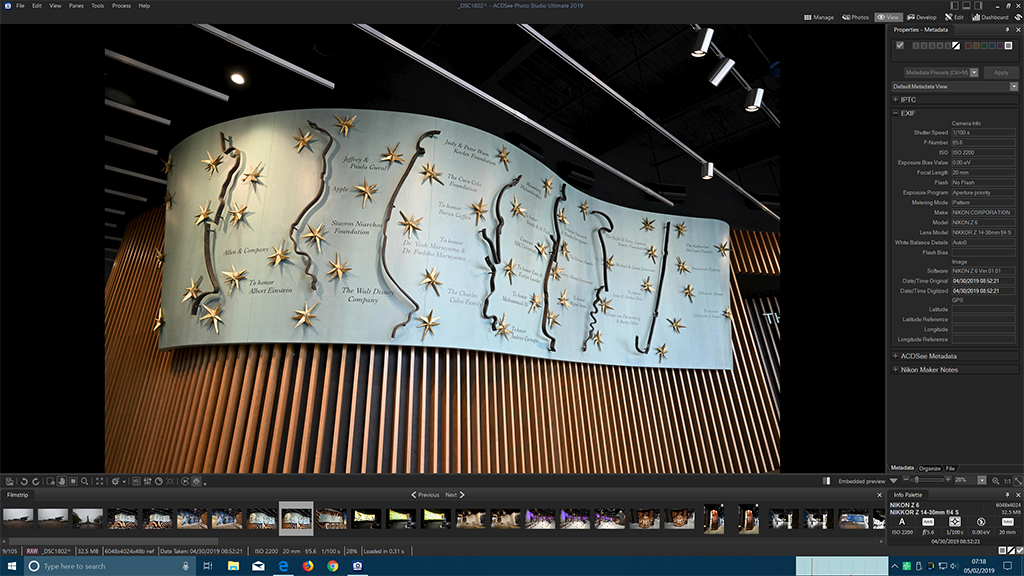
View panel:
May 02, 2019 at 05:16 AM
p.2 #13Picasa replacement
XnView MP is free and is really fast https://www.xnview.com/en/
Adobe Bridge is also free to use.
Might be more than you need but I have grown to be a fan of DigiKam, free and open source.
Adobe Bridge is also free to use.
Might be more than you need but I have grown to be a fan of DigiKam, free and open source.
May 02, 2019 at 08:27 AM
p.2 #14Picasa replacement
jose120photo wrote:
XnView MP is free and is really fast https://www.xnview.com/en/
Free and fast are very relevant characteristics. Unfortunately it misses all the things I like
jose120photo wrote:
Adobe Bridge is also free to use.
Already use that as the most convenient interface to PS. Other than that it does not have too many redeeming qualities :-)
jose120photo wrote:
Might be more than you need but I have grown to be a fan of DigiKam, free and open source.
Tried it, did not like it. See comments from a few posts back.
For the moment I am trending towards paying for ACDsee. Thank you for the suggestions.
May 02, 2019 at 08:03 PM
p.2 #15Picasa replacement
Another consideration should be Corel After Shot Pro. I'm a long time Linux user (Linux Mint 19.1 Cinnamon) and have used several of the free Linux photo applications. About a year ago I tried After Shot Pro and liked it enough to pay for it. Especially since it is multi-platform and my wife can also use it on her Mac. (And she'll be shifting to Linux Mint too when her old iMac gives up the ghost!)
ASP has a lightning fast raw converter and allows for working via your existing file system or via a database (like Lightroom).
Worth checking out in my opinion.
ASP has a lightning fast raw converter and allows for working via your existing file system or via a database (like Lightroom).
Worth checking out in my opinion.
Jun 21, 2019 at 10:26 PM