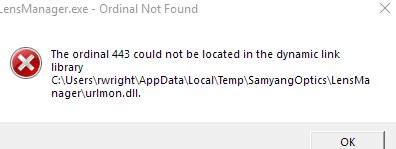
bought a used samyang station to update my 24mf2.8. as instructed I downloaded the lens manager software and installed. so far in various combinations of what to hook up first and on 3 different computers with slightly different versions of windows 10. the software will not run.
anyone got any idea what this is. an email to samyang got the simple response to reinstall software. any other queries were not answered.
if you're getting that message on three different computers with the same software installed, I'd try re-downloading and installing the software. It could also be a driver, so try removing the particular driver for that, although I doubt that's the case based on the error. But in case it is, delete the device driver and then re-plug in and re-discover.
If those don't work, try downloading from a different computer.
If that still doesn't work - there may be something with their current version offered for download. (although I doubt it - they'd likely know they put out a faulty version by now) So potentially just wait for the next version.
the best I could find online is that it is referring to a executable c or c+ module that is several years old and shows to be on all the computers.
not sure that is what it really says though. the uninstall software gets the same error. will try deleting and reinstalling the driver.
I had the same problem. Here's how I solved it. Search your computer for a copy of the urlmon.dll, copy it and place the copy in the folder shown in path of the error message you posted above; i.e. C:users rwright AppData Local Temp SamyangOptics LensManager