bs kite wrote:
S is accomplished by pressing/releasing the AF-ON button only.
Let me make sure I got this right. So if the bird (or subject in general) stopped moving you focus using the af-on, then release the af-on, then recompose and shoot.
If my understanding of your afc-s strategy is correct, then what if the subject moves between the focus moment and the recompose moment? I assume you will repeat the steps.
I have another question but I leave until I understand the afc-s first
> I only use S and Auto AF. Of course, I must also have AFC selected so AF is continuous if I want it to be.
S is used for stationary subjects, or nearly stationary or very slow subjects. I used it on the beaver head. It is the most precise AF option, but only if you can hold the single AF square on the point you want to focus on. A number of us would like it if Nikon would make that square even smaller and maybe a blue color.
> When I actually go to focus, I only use the AF-ON button. My shutter release button is disabled as a focusing option; i.e. I do not focus at all with the shutter release button. This means that once focus is acquired, it cannot be changed during the release of the shutter. That means that the subject can be QUICKLY reframed or moved within the frame, and the focusing distance will not be changed when the shutter is released.
Of course one has to refocus if the subject moves.
If I press and RELEASE the AF-ON button, the focus is locked at that distance. However, if I want focus to be continuous, I must press the AF-ON button and keep it pressed in during the continuous focusing.
To engage AUTO AF: In order to continually focus on flying subjects (BIF) or fast moving subjects, I must continually hold the AF-ON button in while continually holding the Preview button in. In other words, when I am acquiring and following a flying bird, I have both the AF-ON and Preview button pressed in simultaneously. This is not a problem because it is of a short duration.
Whew!
After all that is said, I will be testing this during this season and may adopt some slight variation.
Please feel free to PM me if you do not understand anything. Don’t feel bad, because stuff is not simple to understand.
Thank you.
And others may have some input here too. This subject has gotten so much attention over the years. But that is understandable. It took me a very long time to settle into a technique. I always like to give credit when due: Arbitrage (Geoff) was the person who recommended AUTO AF to me.
bs kite wrote:
> I only use S and Auto AF. Of course, I must also have AFC selected so AF is continuous if I want it to be.
S is used for stationary subjects, or nearly stationary or very slow subjects. I used it on the beaver head. It is the most precise AF option, but only if you can hold the single AF square on the point you want to focus on. A number of us would like it if Nikon would make that square even smaller and maybe a blue color.
> When I actually go to focus, I only use the AF-ON button. My shutter release button is disabled as a focusing option; i.e. I do not focus at all with the shutter release button. This means that once focus is acquired, it cannot be changed during the release of the shutter. That means that the subject can be QUICKLY reframed or moved within the frame, and the focusing distance will not be changed when the shutter is released.
Of course one has to refocus if the subject moves.
If I press and RELEASE the AF-ON button, the focus is locked at that distance. However, if I want focus to be continuous, I must press the AF-ON button and keep it pressed in during the continuous focusing.
To engage AUTO AF: In order to continually focus on flying subjects (BIF) or fast moving subjects, I must continually hold the AF-ON button in while continually holding the Preview button in. In other words, when I am acquiring and following a flying bird, I have both the AF-ON and Preview button pressed in simultaneously. This is not a problem because it is of a short duration.
Whew!
After all that is said, I will be testing this during this season and may adopt some slight variation.
Please feel free to PM me if you do not understand anything. Don’t feel bad, because stuff is not simple to understand.
Thank you.
And others may have some input here too. This subject has gotten so much attention over the years. But that is understandable. It took me a very long time to settle into a technique. I always like to give credit when due: Arbitrage (Geoff) was the person who recommended AUTO AF to me.
Have you tried using the button on the lens (for lenses that have them like the 500PF) to engage Auto AF instead of the Pv button? I've always found the Pv button awkward to hit. I used to use Pv for Single point but now use Single Point as my main AF mode and then have Group AF on my lens button and Auto AF on the joystick push. I find the Lens Button to be my second favourite button after the AF-ON button. Of course my 300PF and my (now sold) 200-500 don't have that button so that complicates switching to other lenses. But the only lens I use these days is the 500PF so that takes care of that
arbitrage wrote:
Have you tried using the button on the lens (for lenses that have them like the 500PF) to engage Auto AF instead of the Pv button? I've always found the Pv button awkward to hit. I used to use Pv for Single point but now use Single Point as my main AF mode and then have Group AF on my lens button and Auto AF on the joystick push. I find the Lens Button to be my second favourite button after the AF-ON button. Of course my 300PF and my (now sold) 200-500 don't have that button so that complicates switching to other lenses. But the only lens I use these days is the 500PF so that takes care of that...Show more →
Does all the 4 buttons on the lens act like a single button?
NissanPatrol wrote:
Does all the 4 buttons on the lens act like a single button?
thanks
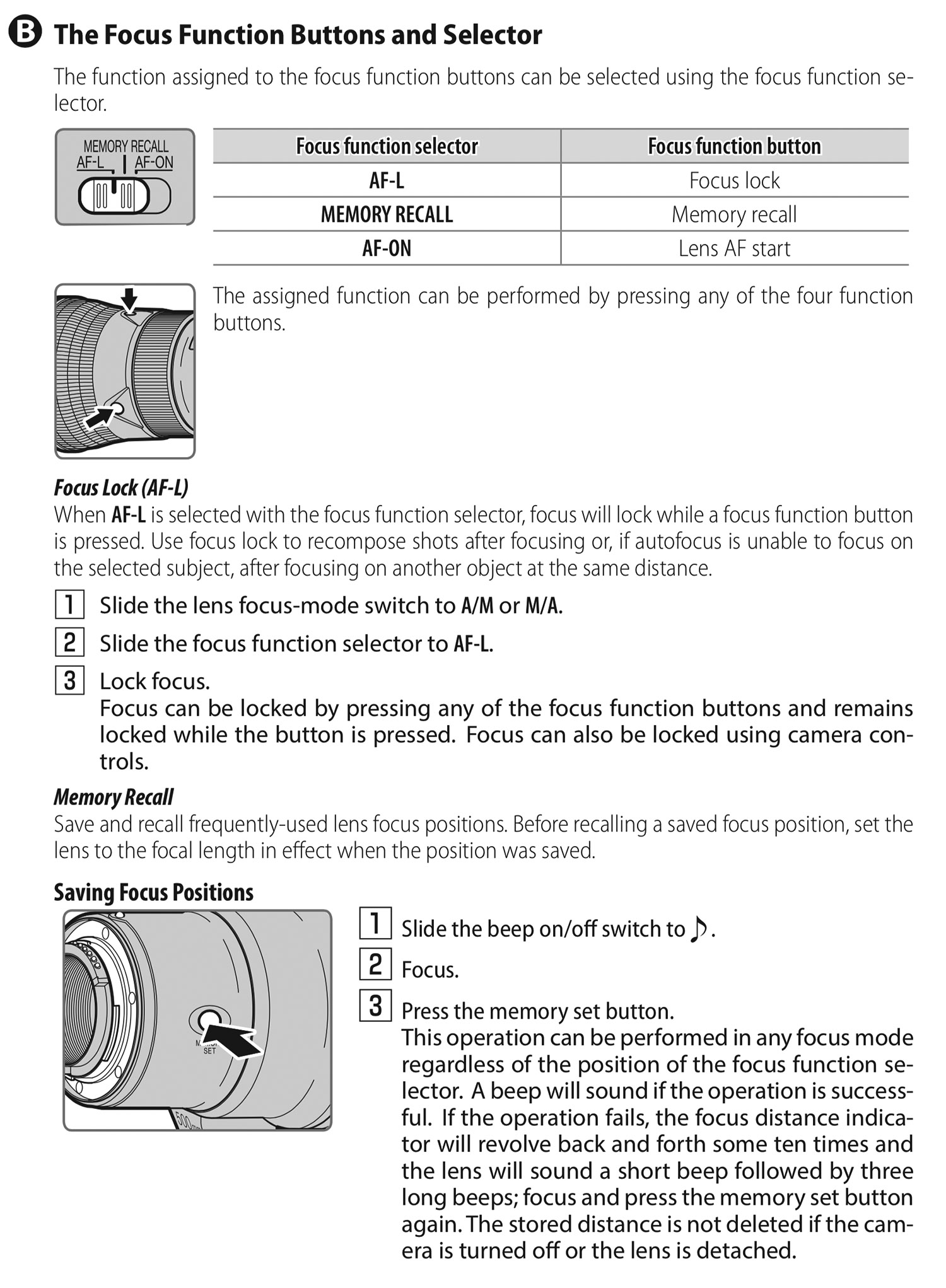
Yes, you can only program it for a single feature. The lens button has a physical switch on the lens to change between three functions: AF-ON (duplicates what your AF-ON setting is), Memory Recall: Recall set focus distance set via the little button close to the lens mount (I sometimes use this in my backyard setup) and the L-Fn setting which is what I'm using and is programmed in the menus ahead of time in Custom Setting f1. I use Area Mode + AF-ON and set it to Group AF.
arbitrage wrote:
Have you tried using the button on the lens (for lenses that have them like the 500PF) to engage Auto AF instead of the Pv button? I've always found the Pv button awkward to hit. I used to use Pv for Single point but now use Single Point as my main AF mode and then have Group AF on my lens button and Auto AF on the joystick push. I find the Lens Button to be my second favourite button after the AF-ON button. Of course my 300PF and my (now sold) 200-500 don't have that button so that complicates switching to other lenses. But the only lens I use these days is the 500PF so that takes care of that...Show more →
Read your suggestions/post early this morn; have been thinking about each component of it.
This sounds like it could all (or most of it) be a significant improvement for me. I must test.
Yes, the PV button is also awkward (but useable) for me.
Seems as though that joystick might be the perfect AUTO AF button.
Single point (S) is also my main AF mode; i.e. if I can get away with it, I use it for its “exactness”, “fineness” (if you will).
Being new to the 500PF I am not as familiar with the location of those lens-barrel buttons. I play (fool with) the keyboard some (no roadie you understand , nor endeavor to be!). But I think I am discovering an interesting phenom: Seems it may be better (more exacting?) to practice "key-location" if the eyes are closed. I wonder if Ray Charles knew this or those around him saw it.
I've had difficulty quickly relocating that left hand lens-barrel button. But with practice all things come. I think I’ll close my eyes and practice finding it so it becomes quick and natural for me too.
Yes, I can see how that lens-barrel button could be a favorite along with the AF-ON.
bs kite wrote:
Read your suggestions/post early this morn; have been thinking about each component of it.
This sounds like it could all (or most of it) be a significant improvement for me. I must test.
Yes, the PV button is also awkward (but useable) for me.
Seems as though that joystick might be the perfect AUTO AF button.
Single point (S) is also my main AF mode; i.e. if I can get away with it, I use it for its “exactness”, “fineness” (if you will).
Being new to the 500PF I am not as familiar with the location of those lens-barrel buttons. I play (fool with) the keyboard some (no roadie you understand ). But I think I am finding it is easier to practice "key-location" if the eyes are closed. I wonder if Ray Charles knew this or those around him saw it. I have had difficulty quickly relocating that left hand lens-barrel button. But with practice all things comes. I think I’ll close my eyes and practice finding it so it becomes quick and natural for me too. Yes, I can see how that button could be a favorite along with the AF-ON.
The only problem with the joystick is it takes a little precision to push it straight in and sometimes you end up moving your Single point instead.
The way I hold the 500PF lands my thumb on the left lens button fairly naturally so I've trained my muscle memory to know where it is.
I will also add that if I'm out shooting a very particular subject like swallows in flight I will change my main AF-mode to Auto and I re-enable my shutter button to AF so I don't even have to use any back buttons. Just makes reacting to swallows IF faster.
arbitrage wrote:
Yes, you can only program it for a single feature. The lens button has a physical switch on the lens to change between three functions: AF-ON (duplicates what your AF-ON setting is), Memory Recall: Recall set focus distance set via the little button close to the lens mount (I sometimes use this in my backyard setup) and the L-Fn setting which is what I'm using and is programmed in the menus ahead of time in Custom Setting f1. I use Area Mode + AF-ON and set it to Group AF.
I have the lens for few days I did not have time to play with it.
The lens button is very convenient. I already programmed it. I used it for afc-s.
I used the af-on for afc-auto. I am sure I will change later when I develop a better experience.
Imagemaster wrote:
You are not doing yourself any favors by posting your images so large. They will look better at a maximum of 1500 pixels on the horizontal size, IMO.
Thank you imagemaster for the critiques
I noticed people are carefull not to cririque for some reason.
I think the way the forum present the image makes it look larger, but I know I am doing something wrong not sure what it is.
Since you mention it I will put more time to understand the image size and how it relates to the final look on the forum
NissanPatrol wrote:
Thank you imagemaster for the critiques
I noticed people are carefull not to cririque for some reason.
I think the way the forum present the image makes it look larger, but I know I am doing something wrong not sure what it is.
Since you mention it I will put more time to understand the image size and how it relates to the final look on the forum
Thanks again
I am of the belief that the bigger the better as long as the image stands up to it. I have a 32" UHD screen, so 3840 x 2160 pixels and anything less than 1500 pixels on the vertical dimension looks like a postage stamp on my screen. If you post a small image, the impact is lessened greatly on my screen and if I have to make it larger by using "CTRL" and mouse scroll, then it loses sharpness and can look terrible. I post around 1800 or 1900 pixels on the vertical dimension but FM seems to resize them to suit the site. If you click on my images, they are then displayed at full res. However, I post from a photo hosting site rather than upload to FM and thus maybe my images are resized to suit FM. Do you upload or post them from a photo hosting site? The thing is, if you post a photo larger than what the screen can display, the it is a simple matter of using the scroll wheel and the "CTRL" of your keyboard to make it smaller. Making it larger by this method just reduces sharpness and thus looks awful.
As for critiquing. I am not a fan of it unless asked for. The reason being, I post images that I am happy with, I generally know what their shortfalls are but that doesn't mean that it can be fixed due to the situation under which it was taken. This is generally more so with say bird photos as you are dealt the hand you're given as to what the bird is doing, sitting on, light, or whatever. These things are normally beyond our control. Not only that, but the fact I am generally happy with what I post, someone else's thoughts are their thoughts and not mine and thus it would be partly their image and not mine if I acceded to their beliefs. And that is the other thing, it is just a difference of opinion and doesn't necessarily mean it is better, just different. I do not offer a critique unless specifically asked for by the poster as they are obviously looking for help with how they can make their image better and only then would I offer advice.
I am of the belief that the bigger the better as long as the image stands up to it.
That what I thought. I usually stay right at the 1.4 mb file size; the limit of FM .
the first thing I do to examine other members images, I stretch (zoom in) as far as I can to check the details. I feel that all what we are doing is worthless if we can not examine the image.
Regarding the critiques, I still can use some. Maybe later after gaining experience, I will change my mind
I am posting straight to the FM, but I reached a stage where I have to organize my images on fliker. We just entered a five days 24 hours curfew, so maybe this is a good time.
ilkka_nissila wrote:
On some browsers, the images are much larger than the screen and if you scale it down to see the whole image, the text becomes impossible to read.
When I'm looking at images, I'm not reading text and vise versa. Not only that, it's simple to look at the images at the smaller size and then scroll up the text when reading that. The point I'm making is, if the images are large then we can *all* see how good they are, how sharp and clean they are whether looking on a large or small res screen When the images are small, then those with large screens have to upscale the image and thus it loses it's edge and we could be looking at a rubbish photo but we'd never know, you can't make an accurate judgement. If the images are large and some have to reduce it to fit on a lower res screen, then that is not as big a loss, you can still make a valued judgement on the quality of the photo.
1) If on a phone or smaller tablet make sure to use the Mobile version of the site (activated by a big Red button at the bottom of any page)
2) With the regular version of the site you can click on any image in a thread and it resizes the image to fit your screen and puts it on a nice black background. Once you've clicked on any image to enter that mode, you can use arrow keys to flip between every image on the entire page (not just each post).





 , nor endeavor to be!). But I think I am discovering an interesting phenom: Seems it may be better (more exacting?) to practice "key-location" if the eyes are closed. I wonder if Ray Charles knew this or those around him saw it.