This topic is in the 2017 archive. You can read it and like its posts here. It is read only.
Archive 2017Stitching or Merging Images. Your Panoramas are Welcome!
p.12 #1Stitching or Merging Images. Your Panoramas are Welcome!
Five image pano of Hong Kong from the Peak @ 70mm:

Panoramic View from the Peak by David Gevert, on Flickr
Panoramic View from the Peak by David Gevert, on Flickr
Mar 29, 2018 at 09:11 PM
p.12 #2Stitching or Merging Images. Your Panoramas are Welcome!
JBPhotog wrote:
D810, 105mm f1.4E, three row, nine shot bokeh pano.
https://dl.dropboxusercontent.com/s/xatvppm3obsc4wh/union_pacific_C_1600.jpg
Is it practical to focus-stack these vertically panned images, so that the entire image is in focus?
Robert
D810, 105mm f1.4E, three row, nine shot bokeh pano.
https://dl.dropboxusercontent.com/s/xatvppm3obsc4wh/union_pacific_C_1600.jpg
Is it practical to focus-stack these vertically panned images, so that the entire image is in focus?
Robert
Mar 30, 2018 at 07:45 AM
p.12 #3Stitching or Merging Images. Your Panoramas are Welcome!
D810 35mm f/1.4 AI-S
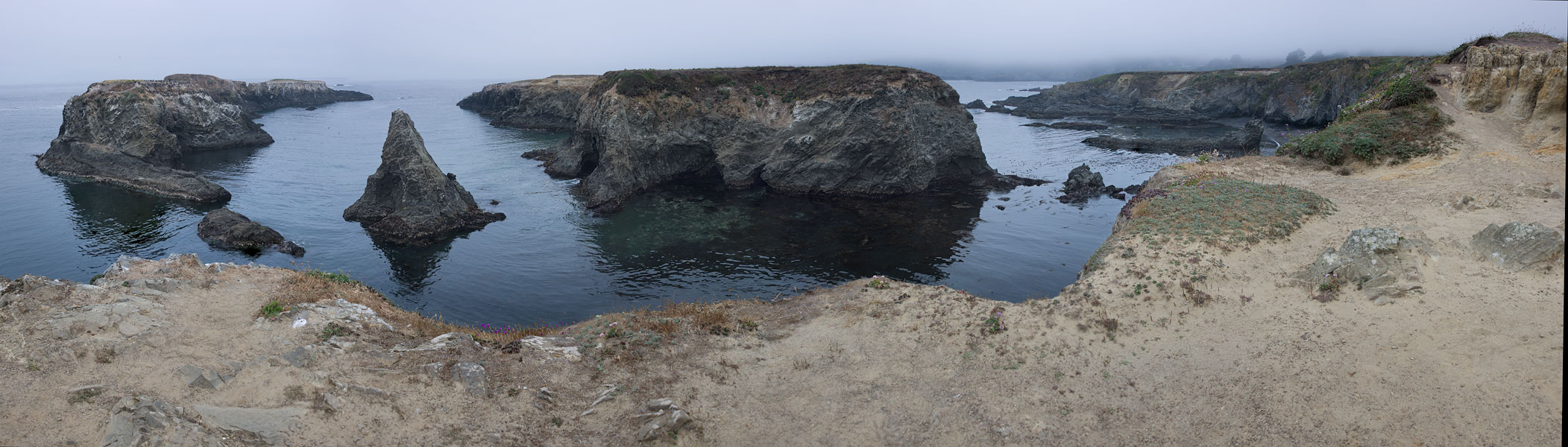
Rinse Cycle
-Jay- © HCE HCE 2018
Rinse Cycle
Mar 30, 2018 at 08:17 AM
p.12 #4Stitching or Merging Images. Your Panoramas are Welcome!
bs kite wrote:
https://dl.dropboxusercontent.com/s/xatvppm3obsc4wh/union_pacific_C_1600.jpgIs it practical to focus-stack these vertically panned images, so that the entire image is in focus?
Robert
If I am not mistaken, I think the point is the exact opposite. Looks like he was going for the Brenizer Method (Bokehrama). The goal is to use a medium or tele lens and stitch it to a field of view that is similar to a wide angle. Make is look like you have a really fast aperture wide angle lens or even like it was shot on an entirely different format sensor.
Edited on Mar 30, 2018 at 10:00 AM · View previous versions
JBPhotog wrote
D810, 105mm f1.4E, three row, nine shot bokeh pano.https://dl.dropboxusercontent.com/s/xatvppm3obsc4wh/union_pacific_C_1600.jpg
Robert
If I am not mistaken, I think the point is the exact opposite. Looks like he was going for the Brenizer Method (Bokehrama). The goal is to use a medium or tele lens and stitch it to a field of view that is similar to a wide angle. Make is look like you have a really fast aperture wide angle lens or even like it was shot on an entirely different format sensor.
Edited on Mar 30, 2018 at 10:00 AM · View previous versions
Mar 30, 2018 at 08:46 AM
p.12 #5Stitching or Merging Images. Your Panoramas are Welcome!
I've enjoyed seeing everyone's work here so far, some great panoramas. I shot a lot of panoramas last year, here's one of my favourites.
Waterton National Park at Sunset
30 image pano shot in 2 rows with Sony A7r and Voigtlander 35mm f/1.7
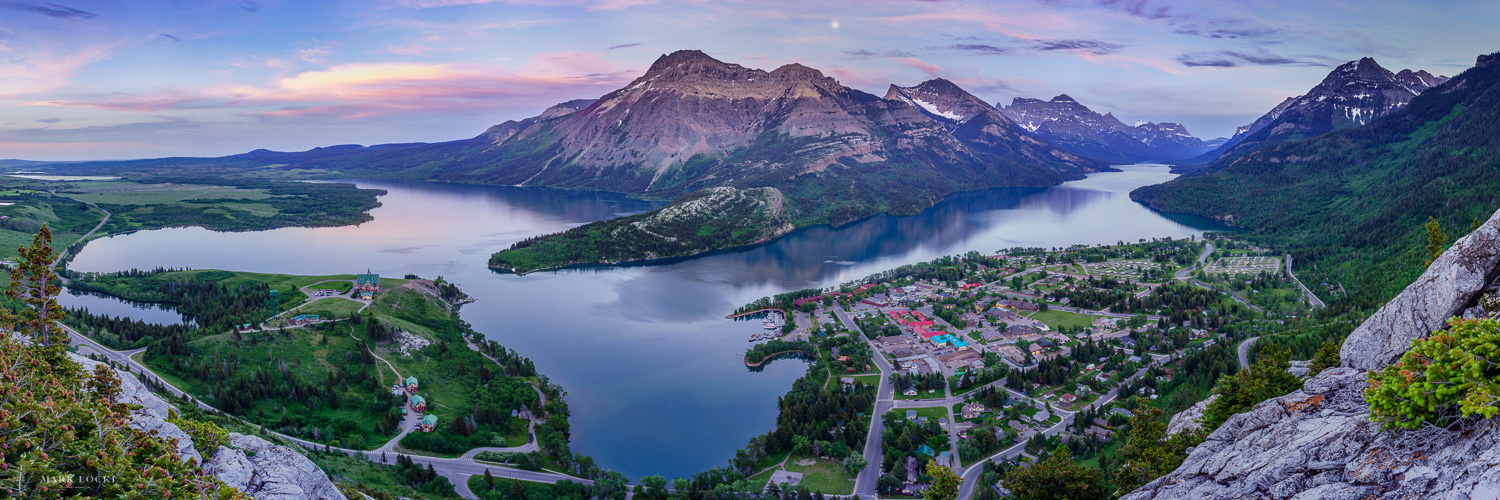
Waterton National Park at Sunset
30 image pano shot in 2 rows with Sony A7r and Voigtlander 35mm f/1.7
Mar 30, 2018 at 08:55 AM
p.12 #6Stitching or Merging Images. Your Panoramas are Welcome!
bs kite wrote:
https://dl.dropboxusercontent.com/s/xatvppm3obsc4wh/union_pacific_C_1600.jpgIs it practical to focus-stack these vertically panned images, so that the entire image is in focus?
Robert
That is a different approach and best accomplished with a tripod. My shot was hand held and shot wide open f1.4 to isolate DOF.
JBPhotog wrote
D810, 105mm f1.4E, three row, nine shot bokeh pano.https://dl.dropboxusercontent.com/s/xatvppm3obsc4wh/union_pacific_C_1600.jpg
Robert
That is a different approach and best accomplished with a tripod. My shot was hand held and shot wide open f1.4 to isolate DOF.
Mar 30, 2018 at 10:13 AM
p.12 #7Stitching or Merging Images. Your Panoramas are Welcome!
D810 35mm f/1.4 AI-S
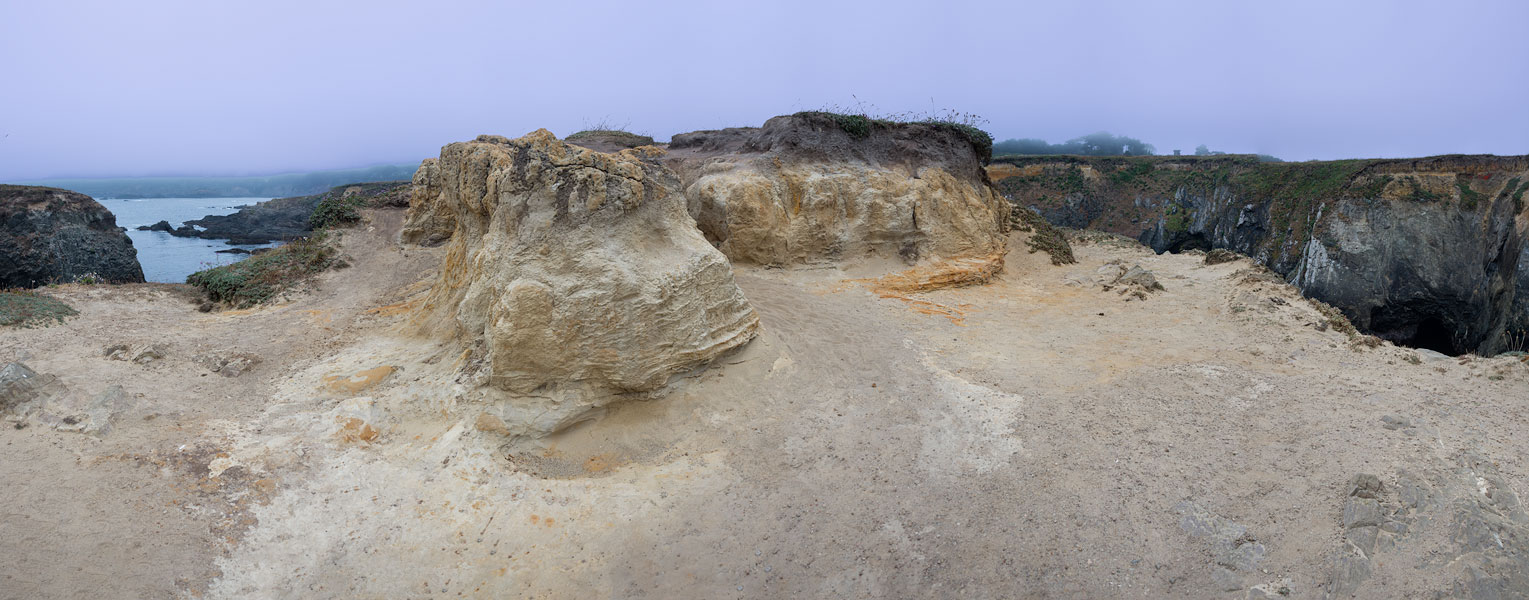
Never Turn Your Back On The Ocean
-Jay- © HCE HCE 2018
Never Turn Your Back On The Ocean
Mar 31, 2018 at 05:41 AM
p.12 #8Stitching or Merging Images. Your Panoramas are Welcome!
Markus L wrote:
I've enjoyed seeing everyone's work here so far, some great panoramas. I shot a lot of panoramas last year, here's one of my favourites.
Waterton National Park at Sunset
30 image pano shot in 2 rows with Sony A7r and Voigtlander 35mm f/1.7
Whoa! That's a stunning image.
I've enjoyed seeing everyone's work here so far, some great panoramas. I shot a lot of panoramas last year, here's one of my favourites.
Waterton National Park at Sunset
30 image pano shot in 2 rows with Sony A7r and Voigtlander 35mm f/1.7
Whoa! That's a stunning image.
Mar 31, 2018 at 12:28 PM
p.12 #9Stitching or Merging Images. Your Panoramas are Welcome!
A little B&W, both handheld:
The mountains:
http://c1.staticflickr.com/5/4192/33550175254_72fa31d4ca_o.jpg
and the sea:
http://c2.staticflickr.com/8/7278/26976023416_67c3b47896_o.jpg
The mountains:
http://c1.staticflickr.com/5/4192/33550175254_72fa31d4ca_o.jpg
and the sea:
http://c2.staticflickr.com/8/7278/26976023416_67c3b47896_o.jpg
Mar 31, 2018 at 12:46 PM
p.12 #10Stitching or Merging Images. Your Panoramas are Welcome!
amacal1 wrote:
Waterton National Park at Sunset
30 image pano shot in 2 rows with Sony A7r and Voigtlander 35mm f/1.7Whoa! That's a stunning image.
Thanks! It took me a while to figure out how to put it all together but I'm pretty happy with how it turned out in the end
Markus L wrote
I've enjoyed seeing everyone's work here so far, some great panoramas. I shot a lot of panoramas last year, here's one of my favourites.Waterton National Park at Sunset
30 image pano shot in 2 rows with Sony A7r and Voigtlander 35mm f/1.7
Thanks! It took me a while to figure out how to put it all together but I'm pretty happy with how it turned out in the end
Mar 31, 2018 at 03:11 PM

p.12 #12Stitching or Merging Images. Your Panoramas are Welcome!
From the Foveon image thread, 26 image horizontal, full spectrum B&W:
 676 26 images small- by Dan T, on Flickr
From the Canon Spring 2018, 2 rows of 14 images. Same image, but B&W conversion here. Canon 5DsR:
 28 image 676 BW- by Dan T, on Flickr
676 26 images small- by Dan T, on FlickrFrom the Canon Spring 2018, 2 rows of 14 images. Same image, but B&W conversion here. Canon 5DsR:
28 image 676 BW- by Dan T, on FlickrApr 01, 2018 at 11:17 AM
p.12 #13Stitching or Merging Images. Your Panoramas are Welcome!
I've found this thread fascinating! Thank you all!
On the topic of using a PC shift lens for panos,I understand the idea of merging 3 shots shot shift left + center + shift right, but I lack the understanding of why that gives you much extra width. I would think it might give you a little extra width, but what it really gives you is proper perspective, like a fence line doesn't converge on the sides. Or are you TILTING/SWINGING rather than SHIFTING? I got the impression it was shifting, but maybe i'm wrong.
On the topic of using a PC shift lens for panos,I understand the idea of merging 3 shots shot shift left + center + shift right, but I lack the understanding of why that gives you much extra width. I would think it might give you a little extra width, but what it really gives you is proper perspective, like a fence line doesn't converge on the sides. Or are you TILTING/SWINGING rather than SHIFTING? I got the impression it was shifting, but maybe i'm wrong.
Apr 01, 2018 at 11:47 AM
p.12 #14Stitching or Merging Images. Your Panoramas are Welcome!
2 views of the remains of Temple of Castor and Pollux, Rome Forum:
 Temple of Castor and Pollux view from below, Rome Forum by Jose, on Flickr
Sony A7RII + Fotasy adapter + Nikkor-PC 35mm f/2.8 ai-s hand held, ISO 100, f/8 at 1/500s. 5-horizontal shots pano.
 Temple of Castor and Pollux (Rome Forum) view from top of Palatine Hill by Jose, on Flickr
Sony A7RII + Fotasy adapter + Nikkor 180mm f/2.8 ai-s ED hand held, ISO 200, f/5.6 at 1/800s; 3-vertical shots pano.
Taken from the top of Palatine Hill.
Temple of Castor and Pollux view from below, Rome Forum by Jose, on FlickrSony A7RII + Fotasy adapter + Nikkor-PC 35mm f/2.8 ai-s hand held, ISO 100, f/8 at 1/500s. 5-horizontal shots pano.
Temple of Castor and Pollux (Rome Forum) view from top of Palatine Hill by Jose, on FlickrSony A7RII + Fotasy adapter + Nikkor 180mm f/2.8 ai-s ED hand held, ISO 200, f/5.6 at 1/800s; 3-vertical shots pano.
Taken from the top of Palatine Hill.
Apr 01, 2018 at 04:19 PM
p.12 #15Stitching or Merging Images. Your Panoramas are Welcome!
jbouchard wrote:
I've found this thread fascinating! Thank you all!
On the topic of using a PC shift lens for panos,I understand the idea of merging 3 shots shot shift left + center + shift right, but I lack the understanding of why that gives you much extra width. I would think it might give you a little extra width, but what it really gives you is proper perspective, like a fence line doesn't converge on the sides. Or are you TILTING/SWINGING rather than SHIFTING? I got the impression it was shifting, but maybe i'm wrong.
As I understand it, the shifted amount is picked up on each side (landscape orientation). If a "full frame" sensor is 36mm wide, and your lens has 11mm of shift, you are gaining an additional 22mm to work with, providing that the lens is sharp all the way to the edge in full shift mode and there isn't enough vignetting to mess things up.
Some techniques shift the lens relative to the camera, others use a special adapter that holds the lens steady on a tripod and the camera shifts relative to the lens.
If the subject matter is far enough away, and if your rotation point is close enough to the nodal point of the lens, panoramic image software is pretty darn good at straightening things out if there is enough overlap to work with. I have been quite surprised at just how much the software will fix on its own with very little correction needed on my part. I have yet to try using a tilt shift lens to correct a tilted image as much as possible before taking them and assembling them.
Even images taken hand held will work if the subject is far enough away. Taking multiple images with limited intentional movement can be used to create a "super resolution" image.
Apr 01, 2018 at 04:46 PM

p.12 #16Stitching or Merging Images. Your Panoramas are Welcome!
danski0224 wrote:
On the topic of using a PC shift lens for panos,I understand the idea of merging 3 shots shot shift left + center + shift right, but I lack the understanding of why that gives you much extra width. I would think it might give you a little extra width, but what it really gives you is proper perspective, like a fence line doesn't converge on the sides. Or are you TILTING/SWINGING rather than SHIFTING? I got the impression it was shifting, but maybe i'm wrong.As I understand it, the shifted amount is picked up on each side (landscape orientation). If a "full frame" sensor is 36mm wide, and your lens has 11mm of shift, you are gaining an additional 22mm to work with, providing that the lens is sharp all the way to the edge in full shift mode and there isn't enough vignetting to mess things up.
Some techniques shift the lens relative to the camera, others use a special adapter that holds the lens steady on a tripod and the camera shifts relative to the lens.
If the subject matter is far enough away,...Show more →
I have shown all the images I was able to gain from rotating the shifting my Nikkor 28mm f3.5 PC lens. The first image shows all the images in overlay mode.
 Nikon Nikkor 28mm f3.5 PC Lens by Ramkumar Sangameshwar, on Flickr
This second image is basically a photo merge with content aware fill of the empty areas.
 Nikon Nikkor 28mm f3.5 PC Lens by Ramkumar Sangameshwar, on Flickr
jbouchard wrote
I've found this thread fascinating! Thank you all!On the topic of using a PC shift lens for panos,I understand the idea of merging 3 shots shot shift left + center + shift right, but I lack the understanding of why that gives you much extra width. I would think it might give you a little extra width, but what it really gives you is proper perspective, like a fence line doesn't converge on the sides. Or are you TILTING/SWINGING rather than SHIFTING? I got the impression it was shifting, but maybe i'm wrong.
Some techniques shift the lens relative to the camera, others use a special adapter that holds the lens steady on a tripod and the camera shifts relative to the lens.
If the subject matter is far enough away,...Show more →
I have shown all the images I was able to gain from rotating the shifting my Nikkor 28mm f3.5 PC lens. The first image shows all the images in overlay mode.
Nikon Nikkor 28mm f3.5 PC Lens by Ramkumar Sangameshwar, on FlickrThis second image is basically a photo merge with content aware fill of the empty areas.
Nikon Nikkor 28mm f3.5 PC Lens by Ramkumar Sangameshwar, on FlickrApr 02, 2018 at 08:52 AM
R.H. Johnson
Offline
Activity
[X]
Details
p.12 #17Stitching or Merging Images. Your Panoramas are Welcome!
Apr 02, 2018 at 10:45 AM
p.12 #18Stitching or Merging Images. Your Panoramas are Welcome!
(FYI, the bridge slopes downward slightly at this location. This is not a stitching error.)
Stitched from 3 image x 2 row panorama in landscape orientation. Cropped slightly to remove unsightly roadway on bottom of image.
 IMG_2368-Pano-20180402-HALF by Andrew Macaluso, on Flickr
Stiched from single row of 5 portrait images.
 IMG_2380-Pano-20180402-HALF by Andrew Macaluso, on Flickr
Edited on Apr 03, 2018 at 10:12 AM · View previous versions
Stitched from 3 image x 2 row panorama in landscape orientation. Cropped slightly to remove unsightly roadway on bottom of image.
IMG_2368-Pano-20180402-HALF by Andrew Macaluso, on FlickrStiched from single row of 5 portrait images.
IMG_2380-Pano-20180402-HALF by Andrew Macaluso, on FlickrEdited on Apr 03, 2018 at 10:12 AM · View previous versions
Apr 02, 2018 at 10:26 PM
p.12 #19Stitching or Merging Images. Your Panoramas are Welcome!
Nikon D800E
Zeiss Apo Sonnar T* 2/135 ZF.2
ƒ/5.6 135.0 mm 1/125 800
(6 horizontal frames)

Zeiss Apo Sonnar T* 2/135 ZF.2
ƒ/5.6 135.0 mm 1/125 800
(6 horizontal frames)
Apr 02, 2018 at 11:18 PM
p.12 #20Stitching or Merging Images. Your Panoramas are Welcome!
Pano of 8 frames. Shot from the Sawnee Mt Preserve, North Georgia.
 Sawnee Mountain Preserve - Panorama by Ramkumar Sangameshwar, on Flickr
Apr 03, 2018 at 01:12 PM