This topic is in the 2017 archive. You can read it and like its posts here. It is read only.
Archive 2017A7rIII settings
p.11 #1A7rIII settings
Fred will likely reply as it is he that shared the method. But my understanding is that it takes the highlights all the way up before overexposing causes them to clip. It's the ETTR (expose to the right) method. This gives the max exposure for the shadows which results in less noise (you get more noise when you lift exposure/shadows in post)
Dec 15, 2017 at 09:14 AM
p.11 #2A7rIII settings
Basic understanding of meters is it’s reading highlights as a mid grey not as a white. What this does is reads the highlights and your making it 2 stops brighter to be white, which pulls up the shadows in the file not in software where you can be adding more noise to the shadows.
Hope that makes sense
Hope that makes sense
Dec 15, 2017 at 09:31 AM
p.11 #3A7rIII settings
GMPhotography wrote:
Basic understanding of meters is it’s reading highlights as a mid grey not as a white. What this does is reads the highlights and your making it 2 stops brighter to be white, which pulls up the shadows in the file not in software where you can be adding more noise to the shadows.
Hope that makes sense
Yes, I understand this for sure.
I thought that people were setting the exposure compensation to +2 in addition to setting the meter mode to Highlight.
So the discussions were simply saying that using Highlight was adding +1.7, +2 or whatever?
Dec 15, 2017 at 09:44 AM
p.11 #4A7rIII settings
moosehead222 wrote:
Hope that makes senseYes, I understand this for sure.
I thought that people were setting the exposure compensation to +2 in addition to setting the meter mode to Highlight.
So the discussions were simply saying that using Highlight was adding +1.7, +2 or whatever?
Your original understanding is correct. EC +2. If the resulting image is too bright, you lower the exposure in post processing; the highlight data should be there in the raw file (which is the point of the highlight + EC2 technique; highlights aren't lost, and as much light as possible for the shadow areas is captured).
GMPhotography wrote
Basic understanding of meters is it’s reading highlights as a mid grey not as a white. What this does is reads the highlights and your making it 2 stops brighter to be white, which pulls up the shadows in the file not in software where you can be adding more noise to the shadows.Hope that makes sense
I thought that people were setting the exposure compensation to +2 in addition to setting the meter mode to Highlight.
So the discussions were simply saying that using Highlight was adding +1.7, +2 or whatever?
Your original understanding is correct. EC +2. If the resulting image is too bright, you lower the exposure in post processing; the highlight data should be there in the raw file (which is the point of the highlight + EC2 technique; highlights aren't lost, and as much light as possible for the shadow areas is captured).
Dec 15, 2017 at 09:53 AM
p.11 #5A7rIII settings
brafman wrote:
Hope that makes senseYes, I understand this for sure.
I thought that people were setting the exposure compensation to +2 in addition to setting the meter mode to Highlight.
So the discussions were simply saying that using Highlight was adding +1.7, +2 or whatever?Your original understanding is correct. EC +2. If the resulting image is too bright, you lower the exposure in post processing; the highlight data should be there in the raw file (which is the point of the highlight + EC2 technique; highlights aren't lost, and as much light as possible for the shadow areas is captured).
You use Highlight Mode to make sure you capture the highlight area (got it) but then why bump up the exposure EC2 which lets say is the same as shooting in Matrix lets say. Example; Highlight Mode EC2 reads 1/2000 at 5.6 Matrix Mode EC0 reads 1/2000 at 5.6 produces the same RAW file.
Maybe you can recover up to +2 in the highlights and this ensures the exposure is not blown any more than +2.
You could shoot in spot mode and do +2 on the very white clouds but this takes a lot of time.
Matrix Mode you just don't know.
Am I con the right track here?
Edited on Dec 15, 2017 at 10:22 AM · View previous versions
moosehead222 wrote
GMPhotography wrote
Basic understanding of meters is it’s reading highlights as a mid grey not as a white. What this does is reads the highlights and your making it 2 stops brighter to be white, which pulls up the shadows in the file not in software where you can be adding more noise to the shadows.Hope that makes sense
I thought that people were setting the exposure compensation to +2 in addition to setting the meter mode to Highlight.
So the discussions were simply saying that using Highlight was adding +1.7, +2 or whatever?
You use Highlight Mode to make sure you capture the highlight area (got it) but then why bump up the exposure EC2 which lets say is the same as shooting in Matrix lets say. Example; Highlight Mode EC2 reads 1/2000 at 5.6 Matrix Mode EC0 reads 1/2000 at 5.6 produces the same RAW file.
Maybe you can recover up to +2 in the highlights and this ensures the exposure is not blown any more than +2.
You could shoot in spot mode and do +2 on the very white clouds but this takes a lot of time.
Matrix Mode you just don't know.
Am I con the right track here?
Edited on Dec 15, 2017 at 10:22 AM · View previous versions
Dec 15, 2017 at 10:19 AM
p.11 #6A7rIII settings
I shot outside the other day like this and all I had to do in post was recover highlights a bit by bringing it down slightly. I was using +2 but I’m going to go with 1.7 instead . I did not have to touch the shadows at all, which would keep the noise down.
Actually all those shots are the FE 50 1.8 big bronco thread if you want to look at the results of that
Actually all those shots are the FE 50 1.8 big bronco thread if you want to look at the results of that
Dec 15, 2017 at 10:21 AM
p.11 #7A7rIII settings
GMPhotography wrote:
I shot outside the other day like this and all I had to do in post was recover highlights a bit by bringing it down slightly. I was using +2 but I’m going to go with 1.7 instead . I did not have to touch the shadows at all, which would keep the noise down.
Actually all those shots are the FE 50 1.8 big bronco thread if you want to look at the results of that
I added (edited) my latest post so I understand now.. And it is a quick excellent method when shooting many scenes. Thanks for hanging with me.
Dec 15, 2017 at 10:24 AM
p.11 #8A7rIII settings
Why I’m here. I enjoy very much helping as best I can
Dec 15, 2017 at 10:27 AM
p.11 #9A7rIII settings
tn1krr wrote:
Mark Galer (Sony Global Imaging Ambassador) has made a good video explaining different options for action shooting; it covers shutter modes, how they affect EVF/tracking, AF areas etc. and lot of else. Highly recommended
Really useful videos. thanks for posting
Mark Galer (Sony Global Imaging Ambassador) has made a good video explaining different options for action shooting; it covers shutter modes, how they affect EVF/tracking, AF areas etc. and lot of else. Highly recommended
Really useful videos. thanks for posting
Dec 15, 2017 at 10:32 AM
p.11 #10A7rIII settings
GMPhotography wrote:
I shot outside the other day like this and all I had to do in post was recover highlights a bit by bringing it down slightly. I was using +2 but I’m going to go with 1.7 instead . I did not have to touch the shadows at all, which would keep the noise down.
Actually all those shots are the FE 50 1.8 big bronco thread if you want to look at the results of that
I'm glad you are using this Guy. I love the new metering mode as well. Before with the A7R II, this was a bit more complicated having to rely on the Zebra function but with the A7RIII, ETTR is pretty much automated now.
Tweaking the exposure bias is a balance between recoverable highlights (in post) and having the best shadows possible.
Are you keeping the FE 50/1.8? From your test, it seems to be a great lens. I did't even see onion rings in the specular highlights.
Dec 15, 2017 at 10:50 AM
p.11 #11A7rIII settings
I’m going to keep it. For its use it’s perfect
Fred can you explain the procedure of how to set this up in the menus. I did what you told me but will help others.
Fred can you explain the procedure of how to set this up in the menus. I did what you told me but will help others.
Dec 15, 2017 at 11:03 AM
p.11 #12A7rIII settings
GMPhotography wrote:
I’m going to keep it. For its use it’s perfect
Fred can you explain the procedure of how to set this up in the menus. I did what you told me but will help others.
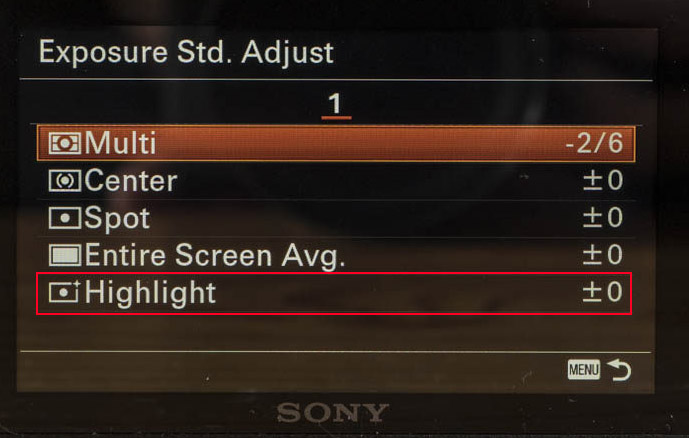
I got some PMs about it. Here is how I set this up:
1) Change the camera metering to "Highlight".
2) Go to Menu setting: "Exposure Std. Adjust" (See image) and tweak Highlight metering from "0" to "+1" (which is the maximum allowed. -- It would be ideal if it let us change to "+2" though.
3) Change the top exposure compensation dial to "+1" and keep it there whenever using metering "Highlight".
Alternatively you could change exposure compensation in the menu instead of dial but I prefer to always see the exposure bias I'm using.
That's it.
_____________
PS: Of course you could always just set your camera to Metering: Highlight and change the top exposure compensation dial to "+2" instead of messing with "Exposure Std. Adjust".
Whichever is easier.
 |
||
 |
||
|
Dec 15, 2017 at 11:16 AM
p.11 #14A7rIII settings
BTW: Older versions of ExifTool do not recognize the A7R III's image count.
Download the latest version ExifTool-10.68 and it will work.
https://www.sno.phy.queensu.ca/~phil/exiftool/ (PC and Mac)
Here are the command lines:
How many clicks do you have already? I have only 55 since I'm mostly using electronic shutter.
Download the latest version ExifTool-10.68 and it will work.
https://www.sno.phy.queensu.ca/~phil/exiftool/ (PC and Mac)
Here are the command lines:
exiftool -imagecountOR
exiftool -s -G -All:*Count*
How many clicks do you have already? I have only 55 since I'm mostly using electronic shutter.
Dec 15, 2017 at 12:20 PM
p.11 #15A7rIII settings
Chuck Coyne wrote:
See this blog post by Colby Brown. Scroll down to the Determine Your Multi SD Card Workflow. This is how I set mine up so the camera switches over to the 2nd card automatically after filling the first card.
https://www.colbybrownphotography.com/getting-the-most-out-of-your-sony-a7r-iii/
Chuck
Thanks - It turns out I figured this out myself, but wasn't sure since I haven't filled up the card in slot 1 yet.
I've found the A7RIII user manual to be pretty thin on details like this.
- J
Dec 15, 2017 at 10:57 PM
p.11 #16A7rIII settings
So I finally I think settled in on settings. I tried to group MF operations on C1 as focus magnify and C2 as AF/MF toggle that way I can get to manual focus easy with a AF lens.
C3 is Shutter
It’s C4 is Crop mode. I used them because there a little harder to engage by accident
This one is interesting
Joystick is both moving AF around but Press is Actually AF on. Than I took the AF on button and made it a recall button. It’s AFS with a center zone for anything really quick in front of me
Left dial is color balance
Right dial is focus peaking adjustment
Down dial Live view of/on because of flash stuff
Center Dial button is AF area
Rotate dial is ISO
Than Fn in order pixel stitch, drive mode, af mode and anything not primary. Seems to be working pretty good
Edited on Dec 16, 2017 at 06:58 AM · View previous versions
Dec 15, 2017 at 11:22 PM
 Do you mean silent shooting?
p.11 #18A7rIII settings
Yes my control for silent or mechanical. So I can toggle bewteeen them
Dec 16, 2017 at 06:56 AM
p.11 #19A7rIII settings
GMPhotography wrote:
Yes my control for silent or mechanical. So I can toggle bewteeen them
Can you actually toggle *directly* between the two? Playing with my friend’s camera (have not received mine yet), we were able to assign the silent shutter to a custom key, but there was one more step to put it on or off.
Dec 16, 2017 at 07:12 AM
p.11 #20A7rIII settings
No a dialog box will come up and than you get the choice. Now C4 I have Crop mode that will go into crop right on first push. Which can be very useful when shooting on the fly. But I made it C4 because it’s just a little harder to hit by accident. Also I never used the dial rotation for anything on previous A7x or A9 it was always to loose and I constantly accidentally hit it. The A7rIII they tighten the drag on it so now it’s a lot harder to accidentally rotate. This gave me a extra custom function.
Dec 16, 2017 at 07:17 AM