BPDsas67 wrote:
Thought I would add my name and issue to the list of dirty 1dxmkii sensors...
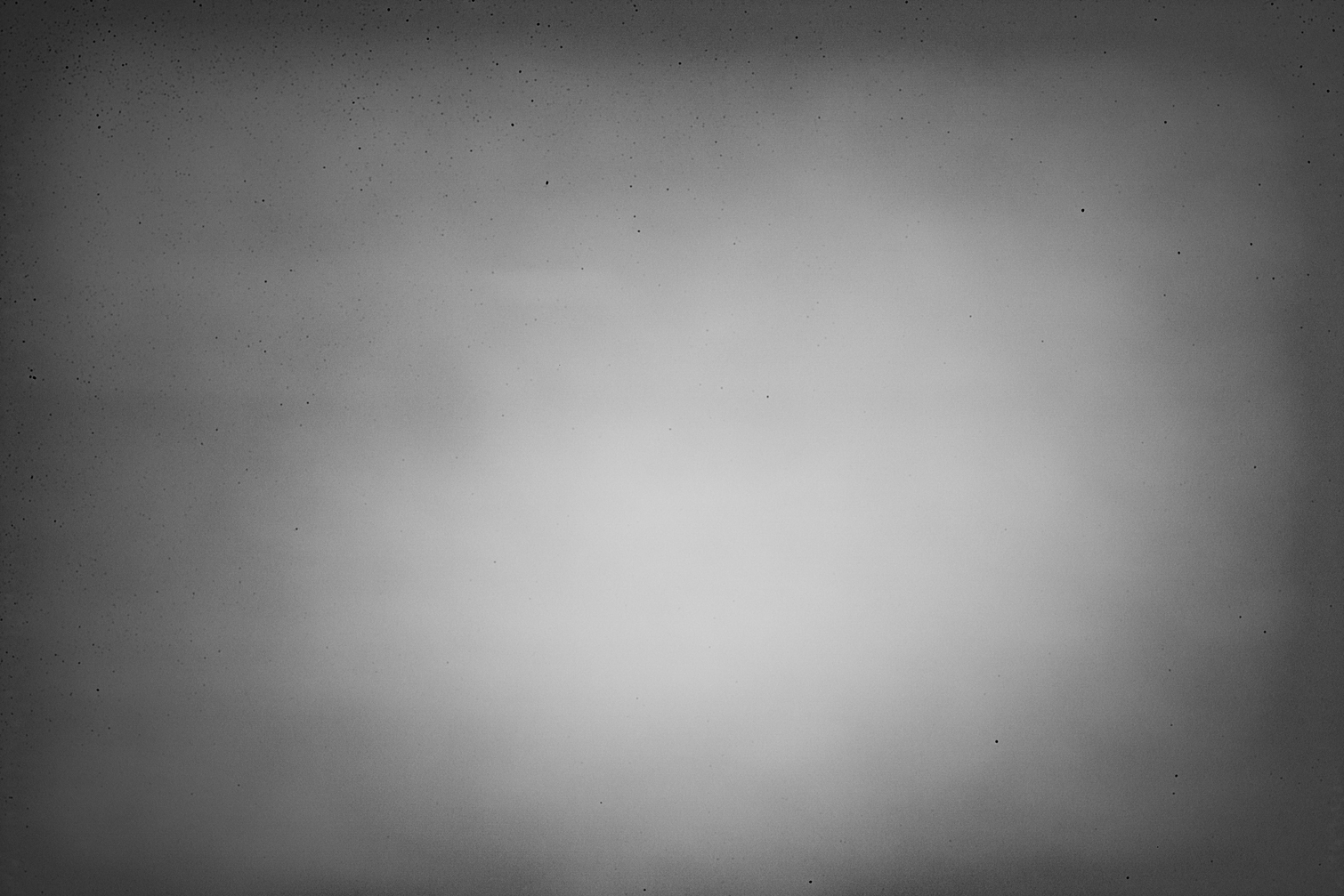
I was one of the first batches of this camera as I pre-ordered from B&H. After just a couple of outings I noticed dirt on sensor right away... ( mostly in upper left hand corner - but some in center as well) I am a CPS member so I sent it in after a couple of months to get cleaned ( I didnt want to be without it). A couple of months later, noticed the same issue. Sent it in advising that I believed it was splattering oil (although I am far from an expert and was just guessing as blowing didnt help ). It took them 3X's to get it properly cleaned! After the second failed attempt by Canon to properly clean the sensor, I sent in a printed photo as well as a disk with photos showing all the dirt spots, along with a letter expressing my displeasure with how poor of a job they did even after 2X cleanings. My guess is that if was just simply dust on sensor it would clean up much easier. It should NOT take 3x's for them to get it right. I should mention that I noticed these spots shooting a long lens 500mm + 1.4TC @ f/5.6-f/7.1 without cranking up contrast and sharpening. I will say that my camera seems to be settling down now. I havent noticed the sensor getting as dirty as quickly in recent months.... but I also havent been shooting against clear skies as of late... I am a reasonable guy...and understand that dust and dirt is gonna happen...but it seems that the theme here is that an UNreasonable amount of debris is finding its way to our 1dxmkii sensors... I will do a check at f/11 next clear blue sky I see....Show more →
Thank you for telling us your experience.
If you do check your sensor at f/11, would you mind forwarding me your RAW? I'm forwarding all the RAWs I can possibly get to Canon Canada and Canon USA, whether they show a clean sensor or a dirty one (so far they've all turned out to be dirty).
arbitrage wrote:
I think it is telling that as far as I can tell no one has yet to post a RAW file at f/22 that doesn't show the upper left corner mess.
Chimping wrote:
I've thought about starting a thread in the Nikon sub-forum too. It would be interesting to find out more Nikon D5 owners' experiences. From the few people I know with D5s, they've all said the same thing - that their cameras don't have the problems we're experiencing. They were shocked when I showed them some examples.
I have had several responses so far now and no one has had any issue with the D5, so i think we can bust the myth that every high fps camera has a dust/oil issue.
I'm going to be sending Canon RAWs from a few other cameras. They want something to compare to.
I have RAWs from the 5DIV, 7D2, and a Nikon D600. If anyone here has any of those cameras and can send me RAWs from them too, I'd appreciate it. Again, the more we have in the way of examples the better for everyone.
Canon also doesn't just want sky photos -- they want more real world representations of how these issues affect our everyday-type of shooting. I have a few from my own camera, WarrenL's airshow photos, Gust's photo, and a few shots from David Pattyn. The rest I submitted are of the sky, or some other low contrast scene.
I also have a few macro examples where the sensor line issue presents itself, especially with a black and white conversation. I'll be submitting the macro shots as well.
LMT1972 wrote:
Below is an image of the top left quarter of the sensor @ f20. This was wet cleaned about 6 weeks ago. I have boosted the contrast and used Nik detail extractor to highlight the spots. If you are shooting sports, weddings or using fast glass all the time this is likely not to be a major issue. I shoot landscape and macro mostly so most of my images have visible spots that need to be cloned out. As I said above, once you start processing the image (eg. cloudy skies) the spots start appearing everywhere. I wet clean my own sensor so not a big deal for me, but the problem doesn't appear to be improving. Some D600 users stated the problem improved once shutter count got over 20,000 but certainly not my experience.
Cheers
Leigh
http://sjbagnutri.com.au/resources/CAM_8526.jpg...Show more →
It's certainly the top left corner of the image that is most affected Canon replaced the sensor and shutter box on my 1Dx and I initially thought the 1Dx2 was better - I now avoid 'H burst' mode (which was one of the main reasons for buying the 1Dx2) and its so-so. There is little point in Canon saying they want to avoid sky shots as they want to see how it affects 'normal' photographs - I'm an aircraft photographer and, perhaps surprisingly to Canon, that's where most of my subjects are!!!
Top corner of a 1Dx2 RAW file put through Nik Detail Extractor!!!
Here’s a real world example of a picture that was ruined due to excessive oil splatter. This is the picture I was working on that uncovered the issue for me in the first place. I have lots of other examples from this trip, but this is the only one I have access to at the moment. https://flic.kr/p/21ALsNp
therealthings wrote:
I did some more testing with my latest copy that has a lot of those brush strokes.
They become visible from f10 and up where at f16 they are visible even without post processing if you know were they are.
The fact that i have seen files from copies that are near perfect is quite frustrating because all bodies i have had in my hands (except for 1 loaner that i still have here) including 2 brand new ones are affected by it. I just cannot accept that. Besides, the moment i will send my body in for cleaning, Canon is going to claim i damaged my sensor....Show more →
I wouldn’t just send them, raw files. The raw files are typically pretty flat and not want a photographer envisions the final photo to look like. My example I knew I wanted to be black and white and bring out contrast in the clouds. I never expected a thousand dots to appear in those clouds. In the raw file I never noticed them it wasn’t until I began adjusting the photo that they “appeared”.
I wouldn’t just send them, raw files. The raw files are typically pretty flat and not want a photographer envisions the final photo to look like. My example I knew I wanted to be black and white and bring out contrast in the clouds. I never expected a thousand dots to appear in those clouds. In the raw file I never noticed them it wasn’t until I began adjusting the photo that they “appeared”.
And that is exactly what Canon wants you to say. So they can say they do not appear in an untouched image (well my latest screenshot proved otherwise). The moment you touch any slider, they can claim you are altering the image to emphasize the dust, and does not reflect a 'real world condition'.
I just used one of the dozen copies to do bursts of 20 images with little pauses. After cycling through all the images, you can literally see the dust accumulate in the left corner every 10 frames or so.
Ofcourse you won't see that dust at f4.0 (until it becomes really bad like my sensor after a year). But from f8 and up it is clearly visible on all light backgrounds.
So guys, your 1Dx mark II is fine but might not work for you in the following conditions:
Macro work
Video work (if you also use your camera to take photos)
Landscape photography with apertures above f8
Aviation photography with lots of sky and larger apertures
Kitesurfing or other watersport photography with apertures at f8 or above
Unless you clean the sensor every few hundred shots, if you don't damage it ofcourse...
Here’s a real world example of a picture that was ruined due to excessive oil splatter. This is the picture I was working on that uncovered the issue for me in the first place. I have lots of other examples from this trip, but this is the only one I have access to at the moment. https://flic.kr/p/21ALsNp
Would you feel comfortable sending me the RAW or TIFF of that image?
I wouldn’t just send them, raw files. The raw files are typically pretty flat and not want a photographer envisions the final photo to look like. My example I knew I wanted to be black and white and bring out contrast in the clouds. I never expected a thousand dots to appear in those clouds. In the raw file I never noticed them it wasn’t until I began adjusting the photo that they “appeared”.
Canon asked me to send them RAWs. I have, however, sent them many accompanying jpegs as well. In fact, they have more jpegs than they do RAWs. Now they are unhappy that I sent RAW files of just clouds. Your photo would be a perfect example of a real world shot that still exhibits the problem.
nrferguson wrote:
It's certainly the top left corner of the image that is most affected Canon replaced the sensor and shutter box on my 1Dx and I initially thought the 1Dx2 was better - I now avoid 'H burst' mode (which was one of the main reasons for buying the 1Dx2) and its so-so. There is little point in Canon saying they want to avoid sky shots as they want to see how it affects 'normal' photographs - I'm an aircraft photographer and, perhaps surprisingly to Canon, that's where most of my subjects are!!!
Can you send me this file too, or an airshow shot?
Another person there tried to say they did not have any issues, and after closer inspection of their files they did indeed exhibit oil splatter.
Of course there’s the typical “never had a problem... I have shot a bazillion photos” as well in the thread. Typical that these people love chiming in with comments on how we are out to lunch, but then never provide any real proof or examples of their claims.
I LITERALLY have yet to see a 1DX Mark II camera not exhibit oil splatter. Later this week I’ll be going to different camera stores around the city with my CF Card to take a look at their demo units for even more examples.
Also notice Herb is still saying he doesn’t have an issue.
My sensor was a mess in the top left corner. I sent it to Canon CPS for a cleaning just got the camera back today. Looks like they did a good job cleaning it.
Pius Sullivan wrote:
My sensor was a mess in the top left corner. I sent it to Canon CPS for a cleaning just got the camera back today. Looks like they did a good job cleaning it.
The difference is night and day. They did a good cleaning job looking at the resized images. (Can't tell exactly since they are not crops but it looks good). The question is, if you do a couple of hundred shots with it on 14fps in a number of bursts, how does the top left corner look. I have had brand new bodies that i tested like that and only after a few hundred the left corner had already a few dozen spots on it visible from f8.
Pius Sullivan wrote:
My sensor was a mess in the top left corner. I sent it to Canon CPS for a cleaning just got the camera back today. Looks like they did a good job cleaning it.
You sent you camera to Canon Canada CPS, and my experience with their cleaning service was also excellent, as I have already stated in this thread. Whomever it is that cleans sensors there, I hope they pay them enough to keep em around!
As you can see...it's the upper-lefthand corner again. That's not normal. As therealthing noted, the question is how long it will take before your sensor is filthy again. Do you do a lot of high burst shooting? If you do, can you keep track of the amount of frames you're taking and then report back?
Thank you for your input. Can I trouble you for the RAWs of both these photos?
I took my camera to CPS in Jamesburg NJ . It’s only an hour drive for me. They did an ok job cleaning the sensor they got everything off the top left corner of frame but left some in the lower left. I shot about 45 frames single shot and took a test shot for dirt and didn’t see any additional dirt/oil. I plan on shooting eagles sometime this weekend so will probably get a few hundred frames at 14fps. I’ll take another test shot after to see how the sensor looks.