This topic is in the 2017 archive. You can read it and like its posts here. It is read only.
Archive 2017Official Nikon D850 image & resource hub thread ...
p.54 #1Official Nikon D850 image & resource hub thread ( images picture )
 Windfarm in the Quiet of the Night by primeshooter, on Flickr
Dec 18, 2017 at 11:38 AM


Dec 18, 2017 at 01:15 PM
p.54 #3Official Nikon D850 image & resource hub thread ( images picture )
D850, 200mm F2, F2.8, 1/200, ISO100
 4060 by eric laquerre, sur Flickr
Dec 20, 2017 at 09:28 PM
p.54 #4Official Nikon D850 image & resource hub thread ( images picture )
handheld panorama, 14-24 at 16mm, 5-6 images stitched together.

False Creek Panorama
Dec 20, 2017 at 09:35 PM
p.54 #5Official Nikon D850 image & resource hub thread ( images picture )
http://
 Breathe by joshua marcus, on Flickr
 Pain by joshua marcus, on Flickr[/url]
Dec 20, 2017 at 10:56 PM
p.54 #6Official Nikon D850 image & resource hub thread ( images picture )
A selection of photos (in 4K) taken with my D850 in the first 3 months of ownership (September-December 2017):
MERRY XMAS AND HAPPY NEW YEAR TO ALL!!!
MERRY XMAS AND HAPPY NEW YEAR TO ALL!!!
 |
||
|
Dec 21, 2017 at 05:08 AM
p.54 #7Official Nikon D850 image & resource hub thread ( images picture )
4mpx wrote:
A selection of photos (in 4K) taken with my D850 in the first 3 months of ownership (September-December 2017):
MERRY XMAS AND HAPPY NEW YEAR TO ALL!!!
very cool.
A selection of photos (in 4K) taken with my D850 in the first 3 months of ownership (September-December 2017):
MERRY XMAS AND HAPPY NEW YEAR TO ALL!!!
very cool.
Dec 21, 2017 at 06:11 AM
p.54 #8Official Nikon D850 image & resource hub thread ( images picture )
4mpx wrote:
A selection of photos (in 4K) taken with my D850 in the first 3 months of ownership (September-December 2017):
MERRY XMAS AND HAPPY NEW YEAR TO ALL!!!
Very cool...btw, what software did you use to put that together, I would like to do something similar?
A selection of photos (in 4K) taken with my D850 in the first 3 months of ownership (September-December 2017):
MERRY XMAS AND HAPPY NEW YEAR TO ALL!!!
Very cool...btw, what software did you use to put that together, I would like to do something similar?
Dec 21, 2017 at 06:38 AM
p.54 #9Official Nikon D850 image & resource hub thread ( images picture )
another wide angle one from last evening.
14mm, f8, 0.8s, iso 64.
Happy Holidays everyone.

Giant Christmas Baubles
14mm, f8, 0.8s, iso 64.
Happy Holidays everyone.
Dec 21, 2017 at 10:21 AM
p.54 #10Official Nikon D850 image & resource hub thread ( images picture )
cvrle59 wrote:
MERRY XMAS AND HAPPY NEW YEAR TO ALL!!!Very cool...btw, what software did you use to put that together, I would like to do something similar?
I use a free software called "4K Slideshow Maker".
4mpx wrote
A selection of photos (in 4K) taken with my D850 in the first 3 months of ownership (September-December 2017):MERRY XMAS AND HAPPY NEW YEAR TO ALL!!!
I use a free software called "4K Slideshow Maker".
Dec 21, 2017 at 01:34 PM
p.54 #11Official Nikon D850 image & resource hub thread ( images picture )
D850_500mm F4
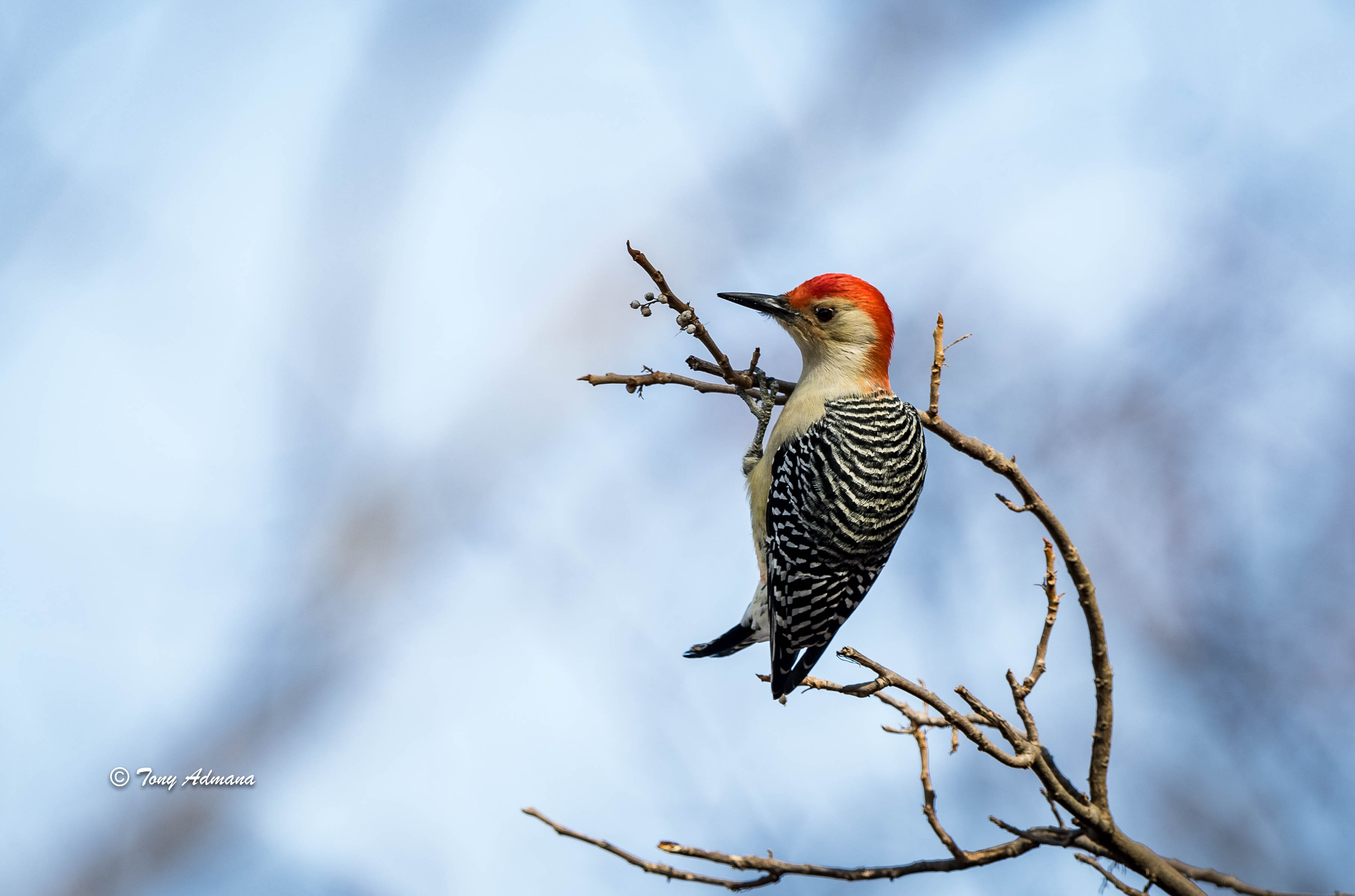
Red-bellied woodpecker
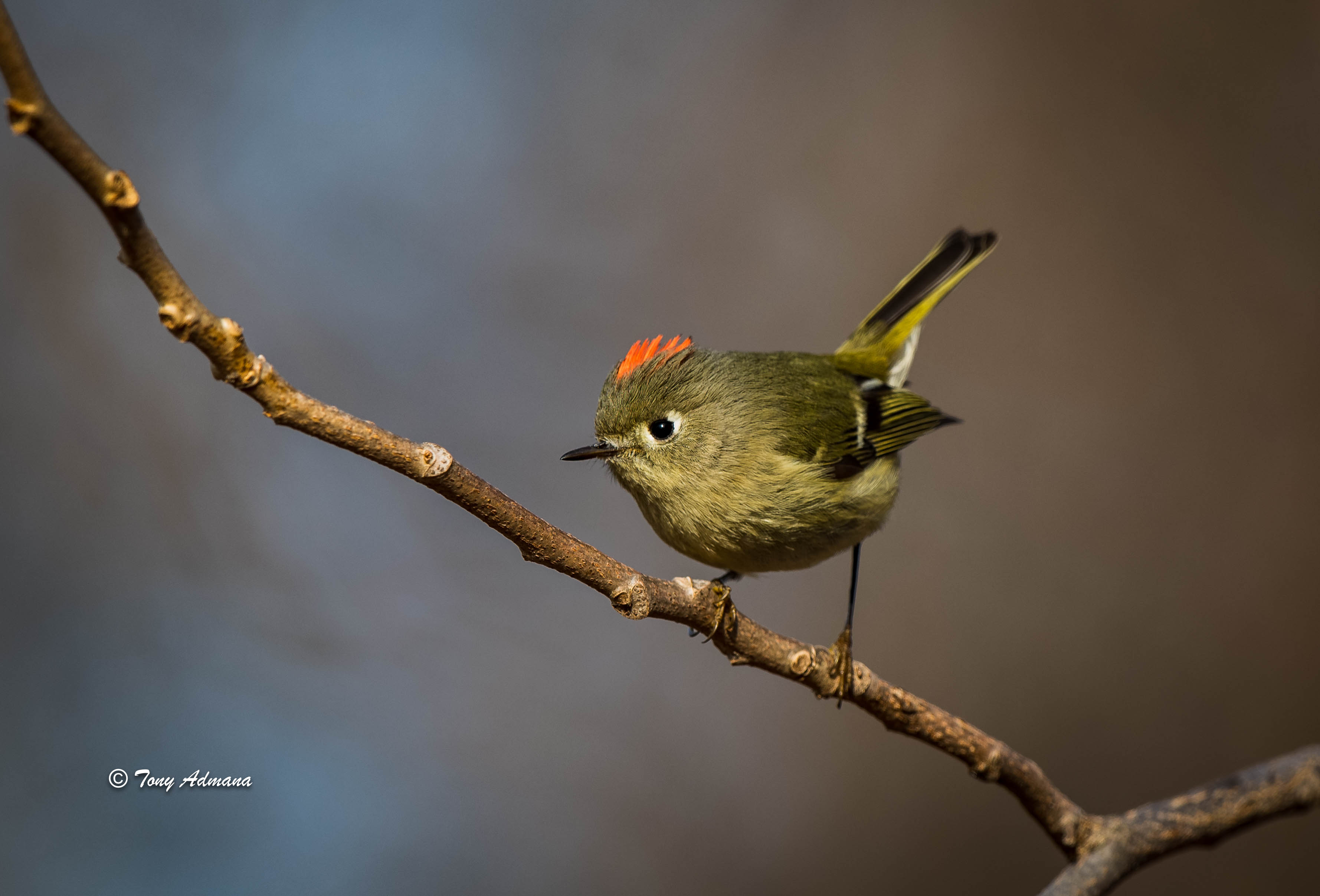
Ruby-crowned kinglet
Red-bellied woodpecker
Ruby-crowned kinglet
Dec 21, 2017 at 01:46 PM
p.54 #12Official Nikon D850 image & resource hub thread ( images picture )
Just received my D850 and after configuring I'm trying all (new for me) features out.
What I can't figure out is how to control the auto focus point in live view. I can move it around with my fingertip, but when I take my finger off from the screen it takes a picture.
RTFM doesn't helped me. It's driving me crazy as it is probably something stupid I overlooked.
What I can't figure out is how to control the auto focus point in live view. I can move it around with my fingertip, but when I take my finger off from the screen it takes a picture.
RTFM doesn't helped me. It's driving me crazy as it is probably something stupid I overlooked.
Dec 21, 2017 at 03:10 PM
p.54 #13Official Nikon D850 image & resource hub thread ( images picture )
Chris Dees wrote:
Just received my D850 and after configuring I'm trying all (new for me) features out.
What I can't figure out is how to control the auto focus point in live view. I can move it around with my fingertip, but when I take my finger off from the screen it takes a picture.
RTFM doesn't helped me. It's driving me crazy as it is probably something stupid I overlooked.
If you're in normal, wide, or pinpoint AF mode in Live View, the multi-selector should be moving the focus point. If you're in face priority AF, I don't remember if the multi-selector does anything except switch between faces, if present. Also make sure your focus point lock lever that surrounds the multi selector isn't set to "L".
Just received my D850 and after configuring I'm trying all (new for me) features out.
What I can't figure out is how to control the auto focus point in live view. I can move it around with my fingertip, but when I take my finger off from the screen it takes a picture.
RTFM doesn't helped me. It's driving me crazy as it is probably something stupid I overlooked.
If you're in normal, wide, or pinpoint AF mode in Live View, the multi-selector should be moving the focus point. If you're in face priority AF, I don't remember if the multi-selector does anything except switch between faces, if present. Also make sure your focus point lock lever that surrounds the multi selector isn't set to "L".
Dec 21, 2017 at 03:35 PM
p.54 #14Official Nikon D850 image & resource hub thread ( images picture )
To change how the touch af behave press on the info button at the bottom right and you will see a af icon appear on your top left corner of your live view. Tap on it to change the behavior, af only, af+shutter or touch af off.
Edited on Dec 21, 2017 at 03:42 PM · View previous versions
Edited on Dec 21, 2017 at 03:42 PM · View previous versions
Dec 21, 2017 at 03:39 PM
p.54 #15Official Nikon D850 image & resource hub thread ( images picture )
Chris Dees wrote:
Just received my D850 and after configuring I'm trying all (new for me) features out.
What I can't figure out is how to control the auto focus point in live view. I can move it around with my fingertip, but when I take my finger off from the screen it takes a picture.
RTFM doesn't helped me. It's driving me crazy as it is probably something stupid I overlooked.
Hi Chris. Congrats on the D850 In LV there is an icon on the left side of the screen. Just tap and turn off the shot function when you take your finger off. This took me ages to find and is not obvious as there is no direct menu function
Just received my D850 and after configuring I'm trying all (new for me) features out.
What I can't figure out is how to control the auto focus point in live view. I can move it around with my fingertip, but when I take my finger off from the screen it takes a picture.
RTFM doesn't helped me. It's driving me crazy as it is probably something stupid I overlooked.
Hi Chris. Congrats on the D850
In LV there is an icon on the left side of the screen. Just tap and turn off the shot function when you take your finger off. This took me ages to find and is not obvious as there is no direct menu function Dec 21, 2017 at 03:40 PM
p.54 #16Official Nikon D850 image & resource hub thread ( images picture )
Thanks for the help.
I can move the AF-points now, but I'm still not able to autofocus.
I tried with AF-ON (BBF) and shutter button.
I can move the AF-points now, but I'm still not able to autofocus.
I tried with AF-ON (BBF) and shutter button.
Dec 21, 2017 at 03:54 PM
p.54 #17Official Nikon D850 image & resource hub thread ( images picture )
Chris Dees wrote:
Thanks for the help.
I can move the AF-points now, but I'm still not able to autofocus.
I tried with AF-ON (BBF) and shutter button.
You should be able to AF with no issues when the touch to release mode is disabled. When you are in LV set the AF modes as they are different when you are in OVF mode.
Edited on Dec 21, 2017 at 04:02 PM · View previous versions
Thanks for the help.
I can move the AF-points now, but I'm still not able to autofocus.
I tried with AF-ON (BBF) and shutter button.
You should be able to AF with no issues when the touch to release mode is disabled. When you are in LV set the AF modes as they are different when you are in OVF mode.
Edited on Dec 21, 2017 at 04:02 PM · View previous versions
Dec 21, 2017 at 03:59 PM
p.54 #18Official Nikon D850 image & resource hub thread ( images picture )
Your lense is set to manual focus or your lever on your camera is set to m! I don't see anything else.
Dec 21, 2017 at 04:01 PM
p.54 #19Official Nikon D850 image & resource hub thread ( images picture )
charles.K wrote:
I can move the AF-points now, but I'm still not able to autofocus.
I tried with AF-ON (BBF) and shutter button.You should be able to AF with no issues when the touch to release mode is disabled. When you are in LV set the AF modes as they are different when you are in OVF mode.
It's not.
If I change to normal mode everything is working as I expect to (AF is instantaniously).
Chris Dees wrote
Thanks for the help.I can move the AF-points now, but I'm still not able to autofocus.
I tried with AF-ON (BBF) and shutter button.
It's not.
If I change to normal mode everything is working as I expect to (AF is instantaniously).
Dec 21, 2017 at 04:04 PM
p.54 #20Official Nikon D850 image & resource hub thread ( images picture )
Chris Dees wrote:
I can move the AF-points now, but I'm still not able to autofocus.
I tried with AF-ON (BBF) and shutter button.You should be able to AF with no issues when the touch to release mode is disabled. When you are in LV set the AF modes as they are different when you are in OVF mode.It's not.
If I change to normal mode everything is working as I expect to (AF is instantaniously).
I am not sure what is happening and maybe a missed sequence of settings. The touch release shoot mode is off on my D850 as I rarely have a need. Also for focus shift shoots this is great as you find the nearest focus point and then start the sequence of shots. I will test my D850 and see if I can replicate as to what you are seeing.
charles.K wrote
Chris Dees wrote
Thanks for the help.I can move the AF-points now, but I'm still not able to autofocus.
I tried with AF-ON (BBF) and shutter button.
If I change to normal mode everything is working as I expect to (AF is instantaniously).
I am not sure what is happening and maybe a missed sequence of settings. The touch release shoot mode is off on my D850 as I rarely have a need. Also for focus shift shoots this is great as you find the nearest focus point and then start the sequence of shots. I will test my D850 and see if I can replicate as to what you are seeing.
Dec 21, 2017 at 04:13 PM