First off, a HUGE thanks to Genji and others who have contributed to this FAQ thread.
I just received the TAP and per the FAQ at the top, also ordered a Fotodiox Nikon F to Leica M mount adapter for my Nikon 105/2.5 AIS and Zeiss 25/2.8 ZF lenses. I've only started to test it and will need to go back through the incredibly helpful suggestions in this thread to see how the TAP performs (prelim tests looked good for static objects in good light and less good for my stationary daughter in okay-ish light).
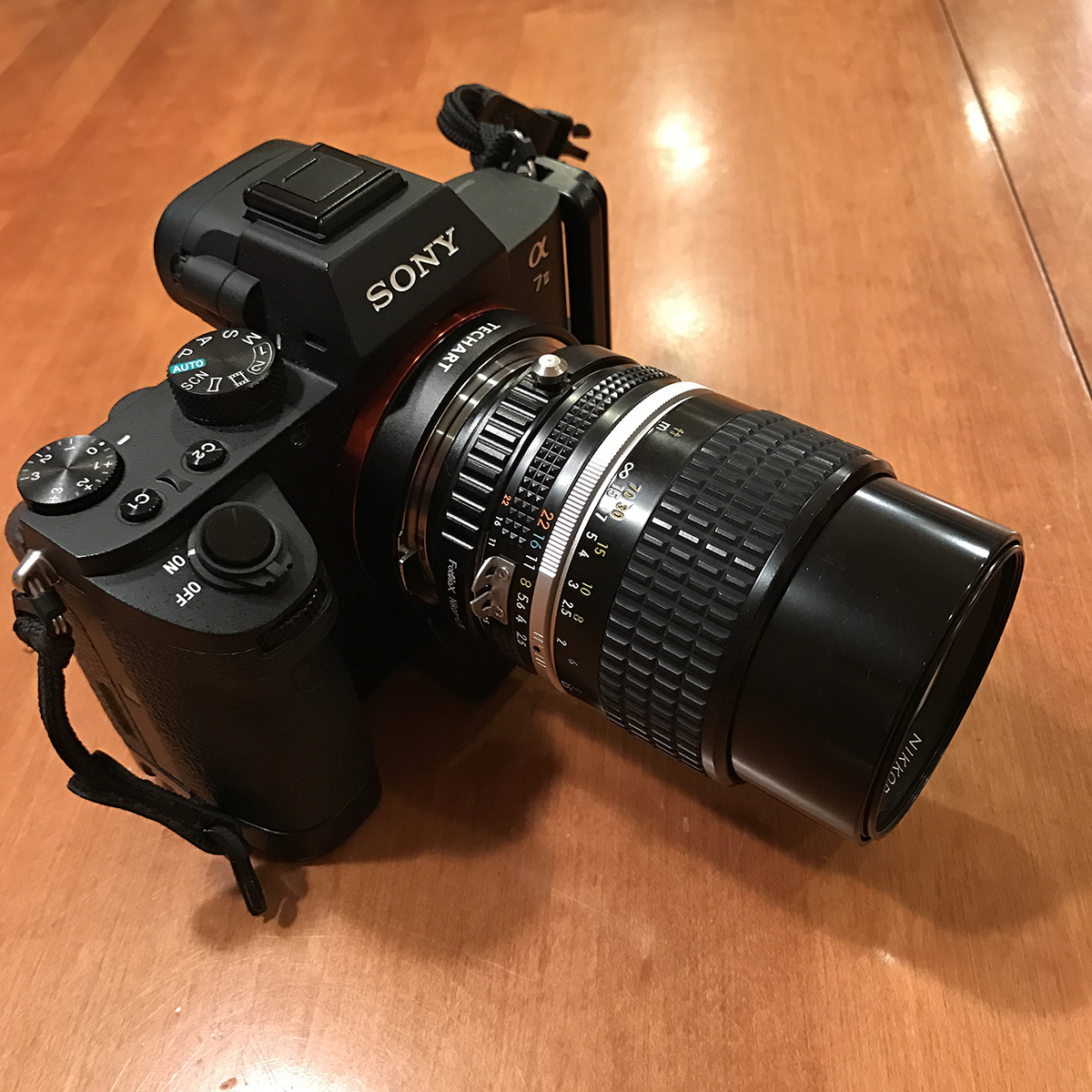
Anyway, my immediate question has to do with the Fotodiox adapter I received. Take a look at the attached picture. Notice anything odd? Per this thread as well as the TAP instructions, I believe I correctly lined up the TAP with the A7II (white dot to white dot) as well as the Fotodiox F->M with the TAP (red dot to red dot). The problem is that the Fotodiox seems to be off when properly mounted, i.e. it leaves the "top" of the lens barrel at 9:00. I assume this is a manufacturing/assembly mistake at Fotodiox? Thoughts? Return it to B&H for one that is aligned correctly?
Thanks,
Steve
P.S. For anyone interested, the TAP works with the RRS BA7R2-L plate (i.e. it doesn't hit it), but the TAP gets in the way of using the A7II with the RRS plate on a tripod, or more specifically, with the BH-30 head and B2-Pro clamp.
Thanks, bluloo and Fred. Good to know that Nikon lenses aren't supposed to be at 90-deg to the left. :-) I can't seem to locate a Leicaist vendor not in China (with a 2+ week delivery) so for now, I ordered a $20 K&F Concept from Amazon and will send back the Fotodiox to B&H.
More importantly, I'll play around over the weekend with the current setup (it works, it's just 90-deg off) and see how well the TAP works with both of my Nikon mount lenses.
Steve Miller wrote:
First off, a HUGE thanks to Genji and others who have contributed to this FAQ thread.
I just received the TAP and per the FAQ at the top, also ordered a Fotodiox Nikon F to Leica M mount adapter for my Nikon 105/2.5 AIS and Zeiss 25/2.8 ZF lenses. I've only started to test it and will need to go back through the incredibly helpful suggestions in this thread to see how the TAP performs (prelim tests looked good for static objects in good light and less good for my stationary daughter in okay-ish light).
Anyway, my immediate question has to do with the Fotodiox adapter I received. Take a look at the attached picture. Notice anything odd? Per this thread as well as the TAP instructions, I believe I correctly lined up the TAP with the A7II (white dot to white dot) as well as the Fotodiox F->M with the TAP (red dot to red dot). The problem is that the Fotodiox seems to be off when properly mounted, i.e. it leaves the "top" of the lens barrel at 9:00. I assume this is a manufacturing/assembly mistake at Fotodiox? Thoughts? Return it to B&H for one that is aligned correctly?
Thanks,
Steve
P.S. For anyone interested, the TAP works with the RRS BA7R2-L plate (i.e. it doesn't hit it), but the TAP gets in the way of using the A7II with the RRS plate on a tripod, or more specifically, with the BH-30 head and B2-Pro clamp....Show more →
Definitely best to return the Fotodiox adapter. Still, even with the 90 degree offset, it's so cool to see that Nikon 105/2.5 AIS mounted on the A7 II; such a perfect combination!
Okay, I've been playing around with the A7II + TAP + Nikon 105/2.5 combo today. A few observations:
1) I'm impressed with the AF accuracy and reasonably impressed with the speed. I'm still amazed that you can take a lens that was designed for manual focus only and have it AF on a 2015 camera. So cool!
2) I think I've set up everything correctly but find that all images are underexposed so I need to set EC of 1.0 to get images that are properly exposed. FYI, I've configured the camera as follows: TAP aperture set to F29 for one pic to store a 90mm lens (closest to 105), A7II set to SteadyShot-Auto so it picks up 90mm (close enough for 105) - this is confirmed when I see the EXIF registering a 90mm FL, aperture locked in at f/2.0 in the camera. I shoot in Manual mode and adjust the aperture on the lens and shutter speed on the camera. ISO is on Auto with a 12800 cap (most of these indoor test shots have been between 500-2500).
3) I think I'm experiencing a HUGE battery drain but will confirm tonight with a fresh battery. I thought I went to sleep last night with the battery around 65%. This morning it was at 40%. Having shot about 20 pictures over the past 90-min and the camera either in sleep mode or fully off, the battery level is now at 24%. I was hardly scientific about it so I'll check again tonight with a fully charged battery and the camera off. Then I'll see how much normal usage drains the battery as well.
That's it for now.
Steve
P.S. TAP firmware was updated to 4.0 (via IOS app) when I got it yesterday.
Steve Miller wrote:
Okay, I've been playing around with the A7II + TAP + Nikon 105/2.5 combo today. A few observations:
1) I'm impressed with the AF accuracy and reasonably impressed with the speed. I'm still amazed that you can take a lens that was designed for manual focus only and have it AF on a 2015 camera. So cool!
2) I think I've set up everything correctly but find that all images are underexposed so I need to set EC of 1.0 to get images that are properly exposed. FYI, I've configured the camera as follows: TAP aperture set to F29 for one pic to store a 90mm lens (closest to 105), A7II set to SteadyShot-Auto so it picks up 90mm (close enough for 105) - this is confirmed when I see the EXIF registering a 90mm FL, aperture locked in at f/2.0 in the camera. I shoot in Manual mode and adjust the aperture on the lens and shutter speed on the camera. ISO is on Auto with a 12800 cap (most of these indoor test shots have been between 500-2500).
3) I think I'm experiencing a HUGE battery drain but will confirm tonight with a fresh battery. I thought I went to sleep last night with the battery around 65%. This morning it was at 40%. Having shot about 20 pictures over the past 90-min and the camera either in sleep mode or fully off, the battery level is now at 24%. I was hardly scientific about it so I'll check again tonight with a fully charged battery and the camera off. Then I'll see how much normal usage drains the battery as well.
That's it for now.
Steve
P.S. TAP firmware was updated to 4.0 (via IOS app) when I got it yesterday....Show more →
If you have (or have access to) an Android device, you can use the Configuration App to set 105mm as one of your focal length choices. It's really worth doing because not only can you modify the defaults but you can also move your most used focal lengths to the beginning of the aperture sequence (e.g. F11 for 105mm instead of the default 15mm), thereby cutting down on the number of clicks needed to change focal length.
genji wrote:
If you have (or have access to) an Android device, you can use the Configuration App to set 105mm as one of your focal length choices. It's really worth doing because not only can you modify the defaults but you can also move your most used focal lengths to the beginning of the aperture sequence (e.g. F11 for 105mm instead of the default 15mm), thereby cutting down on the number of clicks needed to change focal length.
Thanks, genji. Our family is all iPhone, but maybe I can borrow a friend's for a one-off settings change.
I'm in the process of updating my TAP to version 4 software. It has been installing for about 20 minutes. Currently the countdown number in the lower left of the app is at 65,000, and it's counting down 1,000 numbers at the rate of about 1,000 per second. By my calcs that indicates I've got about 18 hours left.
brick33308 wrote:
I'm in the process of updating my TAP to version 4 software. It has been installing for about 20 minutes. Currently the countdown number in the lower left of the app is at 65,000, and it's counting down 1,000 numbers at the rate of about 1,000 per second. By my calcs that indicates I've got about 18 hours left.
Is that possibly right? Any suggestions?
No way it took hours when I did this, maybe 5-10 minutes max, if I remember right.
It took me about 15-min. From your math though, if it's counting down from 65,000 at a rate of 1,000 per second, you should have 65 seconds left before it's done. Worst case, if you meant to say it's counting down at a rate of 1,000 per minute, it will be done in an hour. Though I highly doubt it should take that long.