fredmiranda.com
Login

Moderated by: Fred Miranda
FM Forum Rules
Landscape Posting Guidelines
  

FM Forums | Landscape Photographer | Join Upload & Sell

       2       end
  

Archive 2016 · Chasing the Milky Way in The Outer Banks


Travis Rhoads
Offline
• • • • •
Upload & Sell: On
p.1 #1 · Chasing the Milky Way in The Outer Banks


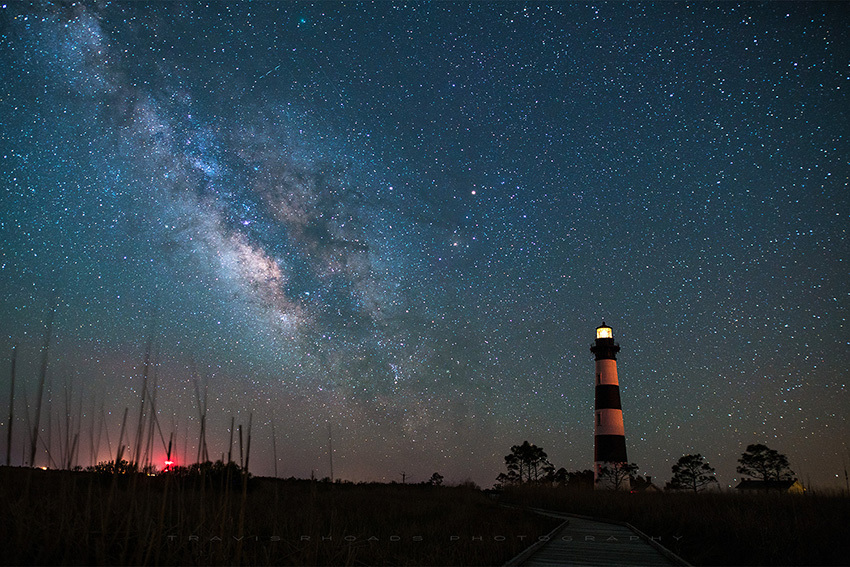
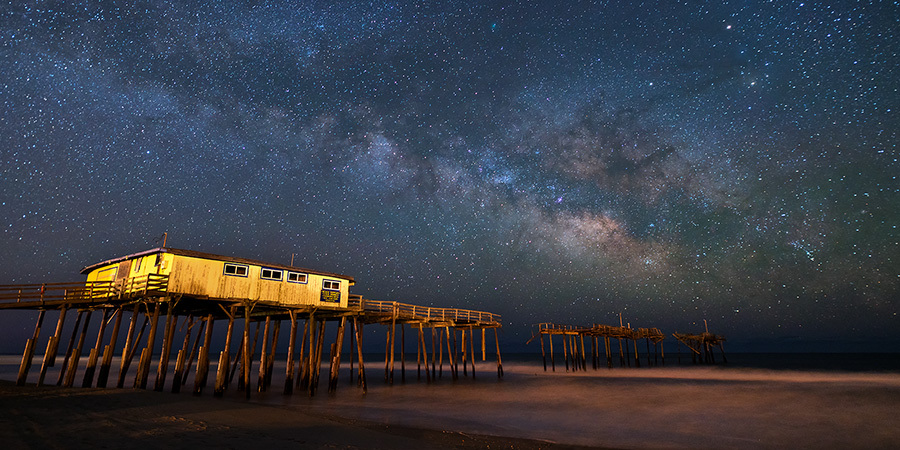
A couple of weeks ago I spent a weekend in The Outer Banks. It was my first real photography outing of the year, and the first with the Sony A7R2 as the primary gear...crap weather for the first couple of days had me down...I was in search of clear skies to chase the Milky Way. On the last night of the trip, I set out at 11PM for a night long session of shooting. I thought I would share the fruits of that long session in the dark...just me and my imagination running wild. These are not really in order...just a way of showing them...I could go on for many many words about the chase...but no one is really interested in that. SO I will shut it now.

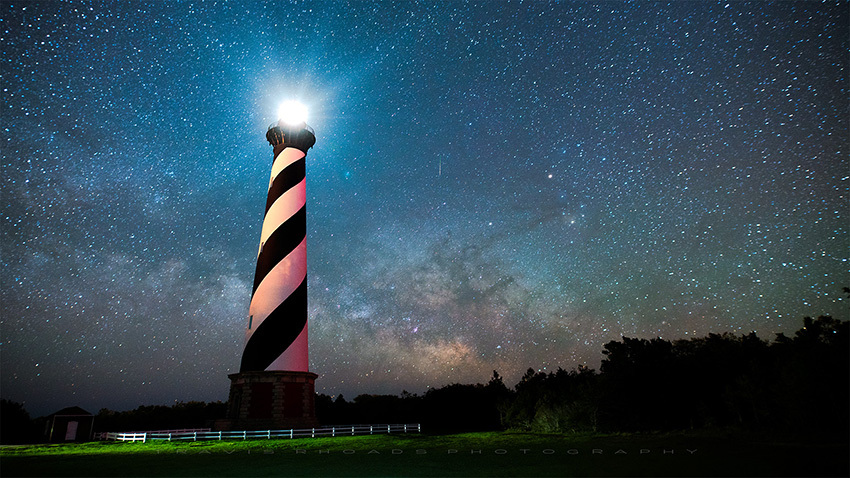
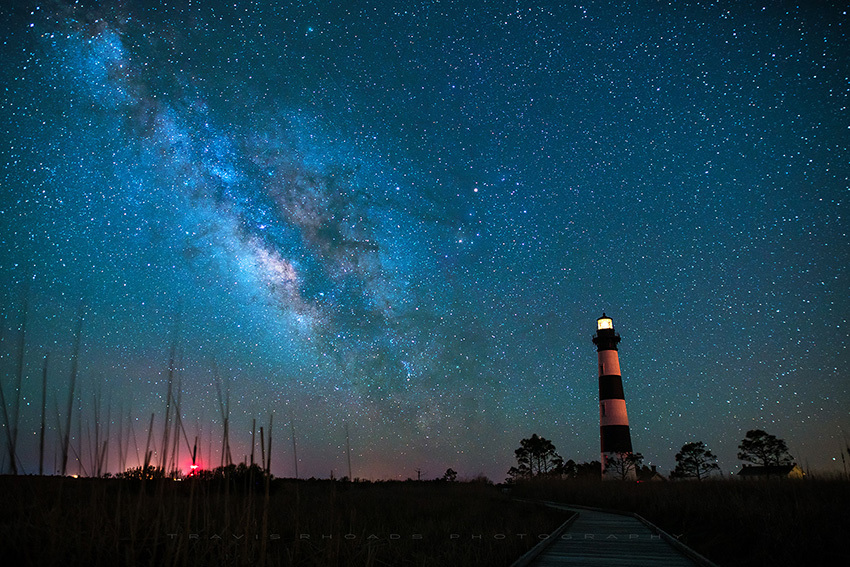
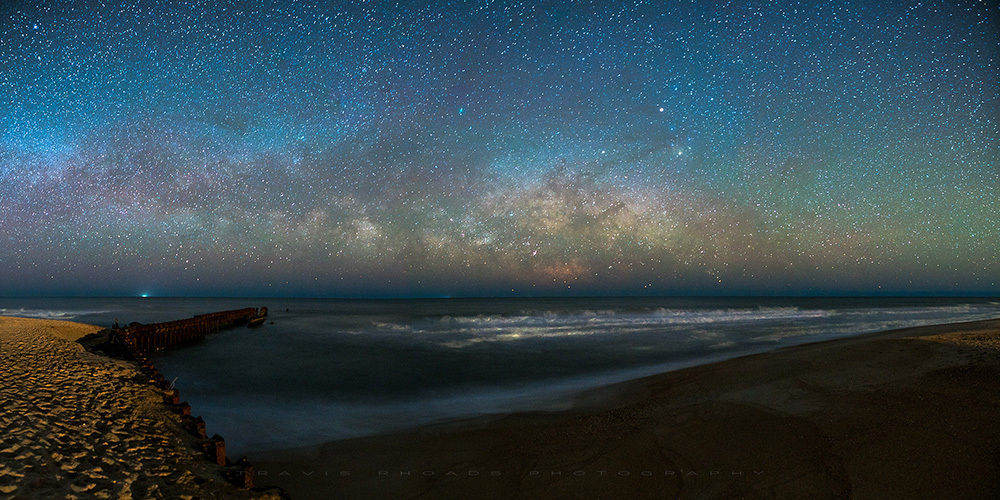
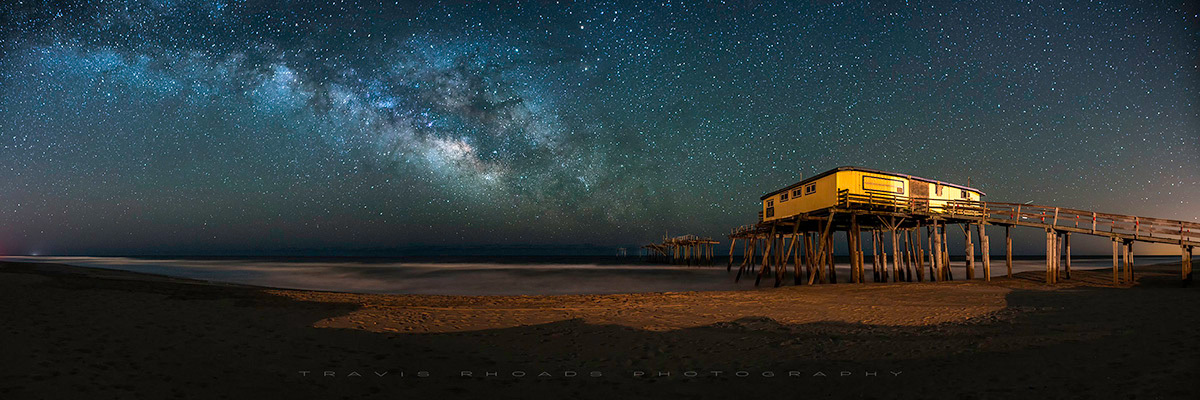
The first three are single images, the last two are panos.

Thanks for looking, any crits are more than welcome, this was the first time shooting the Milky Way where I had the right gear for it.


#1: Frisco Rising


#2:Shooting Hatteras


#3: Interstellar Bodie


#4: On The Horizon


#5: Cosmic Frisco


Edited on Apr 19, 2016 at 07:24 AM · View previous versions


Apr 18, 2016 at 09:35 PM
narasimhalu
Offline

Upload & Sell: Off
p.1 #2 · Chasing the Milky Way in The Outer Banks


Wonderful pictures - your patience paid off. Could you please provide guidance on how you managed to keep the lighthouse light from not "washing" out the exposure? Maybe not a like-for-like comparison, but when i attempted to capture the Milky Way, I had a full moon which washed out the scene at 20 & 30 sec. Thanks for any tips and great shots.


Apr 18, 2016 at 09:52 PM
Chance2
Offline
• •
Upload & Sell: Off
p.1 #3 · Chasing the Milky Way in The Outer Banks


Looks like you had one heck of a productive night! I've had limited experience and luck at night (and I have no clue how one gets results like this with just a singe image) so my comments might not mean much, but I feel there's something special about each of these.

I'm sure you'll get a ton of feedback so I'll just say that the first, with that amazing sky and great pier, is my favorite. And... great job!


Apr 18, 2016 at 11:15 PM
JimFox
Offline
• • • • • • •
Upload & Sell: Off
p.1 #4 · Chasing the Milky Way in The Outer Banks


Hey Travis,

You did have a productive evening!

I think I like #2 and 3 the best of these, with #2 my favorite.

A couple of thoughts though.

The Milky Way looks the best in #2 and 4, but the others the Milky Way turned blue instead of being white/gray. The Core of it looks pretty good in most of them as it's brownish, but all of them to some degree show the Milky Way being discolored blue/cyan.

In both Lighthouse shots the Lighthouse is tilting, with #3 the worst, I would straighten it.

The building on the pier, I think might be a little too bright, at least for me I would tone it down.

The Milky Way is a delicate animal, and it's easy for it to get discolored, I usually have to mask it to protect it from getting off colored when processing.

Jim


Apr 19, 2016 at 02:09 AM
DSC01
Offline
• • • •
Upload & Sell: Off
p.1 #5 · Chasing the Milky Way in The Outer Banks


Travis,
These are really neat.
I think #1 would benefit from just bringing down the light on the bldg slightly. I love the waves in #4 they almost look like the reflection of the MW, to me its the most interesting of the lot. Nice job on these.
Regards,
Dean


Apr 19, 2016 at 05:54 AM
Lynn Ross
Offline
• • • •
Upload & Sell: Off
p.1 #6 · Chasing the Milky Way in The Outer Banks


I just flat out like looking at all of these and admire the patience that it took to spend an evening under the stars, and your processing looks good to me cuss I struggle with that, Jim has a good eye for things that I over look.

Anyway really fun post and great shots
Look forward to more from you

Lynn


Apr 19, 2016 at 07:23 AM
Travis Rhoads
Offline
• • • • •
Upload & Sell: On
p.1 #7 · Chasing the Milky Way in The Outer Banks


narasimhalu wrote:
Wonderful pictures - your patience paid off. Could you please provide guidance on how you managed to keep the lighthouse light from not "washing" out the exposure? Maybe not a like-for-like comparison, but when i attempted to capture the Milky Way, I had a full moon which washed out the scene at 20 & 30 sec. Thanks for any tips and great shots.

Thank you for taking the time to look and comment. Patience was key. When I left the house I was staying at, I thought it would be almost 4AM before the Milky Way came off the horizon, it was more like 2AM...

For #2, the light on the lighthouse is rotating, and it is mostly casting its light out and not down in the area where I was. I also had the advantage of zero moon present, the moon didn't show up until after I was shooting #3. Which leads to #3. The light on Bodie is not on all the time. It flashes and then goes dark for a period of about 20 seconds or so...I timed that exposure to start just as the light started to go off, then the rest of my exposure was while the light was off.
---------------------------------------------

Chance2 wrote:
Looks like you had one heck of a productive night! I've had limited experience and luck at night (and I have no clue how one gets results like this with just a singe image) so my comments might not mean much, but I feel there's something special about each of these.

I'm sure you'll get a ton of feedback so I'll just say that the first, with that amazing sky and great pier, is my favorite. And... great job!

Thanks for the kind words, and taking the time. I think the combination of the right lens, the Sigma 20ART is great for this kind of work, and a really sensitive full frame sensor were the key elements. None of my previous attempts to shoot the MW were very successful, I didn't have fast enough glass, which meant raising the ISO too much...which produced noisy images. To be able to shoot at f/2 was a big bonus.
---------------------------------------------

JimFox wrote:
Hey Travis,

You did have a productive evening!

I think I like #2 and 3 the best of these, with #2 my favorite.

A couple of thoughts though.

The Milky Way looks the best in #2 and 4, but the others the Milky Way turned blue instead of being white/gray. The Core of it looks pretty good in most of them as it's brownish, but all of them to some degree show the Milky Way being discolored blue/cyan.

In both Lighthouse shots the Lighthouse is tilting, with #3 the worst, I would straighten it.

The building on the pier, I think might be a little too
...Show more
Jim I really appreciate your feedback...this is a genre I am still getting used to.I need to go back and look at the color tone in most of them it seems, particularly Bodie...not sure what I did wrong there, I revised it a bit and like it more. Maybe I should have let that one marinate a little. I also adjust the perspective correction a bit. On #2, I was standing pretty close to the lighthouse, not much I can do that doesn't really wreck the image, and sometimes I think we get too caught up in making everything too correct when it comes to perspective.

Do you have any reading or tutorials that you have found helpful when processing MW images...I have read and looked at a lot, and they all vary so widely...with mixed results of course.
---------------------------------------------

DSC01 wrote:
Travis,
These are really neat.
I think #1 would benefit from just bringing down the light on the bldg slightly. I love the waves in #4 they almost look like the reflection of the MW, to me its the most interesting of the lot. Nice job on these.
Regards,
Dean


Thanks Dean. #4 was when I first realized that the core was visible...I was shooting in the dark, a little creeped out by sounds around me...and when it first showed up on the LCD I thought...huh, that is earlier than I expected!


#3 Version 2


Apr 19, 2016 at 07:23 AM
dgdg
Offline
• • • • •
Upload & Sell: Off
p.1 #8 · Chasing the Milky Way in The Outer Banks


These are all nice, you were quite productive!
You have some amazing milky way detail for a single capture untracked.
It is a nice place to shoot the milky way, esp before the bugs kick into full gear.

Some little nits -
In #1, if you create too strong of a high pass filter effect on the sky, it will create black halos around the stars. I see them in this upload for #1, but not the others.

In the one's with the light houses, I'd warp them upright.

For the brightly lit pier houses, nothing you can do about the dock lights, I'd darken and cool (more blue) them a little for better balance.

The sky color balance is off and inconsistent shot to shot. If you are doing any gallery presentations, you'd have to be careful having them too close to each other.
Color balance is a personal taste for the night sky and it needs to blend with the land portion for your tastes. Given that important caveat, I'd say your edit for #3 is the best color balance (for me). Sky color balance used to drive me nuts but I finally found a consistent method that works for me.
In Photoshop, I like to put a 3x3 color picker dropper on a piece of dark sky and then look at the R,G,B values in the info window. After I correct for vignetting first, I then use levels on each color channel and move the far left (black point) slider until the info window shows 30/30/35 (R,G,B respectively) for the dropper. If you want the background sky (black point) brighter or darker, simply just adjust these far left level sliders. If the sky is underexposed ('gasp'), then you would need to adjust the output level instead. Assuming no funky light pollution or air glow, this should give a pleasing sky and milky way core color (yellow on left, reddish on the right) as well without having to do further color adjustments.
Then to blend the color balance for the foreground if needed, I go back to each channel in levels and adjust the middle slider. Color changes but black point stays the same. I do not often need to do this.
To adjust the milky way core further, I use an inverted luminance mask. You can increase micro-contrast in the dust lanes, etc without affecting the stars or background sky. That being said, I would not do anything to yours as the detail is excellent but still very 'natural' looking.
This gives me a more objective approach to sky brightness and color. This also helps with contrast and permits gentler clarity/high pass filter use.

I try to make it down there once a summer with the family to see the bears. If I'm lucky enough to head down to the beach this summer I'll have to give you a ring!


Apr 19, 2016 at 08:05 AM
JimFox
Offline
• • • • • • •
Upload & Sell: Off
p.1 #9 · Chasing the Milky Way in The Outer Banks


Hey Travis,

Your edit of #3 looks so much better! I am liking the way both the MW and the sky looks.

Shooting and especially processing MW shots I think just takes time and there is a learning curve one has to go through. Milky Ways are delicate! I don't have any tutorials I have used or seen on processing the MW, I just learned how I do it by trial and error. What I typically do is to have 3 layers in Photoshop.

Top Layer: Will have a layer mask selecting the whole sky. This then protects the sky layer from adjustments you do to the ground layer.

Middle Layer: Will use the Color Range tool and select a white star in the sky. Then adjust the Fuzziness to get it to select the Milky Way also. You can ignore anything it might select in the ground layer since with the Top Layer mask the Ground is protected in this layer. Then Press ALT and click on the make Layer Mask icon in the Layers window and you have a Layer Mask from the Selection. Now this layer you adjust the background sky since it is protecting the Milky Way and stars. So any tweeks to the color balance, any darkening won't affect the brightness or whiteness of the stars and MW.

Bottom Layer: No Layer Masks on this. In this layer you will usually brighten it a bit to make the Milky Way and stars look a little more prominent. You can possibly Desaturate it some in case from your Raw conversion the Color Balance had given some off coloring to the stars and MW.

That's my basic steps. I will most often Flatten this and then do some other localized editing perhaps on the foreground or sky as you fine tune the image.

Hope that helps, or sparks some ideas for your editing.

Jim


Apr 19, 2016 at 12:23 PM
martines34
Offline
• • • •
Upload & Sell: Off
p.1 #10 · Chasing the Milky Way in The Outer Banks


A very enjoyable set of well taken and well processed images.

Thanks for sharing.


Apr 19, 2016 at 01:12 PM
Mark Metternich
Offline
• • • • • •
Upload & Sell: On
p.1 #11 · Chasing the Milky Way in The Outer Banks


Very nice work. Quite inspiring. Thank you for sharing.

My only nit is that I feel the web sharpening could be better. What is your sharpening / noise reduction protocol, if you don't mind me asking?


Apr 19, 2016 at 02:39 PM
Fred Miranda
Offline
Admin
Upload & Sell: On
p.1 #12 · Chasing the Milky Way in The Outer Banks


Very well balanced images Travis. I really like the edited version (#3). If you could do the same for the other images, they will improve even further.


Apr 19, 2016 at 02:50 PM
d4mike
Offline
• •
Upload & Sell: Off
p.1 #13 · Chasing the Milky Way in The Outer Banks


If this was your first time shooting the milky way with new equipment, I think you did great. Post editing is always a matter of taste, some night skys are dark black, early or late it will be more blue.
The more you shoot night sky's, the more you'll want to shoot night sky's more.

At 20 seconds I was a little surprised you had some star movement in the corners, maybe it's the 20mm lens?

"When I left the house I was staying at, I thought it would be almost 4AM before the Milky Way came off the horizon, it was more like 2AM..."

Have you ever heard of the app called PhotoPils? It has a planing function where you can get a augmented reality of the scene, rotate the image and you can tell exactly how the milky way will line up with the foreground, and at what time it will line up.

You can even look into the future to plan shots of the MW, around the dark of the moon, meteor showers, etc. I use it all the time.


Apr 19, 2016 at 02:56 PM
Travis Rhoads
Offline
• • • • •
Upload & Sell: On
p.1 #14 · Chasing the Milky Way in The Outer Banks


dgdg wrote:
These are all nice, you were quite productive!
You have some amazing milky way detail for a single capture untracked.
It is a nice place to shoot the milky way, esp before the bugs kick into full gear.

Some little nits -
In #1, if you create too strong of a high pass filter effect on the sky, it will create black halos around the stars. I see them in this upload for #1, but not the others.

In the one's with the light houses, I'd warp them upright.

For the brightly lit pier houses, nothing you can do about the dock lights, I'd darken and
...Show more
I will have to experiment with what you posted, thanks for the tips. Yeah, the WB is off a little from one to the next, each was done in its own editing session and with a different feel intended for each...I think here on FM is the only place I would present them as a collection like this...I went that route rather than a new post for each...seems a bit silly to do that.

I am no where near the OBX, I wish I was. I am a little over 12 hours away, I planned this trip around a work trip to North Carolina. I was in the OBX scouting for future plans too...
---------------------------------------------

JimFox wrote:
Hey Travis,

Your edit of #3 looks so much better! I am liking the way both the MW and the sky looks.

Shooting and especially processing MW shots I think just takes time and there is a learning curve one has to go through. Milky Ways are delicate! I don't have any tutorials I have used or seen on processing the MW, I just learned how I do it by trial and error. What I typically do is to have 3 layers in Photoshop.

Top Layer: Will have a layer mask selecting the whole sky. This then protects the sky layer from adjustments
...Show more
Thanks for the editing info Jim, like the above, I will have to experiment with it.
---------------------------------------------

martines34 wrote:
A very enjoyable set of well taken and well processed images.

Thanks for sharing.

Thank you.
---------------------------------------------

Mark Metternich wrote:
Very nice work. Quite inspiring. Thank you for sharing.

My only nit is that I feel the web sharpening could be better. What is your sharpening / noise reduction protocol, if you don't mind me asking?

Thanks Mark. To be honest, the sharpening/NR for web in my workflow needs more work...I focus so much of what I do around printing, that presentation on the web suffers. Do they lack sharpening in your opinion? I use NIK dFine for NR but try not to get too heavy handed with it, since it tends to ruin details.
---------------------------------------------

Fred Miranda wrote:
Very well balanced images Travis. I really like the edited version (#3). If you could do the same for the other images, they will improve even further.

Thank you Fred...I might just have to go back and edit all of them again in one sitting and try to unify the process.
---------------------------------------------

d4mike wrote:
If this was your first time shooting the milky way with new equipment, I think you did great. Post editing is always a matter of taste, some night skys are dark black, early or late it will be more blue.
The more you shoot night sky's, the more you'll want to shoot night sky's more.

At 20 seconds I was a little surprised you had some star movement in the corners, maybe it's the 20mm lens?

"When I left the house I was staying at, I thought it would be almost 4AM before the Milky Way came off the horizon,
...Show more
While it was not my first time "trying" to shoot the MW...it was the first with this gear. I too was confused by the longer trails at 20mm and 20 seconds, especially in #1. I think it is wide angle distortion myself...

I have heard of PhotoPils, and put it on an iPad, but its built for an iphone, and I am an Android user...I have StarWalk 2 and its really good, it was just off a little in its prediction for when the Milky Way would be more visible, that and it was so much clearer on the horizon than I expected which meant it was more visible early.


Apr 19, 2016 at 03:18 PM
Lynn Ross
Offline
• • • •
Upload & Sell: Off
p.1 #15 · Chasing the Milky Way in The Outer Banks


I'm enjoying the conversation here and have a website that has help me a little so check it out!

http://www.adamwoodworth.com/blog//2013/09/introduction-to-milky-way-landscape_2.html

Lynn


Apr 19, 2016 at 03:29 PM
Chris Moy
Offline
• • • •
Upload & Sell: Off
p.1 #16 · Chasing the Milky Way in The Outer Banks


GREAT series Travis! I love them all!


Apr 19, 2016 at 04:08 PM
Travis Rhoads
Offline
• • • • •
Upload & Sell: On
p.1 #17 · Chasing the Milky Way in The Outer Banks


Lynn Ross wrote:
I'm enjoying the conversation here and have a website that has help me a little so check it out!

http://www.adamwoodworth.com/blog//2013/09/introduction-to-milky-way-landscape_2.html

Lynn

Stylized for sure, it is a matter of taste no doubt.
---------------------------------------------

Chris Moy wrote:
GREAT series Travis! I love them all!


Thanks Chris.


So...a rework of a different frame from the set at Frisco Pier...


Apr 19, 2016 at 08:33 PM
Emily Larson
Offline

Upload & Sell: Off
p.1 #18 · Chasing the Milky Way in The Outer Banks


I have always wanted to try this. Inspiring thank you.


Apr 19, 2016 at 10:02 PM
dgdg
Offline
• • • • •
Upload & Sell: Off
p.1 #19 · Chasing the Milky Way in The Outer Banks


Nuts I forgot you ate in GA.

Mike,
Coma is often confused with star trails.


Apr 20, 2016 at 06:10 AM
fplstudio
Offline
• • •
Upload & Sell: Off
p.1 #20 · Chasing the Milky Way in The Outer Banks


Impressive series, I just imagine how much work you did in PP. I guess you really enjoyed that night.
Francesco


Apr 20, 2016 at 08:10 AM
       2       end


FM Forums | Landscape Photographer | Join Upload & Sell

       2       end


Welcome back
Log in to your account