Emily Larson wrote:
I have always wanted to try this. Inspiring thank you.
Emily, it is a lot of fun, I hope you can get out and try it.
---------------------------------------------
dgdg wrote:
Nuts I forgot you ate in GA.
Mike,
Coma is often confused with star trails.
Yep...good old GA...I was wondering if the stars in the edges was a result of coma, I think its more about focus accuracy than it is coma...that is one thing about the Sigma 20ART...it required a lot of fiddling with focus and I think to ideally be done right, two images for these scenes.
---------------------------------------------
fplstudio wrote:
Impressive series, I just imagine how much work you did in PP. I guess you really enjoyed that night.
Francesco
Thank you. The work in post was doubled...I went back and re-edited most of them! It was a lot the first time, since I am still learning this genre...the second time it went faster.
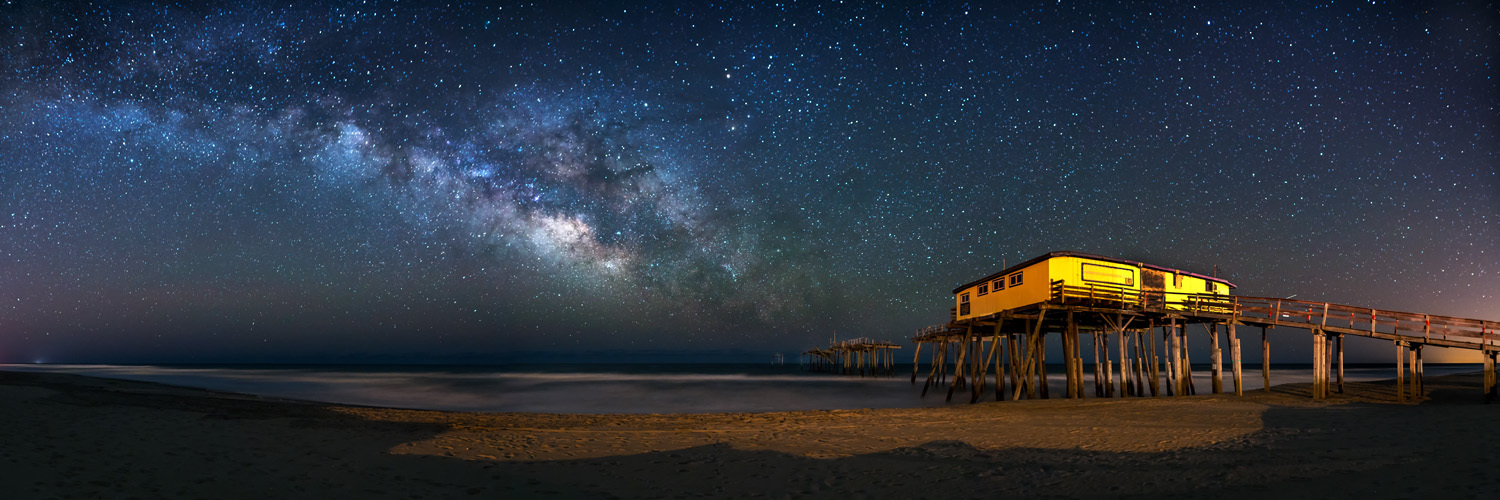
Lovely images of Milky Way. My Fav is the last pano shot. Stunning! I cannot wait till summer for the dark night at Joshua Tree NP where I planned on shooting lots of Milky Way and Star Trails this year. Congrats again!
Really well done with all of these. I like the compositions on the images. I don't mind the colors you have, many a little bit bluish on some but nothing garish. My preference is for the pier building to be less bright and yellow and for it and the lighthouse to have less distortion but that's all to taste.
rongwam wrote:
Lovely images of Milky Way. My Fav is the last pano shot. Stunning! I cannot wait till summer for the dark night at Joshua Tree NP where I planned on shooting lots of Milky Way and Star Trails this year. Congrats again!
Henry
Thanks Henry. The last pano is the one I am still working on the revision... I plan to have it done on metal BIG!
JTNP for night shooting would be awesome, have a great trip!
---------------------------------------------
sbeme wrote:
I'm in no position to critique, but a great series to enjoy! Wonderful photos!
Scott
Thanks Scott!
---------------------------------------------
Tuan Le wrote:
Travis,
Really well done with all of these. I like the compositions on the images. I don't mind the colors you have, many a little bit bluish on some but nothing garish. My preference is for the pier building to be less bright and yellow and for it and the lighthouse to have less distortion but that's all to taste.
Thanks for taking the time to check them out and comment Tuan. The building is actually yellow...I am working to tone it down a bit, but not taking the color out of it.
---------------------------------------------
phantom76 wrote:
Fantastic photos. I have the same gear and I love how you can get a day time like exposure with this combo.
Thanks. The camera is pretty amazing...I really do like it a lot. I can't wait for Sony to get the lens lineup built up to support it...until then I will keep using adapted lenses.
The lighthouse is pretty incredible. If you can correct the vertical tilting (lens distortion) and make the lighthouse more upright it will be fantastic.
gordon l wrote:
The lighthouse is pretty incredible. If you can correct the vertical tilting (lens distortion) and make the lighthouse more upright it will be fantastic.
Thanks Gordon. I have tried to correct the lighthouse a lot in #3...the original was much worse. Lesson learned...don't stand so close with a wide angle lens...but I liked the distortion a little...
Your rework at the Frisco Pier is pretty awesome.
The sky color and brightness is very nice, great detail in the Milky Way without excess contrast around it. The tiny black halos around the stars are gone as well. For a single capture, I'm additionally impressed.
I think with the brighter and more red surf, you just have to decide how you like it. The color does add gentle contrast and a bit of color pop. If you made it darker and more blue, then it would start to blend in maybe too much. It's good.
The other shots all have consistent sky colors now, but unlike the Frisco Pier rework, these all have a bit of cyan in them still. It's a matter of taste, but I tend to go for more straight blue, no green tones.
I looked for tour information on your site, mostly curious, but couldn't find it. You mentioned it in a post but not easy to find for the eager person.
Very nice!!!!
David
Apr 21, 2016 at 03:21 PM
Mark Metternich Offline • • • • • • Upload & Sell: On
p.2 #10 · Chasing the Milky Way in The Outer Banks
Thanks Mark. To be honest, the sharpening/NR for web in my workflow needs more work...I focus so much of what I do around printing, that presentation on the web suffers. Do they lack sharpening in your opinion? I use NIK dFine for NR but try not to get too heavy handed with it, since it tends to ruin details.
Hi Travis. No I don't think they lack sharpening. It is more the type. It is hard for me to explain but it is sort of a chunky look rather than a fine look. Really hard to explain and I don't want to insult them at all because your work is very nice as presented. And some may prefer this type of look.
But yes, I would advocate for noise reduction done in the Raw converter (LR or CR) and then some advanced downsizing and sharpening techniques specifically for web. But I get you. For some, if they are into the prints (and I am) then sometimes web representation can be less critical...
p.2 #11 · Chasing the Milky Way in The Outer Banks
dgdg wrote:
Your rework at the Frisco Pier is pretty awesome.
The sky color and brightness is very nice, great detail in the Milky Way without excess contrast around it. The tiny black halos around the stars are gone as well. For a single capture, I'm additionally impressed.
I think with the brighter and more red surf, you just have to decide how you like it. The color does add gentle contrast and a bit of color pop. If you made it darker and more blue, then it would start to blend in maybe too much. It's good.
The other shots all have consistent sky colors now, but unlike the Frisco Pier rework, these all have a bit of cyan in them still. It's a matter of taste, but I tend to go for more straight blue, no green tones.
I looked for tour information on your site, mostly curious, but couldn't find it. You mentioned it in a post but not easy to find for the eager person.
Very nice!!!!
David ...Show more →
David, sending you a PM...
---------------------------------------------
Mark Metternich wrote:
Hi Travis. No I don't think they lack sharpening. It is more the type. It is hard for me to explain but it is sort of a chunky look rather than a fine look. Really hard to explain and I don't want to insult them at all because your work is very nice as presented. And some may prefer this type of look.
But yes, I would advocate for noise reduction done in the Raw converter (LR or CR) and then some advanced downsizing and sharpening techniques specifically for web. But I get you. For some, if they are into the prints (and I am) then sometimes web representation can be less critical... ...Show more →
Mark, probably an unsharp mask to blame...still trying to figure out the best way for sharpening stars to start with, then for web presentation, well that throws another curve...Thanks for the crits and feedback, I really do appreciate it.
Apr 21, 2016 at 09:00 PM
Mark Metternich Offline • • • • • • Upload & Sell: On
p.2 #12 · Chasing the Milky Way in The Outer Banks
"Mark, probably an unsharp mask to blame...still trying to figure out the best way for sharpening stars to start with, then for web presentation, well that throws another curve...Thanks for the crits and feedback, I really do appreciate it."
A couple of Q's...
Do you size down using Bicubic or Bicubic Sharper in PS?
Also are you aware of the pre sharpening downsizing technique the Marc Adamus innovated, that has pretty much set the standard for fine web detail?
p.2 #13 · Chasing the Milky Way in The Outer Banks
Mark Metternich wrote:
A couple of Q's...
Do you size down using Bicubic or Bicubic Sharper in PS?
Also are you aware of the pre sharpening downsizing technique the Marc Adamus innovated, that has pretty much set the standard for fine web detail?
truth be told...neither of those, PS is set to automatic...is one better than the other...time to go reading. [EDIT: It appears that PSCC automagically uses Bicubic Sharper when downsizing]
I have not heard of Marc's pre sharpening/downsizing technique...time to go research that too!
Thanks for the leads...I have my reading material for tonight! Always enjoy learning new stuff.
p.2 #15 · Chasing the Milky Way in The Outer Banks
mco_970 wrote:
These are great, Travis! Lovely set.
Thank you. Glad you like them, thanks for commenting.
Apr 23, 2016 at 11:01 AM
Mark Metternich Offline • • • • • • Upload & Sell: On
p.2 #16 · Chasing the Milky Way in The Outer Banks
Travis Rhoads wrote:
truth be told...neither of those, PS is set to automatic...is one better than the other...time to go reading. [EDIT: It appears that PSCC automagically uses Bicubic Sharper when downsizing]
I have not heard of Marc's pre sharpening/downsizing technique...time to go research that too!
Thanks for the leads...I have my reading material for tonight! Always enjoy learning new stuff.
Yes, "Automatic" chooses wrongly when downsizing (it chooses Bicubic Sharper)!
When you teach Photoshop students this preference issue, among many other preference issues and color space preference issues, it is something you want to teach right off the bat to students so that people are not harming their precious images without even knowing it.
"Automatic" gets it correct when upsizing (Smoother). Choose "Bicubic - smooth gradients" when downsizing. This may be one of the main culprits (creates a less smooth look to photos). They are sensitive about mentioning anything commercially here but I do have a free video tutorial on Youtube that goes over most if not all of this... Just search my name there. The only thing it does not address is how high ISO star/night shots are best handled on master files (so they can be downsized, but even more importantly made into huge enlargements and still look great). That is yet to be done but in the works...
I simply change my Photoshop preference to "Bicubic - Smooth Gradients." Because we downsize for web far more often than we size up for print... Then when I make huge prints (all the time) I change that manually. Then I will usually use a combination of "Bicubic Smoother" (best in the world for upsizing) and "Preserve Details" which can do the smooth surfaces a little better on really massive prints (like 36", 40", 50", 60", 70", 80", 90"+). So, in those cases I mask the two together (the smooth surfaces with "Preserve Details" and the detailed surfaces with "Smoother").
p.2 #17 · Chasing the Milky Way in The Outer Banks
Mark Metternich wrote:
Yes, "Automatic" chooses wrongly when downsizing (it chooses Bicubic Sharper)!
When you teach Photoshop students this preference issue, among many other preference issues and color space preference issues, it is something you want to teach right off the bat to students so that people are not harming their precious images without even knowing it.
"Automatic" gets it correct when upsizing (Smoother). Choose "Bicubic - smooth gradients" when downsizing. This may be one of the main culprits (creates a less smooth look to photos). They are sensitive about mentioning anything commercially here but I do have a free video tutorial on Youtube that goes over most if not all of this... Just search my name there. The only thing it does not address is how high ISO star/night shots are best handled on master files (so they can be downsized, but even more importantly made into huge enlargements and still look great). That is yet to be done but in the works...
I simply change my Photoshop preference to "Bicubic - Smooth Gradients." Because we downsize for web far more often than we size up for print... Then when I make huge prints (all the time) I change that manually. Then I will usually use a combination of "Bicubic Smoother" (best in the world for upsizing) and "Preserve Details" which can do the smooth surfaces a little better on really massive prints (like 36", 40", 50", 60", 70", 80", 90"+). So, in those cases I mask the two together (the smooth surfaces with "Preserve Details" and the detailed surfaces with "Smoother").
Hope it helps!
...Show more →
Mark, I can't thank you enough...that made all the difference. I know you didn't have to take the time to explain that to me, but I sincerely appreciate that you did...Someone earlier mentioned the black halos around the stars and mentioned a high pass filter...which was odd, since I never use high pass sharpening on stars...that change in the type of resampling made all the difference.
BTW been following your work for a while now...pretty sure I am already a YouTube subscriber!
I promise...no more re-works...this is the last one, it is the final piece, and my favorite...especially after the good folks here have provided some outstanding feedback.