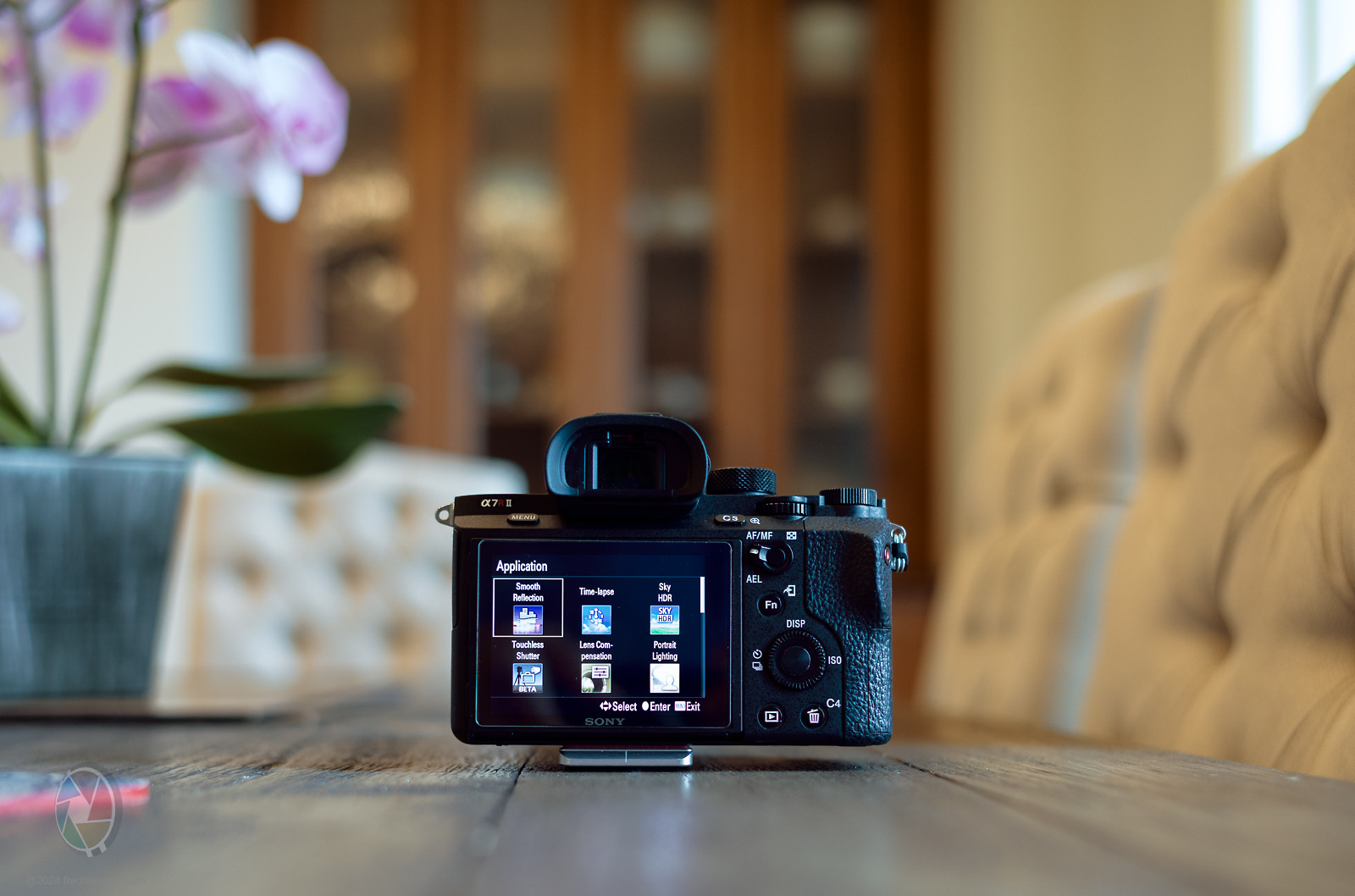
Update: I successfully installed all my Playmemories apps on my new A7R II. I'm thrilled to have this camera and its apps back in action, especially smooth reflections!
I also discovered a method to back up the apps to my computer, as they will no longer be accessible from Sony after 2025.
LEICA M10-RVoigtlander 28mm f/1.5 Nokton lens28mmf/2.01/30s400 ISO+0.7 EV
Fred Miranda wrote:
Thanks for the info, Adam. If you bought a Playmemories app before, you can load it onto your camera until 2025. However, you can no longer add the app directly from the camera or purchase it for the first time. I just checked, and it seems you can still add apps from a computer to the camera.
hmm..
is there a wayto download paid apps from plamemories website to the computer? i went to the site but didn't see an obvious location to navigate to. i would like to download and install my paid apps on my a7r (recent buy)
the paid apps i.e. smooth reflection and free app, remote control, currently resided on my waterlogged a6000. so i cannot backed them up from the camera to the computer for reinstallation.
and logging into the playmemories site through the camera, those paid apps a grayed out, which implies they are no longer available or download as of sept. 2023 per sony's announcement.
Today I went to Sony's PlayMemories site to download my content before they shut it down. Their site isn't accepting my password so I thought easy fix - I'll just reset it. Here's the ridiculously-difficult 15-part puzzle I was given when I attempted to do so.
snapsy wrote:
Today I went to Sony's PlayMemories site to download my content before they shut it down. Their site isn't accepting my password so I thought easy fix - I'll just reset it. Here's the ridiculously-difficult 15-part puzzle I was given when I attempted to do so.
sony don't know you 🙂 i had to reset my password as well but didn't recall a 15 steps validation.
do post the result of your attempt and if your paid aps are grayed out.. mine did..
snapsy wrote:
Today I went to Sony's PlayMemories site to download my content before they shut it down. Their site isn't accepting my password so I thought easy fix - I'll just reset it. Here's the ridiculously-difficult 15-part puzzle I was given when I attempted to do so.
That's what happens when Customer Experience (CX) goals are missing My impression is that only some western companies do it right...
is there a wayto download paid apps from plamemories website to the computer? i went to the site but didn't see an obvious location to navigate to. i would like to download and install my paid apps on my a7r (recent buy)
the paid apps i.e. smooth reflection and free app, remote control, currently resided on my waterlogged a6000. so i cannot backed them up from the camera to the computer for reinstallation.
and logging into the playmemories site through the camera, those paid apps a grayed out, which implies they are no longer available or download as of sept. 2023 per sony's announcement....Show more →
To get started, download the apps onto your camera. Keep in mind that Sony currently only allows downloads for apps you've purchased in the past. They are not currently selling any new apps. To do this, visit this page, sign in, and click on the "Simple 4-step installation guide" green button.
Once the apps are on your camera, you can transfer them to your computer as a backup. Simply follow the steps outlined in the link I provided earlier.
It's a good idea to consider backing up your paid apps from your camera to your computer, even though Sony doesn't officially support this method. This is important because if your camera ever needs to be reset, there's a risk of losing the apps. Here is the termination schedule from Sony:
Sep. 30, 2023 End of sales of paid apps
Aug. 31, 2025 Termination of paid and free application download services
After the download service termination, you can continue to use the apps that you have already downloaded, though please note you can not reinstall apps in the event of a factory reset, camera repair initialization and so on.
jwpstl wrote:
I don't have a Playmemories account; the apps were on the camera when I bought it. I guess that leaves me out of the ability to back up the apps.
I wonder if the camera will eventually have more value on the used market if it comes with apps like Smooth R and Time Lapse.
If you already have the camera with the apps inside, you've completed the first step. Now, simply follow the steps in the link provided in this post to download them to your computer.
Note: The steps in the provided link originated from a Reddit thread and are not officially endorsed by Sony. Despite this, some users have reported successful results.
** Proceed at your own risk. **
Fred Miranda wrote:
To get started, download the apps onto your camera. Keep in mind that Sony currently only allows downloads for apps you've purchased in the past. They are not currently selling any new apps. To do this, visit this page, sign in, and click on the "Simple 4-step installation guide" green button.
Once the apps are on your camera, you can transfer them to your computer as a backup. Simply follow the steps outlined in the link I provided earlier.
It's a good idea to consider backing up your paid apps from your camera to your computer, even though Sony doesn't officially support it. This is important because if your camera ever needs to be reset, there's a risk of losing the apps. Here is the termination schedule from Sony:
Sep. 30, 2023 End of sales of paid apps
Aug. 31, 2025 Termination of paid and free application download services
After the download service termination, you can continue to use the apps that you have already downloaded, though please note you can not reinstall apps in the event of a factory reset, camera repair initialization and so on....Show more →
thank you 🙏🙏.. i'll try the link you provided. and yes, i also planned to download installed apps from camera to computer for future reinstall.
Fred Miranda wrote:
To get started, download the apps onto your camera. Keep in mind that Sony currently only allows downloads for apps you've purchased in the past. They are not currently selling any new apps. To do this, visit this page, sign in, and click on the "Simple 4-step installation guide" green button.
Once the apps are on your camera, you can transfer them to your computer as a backup. Simply follow the steps outlined in the link I provided earlier.
It's a good idea to consider backing up your paid apps from your camera to your computer, even though Sony doesn't officially support this method. This is important because if your camera ever needs to be reset, there's a risk of losing the apps. Here is the termination schedule from Sony:
Sep. 30, 2023 End of sales of paid apps
Aug. 31, 2025 Termination of paid and free application download services
After the download service termination, you can continue to use the apps that you have already downloaded, though please note you can not reinstall apps in the event of a factory reset, camera repair initialization and so on....Show more →
Thanks Fred. I was able to sign in after resetting my password and installed Smooth Reflections on the only Sony body I own that still supports apps - RX10 III.
Fred Miranda wrote:
After reviewing many of my landscape images created using the Smooth Reflections app, I decided to search for a used A7R II and recently purchased one. I ensured that the SR app was pre-loaded by the seller since it seems that Sony no longer allows new purchases of PlayMemories apps.
However, I didn't anticipate that this change had already taken place. When I navigate to the camera app menu and attempt to connect with the PlayMemories page to download more apps, the page cannot be found. It seems that Sony may have already discontinued this functionality. Can anyone confirm this?
Fred,
You seemed to have success with Adam's program essentially doing the same thing as the Smooth Reflections App.
Why did you go back to the A7RII and the Sony SM app?
Are you seeing better results?
sfurr wrote:
Fred,
You seemed to have success with Adam's program essentially doing the same thing as the Smooth Reflections App.
Why did you go back to the A7RII and the Sony SM app?
Are you seeing better results?
Adam's app is remarkable, but the process of downloading a large number of images and performing post-processing takes a considerable amount of time. The outcomes are improved because I can shoot high-bit ARW files. However, when doing image averaging, the having higher bits doesn't matter much, as long as I preserve the highlights while using smooth reflections. I'm uncertain, but I enjoy using the in-camera SR app. It's entertaining to watch the camera capturing numerous pictures and witnessing the final result at the end. Perhaps it's nostalgic because in the past, I captured many of my landscapes like this.
Fred Miranda wrote:
Adam's app is remarkable, but the process of downloading a large number of images and performing post-processing takes a considerable amount of time. The outcomes are improved because I can shoot high-bit ARW files. However, when doing image averaging, the having higher bits doesn't matter much, as long as I preserve the highlights while using smooth reflections. I'm uncertain, but I enjoy using the in-camera SR app. It's entertaining to watch the camera capturing numerous pictures and witnessing the final result at the end. Perhaps it's nostalgic because in the past, I captured many of my landscapes like this.
Yeah, it's hard to argue against the convenience of doing it in-camera. Have you ever considered picking up one of the Olympus bodies that have the Live ND feature? The OM-1 Mark II was just announced yesterday which extended the feature to supported GNDs. I wrote about a sensor readout technique that could do GND's a few years ago in this post.
snapsy wrote:
Yeah, it's hard to argue against the convenience of doing it in-camera. Have you ever considered picking up one of the Olympus bodies that have the Live ND feature? The OM-1 Mark II was just announced yesterday which extended the feature to supported GNDs. I wrote about a sensor readout technique that could do GND's a few years ago in this post.
Gents,
Thank you for the information!
I had a A7R2 and A6500 with the apps many years ago. I used SR sparingly but I did use it. I now have the A7R5 and was looking at Adam's app (I have not used it yet), but I was wondering if I needed to acquire an A7R2 with the app, but as little as I would use it now I think I can forgo an additional body.


 My impression is that only some western companies do it right...