fredmiranda.com
Login

Moderated by: Fred Miranda
  New fredmiranda.com Mobile Site
  New Feature: SMS Notification alert
  New Feature: Buy & Sell Watchlist
  

FM Forums | Leica & Alternative Gear | Join Upload & Sell

1       2              4       end
  

Archive 2015 · Which manufacturer has the most intuitive UI?


taran
Offline
• • •
Upload & Sell: Off
p.3 #1 · Which manufacturer has the most intuitive UI?


Lee Saxon wrote:
Since it seems the OP was talking specifically about screen / menu UI and not the entirety of the UI, I'll say that my answer to that is none of them. The focus on the former at the expense of the latter is in fact the whole problem with a lot of "modern" UI design, and what I was getting at with my complaints about touchscreens and smartphones. The less you have to open those menus the better.


I don't agree at all. I don't like and was not defending compact cameras. Compact cameras sucked for any number of reasons
...Show more

I agree with you but Red's cheapest product costs how much?

What you are describing is nice, but it will never happen, and its silly to think it will. Adding buttons requires serious tooling, research, and moving parts... all of which add expense to a device. Like I said, you can want it all you want, and I would want it too, but such a product cannot compete against a touchscreen and software, at 1/100th the price.

I personally don't know what touch screens you are using, but the touchscreen of my GX7 is far more useable than my D2x and h cameras with dedicated controls, it allows me far greater precision and control, more configurability, and the GX7 has buttons for everything anyway, so if I want to turn it off, I can. Having the option is better than not having it.

"Real" cameras is also a nebulous term I refuse to believe in. As a disciple of Tichy, photographic art can be created with almost anything... to conflate what is "real" from what can be imagined, would be a detriment to ones photography and creative impulses.

I doubt I would even recognize a "real" camera 100 years from now, whatever it is, but I bet it has a touchscreen.


Apr 14, 2015 at 11:53 AM
Lee Saxon
Offline
• • • •
Upload & Sell: On
p.3 #2 · Which manufacturer has the most intuitive UI?


taran wrote:
I agree with you but Red's cheapest product costs how much?


You're right about most of what you say but I do have a comment on this point. "Going pro like Red" meant more of a philosophical thing. They would never become as expensive. Even highest-end and smallest-market D4 and 1D X require a tiny fraction of the horsepower of Red's cameras and have monthly sales volume something like Red's annual.


Apr 14, 2015 at 12:26 PM
dasrocket
Offline
• • • •
Upload & Sell: Off
p.3 #3 · Which manufacturer has the most intuitive UI?


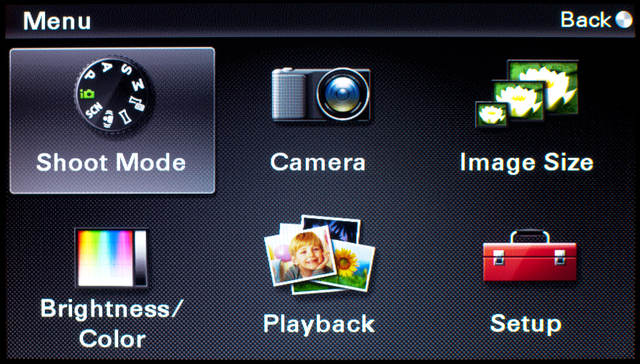
I am not sure whether the NEX 7 and 5R have the same menu system, but if so, I wonder whether the touchscreen VS wheels and buttons makes a difference on the same menu.

...Or whether the content placement and menu /submenu organization is more important to the method of navigation.

arduluth wrote:
I've not been impressed with the touchscreens I've used on cameras so far. It'd admittedly a small sample set, just the EOS M and Sony NEX-5R. The NEX-5R was preferable in this regard for me, as you didn't *have* to use the touchscreen and could completely disable it. The EOS M required it and couldn't be disabled. The one time I liked having a touchscreen on the NEX-5R was directly posting an image to Facebook with the app, using the d-pad to drive the keyboard wouldn't be any fun. Having upgraded to the A7 I don't miss the keyboard, as
...Show more


Apr 14, 2015 at 01:01 PM
arduluth
Offline
• • •
Upload & Sell: Off
p.3 #4 · Which manufacturer has the most intuitive UI?


dasrocket wrote:
I am not sure whether the NEX 7 and 5R have the same menu system, but if so, I wonder whether the touchscreen VS wheels and buttons makes a difference on the same menu.

...Or whether the content placement and menu /submenu organization is more important to the method of navigation.


Touchscreen or not, you're still dealing with the menu/submenu organization.

The NEX-7 and NEX-5R have the same menu system. I haven't owned the NEX-7, but I have used the NEX-3N, which has the same menu system and no touchscreen. To me, it made no difference in how usable the menus were. For whatever reason, I would use the touchscreen on the 5R on the top level menu, I suppose because the big buttons are easier to poke than using the d-pad. I didn't have to use the menus on the 5R for much other than turning OSS on and off, which isn't something I had to do very often. Otherwise, I just used the Fn button and customized keys.


Apr 14, 2015 at 01:12 PM
AbramG
Offline
• • • •
Upload & Sell: Off
p.3 #5 · Which manufacturer has the most intuitive UI?


Lee Saxon wrote:
Since it seems the OP was talking specifically about screen / menu UI and not the entirety of the UI, I'll say that my answer to that is none of them. The focus on the former at the expense of the latter is in fact the whole problem with a lot of "modern" UI design, and what I was getting at with my complaints about touchscreens and smartphones. The less you have to open those menus the better.

...

In other words, again, they need to be looking to Red, not Apple.


Lee I do agree with you, and I see numerous problems throughout the industry. Allow me to further explain my intentions with this post.

I'm a design student, and lately I've been focusing on UI Design and understanding more about human interaction with technology. While I, like you, prefer a tactile experience, with physical buttons and dials, I am working on a project, as a student, to re-interpret the graphical interface on digital cameras. As much as I would like to, I don't have the facilities to properly design my own camera, but I will of course be incorporating the relationship between the physical interface and the digital one.

The purpose of this thread was merely to open a line of dialog and see where people's biases are, and what different people prefer. This is just a cursory look for me as a student. I will be developing the idea and project further over the next 6 months.

So with that, thank you all for participating so far, and let's continue!


Apr 14, 2015 at 01:33 PM
curious80
Offline
• • • •
Upload & Sell: Off
p.3 #6 · Which manufacturer has the most intuitive UI?


sebboh wrote:
which ever one you've been using longest.


I don't completely agree. Yes it is true that once you get familiar with a control and menu layout then it becomes more natural for you. However there are still some cameras which are more intuitive than others. Having used a number of different cameras and brands, when I operate a new camera from a new brand it doesn't typically take me much time to figure out how things work on it. But when I had got my D7000 for the first time it took me some time to figure it out. I do remember that for the life of me I couldn't figure out how to change the AF mode on it. I looked at all the buttons, went through all the menu options and still couldn't figure it out. It was perhaps the first time I had to google to figure out how to do something on a camera. I don't think Nikon DSLRs, specially higher end ones are intuitive at all. Note that not intuitive doesn't mean not good. Once you learn Nikon style of controls they could be great. But intuitive they are not.


Apr 14, 2015 at 01:49 PM
deadwolfbones
Offline
• • • •
Upload & Sell: On
p.3 #7 · Which manufacturer has the most intuitive UI?


AbramG wrote:
Great responses everyone! To clarify, I want to focus on the GUI or what you see on the rear LCD (though mirrorless cameras can display quite a lot in their EVFs so that counts as well if you feel like talking about it).

Naturally the UI includes physical buttons and dials (absolutely my preference), but what I'm researching is how the menu-driven systems have developed over time since digital became mainstream.

I really appreciate the insight though, and please keep it coming!


I'm going to go out on a crazy limb and say the Samsung NX system actually has the best GUI, including fantastic touch/swipe/pinch capability. Their experience building smartphones really shines through.


Apr 14, 2015 at 07:52 PM
sebboh
Offline
• • • • • •
Upload & Sell: Off
p.3 #8 · Which manufacturer has the most intuitive UI?


sebboh wrote:
which ever one you've been using longest.


curious80 wrote:
I don't completely agree. Yes it is true that once you get familiar with a control and menu layout then it becomes more natural for you. However there are still some cameras which are more intuitive than others. Having used a number of different cameras and brands, when I operate a new camera from a new brand it doesn't typically take me much time to figure out how things work on it. But when I had got my D7000 for the first time it took me some time to figure it out. I do remember that for the life of
...Show more

i think this just proves my point. i've heard lots of people say the opposite – "nikon prosumer and pro cameras just work the way you'd naturally expect a camera to work while canon (usually it's canon but it could be oly, fuji, sony, etc) just has buttons, knobs, and menus put together in a nonintuitive way."


Apr 15, 2015 at 12:07 AM
curious80
Offline
• • • •
Upload & Sell: Off
p.3 #9 · Which manufacturer has the most intuitive UI?


sebboh wrote:
i think this just proves my point. i've heard lots of people say the opposite – "nikon prosumer and pro cameras just work the way you'd naturally expect a camera to work while canon (usually it's canon but it could be oly, fuji, sony, etc) just has buttons, knobs, and menus put together in a nonintuitive way."


To me intuitive means that I can figure it out without having used it before. So, 'being easy to use once you are familiar' doesn't fall under the definition of intuitive to me.

There were quite a few simple examples of this with my D7000. One being ISO. Typically cameras allow you to either select a specific ISO value or select Auto ISO - easy enough to understand and completely intuitive. In case of D7000, the control for Auto ISO is a separate menu option independent from the ISO value setting. OK so I am shooting at ISO 1600 but conditions change and I decide that I want to set the camera to Auto ISO. I go to the menu option and turn on "Auto ISO Sensitivity Control", and start shooting. After a few shots I notice that the camera is still shooting at ISO 1600, even though under the new conditions it should be able to select ISO 100. Hmmmm is the Auto ISO not working? Check the menu option again, but it is set to Auto ISO. What could be wrong? Well it turns out that the way Auto ISO works in the camera is that it will try first to use the ISO value that you have set and will only change from that ISO if it can't meet the minimum shutter speed using that ISO. Useful? Perhaps. Intuitive? No way. And what's more, the ISO button on the camera only lets me change the ISO value. I can't actually turn Auto ISO on/off using the ISO button. The Auto ISO can only be set through a menu option. So now you turn into another interesting scenario where I am using the ISO button to try and change ISO value and the shots are coming out at some ISO value completely different from what I have set. Well turns out that unknown to me the Auto ISO is set in the menu from my last shooting session and taking over the ISO values. At that point I hit my head against the wall.

Another example - OK I have my D7000 in my hand and trying to figure out how to change the focus area (i.e. auto vs, center point vs 9 point etc). I look at all the buttons on the body, go through every single menu item 5 times and can't figure it out. This is the first time I have a camera where I am simply unable to figure out how to set focus area. Well a google search reveals that at the front-bottom of the camera, in the center of the AF/MF selection lever, there exists a button which is completely unmarked and I have to push that button and turn one of the dials to change the AF area. Until I googled I didn't even realize that there is a button there let alone thinking that it could be the key to setting the AF area. Not sure how could anyone figure that out on his own. In my opinion Nikon cameras are designed to be learnt to gain maximum control, and not designed to be intuitively obvious to use.


Apr 15, 2015 at 01:43 AM
Chrissearle
Offline
• •
Upload & Sell: Off
p.3 #10 · Which manufacturer has the most intuitive UI?


Sony worst easily


Apr 15, 2015 at 02:25 AM
dasrocket
Offline
• • • •
Upload & Sell: Off
p.3 #11 · Which manufacturer has the most intuitive UI?


This makes sense and I agree. My problem with the NEX menu was the layout and the un-intuitive sequencing, not the navigation method.

arduluth wrote:
Touchscreen or not, you're still dealing with the menu/submenu organization.

The NEX-7 and NEX-5R have the same menu system. I haven't owned the NEX-7, but I have used the NEX-3N, which has the same menu system and no touchscreen. To me, it made no difference in how usable the menus were. For whatever reason, I would use the touchscreen on the 5R on the top level menu, I suppose because the big buttons are easier to poke than using the d-pad. I didn't have to use the menus on the 5R for much other than turning OSS on and off,
...Show more


Apr 15, 2015 at 06:56 AM
arduluth
Offline
• • •
Upload & Sell: Off
p.3 #12 · Which manufacturer has the most intuitive UI?


dasrocket wrote:
This makes sense and I agree. My problem with the NEX menu was the layout and the un-intuitive sequencing, not the navigation method.


Same here. The long lists were also a pain, while the idea of pages/tabs as found in Sony's RX and post-NEX Alpha E cameras, as well as Canon's and others, make a lot more sense and make easier to establish muscle memory, at least for me.


Apr 15, 2015 at 09:20 AM
SoulNibbler
Offline
• •
Upload & Sell: Off
p.3 #13 · Which manufacturer has the most intuitive UI?


Meh, I'm really in the whatever you have used longest camp. With some exceptions.

Best setup interface: Sigma SD14
Current Favorite: Sony A7R
Current Least Favorite: Samsung NX-1 (WTF finding the custom mapping always takes me a few tries and they always reset the custimizations every bloody update)
Current Runner Up: Sony A99

So the SD14 just worked if it was something you could do, it had a quick button and each of the 4 controllers would increment a setting. Switching ISO, and WB were easy and this was a raw camera so really thats pretty much all that needed to happen. It was super quick too!

I had an Olympus e420 at the same time, it had I think three competing menu types and none was well organized.

The Pentax ist* I also had at the same time was great even if it's capabilities were limited. Menu was used to chance ISO and format the card.

Then came the Sony a900, its menu's were pretty good, but it had a direct iso and wb buttons so really I only used the last two pages of the menu once I had things set up, to turn off the beep and to format the card. The menu wasn't needed and that was good. I never used the manual, the camera was bought in China and I think I discovered all the features.

The Sony nex-3 came next, to be perfectly honest I never understood what the fuss was about. As a RAW camera the machine worked perfectly after the first big firmware update that added peaking and remapping the A,B,C controls.

Then a Leica m8, actually a decent menu, there weren't a ton of features but that was fine, this was my first Raw+Jpeg camera since the B&W jpegs were so pretty.

Nex-7 was cool, it was really my favorite until the A7R came out because it had 3 wheels! ISO, Shutter, Aperture, heaven. Another set-up and be happy camera.

A99 came next and sent the nex-7s packing, I moved to m645 lenses and wanted less crop factor. It's fine, not great though, the option to turn off SSS is on the 3rd page or something. Completely useless. As with all Sony cameras you have to set the NR-off setting while in jpeg mode then switch back to RAW. At least the zoom is in a decent place though.

A7R, bought one because I had a pile of m-mount lenses sitting around. Its pretty good for the menus, then again its a RAW camera with MF lenses. I forget the hotkey for white balance, but everything pretty much works without thinking. The NFC-wifi to phone thing is completely transparent and clear and works great in the field.

Samsung NX-1, bought one for shits and giggles, the menus are ok, I still don't find the separation between video and stills to be very well thought out. I always feel lost on them because of I guess a lack of strict pagination. There are 3 different menus on the camera with little overlap, so finding out how to... switch to MF with a lens that has no switch is frustrating. I'm also pissed, though not with the menus, that there is so much that has to be adjusted with the left hand.

I've played with the 5D,ii,iii, I can never find anything until I spend 5 minutes searching. (Like canon-sony folks). Both brands of camera are set up and forget, which is nice.

My votes are of course odd, because I only want limited features. I've played with the AF options on the big Nikon's they seem to be nice but that's not menus.

Most of the niggles that I see from people are about, convoluted customization, or limited customization (I mean WTF sony, why can't I move the zoom in playback to the MF/AF button where I put my zoom in shooting mode!!), which is why the cameras with more buttons seem to do better unless someone really screws the pooch (Olympus and Panasonic). Touch screens can be bad and good, panasonic GM5 and samsung NX1, but they really don't seem to help with the menus. Of course I'm more and more convinced that it isn't the menus at all!, its the system design that hasn't properly explored what states people want to use. Its not the UI, its the underlying concept.


Apr 15, 2015 at 10:21 AM
sebboh
Offline
• • • • • •
Upload & Sell: Off
p.3 #14 · Which manufacturer has the most intuitive UI?


curious80 wrote:
To me intuitive means that I can figure it out without having used it before. So, 'being easy to use once you are familiar' doesn't fall under the definition of intuitive to me.


yes i agree, but what you've used before impacts what you can figure out without having used it before. many nikon users can't figure out how to use important features on canon and vise versa.


Apr 15, 2015 at 10:48 AM
f.hayek
Offline
• •
Upload & Sell: Off
p.3 #15 · Which manufacturer has the most intuitive UI?


Ricoh GR.

If Pentax had the good sense of importing that exact UI, much would be gained.


Apr 15, 2015 at 11:01 AM
Beni
Offline
• • • • • •
Upload & Sell: Off
p.3 #16 · Which manufacturer has the most intuitive UI?


It's interesting just how much praise Leica got for the T camera for using a smartphone-esque style interface to the extent that the price and very obvious flaws were mostly glossed over. It does seem that if you want to make a hit, make your interface like an idevice. Whatever the feelings of the last century crowd (myself very much included).


Apr 16, 2015 at 05:55 AM
Gary Clennan
Offline
• • • • •
Upload & Sell: Off
p.3 #17 · Which manufacturer has the most intuitive UI?


My first choice is Leica followed by Ricoh GR....


Apr 16, 2015 at 11:26 AM
BigIronCruiser
Offline
• • •
Upload & Sell: Off
p.3 #18 · Which manufacturer has the most intuitive UI?


My recent experience includes Pentax, Nikon and Fuji. I currently shoot 75% Nikon D4/D800 and 25% Fuji X-T1.

With enough practice, the UI of any camera becomes (almost) second nature.

In terms of an electronic UI, the Fuji "Q" menu could be something to build on. The "Q" menu is limited to 16 user-defined options, but could be used for everything if it allowed paging/scrolling. After pressing "Q", the front and back selector wheels do the same thing - one could theoretically be programmed for scrolling. The rear screen might be even better if it were touch-sensitive. Fuji also allows buttons to be customized by simply pressing the button for about 1 second.

Keep in mind that buttons, knobs and wheels may be the most important part of any UI. They're fast and reliable, and serve an indispensable purpose. LCD's on the back of a camera are difficult to see in bright light, and they're slow in comparison. Most camera's will eventually have EVF's, but that might be 5-10 years down the road.

Once completed, it would be interesting to see what you came up with.


Apr 17, 2015 at 12:54 AM
philip_pj
Offline
• • • • • •
Upload & Sell: On
p.3 #19 · Which manufacturer has the most intuitive UI?


'make your interface like an idevice.'

Appearances (App appearances) matter far more to some of Gen Hipster than prosaic matters like functionality. If it looks good enough, it may not need to work well at all. You know it makes sense. ;-)


Apr 17, 2015 at 05:28 PM
Kit Laughlin
Offline
• • • •
Upload & Sell: Off
p.3 #20 · Which manufacturer has the most intuitive UI?


I have not read the other posts here so as not to influence on on my own thinking on this interesting subject. My vote goes for the Fuji X-100S, hands down. I have owned all of the current mirrorless cameras (except for the Sony A7 bodies) and professional level Canon and Nikon bodies over a 30 year professional photography period. The Fuji X-100S has, in my view, the most intelligent interface of any of these cameras.

The short list is leaf shutter (so silent, and flash sync at any shutter speed), and ND filter on a button, manual aperture ring, manual SS if needed, and all essential controls to hand; a smooth form factor with no projecting parts (which makes it getting in and out of the bag easy as nothing snags), and literally nothing in hardware or software that gets in the way of instantly making a decent photograph. If my work did not heavily revolve around video at present, the X-100S would be the daily carry, and the other bodies would be X-T1. But because I carry all my gear as carry-on (I shoot video on location multi-cam) the Panny LX-100 is the daily carry, and three G6 bodies (and the old EM5) are the other cameras, to have the same image signature. I still prefer the X-100s, though.


Apr 17, 2015 at 06:42 PM
1       2              4       end


FM Forums | Leica & Alternative Gear | Join Upload & Sell

1       2              4       end


Welcome back
Log in to your account