This topic is in the 2014 archive. You can read it and like its posts here. It is read only.
Archive 2014Zeiss ZM 35 1.4
p.25 #1Zeiss ZM 35 1.4
JaKo wrote:
Philippe, I am referring to occasional colour cast when shooting WO --> 2.8 and focussing on farther located objects. Perhaps it was just colour balance issue, but maybe not. Will find some samples to share from few weeks ago when I got my ZM 35D.
In general ZM35D, comparing to Biogon 2/35 is nearly free of side colour variations.
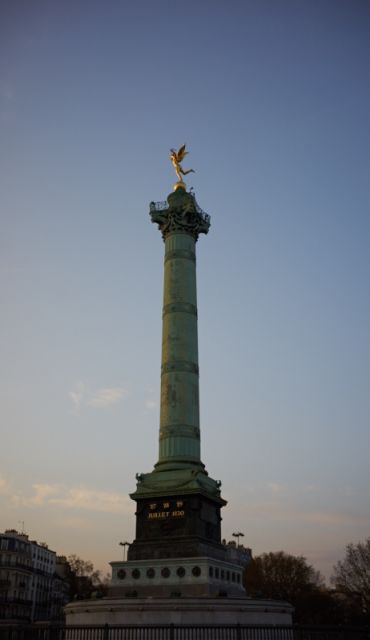
Jack, here is my attempt at replicating what you encountered. F:2.8, focused "farther", with a clear sky to show potential colour cast. What I got was actually mild vignetting, but the colour seems constant enough throughout. Unless I am mistaken...
Philippe, I am referring to occasional colour cast when shooting WO --> 2.8 and focussing on farther located objects. Perhaps it was just colour balance issue, but maybe not. Will find some samples to share from few weeks ago when I got my ZM 35D.
In general ZM35D, comparing to Biogon 2/35 is nearly free of side colour variations.
Jack, here is my attempt at replicating what you encountered. F:2.8, focused "farther", with a clear sky to show potential colour cast. What I got was actually mild vignetting, but the colour seems constant enough throughout. Unless I am mistaken...
Apr 14, 2015 at 11:01 PM
p.25 #2Zeiss ZM 35 1.4
philber wrote:
In general ZM35D, comparing to Biogon 2/35 is nearly free of side colour variations.Jack, here is my attempt at replicating what you encountered. F:2.8, focused "farther", with a clear sky to show potential colour cast. What I got was actually mild vignetting, but the colour seems constant enough throughout. Unless I am mistaken...
You have a little purple color cast which coincides with the vignetting in the top corners from what I see.
JaKo wrote
Philippe, I am referring to occasional colour cast when shooting WO --> 2.8 and focussing on farther located objects. Perhaps it was just colour balance issue, but maybe not. Will find some samples to share from few weeks ago when I got my ZM 35D.In general ZM35D, comparing to Biogon 2/35 is nearly free of side colour variations.
You have a little purple color cast which coincides with the vignetting in the top corners from what I see.
Apr 14, 2015 at 11:06 PM
p.25 #3Zeiss ZM 35 1.4
That is what I thought as well when I saw the picture, Tariq. But when I used the vignetting tool in Capture One to lighten up the corner, there was no discernible colour change, either visually or with the C1 tool. So, unless the vignetting tool corrects for that, or unless you tell me otherwise, I think it is just an effect of vignetting.
Apr 14, 2015 at 11:43 PM
p.25 #4Zeiss ZM 35 1.4
philber wrote:
That is what I thought as well when I saw the picture, Tariq. But when I used the vignetting tool in Capture One to lighten up the corner, there was no discernible colour change, either visually or with the C1 tool. So, unless the vignetting tool corrects for that, or unless you tell me otherwise, I think it is just an effect of vignetting.
Our eyes are not lying in this case. I opened your image in Photoshop, applied a vignetting correction of +35 using the lens correction filter (in Photoshop "proper", not ACR) and then checked the numerical % of C, M, Y and K in the corner area versus the center just above the tower. The numbers indicate more magenta % in the corner. I actually expected the number difference to be greater given the visual difference but nevertheless it's there. It should be an easy fix.
Corner %'s after just correcting for the vignetting:
C:61%, M:52%, Y:19%, K:1%
Center %'s:
C:61%, M:45%, Y:23%, K:1%
With just Vignetting correction in Photoshop (which shows the purple color vignette on my screens). Perhaps C1 is correcting for both?:
https://dl.dropboxusercontent.com/u/5540407/1122066PB.jpg
That is what I thought as well when I saw the picture, Tariq. But when I used the vignetting tool in Capture One to lighten up the corner, there was no discernible colour change, either visually or with the C1 tool. So, unless the vignetting tool corrects for that, or unless you tell me otherwise, I think it is just an effect of vignetting.
Our eyes are not lying in this case.
I opened your image in Photoshop, applied a vignetting correction of +35 using the lens correction filter (in Photoshop "proper", not ACR) and then checked the numerical % of C, M, Y and K in the corner area versus the center just above the tower. The numbers indicate more magenta % in the corner. I actually expected the number difference to be greater given the visual difference but nevertheless it's there. It should be an easy fix.Corner %'s after just correcting for the vignetting:
C:61%, M:52%, Y:19%, K:1%
Center %'s:
C:61%, M:45%, Y:23%, K:1%
With just Vignetting correction in Photoshop (which shows the purple color vignette on my screens). Perhaps C1 is correcting for both?:
https://dl.dropboxusercontent.com/u/5540407/1122066PB.jpg
Apr 15, 2015 at 07:29 AM
p.25 #5Zeiss ZM 35 1.4
 The Evil Preacher MAN Robbindale 02131, MBTA #1 Bus, Boston, MA 2015 by Steven Keirstead, on Flickr
f/1.4
FYI: the free Adobe DNG Flat Field Plugin for Lightroom does a wonderful job correcting color casts. You take a reference photo of a white or neutral object and the plugin can subtract color errors, or both vignetting and color errors, from the other images you take. It creates a new DNG with the correction applied for each corrected image, so it's a space hog, and the format must be DNG (you can convert most proprietary RAW formats to DNG and probably should anyway for archival purposes). I use a credit-card sized piece of white translucent plexiglas for my flatfield images, holding it right in front of the lens. Works great for any lens that gives color casts. The ZM 35mm/1.4 isn't nearly as bad for color casts on my M9-P as my Leica 24mm/3.8 or 28mm ASPH lenses, and those are 6-bit coded!
Apr 16, 2015 at 03:09 PM
p.25 #6Zeiss ZM 35 1.4
SteveDK wrote:
The ZM 35mm/1.4 isn't nearly as bad for color casts on my M9-P as my Leica 24mm/3.8 or 28mm ASPH lenses, and those are 6-bit coded!
I'm surprised there would be any noticeable color cast at all for the ZM 35/1.4 on the M9-P. That's interesting.
The ZM 35mm/1.4 isn't nearly as bad for color casts on my M9-P as my Leica 24mm/3.8 or 28mm ASPH lenses, and those are 6-bit coded!
I'm surprised there would be any noticeable color cast at all for the ZM 35/1.4 on the M9-P. That's interesting.
Apr 16, 2015 at 04:19 PM
p.25 #7Zeiss ZM 35 1.4
Tariq Gibran wrote:
SteveDK wrote
The ZM 35mm/1.4 isn't nearly as bad for color casts on my M9-P as my Leica 24mm/3.8 or 28mm ASPH lenses, and those are 6-bit coded!The M9 and M240 have different interactions with various lenses. For example, the ZM 35/2 shows no color shading on the M9 but on the M240 it is much more noticeable. The ZM 35/1.4 causes some color shading on the M240 but it is much less discernible than the ZM 35/2. I would say it's negligible and requires no correction except for the very picky users.
Apr 16, 2015 at 04:34 PM
p.25 #8Zeiss ZM 35 1.4
edwardkaraa wrote:
I'm surprised there would be any noticeable color cast at all for the ZM 35/1.4 on the M9-P. That's interesting.The M9 and M240 have different interactions with various lenses. For example, the ZM 35/2 shows no color shading on the M9 but on the M240 it is much more noticeable. The ZM 35/1.4 causes some color shading on the M240 but it is much less discernible than the ZM 35/2. I would say it's negligible and requires no correction except for the very picky users.
Thanks for the info Edward.
Tariq Gibran wrote
SteveDK wrote
The ZM 35mm/1.4 isn't nearly as bad for color casts on my M9-P as my Leica 24mm/3.8 or 28mm ASPH lenses, and those are 6-bit coded!Thanks for the info Edward.
Apr 16, 2015 at 04:46 PM
p.25 #9Zeiss ZM 35 1.4
edwardkaraa wrote: The ZM 35/1.4 causes some color shading on the M240 but it is much less discernible than the ZM 35/2. I would say it's negligible and requires no correction except for the very picky users.
Edward, I noticed exactly the same on modded A7R; Distagon ZM 1.4/35 has very minimal, but still present colour casting and shading, and comparing to Biogon ZM 2/35 it's almost non existent.
Philippe, I just received Shoten M-E focus helicoid adapter for Leica M and compared ZM35D wide open using three adapters. Making long story short I expected Voigtlander v. II adapter with its wide throttle to project less shading, but it turns out that Shoten actually looks the best. As you can see there is still very small amount of colour casting, but applying lens profile in ARC or CornerFix will correct it all.
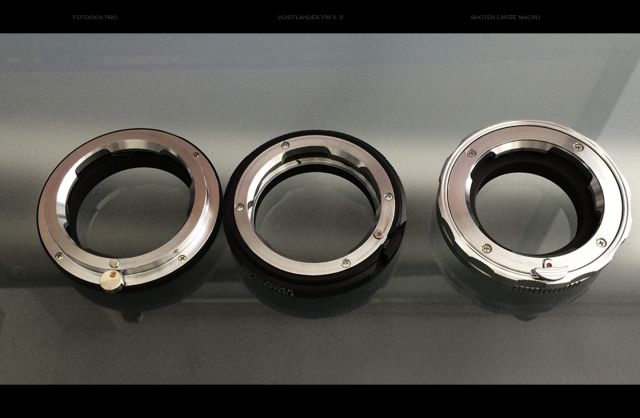

Voigtlander VM II

Shoten LM-SE Macro
Apr 16, 2015 at 04:51 PM
p.25 #10Zeiss ZM 35 1.4
Tariq Gibran wrote:
I'm surprised there would be any noticeable color cast at all for the ZM 35/1.4 on the M9-P. That's interesting.
I'm quite picky. I like to make diptychs and triptychs with vertical frames shot while panning the camera, separated in prints or web image versions by thin black lines. Any trace of color shift in the corners becomes noticeable when I do this, particularly in clear blue skies or snow. What happens with the M9-P is that the color shift in one corner will be toward green and in the other corner toward magenta (or cyan vs red depending on the lighting), so it becomes quite obvious if the frames are placed adjacent to each other. The flatfield plugin does a great job even on the more problematic lenses like my Leica 24mm/3.8.
SteveDK wrote
The ZM 35mm/1.4 isn't nearly as bad for color casts on my M9-P as my Leica 24mm/3.8 or 28mm ASPH lenses, and those are 6-bit coded!I'm quite picky. I like to make diptychs and triptychs with vertical frames shot while panning the camera, separated in prints or web image versions by thin black lines. Any trace of color shift in the corners becomes noticeable when I do this, particularly in clear blue skies or snow. What happens with the M9-P is that the color shift in one corner will be toward green and in the other corner toward magenta (or cyan vs red depending on the lighting), so it becomes quite obvious if the frames are placed adjacent to each other. The flatfield plugin does a great job even on the more problematic lenses like my Leica 24mm/3.8.
Apr 16, 2015 at 09:41 PM

p.25 #12Zeiss ZM 35 1.4
Interesting arrangement, Steve. Your notes regarding colour shading make perfect sense now.
You must have developed your way of work, but out of curiosity how would the above image turned out from a stitch of 9 images merged then split into 3 frames? Wouldn't slight panning movement benefit towards final 'seamlessness' of final picture? (That's assuming that your goal is, or not, more in aligning separate shots, which would make it more stylish)
Nevertheless, your work [flickr] is very unique and engaging. Always a pleasure to see your posts.
'Bad time' reading...
http://www.kozera.ca/photos/images/_DSC8709_640.jpg
You must have developed your way of work, but out of curiosity how would the above image turned out from a stitch of 9 images merged then split into 3 frames? Wouldn't slight panning movement benefit towards final 'seamlessness' of final picture? (That's assuming that your goal is, or not, more in aligning separate shots, which would make it more stylish)
Nevertheless, your work [flickr] is very unique and engaging. Always a pleasure to see your posts.
'Bad time' reading...
http://www.kozera.ca/photos/images/_DSC8709_640.jpg
Apr 17, 2015 at 11:07 PM
p.25 #13Zeiss ZM 35 1.4
Lovely picture, Jack! And thanks to all for the info. You guys know and care so much...
Apr 17, 2015 at 11:43 PM
p.25 #14Zeiss ZM 35 1.4
JaKo wrote:
Interesting arrangement, Steve. Your notes regarding colour shading make perfect sense now.
You must have developed your way of work, but out of curiosity how would the above image turned out from a stitch of 9 images merged then split into 3 frames? Wouldn't slight panning movement benefit towards final 'seamlessness' of final picture? (That's assuming that your goal is, or not, more in aligning separate shots, which would make it more stylish)
Nevertheless, your work [flickr] is very unique and engaging. Always a pleasure to see your posts.
i don't think that would work for shots using disparate dof as the one posted has.
Interesting arrangement, Steve. Your notes regarding colour shading make perfect sense now.
You must have developed your way of work, but out of curiosity how would the above image turned out from a stitch of 9 images merged then split into 3 frames? Wouldn't slight panning movement benefit towards final 'seamlessness' of final picture? (That's assuming that your goal is, or not, more in aligning separate shots, which would make it more stylish)
Nevertheless, your work [flickr] is very unique and engaging. Always a pleasure to see your posts.
i don't think that would work for shots using disparate dof as the one posted has.
Apr 17, 2015 at 11:58 PM
p.25 #15Zeiss ZM 35 1.4
Thank you so much Philippe!
Playing with new gear is always exciting, but getting to know it then using is more always more rewarding
http://www.kozera.ca/photos/images/_DSC8684_1600.jpg
Playing with new gear is always exciting, but getting to know it then using is more always more rewarding
http://www.kozera.ca/photos/images/_DSC8684_1600.jpg
Apr 18, 2015 at 12:13 AM
p.25 #16Zeiss ZM 35 1.4
sebboh wrote:
You must have developed your way of work, but out of curiosity how would the above image turned out from a stitch of 9 images merged then split into 3 frames? Wouldn't slight panning movement benefit towards final 'seamlessness' of final picture? (That's assuming that your goal is, or not, more in aligning separate shots, which would make it more stylish)
Nevertheless, your work [flickr] is very unique and engaging. Always a pleasure to see your posts.i don't think that would work for shots using disparate dof as the one posted has.
Wasn't sure myself, as stated, about the DoF or composition but Steve's above shot may need some 'centering' or 'liqudity'
Please don't reply yet till I see his posts on my regular screen/resolution
JaKo wrote
Interesting arrangement, Steve. Your notes regarding colour shading make perfect sense now.You must have developed your way of work, but out of curiosity how would the above image turned out from a stitch of 9 images merged then split into 3 frames? Wouldn't slight panning movement benefit towards final 'seamlessness' of final picture? (That's assuming that your goal is, or not, more in aligning separate shots, which would make it more stylish)
Nevertheless, your work [flickr] is very unique and engaging. Always a pleasure to see your posts.
Wasn't sure myself, as stated, about the DoF or composition but Steve's above shot may need some 'centering' or 'liqudity'
Please don't reply yet till I see his posts on my regular screen/resolution
Apr 18, 2015 at 12:20 AM
p.25 #17Zeiss ZM 35 1.4
philber wrote:
Lovely picture, Jack! And thanks to all for the info. You guys know and care so much...
Ditto.
Lovely picture, Jack! And thanks to all for the info. You guys know and care so much...
Ditto.
Apr 18, 2015 at 01:33 AM


