This topic is in the 2014 archive. You can read it and like its posts here. It is read only.
Archive 2014Nikon 24 1.4G AF-S - Post Photos Please!
p.3 #1Nikon 24 1.4G AF-S - Post Photos Please!
JakeB17 wrote:
The 24mm 1.4 is probably my favorite lens. I really need to use it more often though.
Some stuff I've shot with mine...
jake, those are fantastic shots! thanks for sharing.
The 24mm 1.4 is probably my favorite lens. I really need to use it more often though.
Some stuff I've shot with mine...
jake, those are fantastic shots! thanks for sharing.
Oct 23, 2014 at 08:47 AM
p.3 #2Nikon 24 1.4G AF-S - Post Photos Please!
Really digging this lens.
 The Carving by Jier-Shu Chen, on Flickr
Oct 23, 2014 at 07:34 PM
p.3 #3Nikon 24 1.4G AF-S - Post Photos Please!
amazing shots, i wish i had the money for one
Oct 23, 2014 at 07:56 PM
p.3 #4Nikon 24 1.4G AF-S - Post Photos Please!
Taken at Sydney's annual "Sculptures by the Sea" exhibition.
D810 + 24m f1.4G @ f2, ISO64, 1/5000sec.

D810 + 24m f1.4G @ f2.5, ISO64, 1/3200sec.

D810 + 24m f1.4G @ f2, ISO64, 1/3200sec.

D810 + 24m f1.4G @ f2.5, ISO64, 1/3200sec.

D810 + 24m f1.4G @ f2, ISO64, 1/5000sec.
D810 + 24m f1.4G @ f2.5, ISO64, 1/3200sec.
D810 + 24m f1.4G @ f2, ISO64, 1/3200sec.
D810 + 24m f1.4G @ f2.5, ISO64, 1/3200sec.
Oct 25, 2014 at 07:36 PM
p.3 #5Nikon 24 1.4G AF-S - Post Photos Please!
Lance, these are beautiful! I really like the color renditions of the 24/1.4G and the D810.
Oct 25, 2014 at 08:07 PM
p.3 #6Nikon 24 1.4G AF-S - Post Photos Please!
ocean2059 wrote:
Lance, these are beautiful!
Thank you very much for your kind comment, ocean2059!
I really like the color renditions of the 24/1.4G and the D810.
It's why it's one of my favourite lenses.
Lance, these are beautiful!
Thank you very much for your kind comment, ocean2059!
I really like the color renditions of the 24/1.4G and the D810.
It's why it's one of my favourite lenses.
Oct 25, 2014 at 08:40 PM
p.3 #7Nikon 24 1.4G AF-S - Post Photos Please!
Lance B wrote:
Taken at Sydney's annual "Sculptures by the Sea" exhibition.
D810 + 24m f1.4G @ f2, ISO64, 1/5000sec.
http://www.pbase.com/lance_b/image/157942818/original.jpg
D810 + 24m f1.4G @ f2.5, ISO64, 1/3200sec.
http://www.pbase.com/lance_b/image/157942825/original.jpg
D810 + 24m f1.4G @ f2, ISO64, 1/3200sec.
http://www.pbase.com/lance_b/image/157942826/original.jpg
D810 + 24m f1.4G @ f2.5, ISO64, 1/3200sec.
http://www.pbase.com/lance_b/image/157942827/original.jpg
I also love these images, wonderful clarity and colour, but its the way they convey sunlight that does it for me, my screen is radiating that sun light, I feel like a should be getting a vitamin D fix!
Thanks for sharing
Taken at Sydney's annual "Sculptures by the Sea" exhibition.
D810 + 24m f1.4G @ f2, ISO64, 1/5000sec.
http://www.pbase.com/lance_b/image/157942818/original.jpg
D810 + 24m f1.4G @ f2.5, ISO64, 1/3200sec.
http://www.pbase.com/lance_b/image/157942825/original.jpg
D810 + 24m f1.4G @ f2, ISO64, 1/3200sec.
http://www.pbase.com/lance_b/image/157942826/original.jpg
D810 + 24m f1.4G @ f2.5, ISO64, 1/3200sec.
http://www.pbase.com/lance_b/image/157942827/original.jpg
I also love these images, wonderful clarity and colour, but its the way they convey sunlight that does it for me, my screen is radiating that sun light, I feel like a should be getting a vitamin D fix!
Thanks for sharing
Oct 26, 2014 at 01:17 AM
p.3 #8Nikon 24 1.4G AF-S - Post Photos Please!
Rob UK wrote:
D810 + 24m f1.4G @ f2, ISO64, 1/5000sec.
http://www.pbase.com/lance_b/image/157942818/original.jpg
D810 + 24m f1.4G @ f2.5, ISO64, 1/3200sec.
http://www.pbase.com/lance_b/image/157942825/original.jpg
D810 + 24m f1.4G @ f2, ISO64, 1/3200sec.
http://www.pbase.com/lance_b/image/157942826/original.jpg
D810 + 24m f1.4G @ f2.5, ISO64, 1/3200sec.
http://www.pbase.com/lance_b/image/157942827/original.jpgI also love these images, wonderful clarity and colour, but its the way they convey sunlight that does it for me, my screen is radiating that sun light, I feel like a should be getting a vitamin D fix!
Thanks for sharing
Thank you for your wonderful comments, Rob! Much appreciated!
Lance B wrote
Taken at Sydney's annual "Sculptures by the Sea" exhibition.D810 + 24m f1.4G @ f2, ISO64, 1/5000sec.
http://www.pbase.com/lance_b/image/157942818/original.jpg
D810 + 24m f1.4G @ f2.5, ISO64, 1/3200sec.
http://www.pbase.com/lance_b/image/157942825/original.jpg
D810 + 24m f1.4G @ f2, ISO64, 1/3200sec.
http://www.pbase.com/lance_b/image/157942826/original.jpg
D810 + 24m f1.4G @ f2.5, ISO64, 1/3200sec.
http://www.pbase.com/lance_b/image/157942827/original.jpg
Thanks for sharing
Thank you for your wonderful comments, Rob! Much appreciated!
Oct 26, 2014 at 07:40 AM
p.3 #9Nikon 24 1.4G AF-S - Post Photos Please!
I sold my trusty 14-24mm after getting my hand on this lens - highly recommended
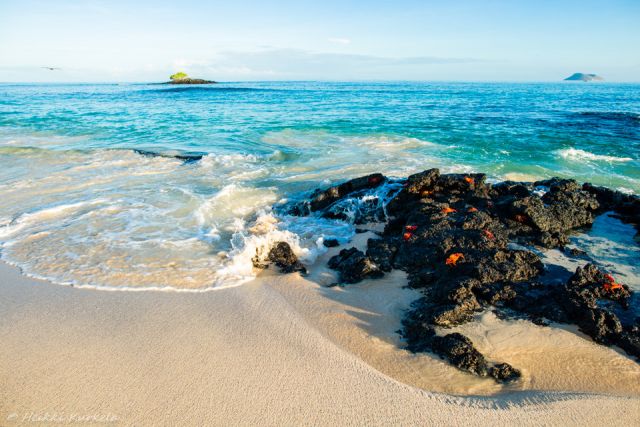
Early morning at Galapagos, Ecuador
Early morning at Galapagos, Ecuador
Oct 26, 2014 at 09:09 AM
p.3 #10Nikon 24 1.4G AF-S - Post Photos Please!
Some shot with the D750 recently.


The lens really has 2 faces. Beautiful look for a wide angle wide open and excellent technical execution when stopped down for "landscape" images.
Cheers,
Bernard
The lens really has 2 faces. Beautiful look for a wide angle wide open and excellent technical execution when stopped down for "landscape" images.
Cheers,
Bernard
Oct 26, 2014 at 05:11 PM
p.3 #11Nikon 24 1.4G AF-S - Post Photos Please!
Lance B wrote:
Taken at Sydney's annual "Sculptures by the Sea" exhibition.
D810 + 24m f1.4G @ f2, ISO64, 1/5000sec.
Hi Lance,
Nice images, thanks for sharing. I love the blues you have achieved here. Care to share the raw converter/white balance setting you used?
Thank you.
Cheers,
Bernard
Taken at Sydney's annual "Sculptures by the Sea" exhibition.
D810 + 24m f1.4G @ f2, ISO64, 1/5000sec.
Hi Lance,
Nice images, thanks for sharing. I love the blues you have achieved here. Care to share the raw converter/white balance setting you used?
Thank you.
Cheers,
Bernard
Oct 26, 2014 at 05:19 PM
p.3 #12Nikon 24 1.4G AF-S - Post Photos Please!
static808 wrote:
must be a pixel density issue. this lens lives at f1.4 on my d700. sharpest f1.4 prime i've used wide open, tied with a sigma 85. it really leads to me being a bad photographer... i need to stop down more, but it performs so well wide open!
Mine also is not great at 1.4 - sort of a veiled haze like some of the old D lenses used to have. It clears up by 1.8, and most certainly by 2.0. I don't think my copy had this issue when I first got it (Apr, 2011). I'm also pretty sure that its probably not a universal issue, only some copies. FWIW, I experience the issue on by D8xx series bodies and also my D4, so it seems not to be a pixel density issue.
DWOfPaul wrote
It's a great lenses, it's only weakens is really it's f1.4 sharpness on FX.Mine also is not great at 1.4 - sort of a veiled haze like some of the old D lenses used to have. It clears up by 1.8, and most certainly by 2.0. I don't think my copy had this issue when I first got it (Apr, 2011). I'm also pretty sure that its probably not a universal issue, only some copies. FWIW, I experience the issue on by D8xx series bodies and also my D4, so it seems not to be a pixel density issue.
Oct 26, 2014 at 05:52 PM
p.3 #13Nikon 24 1.4G AF-S - Post Photos Please!
bernardl wrote:
D810 + 24m f1.4G @ f2, ISO64, 1/5000sec.Hi Lance,
Nice images, thanks for sharing. I love the blues you have achieved here. Care to share the raw converter/white balance setting you used?
Thank you.
Cheers,
Bernard
Hi Bernard,
Thank you for your lovely comments.
I shoot RAW 14 bit lossless compressed. Convert in Capture One Pro 8 to 16bit TIFF. In COP8, I adjust the usual suspects where required[/I], saturation, WB, lens corrections, keystone, highlight/shadows, straighten horizon, etc. I then open in Photoshop CC and again where required[/I], I use noiseware plug-in to reduce noise, I may crop, I may have to use lasso mask and boost contrast or whatever, then resize for web and then sharpen using Power retouche plug-in.
The posted photos were quite straight forward, not major reworking. I think it was a straight forward, saturation boost, WB tweak, maybe a horizon straighten, then some may have had a crop, reize for web and then sharpen.
Edited on Oct 27, 2014 at 05:35 PM · View previous versions
Lance B wrote
Taken at Sydney's annual "Sculptures by the Sea" exhibition.D810 + 24m f1.4G @ f2, ISO64, 1/5000sec.
Nice images, thanks for sharing. I love the blues you have achieved here. Care to share the raw converter/white balance setting you used?
Thank you.
Cheers,
Bernard
Hi Bernard,
Thank you for your lovely comments.
I shoot RAW 14 bit lossless compressed. Convert in Capture One Pro 8 to 16bit TIFF. In COP8, I adjust the usual suspects where required[/I], saturation, WB, lens corrections, keystone, highlight/shadows, straighten horizon, etc. I then open in Photoshop CC and again where required[/I], I use noiseware plug-in to reduce noise, I may crop, I may have to use lasso mask and boost contrast or whatever, then resize for web and then sharpen using Power retouche plug-in.
The posted photos were quite straight forward, not major reworking. I think it was a straight forward, saturation boost, WB tweak, maybe a horizon straighten, then some may have had a crop, reize for web and then sharpen.
Edited on Oct 27, 2014 at 05:35 PM · View previous versions
Oct 27, 2014 at 05:34 PM
p.3 #14Nikon 24 1.4G AF-S - Post Photos Please!
bernardl wrote:
Some shot with the D750 recently.
https://farm4.staticflickr.com/3948/15618897081_b21d82f308_b.jpg
https://farm4.staticflickr.com/3950/15597875506_05205587ce_b.jpg
https://farm4.staticflickr.com/3932/15001395483_e41ac33fbd_h.jpg
The lens really has 2 faces. Beautiful look for a wide angle wide open and excellent technical execution when stopped down for "landscape" images.
Cheers,
Bernard
Very nice, Bernard!
Some shot with the D750 recently.
https://farm4.staticflickr.com/3948/15618897081_b21d82f308_b.jpg
https://farm4.staticflickr.com/3950/15597875506_05205587ce_b.jpg
https://farm4.staticflickr.com/3932/15001395483_e41ac33fbd_h.jpg
The lens really has 2 faces. Beautiful look for a wide angle wide open and excellent technical execution when stopped down for "landscape" images.
Cheers,
Bernard
Very nice, Bernard!
Oct 27, 2014 at 05:35 PM
p.3 #15Nikon 24 1.4G AF-S - Post Photos Please!
Thanks Lance, do you remember the WB values you set in C1 Pro 8?
Thanks.
Cheers,
Bernard
Thanks.
Cheers,
Bernard
Oct 27, 2014 at 07:45 PM
p.3 #16Nikon 24 1.4G AF-S - Post Photos Please!
bernardl wrote:
Thanks Lance, do you remember the WB values you set in C1 Pro 8?
Thanks.
Cheers,
Bernard
They varied slightly from one to the other and sometimes I tweaked them in Photoshop using Colour Balance. However, they were around the "5000" Kelvin and "0" Tint, some slightly under 5000 some slightly over and the same for Tint, some slightly under 0 and some slightly over.
Edited on Oct 29, 2014 at 05:14 AM · View previous versions
Thanks Lance, do you remember the WB values you set in C1 Pro 8?
Thanks.
Cheers,
Bernard
They varied slightly from one to the other and sometimes I tweaked them in Photoshop using Colour Balance. However, they were around the "5000" Kelvin and "0" Tint, some slightly under 5000 some slightly over and the same for Tint, some slightly under 0 and some slightly over.
Edited on Oct 29, 2014 at 05:14 AM · View previous versions
Oct 28, 2014 at 12:00 AM
p.3 #17Nikon 24 1.4G AF-S - Post Photos Please!
Great, thanks, much appreciated.
Cheers,
Bernard
Cheers,
Bernard
Oct 28, 2014 at 12:35 AM
p.3 #18Nikon 24 1.4G AF-S - Post Photos Please!
dyswim wrote:
Mine also is not great at 1.4 - sort of a veiled haze like some of the old D lenses used to have. It clears up by 1.8, and most certainly by 2.0. I don't think my copy had this issue when I first got it (Apr, 2011). I'm also pretty sure that its probably not a universal issue, only some copies. FWIW, I experience the issue on by D8xx series bodies and also my D4, so it seems not to be a pixel density issue.
Given this is not a cheap lens, I would suspect some dirt, oil, etc, on the outer part of one of the elements. Possibly some misalignment that only shows up wide open. Probably worth sending to Nikon for an internal clean and align.
Mine also is not great at 1.4 - sort of a veiled haze like some of the old D lenses used to have. It clears up by 1.8, and most certainly by 2.0. I don't think my copy had this issue when I first got it (Apr, 2011). I'm also pretty sure that its probably not a universal issue, only some copies. FWIW, I experience the issue on by D8xx series bodies and also my D4, so it seems not to be a pixel density issue.
Given this is not a cheap lens, I would suspect some dirt, oil, etc, on the outer part of one of the elements. Possibly some misalignment that only shows up wide open. Probably worth sending to Nikon for an internal clean and align.
Nov 02, 2014 at 02:48 PM
p.3 #19Nikon 24 1.4G AF-S - Post Photos Please!
One more, full open at F1.4
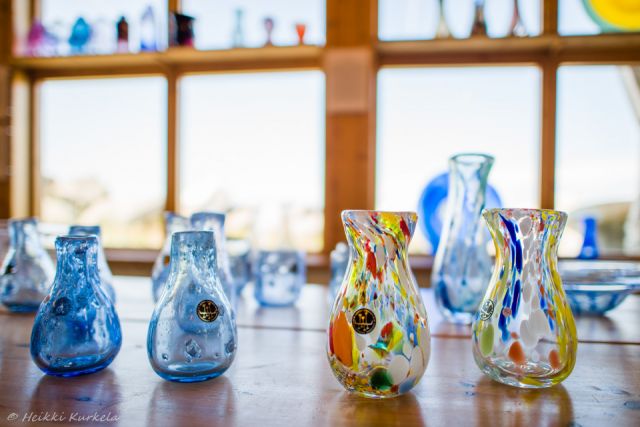
Glass from Lofoten Design, Norway
Glass from Lofoten Design, Norway
Nov 02, 2014 at 03:05 PM
p.3 #20Nikon 24 1.4G AF-S - Post Photos Please!
Shot in Malaysia with a D3X.

Nov 02, 2014 at 03:32 PM