p.171 #6 · Official: Sony A7 and A7R Fullframe Mirrorless
Getting an interesting effect with adapted Leica lenses on my A7. When I combine my 135APO, a high shutter speed and first curtain electronic shutter I get about 15-20% of the image, from the top, underexposed.
If I use the mechanical shutter all is well. The strange bit is this only happens with my 135. My 12,21,50 and 75 don't have this behavior. My 90 Summarit is still away so I can test that yet. I only have one lens adaptor so I'm ruling that out.
p.171 #7 · Official: Sony A7 and A7R Fullframe Mirrorless
flash wrote:
Getting an interesting effect with adapted Leica lenses on my A7. When I combine my 135APO, a high shutter speed and first curtain electronic shutter I get about 15-20% of the image, from the top, underexposed.
If I use the mechanical shutter all is well. The strange bit is this only happens with my 135. My 12,21,50 and 75 don't have this behavior. My 90 Summarit is still away so I can test that yet. I only have one lens adaptor so I'm ruling that out.
p.171 #8 · Official: Sony A7 and A7R Fullframe Mirrorless
What flashes can I use with these cameras? I looked up the yongnuo 560 III. There doesn't seemed to be a sony compatible one.
In the past, I've only used TTL compatible flashes. However, I have used flashes in manual mode before, and I have done a little bit of strobist pics before.
I don't want anything like the hvl-f20m, GN too low for me. I looked at the hvl-f43am, but I need an adapter, which means more money.
TTL or full manual strobe suggestions would be appreciated.
p.171 #9 · Official: Sony A7 and A7R Fullframe Mirrorless
flash wrote:
Getting an interesting effect with adapted Leica lenses on my A7. When I combine my 135APO, a high shutter speed and first curtain electronic shutter I get about 15-20% of the image, from the top, underexposed.
If I use the mechanical shutter all is well. The strange bit is this only happens with my 135. My 12,21,50 and 75 don't have this behavior. My 90 Summarit is still away so I can test that yet. I only have one lens adaptor so I'm ruling that out.
Weird? Normal? Will it happen with the tele zoom?
Gordon
Gordon,
First curtain electronic shutter can cause what you described, so it's "normal".
On very high shutter speeds, it may be wise to turn it off.
Fred
p.171 #10 · Official: Sony A7 and A7R Fullframe Mirrorless
On the A7/A7r (or any Sony camera) is there a way to record raw files to the camera's storage card when using Sony's Playmemories remote control? i need remote control that saves raw files for the stuff i am doing and i cannot get my A7r to save a rar when i am controlling it with a tablet.
p.171 #11 · Official: Sony A7 and A7R Fullframe Mirrorless
amplexis wrote:
On the A7/A7r (or any Sony camera) is there a way to record raw files to the camera's storage card when using Sony's Playmemories remote control? i need remote control that saves raw files for the stuff i am doing and i cannot get my A7r to save a rar when i am controlling it with a tablet.
Same here, I have not been able to get that as well . Although I set the camera in RAW but still in records it in JPG in both the mobile device and SD card. There is no other way around for the files to be converted/transferred to the mobile device in JPG to be displayed there, of course but I wish that there is a way safe the files as RAW into the SD card. Another firmware maybe...?
p.171 #13 · Official: Sony A7 and A7R Fullframe Mirrorless
phuviano wrote:
What flashes can I use with these cameras? I looked up the yongnuo 560 III. There doesn't seemed to be a sony compatible one.
In the past, I've only used TTL compatible flashes. However, I have used flashes in manual mode before, and I have done a little bit of strobist pics before.
I don't want anything like the hvl-f20m, GN too low for me. I looked at the hvl-f43am, but I need an adapter, which means more money.
TTL or full manual strobe suggestions would be appreciated.
The HVL43M has the new hot shoe. The HVL43AM has the old one. Both are the same price. Expensive but the Sony flash design is excellent. The tilt and bounce are fantastic compared to other brands.
p.171 #14 · Official: Sony A7 and A7R Fullframe Mirrorless
AGeoJO wrote:
Same here, I have not been able to get that as well . Although I set the camera in RAW but still in records it in JPG in both the mobile device and SD card. There is no other way around for the files to be converted/transferred to the mobile device in JPG to be displayed there, of course but I wish that there is a way safe the files as RAW into the SD card. Another firmware maybe...?
in my search for a remote control solution i did find a wired tethering Windows app: http://support.d-imaging.sony.co.jp/imsoft/Win/rcc/us.html and for Macintosh: http://support.d-imaging.sony.co.jp/imsoft/Mac/rcc/us.html
this software works for ILCE-5000, ILCE-7, ILCE-7R
SLT-A58 , SLT-A99/A99V
DSLR-A700 , DSLR-A850 , DSLR-A900
maybe i am discovering something everyone else already knows about. but i really need to get raw files while using Sony smart remote control so i can use my camera on the end of a long CF stick to shoot waterfalls.
p.171 #15 · Official: Sony A7 and A7R Fullframe Mirrorless
You can shot in Raw with the smart phone remote app...
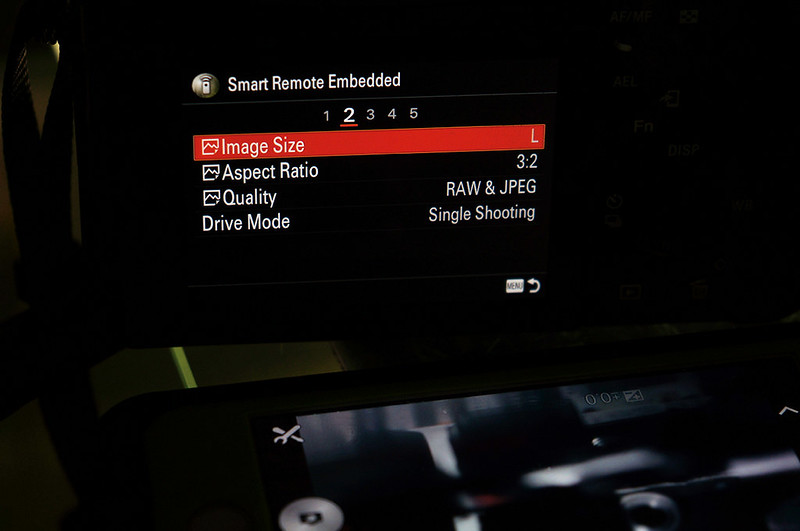
Once you connect the camera and phone or tablet together look at the camera back screen menu and there will be a menu for setting options with image size, format etc...I think it's under menu 2.
Works for me with iphone or ipad, saves a jpg on iphone then on card saves raw and jpeg.
p.171 #16 · Official: Sony A7 and A7R Fullframe Mirrorless
Thanks, tjack. I tried that before but it didn't let me change that after the connection has been established between the two, the mobile device and my A7r. I will have to fiddle some more, I guess.
p.171 #17 · Official: Sony A7 and A7R Fullframe Mirrorless
tjack wrote:
You can shot in Raw with the smart phone remote app...
Once you connect the camera and phone or tablet together look at the camera back screen menu and there will be a menu for setting options with image size, format etc...I think it's under menu 2.
Works for me with iphone or ipad, saves a jpg on iphone then on card saves raw and jpeg.
i have set the quality to raw and i have set the quality to raw & jpeg but when i connect to the tablet with the smart remote control app, apparently the app resets the quality to fine jpeg. and when i do a search i see that many other users are stuck with jpeg files saved to the card even when they have quality set to raw on the camera. i think that maybe some people are getting raw files saved but there is some configuration issue that fouls things. when i asked Sony support about this they said that only jpeg is possible. I also read reports that saving raw files is supported in the current version. what to believe?
Please note that this is not the regular place in the menu for setting image Quality this is in the remote App after connected were you choose this setting.


 . Although I set the camera in RAW but still in records it in JPG in both the mobile device and SD card. There is no other way around for the files to be converted/transferred to the mobile device in JPG to be displayed there, of course but I wish that there is a way safe the files as RAW into the SD card. Another firmware maybe...?