Please note that this is not the regular place in the menu for setting image Quality this is in the remote App after connected were you choose this setting.
I couldn't even see that menu on my A7r. When I connect the camera to my mobile device, it goes straight to the display to actually focus, change aperture, ISO, etc. but I couldn't change the format there. In the application list, it is called "Smart Remote Control" and not "Smart Remote Embedded". I am puzzled.... What did I do differently? Is the A7 menu different than that of the A7 then? Thanks!
p.172 #3 · Official: Sony A7 and A7R Fullframe Mirrorless
AGeoJO wrote:
I couldn't even see that menu on my A7r. When I connect the camera to my mobile device, it goes straight to the display to actually focus, change aperture, ISO, etc. but I couldn't change the format there. In the application list, it is called "Smart Remote Control" and not "Smart Remote Embedded". I am puzzled.... What did I do differently? Is the A7 menu different than that of the A7 then? Thanks!
When your mobile device connects to camera, and you see the display screen to adjust settings (ISO, shutter). Hit the physical menu button on the camera.
Well that's what I did. However I have an A7, not an R. I doubt it would be different though.
p.172 #4 · Official: Sony A7 and A7R Fullframe Mirrorless
On my camera under Application (icon with four squares) are three choices, third being Smart Remote Embedded.
Once connected you may have to touch the menu button to bring it up. First it says "Exit Application", notice it is under a number one in menu, push the right arrow button on camera to advance to menu 2, you should still be under Smart Remote Embedded but will have choice there to choose Raw & JPEG.
There are 4 icons alright but, like I mentioned before, it is called Smart Remote Control instead of Smart Remote Embedded. Apparently the smart version is not that smart.... . The menu setting there is limited and choosing RAW or JPG is not included .
p.172 #8 · Official: Sony A7 and A7R Fullframe Mirrorless
I think you can upgrade the app on the camera but you would have to create an account at Sony PlayMemories App and connect camera...not sure what all is involved but might be worth it. Evidently they did ship the early A7r models with the older remote app installed on camera.
p.172 #9 · Official: Sony A7 and A7R Fullframe Mirrorless
I signed up with Sony already and I do have an account . As of today, the only remote control app they have available right now is the so-called "smart" version... .
p.172 #10 · Official: Sony A7 and A7R Fullframe Mirrorless
You might try this advice, can't guarantee anything.
You can update your sony a7-a7r remote app from a PC-Mac.... Then you have more control of your camera.
Just go to sony.net/pmca and login , then connect your camera via USB and update all the apps.
p.172 #12 · Official: Sony A7 and A7R Fullframe Mirrorless
tjack wrote:
I think you can upgrade the app on the camera but you would have to create an account at Sony PlayMemories App and connect camera...not sure what all is involved but might be worth it. Evidently they did ship the early A7r models with the older remote app installed on camera.
If you have a psn (playstation network account) you don't have to create a new username or password. So anybody that has a login through their ps3 or ps4, should be able to login with the same info.
p.172 #14 · Official: Sony A7 and A7R Fullframe Mirrorless
First, the I couldn't pull down the menu after the connection between my mobile device and the camera was established. I kept on pushing the menu button and nothing happened. I played around with it last night and this time around I pushed and hold the menu button longer. After a brief delay, the menu showed up and now I could change the format to RAW + JPG. As it turned out, the camera is not that responsive or I was too impatient. Maybe I was used to my DSLR system that gives me practically immediate responses . Again, for those of you that want to set this up, you have to push and hold the menu button a little longer for it to display the option of changing the default setting of only JPG. At any rate, it is working on my A7r now and that without reinstalling the app, I should add.
p.172 #15 · Official: Sony A7 and A7R Fullframe Mirrorless
phuviano wrote:
I just took 2 shots with my A7 + fe 55 1.8. Took one shot with lens cap on. Took another with lens cap off.
No light leaks on mine.
How did you test it? 25600 ISO? 30s exposure? Shine a flashlight in the mount area while it's exposing?
I need to do some further testing with mine. If it only shows up when you're actively trying to cause it as described above (which it looks like it does according to my preliminary testing), then I don't really care.
If it only shows up at 10,000+ ISOs in bright daylight and 10s+ exposures then I probably don't care.
If it shows up at anything "worse" then that, then I care.
Regardless of whether or not it ultimately affects me, I think it's pretty shoddy for a 2300 dollar camera. I did the same test with my old D80 and didn't see a single pixel of light leak, though of course it doesn't go to 25,600 ISO.
p.172 #16 · Official: Sony A7 and A7R Fullframe Mirrorless
NicolasKL wrote:
How did you test it? 25600 ISO? 30s exposure? Shine a flashlight in the mount area while it's exposing?
I need to do some further testing with mine. If it only shows up when you're actively trying to cause it as described above (which it looks like it does according to my preliminary testing), then I don't really care.
If it only shows up at 10,000+ ISOs in bright daylight and 10s+ exposures then I probably don't care.
If it shows up at anything "worse" then that, then I care.
Regardless of whether or not it ultimately affects me, I think it's pretty shoddy for a 2300 dollar camera. I did the same test with my old D80 and didn't see a single pixel of light leak, though of course it doesn't go to 25,600 ISO....Show more →
No flashlight, but 25600 ISO, and 30's. Although I did it indoors. Maybe I should try outdoor, but not sure if I could get 30's @ 25600 in daylight though. I thought about using a flashlight, but I would never do it in real life. So using a flash light wouldn't represent how I would normally shoot.
I do have an nd grad 10 stopper, but need a step up ring, since it's too big for my Sony lenses. Once I get a step up ring. I could possibly do an outdoor shot with the sun directly pointing on the suspected light leak location, and see what happens.
For now, the camera works the way I want it too, so I'm pretty happy
p.172 #17 · Official: Sony A7 and A7R Fullframe Mirrorless
phuviano wrote:
No flashlight, but 25600 ISO, and 30's. Although I did it indoors. Maybe I should try outdoor, but not sure if I could get 30's @ 25600 in daylight though. I thought about using a flashlight, but I would never do it in real life. So using a flash light wouldn't represent how I would normally shoot.
I do have an nd grad 10 stopper, but need a step up ring, since it's too big for my Sony lenses. Once I get a step up ring. I could possibly do an outdoor shot with the sun directly pointing on the suspected light leak location, and see what happens.
For now, the camera works the way I want it too, so I'm pretty happy ...Show more →
I'm not surprised that you didn't see it indoors.
Do an outdoor shot and leave the lens cap on and stick the lens in a lens bag or under a blanket or something.
For me I guess there are 3 questions.
1. Is it leaking light. Answer is yes, and I think they ALL are.
2. Is it leaking light enough that a real world photo could be ruined by it, given the right circumstances. I'd say based on the outdoor photo here http://community.sony.com/t5/Alpha-NEX-Cameras/A7-A7R-Light-leaks/td-p/254835 the answer is also yes.
3. Is it likely that I'll ever use the camera in those circumstances? Possibly not, but is "possibly not" good enough to invest thousands of dollars in this system? I haven't answered that one yet.
p.172 #18 · Official: Sony A7 and A7R Fullframe Mirrorless
NicolasKL wrote:
I'm not surprised that you didn't see it indoors.
Do an outdoor shot and leave the lens cap on and stick the lens in a lens bag or under a blanket or something.
For me I guess there are 3 questions.
1. Is it leaking light. Answer is yes, and I think they ALL are.
2. Is it leaking light enough that a real world photo could be ruined by it, given the right circumstances. I'd say based on the outdoor photo here http://community.sony.com/t5/Alpha-NEX-Cameras/A7-A7R-Light-leaks/td-p/254835 the answer is also yes.
3. Is it likely that I'll ever use the camera in those circumstances? Possibly not, but is "possibly not" good enough to invest thousands of dollars in this system? I haven't answered that one yet....Show more →
That certainly looks like a camera problem (gaffer tape around certain areas of the camera mount fixes the issue) - either quality control or design defect.
p.172 #19 · Official: Sony A7 and A7R Fullframe Mirrorless
Just pulled the trigger her on for sale forums on A7r.... Question, is there a link to or might some one point me to a place, where people tried different E lenses for Nex and they covered the full circle or very close to it? I've seen the 10-18 report somewhere. Just looking for one or two small inexpensive autofocus lens to maybe own. I have several manual focusing lenses that I would be trying on it. I am aware of Sony's own adapter and metabones to EOS adapter ways of doing it, but was just looking to see if there were any native Sony e lenses that worked...... any of the primes like 35/1.8, 50/1.8 for example?
p.172 #20 · Official: Sony A7 and A7R Fullframe Mirrorless
NicolasKL wrote:
I'm not surprised that you didn't see it indoors.
Do an outdoor shot and leave the lens cap on and stick the lens in a lens bag or under a blanket or something.
For me I guess there are 3 questions.
1. Is it leaking light. Answer is yes, and I think they ALL are.
2. Is it leaking light enough that a real world photo could be ruined by it, given the right circumstances. I'd say based on the outdoor photo here http://community.sony.com/t5/Alpha-NEX-Cameras/A7-A7R-Light-leaks/td-p/254835 the answer is also yes.
3. Is it likely that I'll ever use the camera in those circumstances? Possibly not, but is "possibly not" good enough to invest thousands of dollars in this system? I haven't answered that one yet....Show more →
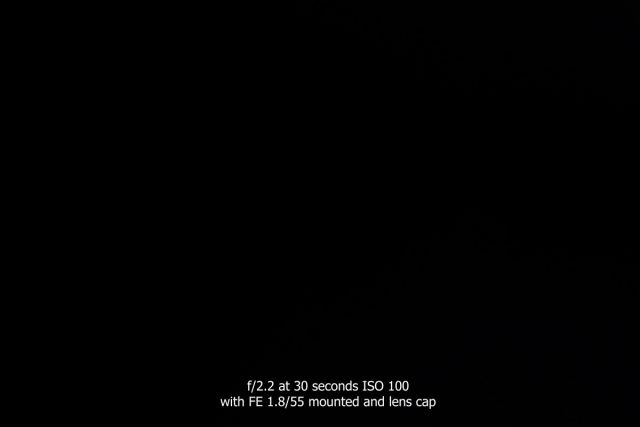
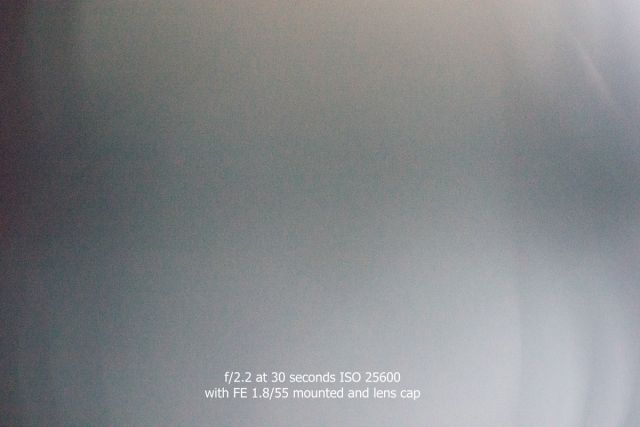
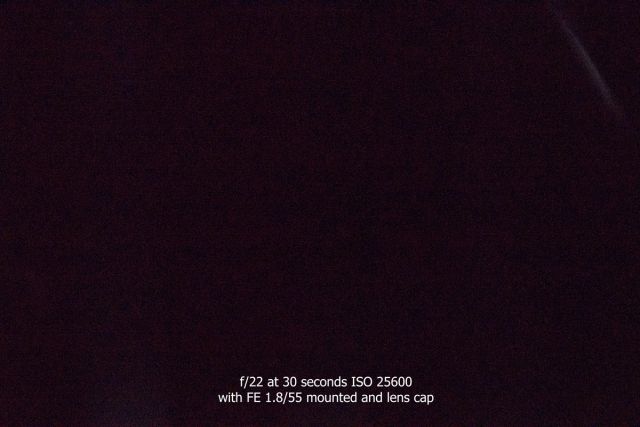
The following images were taken with the sun at it's highest point in our area, at noon, with the FE 1.8/55 lens mounted and the lens cap on, at 30 seconds.
At ISO 100 and f/2.2 there appears no light penetration.
At ISO 25600 and f/2.2 some light penetration can bee seen on the top right corner, as well an uneven exposure all the way down the right side. The latter may well be due to the lens cap.
At ISO 25600 and f/22 light penetration can be seen on the top right corner only.
My interest in doing this is primarily due to the many reports on various sites which demonstrate the issue of light penetration. However, I'm only interested in seeing if the problem exists with native lenses to mitigate any issues that could be caused by adapters etc...
Although these images were taken with the lens cap on, which may be the cause for the light penetration on the top right of two of these images, I'm not disputing this to be an issue. It may well be a QA problem and it should be noted the A7r which is used for these shots is one of the first that arrived in Canada.


 . The menu setting there is limited and choosing RAW or JPG is not included
  and now I could change the format to RAW + JPG. As it turned out, the camera is not that responsive or I was too impatient. Maybe I was used to my DSLR system that gives me practically immediate responses