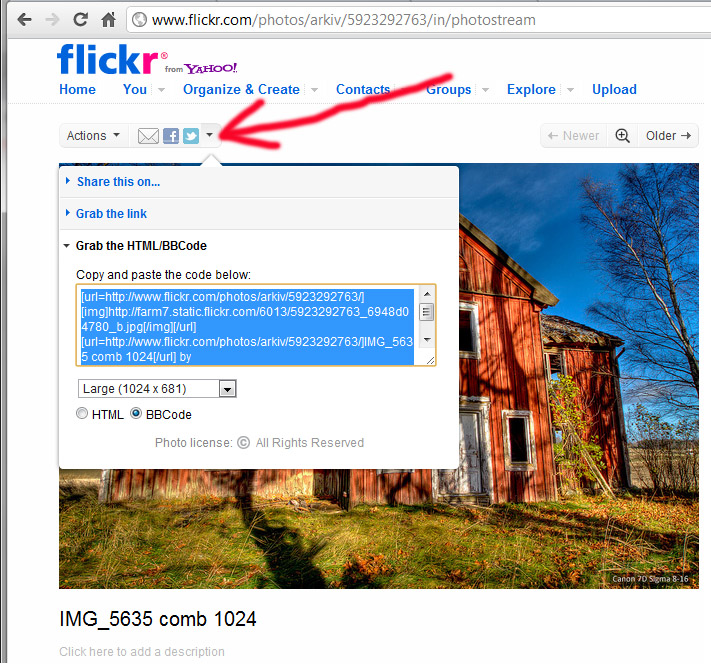
No, the photo must exist somewhere else on the internet, somewhere directly reachable via a web server. Then you need an http:// link to it. For example, I have a domain where I put mine, and I can link directly from there. Many people here use Flickr, and there is some way to link from there too.
carstenw wrote:
No, the photo must exist somewhere else on the internet, somewhere directly reachable via a web server. Then you need an http:// link to it. For example, I have a domain where I put mine, and I can link directly from there. Many people here use Flickr, and there is some way to link from there too.
Hmm, that's exactly what I do from photobucket, obviously they output very small, perhaps I should link with flickr instead.
EDIT: OK that's sorted, there was an output uploader setting in my personal details on photobucket set to 1024px, I've changed it to 1280px for future uploads.
timballic wrote:
Hmm, that's exactly what I do from photobucket, obviously they output very small, perhaps I should link with flickr instead.
EDIT: OK that's sorted, there was an output uploader setting in my personal details on photobucket set to 1024px, I've changed it to 1280px for future uploads.
Photobucket has a setting where you can tell it to only limit the file size to 1 MB. That way you can upload any size and quality you want, as long as you don't exceed the file size limit. I believe that this is also the only way to make Photobucket not recompress your uploaded images.
If I am allowed to pe picky I dont like the intervals but my vote is the interval that starts at 1280 (wideside). It's ok a little larger but then it goes off HD screens which happens to be my guideline.
Flickr makes it easy to share, I use 1280 (select size in the dropdown menu below the selected text)
I routinely export images from Lightroom at 1200px along the long end at a fairly low JPEG compression ratio
- for general publishing to the web (forums, Google Picasa for free and reliable on-line storage and sharing folders with friends and family)
- email
I link in forums usually an 800px or 1200px wide version depending on which forum I'm linking the image, sometimes with a link to a full resolution image, to be a good citizen for mobile users and people like me who keep two browser (or other) windows side by side on a large wide screen. That said it doesn't bother me at all to maximize the browser (F11, one keystroke to toggle back and forth) to see someone's work published large however.
I export full resolution files for special purposes only.
Hey men, I look at your posted pics here, but only large from 1024 and up worth me to invest serious analysis.I see that, small pics have not that detail to contemplate, beside it I always have a bad sense that small pics hide something imperfect.Sorry, that's me.
AhamB wrote:
1024 wide is a bit small for my taste. Smaller than that often makes it difficult to get a decent impression of the picture, IMO. I think 1280 is a nice width but wider is ok for panoramas.
surf monkey wrote:
For Fredmiranda.com posting rules are varied depending on where you look. The suggestions are 600 px, 800 px and 850 px on the longest side.
yeah, that's why i don't spend much time looking at the wildlife and landscape forums anymore, i was always just annoyed that i couldn't see the images at a decent size.