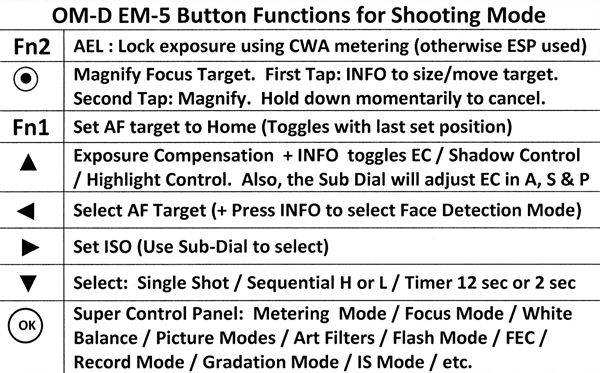
The OM-D E-M5 is one of the most user configurable cameras ever conceived. Olympus listened to us complaining about prior cameras - how we wished this button would do that, etc. So to a large extent (but with some frustrating and incomprehensible exceptions) they made it possible for us to customize our controls on the E-M5. This is a good thing, but it can be a steep learning curve to dig deeply into the possibilities.
This thread is intended to be a place where we ask and answer each other's questions, help each other, share tips and techniques, and share our own setups to give others examples of what can be done.
Giving references by manual page number should be encouraged - e.g. be kind and please, don't just say "read the ******* manual!"
This can be whatever we wish it to be - I hope it will to be a lively give 'n take. If it proves to be useful it will stay on page one for a while, otherwise it will quickly sink into the old thread compost pile.
Third, the E-M5 Instruction Manual. Yeah, really! I knew I was going to be into this manual a lot, and wanted a hard copy I could mark up and fill with sticky notes. Rather than try to print out the PDF, I purchased a bound copy for $10 on the Olympus Support web site here: http://www.olympusamerica.com/cpg_section/cpg_support_manuals.asp?id=1583 . It was well worth the money, for me. Be patient and assume that what you need to know IS in here somewhere – it probably is, really. Learn to follow the “cookie crumbs” pointing from one section to another related one (“see page xx.”) Take your camera in one hand, the manual in the other, and try things!
EDIT: I am not disappointed in the contents of the manual, and it has been an essential tool. But - the quality of the binding is terrible - after a few weeks of steady use the binding is failing and sections are falling out
If you have found other good references, please point us to them!
About the Magnify option in more detail: Tap once, then press INFO. Turn the Sub Dial to size the focus target (it can be much smaller than the normal size) and the arrow buttons to position the focus target in your composition. Then tap a second time to magnify. Now half-press the shutter button to image stabilize the magnified view. After achieving focus complete the press of the shutter button to take your photograph. To return to normal operation, hold the button down momentarily (eg, longer than a "tap.") This is great for Manual Focus. BUT you do not need to be in Manual Focus mode to do this - it also allows you to quickly select a 14x magnified view image stabilized focus target whenever you wish in Auto Focus mode also! Greatest thing since sliced bread and the first digital sensor
For the "secrets" to making this work see pages 87 and 88 in the manual. In section C of the Custom Menu turn Half Way Ris With IS to "ON" and in section D set LV Close Up Mode to Mode 2. (Thank you, Vic for the reminder about the section D setting!)
Fn1 for S-AF it's AEL for C-AF it's AEL/AFL (back button servo like the Canon's or Nikon's).
Fn2 magnify.
Video recording changed to AF Home, I can toggle between 2 AF point locations.
Those 4 ways cursor keys changed for Flash, Exposure (up and down), AF changes (so I don't have direct AF set).
Auto ISO all the time.
For two top dials, the right one changes SS.(for S and M, the other modes change EV).
Info I think this is standard histogram.
Press OK and use my down cursor key I can toggle to submenus easy...like it.
As a default, Auto ISO can not be accessed in M mode. Why not? Who knows as it is very valuable when shooting manually and having the option to use it doesn't mean that you have to. To allow Auto ISO to work in M...
Menu
Custom
Exp/Metering/ISO
ISO-Auto
Select ALL
OK
See P. 89
PS. I concur with Cal that getting and carrying a printed copy of the manual is a very good idea. Waiting for mine to arrive.
Spent the afternoon comparing my OM-D5 with a friend's and his behaves much better. I've deleted my earlier comments as they may be particular to my camera which will be going in to service on Tuesday so the comments may not be applicable to anyone else. At least I'm not feeling as crazy with him utter more than a few WTFs while playing with mine.
You can use the Touch Screen to change the size of the focus area to make it significantly smaller (see p.27) and it will hold its new size when you switch to the EVF and when the camera goes into sleep mode. However, it reverts to the default size if you use the SCP or menu. Has anyone found a setting that allows it to stay at its resized size so that you don't have go back and resize it repeatedly?
Henry, sorry to say I can't make the 14x focus target "stick" either. Will watch with interest to see if there is a way. Thanks!
Edit: I have good news and I have bad news. The good news is that when I turned on my E-M5 today and used manual focus magnify, it HAD saved the size (14x) and placement of the magnify focus target that I used yesterday. The bad news is, that I have no idea what changed or why. And I did change batteries before I saw this, so taking the battery out did not lose the settings. Nothing I do now makes it lose the settings. And I had used the menu and I had taken about two dozen photographs using various options and settings. So we know that the behavior we want IS possible, but not what controls it. Hope that when yours returns it will do everything you wish it to do! And hope that mine just keeps working like it does right now.
A much later edit: Let me clarify this: You can select focus target sizes down to 14X if you have set up the Magnify Focus Target function assigned to a button. Once you select a size (likely 14X!) it WILL "stick" though power down and even through firmware upgrades (at least through version 1.5.) But, after powering down the camera, you will have to press the button to which you assigned Magnify Focus Target again to bring back the saved target size.
Ok. Tried the magnify trick... can get the focus size to reduce, move it around. But as soon as I part depress the shutter, the IS kicks in (in the view finder as well) and the image returns to ordinary size - so no ability to precision focus. This is under V1.5 firmware.
Howard, I didna' do naughthin' honest! Gradation is in the SCP by default - on the right-hand side, 3rd item down. If your SCP doesn't look like the illustration on page 22, somethings wrong (or else I've missed something!)
Oh. Sorry! There are soooo many settings. I am trying to set up my second E-M5 (one silver, one black ) to work exactly like the first, and I alternate between frustration and hilarity. I think that I'm almost there - but I have thought that several times before already
So why did I get a second E-M5? Not that i'm trying to collect 'em. But using my G3 as backup/second camera just wasn't working. Now that I am used to the customized controls and handling of the E-M5, when I pick up the G3 its a "WTF?" experience. The G3 is a good camera, but I gotta sell it before the value drops out of sight.
One can easily see how this can happen. Yes, there are so many settings but once it's set, you forget after a time. I have mine where I want it but I can't say I can remember everything I did to get the settings I'm using because I'm just using it!