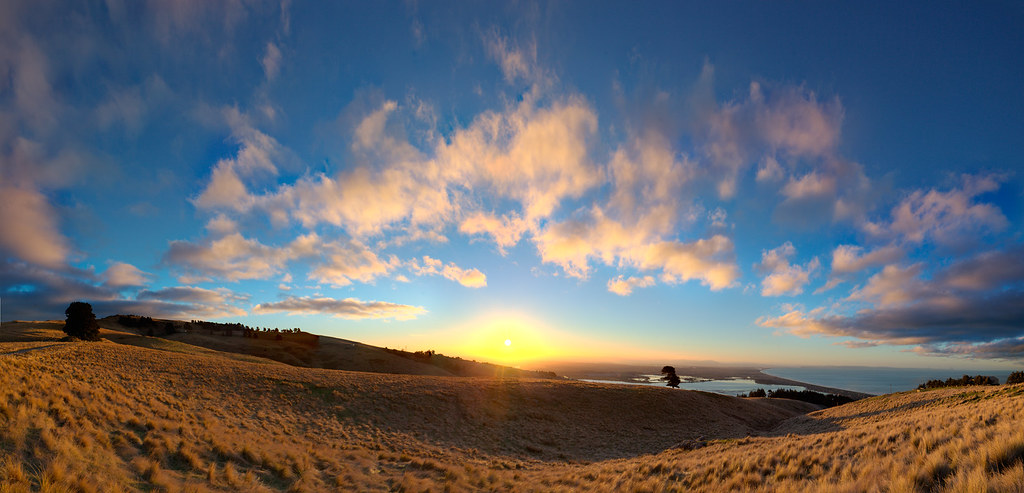
roguecoolman wrote:
*woosh* Poor Todd, all he wanted to know was filter vs digital blending
I'll chime in, while I am not in any way as accomplished as those who have posted above me or after me. But I can share with you the same question I had when I started out with landscape photography.
I started with GND's because every interweb searches told me it was necessary for landscape photography. So naturally I spent money buying first cokin, then hitech and finally now settling with Lee. As I started to use the filters more and more I experienced first hand some difficulties that wasn't apparent to me.
1. I had to make sure the filters were clean (duh) or else I'd get really bad flare
2. If I filter stacked different filter manufactures lee + hitech, I get really strong color cast
3. Soft Vs Hard, uh oh tree lines and mountain tips are darker than they should.
At first just using filters for all of my landscape work was fine for me. I just tried to take the photo to the best of my ability and if I had to sacrifice to gain something (like dark mountain tips to subdue the sunset or sunrise), then so be it.
Then later on, I did more reading and saw more professionals post their work (like here on FM), I started to wonder how come they are able to capture every thing perfectly. So I read up on HDR first, because when I googled multi exposure or blending that was what came up. So obviously the first thing that came up was hdrsoft and I spent money again. I used that software for a bit but it never appealed to me. I am not saying it's wrong or right, just for me it was not my cup of tea. To each their own.
then I learned blending using CS and layer mask technique. I started out simple just pure gradient mask, and it worked for some situations but because my CS skills were very bad thats all I had. then as I increased my knowledge, I began this process for my own photography.
1. Use filter and make sure I get enough shadow detail and highlights without the blinkies. Sometimes I would take more than 1 exposure.
2. Then when I imported in, I would see if my filter shot was what I liked or what I saw, and if not I would blend multi exposures of that.
Now you might ask, well then why in the world did you not just take multi exposures without filters if you are just going to do it digitally anyways. For me the answer was, I was not confident in my blending skills, so I wanted something that I know did work (which was filters) and needed a SAFE/BACKUP capture. I needed to know that I can come away from the scene with a keeper and not have to import in later with a facepalm.
I suspect as I grow more knowledgeable I may go more digital and less filter but for now thats pretty much how i break up my process. I would say almost 50/50 for now.
Todd, I don't think you are going to find a 100% consensus for which technique is better. I think the people here have posted from their experience why they use one over the other or both. I think the underlying element is it is "from their experience". So I highly recommend you go this route and experiment for yourself. Try both and see what limitations you have and where you would like grow. You might develop your own process that is different but it works for you that's fine. If you go filters, I would recommend you start with hitech filters before jumping in LEE because I had to explain to my wife why this is more expensive than that
Reading your experience I think should be helpful to others. And while all of our experiences can be different, I do think your experience is pretty typical.
kurt765 wrote:
Interesting to hear the talk of HDR here. HDR technology came out of the visual effects industry in movies (which is my day job). HDR images are images that have a high dynamic range that are usually stored in the radiance file format (.hdr) or nowadays can also be in an EXR or something. HDRs are generated usually by combining multiple exposures in order to capture all available highlight and shadow information. You then have an image file that contains all of that range. Think of it as a super RAW format that can combine all the exposure range of multiple RAW files. This has been useful in the visual effects business because we take HDR panoramas and map them onto spheres which can then provide lighting for our CG scenes. The HDRs allow us to match the lighting ranges in the real world and mimic that when we want to add a CG car into your car commercial (you might be surprised how many cars you see in car advertisements that are totally CG). But anyway, back to HDR photography.
To look at an HDR on an 8 bit or 10 bit LCD monitor you are going to miss a lot. You're not going to have beautiful detailed skies AND detail rich non-crushed shadows. That's because the HDR contains all the info, and just like your original exposure on a RAW file, your monitor is not going to be able to show the full range. Therefore, you have to compress that dynamic range so that you can fit all the range of the HDR into the comparatively tiny colorspace that your computer monitor or print can actually display.
Different software does this with different methods and with varying success. Let me give an example using Photomatix since that's something I own (though OSX tells me I haven't used it in over a year, ha!).
In my very first trip to Death Valley I captured a number of scenes using a full 7 exposures off a 1Ds II because I thought I'd experiment with HDR photography. And of course I didn't have grad ND filters.
Here's a single exposure with all settings rest to default in Lightroom 4.1:
The computer monitor and png file format cannot handle the dynamic range, so it looks like that. But, the data is there! We just need to extract it in a way that is meaningful and aesthetic way. Let's try tone mapping using the "details enhancer" method. This is an extreme application of this technique to highlight some of the artifacts that can result. Basically the software is taking all the range available in the HDR and creating as much localized contrast as possible. As a result, the values of elements in the scene are swung wildly to artificially create this contrast to exaggerate "detail" that is in the scene.
I have the impression from reading on various forums that this is the technique that most of us react negatively to. In subtle effect you can make less grungy images that can be more compelling. This is actually using the "grunge" preset. This looks like total crap to me. I think when you say "HDR" a lot of people think of this crap. Some people really like it, but I hate it.
The other method is to use the HDR data to try to create a compressed image - compressing the dynamic range into something displayable and printable like normal photography. This can create a far more realistic image, not unlike what we try to do with grads and darkening down sky and lifting shadows, etc. Here's a 1 minute example:
This looks far better and far more realistic. With some work, you can make it look better, balancing out the sky and foreground, or using this in combo with single exposures, or whatever.
In photography the goals of simple exposure blending and HDR can thus be identical: to balance out the extreme dynamic range of reality into the narrow range of a print or monitor. Different tools for the same goal. Most HDR software is doing the work for you. Manually blending exposures in photoshop is going to involve a lot more choices - like "do I want the lighthouse to stay light when I darken the rest of the sky?" etc....Show more →
Hey Kurt,
By the way, that is an excellant example of getting an HDR right. Thanks for sharing that process.
This has been one of the more informative threads on FM I've read in a while! Thanks to all that contributed to both the OPs question as well as the different terminology and explanations of blending for DR and what is/is not considered HDR.
In the fall of 2011, I shot a group photo consisting of over 500 people in separate formations in the foreground with four aircraft being in the "mid-ground." The true background were the mountains behind the group and beautiful sunrise that was coming up during the shoot. Had this thread been available to me back then I would have come away with a much better image.
At the time I lacked photographic skills in almost every fashion, but the passion was there so of course I volunteered for the job. I set up my rinky dink tripod on a 20 foot stand and basically took a shot every minute or so while the formations were getting set up. I remember constantly adjusting my ISO from around 1600 or so down little by little to reduce noise, but had to keep it high initially for a reasonable shutter speed.
Of course, exposing for the people was the main objective, but that gorgeous sunrise was getting blown out and I didn't know how to deal with it at the time. I know now I could have taken a few shots exposed for the sky and just blended them right in.
Luckily, fellow FM'er Steve Wylie gave me some pointers and basically hand-walked me through a similar process in LR3 of how to bring out the sky (increase DR). I'm sure I could use the tools learned from this thread to take a couple of the exposures to create a more pleasing image, but there's really no incentive at this point besides just getting the practice of blending. I'll attach the picture when I get back to my computer for anyone intersted.
I do, however, have a question to add to the OP's original question:
How many stops of DR is "the norm" one might try to achieve when shooting landscapes that include skies and/or sun, etc where bracketing is desired? Not sure if I asked the question properly
I'm not sure if I'll be answering my own question, but would the scene dictate how many stops of DR is used because the photographer is looking for blinkies on one frame and shadow warnings on the other? I guess I'm curious about how many stops this typically ends up being and how they're calculated. Thanks in advance!
Kevin, that's a very good question. And I'm sure someone will give a more technical answer. But for me in practical application I simply try to exposure the mutiple zones or areas of the frame correctly. Normally the sky and foreground are the greatest difference. So as your shot you desribed, I expose for the foreground and if the sky is really blown out I'll shoot a second for it. In certain cases when the difference seems really extreme I'll shoot a third for the mid ground or transition between the two primary areas. That's really all it takes along with learning the blending skills in PS which is where the real work and fun happens.
Thanks Derek for the link. I'm sure the technique can be applied to separating layers, but wasn't exactly aimed at editing landscapes.
Here's the photo, which as you can see could have been much much better had I exposed correctly for the foreground and background in two different frames then blended them together. What I ended up with was a single exposure with a gradient tool applied to the sky in LR3. I don't remember using layers for exposure at the time, just some Nik Color Effects filters to improve color tone. I know if I had to do this again it would come out so much better!
That shot actually turned out not that bad! Of course as you described you could have caught more sky color with a blend or filter. But still very nice.
redmonkee, excellent job with those blends, especially shooting right into the sun! The transitions all look very natural.
Ruahrc wrote:
I have to respectfully disagree with Jim and Dan's arguments. The strict definitions of HDR proposed above come across as a little dogmatic, with some clear undercurrents of simply not wanting to be associated with producing "HDR" images primarily to appear "elite", "old school", or "better than others".
Saying that exposure blending is not a form of HDR "because we did it before the term HDR (misused as tone mapping) became widely used" is arbitrary, and kind of like saying that "selective cross pollination and hybridization of plants" is not a form of genetic engineering, only because ancient peoples developed and domesticated crop plants thousands of years before modern genetic techniques were developed. Especially if you consider the history of HDR techniques in photographic and video imaging, and realize that tone mapping has been around longer than you think. See a brief review on wikipedia: http://en.wikipedia.org/wiki/High_dynamic_range_imaging#History_of_HDR_photography and note that modern tone mapping was developed in the early 1990s, and similar concepts in digital image processing put forth almost a decade before that. Please raise your hand if you were actually out there manually blending digital captures back then, and then you might have some shred of validity in saying the manual blending of exposures using layers predates tone mapping and is a more "authentic" form of HDR. (and keep in mind that photoshop did not add layer support until 1994)
IMHO, one should simply specify the specific technique used in the image, if the photographer so chooses to divulge his methods. HDR is not a technique, rather a term to describe a family of techniques that achieve a similar goal, and so if you want to describe the technique(s) used to create a photo, state the specific techniques and not generalized catch-all terms. So if an image is exposure blended or a fusion of several exposures, state such. If an image was tone mapped, say it was tone mapped. If GND filters were used, then say that. Simply using the blanket term "HDR" is not sufficient to describe what was done to an image. These are all just tools at our disposal, just like a lens or a filter in our gear bag, and I hope to think that we would not be judging images here based on the technique used rather the quality of the outcome.
To finish, this whole debate on phraseology reminds me of a quote I once read. Unfortunately I no longer know the source (but it is highly possible I originally read it here on FM)
"n00bs argue about camera bodies, amateurs argue about glass, and the pros just let their images to the talking"
I think you're swimming up stream with your broad definition of HDR. When people say HDR, they are referring to tone mapping. Though using blending as a way to extend the dynamic range could be construed as a form of HDR, your definition does not match the mainstream sentiment, and leads to confusion when discussing it in a forum. If you wish to go against the grain, you're more than welcome to do so, but it does create confusion.
When people post landscape photos on the forum and put HDR in the title, they are almost always referring to tonemapped images. When was the last time you saw someone post a manually blended photo, and placed HDR in the title, or used HDR to describe the image?
no_surrender wrote:
I do, however, have a question to add to the OP's original question:
How many stops of DR is "the norm" one might try to achieve when shooting landscapes that include skies and/or sun, etc where bracketing is desired? Not sure if I asked the question properly
I'm not sure if I'll be answering my own question, but would the scene dictate how many stops of DR is used because the photographer is looking for blinkies on one frame and shadow warnings on the other? I guess I'm curious about how many stops this typically ends up being and how they're calculated. Thanks in advance!...Show more →
I'm not quite sure if you are asking:
a) How many "stops of light" there are in these scenes, or...
b.) How may stops should separate your multiple exposures if you plan to blend.
Regarding a), this will vary from scene to scene. If the sun itself is in the frame and you also want to retain some detail in subjects that are in shadow from the sun, it could be a LOT of dynamic range. I can't give you actual numbers, but I have done this a few times and ended up making many component exposures. If memory serves, I have have had to use exposures that were 6 or more stops different at the extremes.
Regarding b), this can also vary. However, my general practice in most cases is to simply make a series of exposures usually separated by one stop. I'll usually start with the "darker" exposure and simply expose to the right and watch out for blinkies in the display. Then I'll double the length of the exposure to make the second shot, again looking at the histogram, but now paying more attention to what the curve does at the left/dark end - I'm looking to lift that end of the curve enough so that it doesn't jam up there. If necessary, I'll do another. And another.
On a few rare occasions I have separated the exposures by values other than a stop. Sometimes, where there is a lot of subtle highlight detail, I might use 2/3 stop increments. In other situations in which the dynamic range is extremely large, I might simply separate the exposures by two full stops.
gdanmitchell wrote:
Regarding a), this will vary from scene to scene. If the sun itself is in the frame and you also want to retain some detail in subjects that are in shadow from the sun, it could be a LOT of dynamic range. I can't give you actual numbers, but I have done this a few times and ended up making many component exposures. If memory serves, I have have had to use exposures that were 6 or more stops different at the extremes.
Regarding b), this can also vary. However, my general practice in most cases is to simply make a series of exposures usually separated by one stop. I'll usually start with the "darker" exposure and simply expose to the right and watch out for blinkies in the display. Then I'll double the length of the exposure to make the second shot, again looking at the histogram, but now paying more attention to what the curve does at the left/dark end - I'm looking to lift that end of the curve enough so that it doesn't jam up there. If necessary, I'll do another. And another.
On a few rare occasions I have separated the exposures by values other than a stop. Sometimes, where there is a lot of subtle highlight detail, I might use 2/3 stop increments. In other situations in which the dynamic range is extremely large, I might simply separate the exposures by two full stops.
Thanks Dan for the explanation. I hope I understand you correctly...when shooting a landscape with the intention of digitally blending two or more images together, you start by exposing for the highlights? Using faster SS to expose to the right, watching for blinkies. What I may have misunderstood is doubling the length of exposure for the left side of the histogram. If I were to use 1/1000 to get the correct highlights without overexposing, wouldn't a 1/2000 SS force the histogram farther to the left creating more shadows instead of revealing them?
I think I understand the overall idea, exposing to the right to avoid blinkies and then shooting 2+ stops slower to keep the histogram from bunching up on the left side which should provide nice shadow detail? Not sure if this thread is the right place to ask, but I need to better learn how to blend multiple images together, especially star trail astrophotography that might require 20-100+ images to be "stacked."
As far as counting the stops of DR, I assume we are all shooting the same Av and ISO between the images to be used for blending because shots with various DOF and noise are just not going to go well together. Speaking strictly of shutter speeds, if the frame exposed for highlights is 1/2000 and the frame exposed for shadow detail is 1/250, would this be considered 3 full stops of DR even though it may contain more than the 3 stops that separate the 2 exposures?
BTW - I did order a solid 10-stop ND filter after reading a few of your articles, but that is for an entirely different purpose. Your landscape work is amazing, I've been following your blogs and Facebook updates regularly.
If my first exposure is at 1/1000, the second might be at 1/500, then at 1/250 and so on. Each successive setting doubles the length of the exposure. The result will be blown highlights (that I won't use in the blend) in these follow-up exposures and better exposed shadows (that I will use.)
You will want to have the camera in M or manual mode when you do this. (You could, I suppose, use aV and then exposure compensation, but I think that the manual approach is generally going to be better.)
And thanks for your kind words about my photography. :-)
Dan
no_surrender wrote:
Thanks Dan for the explanation. I hope I understand you correctly...when shooting a landscape with the intention of digitally blending two or more images together, you start by exposing for the highlights? Using faster SS to expose to the right, watching for blinkies. What I may have misunderstood is doubling the length of exposure for the left side of the histogram. If I were to use 1/1000 to get the correct highlights without overexposing, wouldn't a 1/2000 SS force the histogram farther to the left creating more shadows instead of revealing them?
I think I understand the overall idea, exposing to the right to avoid blinkies and then shooting 2+ stops slower to keep the histogram from bunching up on the left side which should provide nice shadow detail? Not sure if this thread is the right place to ask, but I need to better learn how to blend multiple images together, especially star trail astrophotography that might require 20-100+ images to be "stacked."
As far as counting the stops of DR, I assume we are all shooting the same Av and ISO between the images to be used for blending because shots with various DOF and noise are just not going to go well together. Speaking strictly of shutter speeds, if the frame exposed for highlights is 1/2000 and the frame exposed for shadow detail is 1/250, would this be considered 3 full stops of DR even though it may contain more than the 3 stops that separate the 2 exposures?
BTW - I did order a solid 10-stop ND filter after reading a few of your articles, but that is for an entirely different purpose. Your landscape work is amazing, I've been following your blogs and Facebook updates regularly.
gdanmitchell wrote:
If my first exposure is at 1/1000, the second might be at 1/500, then at 1/250 and so on. Each successive setting doubles the length of the exposure. The result will be blown highlights (that I won't use in the blend) in these follow-up exposures and better exposed shadows (that I will use.)
You will want to have the camera in M or manual mode when you do this. (You could, I suppose, use aV and then exposure compensation, but I think that the manual approach is generally going to be better.)
And thanks for your kind words about my photography. :-)
Dan
See, I knew I was missing something. When you said double your exposure my brain wanted to see 1/2000 instead of 1/500!
Yes, I shoot in manual but may have used the abbreviation at the wrong time. I was referring to simply ensuring that the aperture and ISO were kept the same (in manual mode) when adjusting the stops because different DOF or noise levels wouldn't blend together. As of late, I only use Av or Tv for fast moving subjects.
Really not trying to brown nose or anything, but I really do appreciate you taking the time to blog about all that you do instead of just posting your images. Your site has become somewhat of a reference and I dig that. Thanks again!
Now, do I need to add my nickles worth considering the quality of information in this thread? Yup. I have a couple ND Grads, but use multiple exposures 90% of the time...unless there is a moving object(s). That is all I will say about this because I use the same techniques as some of the posters use, and CS5/6.
Rob, this is an awesome shot. In cases like this it really doesn't matter if you used HDR, mannual blends or both. It looks natural. You still have shadows with plenty of dynamic range.
Not sure If a "rookie" like myself has a place saying anything here, but I've tried all sorts of different methods to gain back more dynamic range. I also shot film and loved Slide film for its certain properties.
I have used Photoshop from CS then to CS3 and within the last week CS6. I do use Photomatix and just ordered HDR Efex Pro2 for its greater latitude and ease of use.
Sometime though I process the images a few times, each for what i need, and then manually blend those in Photoshop.
I'm always experimenting with different methods and learn a lot by asking, but I still want that fairly natural look and tend to lose some of the color punch that HDR images lose along the way, that and the biggest problem being noise.
Heres an image that I think looks pretty natural, but seems to lack a lot of color: http://farm8.staticflickr.com/7108/7444766856_0db5fa9614_c.jpg
krickett wrote:
Generally in order of preference for me is:
1. Shoot to avoid blinkies, and push shadows.
2. Use Grad ND's
3. Blend exposures
I sometimes hesitate with Grad ND's because they have given me problems before... namely placing the transition line in a bad place (not always obvious in viewfinder), or just outright keeping them clean. Those things are dust magnets.
+1 and I might add, at least half my blends have subject motion. Most of my blends are multi conversions of the same shot.
In my last post, i was asked how this image below was made, i wasnt being rude and no replying, just forgot but since this post has come back up top i shall post it here.
This image below conists of five images, but note not the entire scene was used each time, just my prefered and selected areas. something a computer and hdr program is unlikely to know .
the first base image was for the foreground to which i blocked the sun with my finger allowing for an image with much higher contrast and eliminating the small patch of flare that showed. Exp was +1 stop over the meter reading.
then with hand away a single exp for the sky which i believe was -1.
after that another 3 exps where taken, -2,-3,-4. i did not use the standard "0" exp this time around.
so, +1 gets layered on top of -1, a luminosty mask of approx 1 click lower than 50% was used, layer mask added to reveal the brighter +1 exp and the sky region.
following the same principles as above the files get darker and so does the area that the luminosity masks selects. but using the add layer mask icon the small areas of the scene are placed and blended accordingly. the very last image -4 was for tthe sun star burst. however the clouds have now moved a short distance, and pixel allignment is not good. this is rectifyable by using the move too and dragging it back to the right location, here it was about 10px out.
the final image: http://www.sussexlandscapephotography.co.uk/raking%20light%20copy.jpg
with regards the Ben`s post above me i will generally never raise shadows as that will show considerable noise patterens etc. If you are lucky enough to have one of the latest nikon cameras this is not a problem as they are almost an ISO`less camear and raising shadows is not an issue. if however you need a brighter exp and do not want to change you shutter / or apeture combo then use and raise your ISO. whilst it seems counterintuitive you will have less noise, on canon cameras you can go up to around iso 4-800 before noise does become an issue.
I think we need a new term for increasing dynamic range since HDR has become profanity to some
How about MDR for More Dynamic Range, or IDR for Increased Dynamic Range?
That way the pious can say, "I don't use HDR, but instead use MDR" when the using the more sacred blending techniques
For Jim, so he does'nt have to promote the D800, he can say, "I used IDR" and folks will know what "that" means