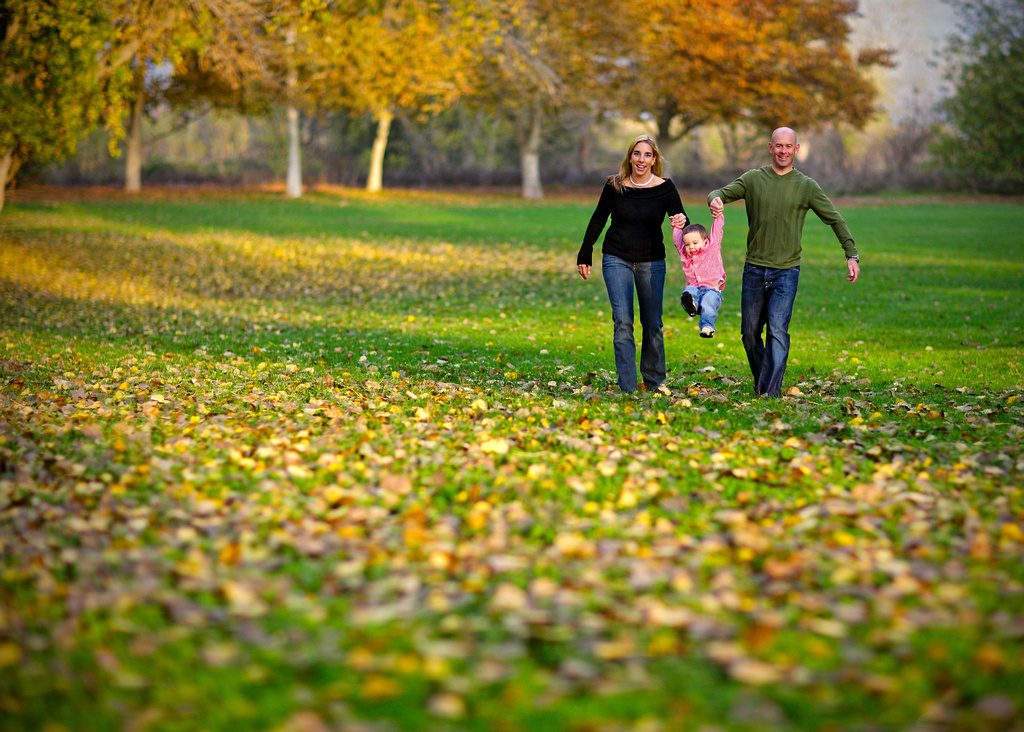
What you are seeing is a function of shallow depth of field, meaning, only a small portion of the scene is in focus. A few things effect depth of field: 1. Aperture - the wider the aperture, the depth of field is shallower. 2. Distance to the subject - the closer you are to the subject, the depth of field is shallower. 3. Focal Length - the longer the focal length, the depth of field is shallower.
They may not enhance depth of field, but selectively controlling contrasts can add to the impression of depth. The idea that the eye registers brighter things as closer and darker as farther away..
One more thing for shallow DOF: 4. sensor size - the larger the sensor the better the look, IMHO. If you're not using a full frame sensor it's more difficult to get that look, along with the other techniques Chuck pointed out.
A lot of it also has to do with how you light a scene. The light falling on your subject, the shadows it creates (or doesn't create), etc can make the difference between a flat image and one with the appearance of depth.
"The 3D Look" is always a hot topic here on FM and tends to be somewhat subjective. Some will post images they believe are the most 3D on the planet and others will comment that they can't see it (same images). I suspect that differences in vision and color sensitivity among different people account for some of that, like some people who can see the images in Stereograms immediately and others that never manage to.
Some of these have already been mentioned but here is my list of things that can enhance the "3D-like" qualities of an image:
- DOF
- Detail/sharpness
- Light vs. shadow (sculpting)
- Bright (closer) vs. dark (farther)
- More saturated (closer) vs. less saturated (farther)
- More contrast (closer) vs. less contrast (farther)
- Warmer colors (closer) vs. cooler colors (farther)
- Composition and leading lines
Some of the above that are "X vs. Y" can be reversed successfully in some images. Note that most of the above can be influenced both "in-camera" (via composition primarily) or in post-processing.
John Paul Caponigro has done some interesting writing and video on these effects, primarily as they relate to landscapes, but you can apply most of the techniques to people pics, too, if you have the time and patience.
Yes Yes Yes Thank you for the information. I am dying to get this look or at least make my photos pop more. After four years of doing it wrong, am starting from scratch and giving it another try. This is a good starting point
And remember that the depth of field is also relative to the shooting distance. If you start framing the subject tighter than you have done before, it will have a favorable effect on the subject isolation by DOF.
The above can be obtained via the "Tilt Shift" look. Although there are several techiques, here is the one that I use:
Tilt & Shift Look (Photoshop)
1. Set quick mask mode ('Q' on the keyboard)
2. Set gradient mode ('G' on the keyboard)
3. Select what type of gradient you want and draw the line starting at the point in the image you WANT totally in focus
4. Exit quick mask mode ('Q' again) - should show crawling ants
5. Filter > blur > lens blur
6. In the dialog that comes up, play with the sliders until you're happy with the TS look
7. Click 'OK' and wait for while PS renders
Stunning photo Bruce. What post processing was done on this, if any? Is the bokeh SOOC, as a result of the 85mm f1.2 (@1.6)? I've recently started using this lens on a 5DMkII and am yet to see an image like this. Can't wait!
Inga wrote:
Stunning photo Bruce. What post processing was done on this, if any? Is the bokeh SOOC, as a result of the 85mm f1.2 (@1.6)? I've recently started using this lens on a 5DMkII and am yet to see an image like this. Can't wait!
Thexonly prossesing was curves, levels, saturation, and selective sharpening. Flash was used as fill on camera and the setting sun was used as the main.