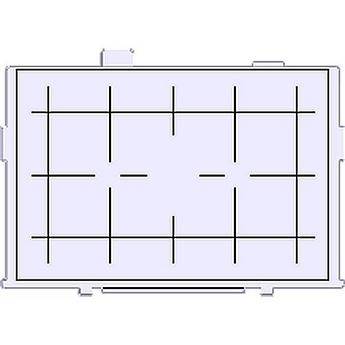
Quick question on the viewfinder... is it possible to get rid of the AF Points black squares ? And only have them light up when AFing ? It would make the viewfinder much cleaner.
I couldn't find an option in any of the menus... I imagine they might be engraved ? If so is there a custom part i could order to remove it and leave myself with only the general circle in the middle ?
Csae wrote:
Quick question on the viewfinder... is it possible to get rid of the AF Points black squares ? And only have them light up when AFing ? It would make the viewfinder much cleaner.
I couldn't find an option in any of the menus... I imagine they might be engraved ? If so is there a custom part i could order to remove it and leave myself with only the general circle in the middle ?
Doubt it.
They'll be there after focus screen changes, in case you getthat idea as a fix. They probably are etched into the camera sides of the prism, or something.
You can keep all but the center from lighting if you want.
Csae wrote:
Quick question on the viewfinder... is it possible to get rid of the AF Points black squares ? And only have them light up when AFing ? It would make the viewfinder much cleaner.
Csae wrote:
Quick question on the viewfinder... is it possible to get rid of the AF Points black squares ? And only have them light up when AFing ? It would make the viewfinder much cleaner.
I couldn't find an option in any of the menus... I imagine they might be engraved ? If so is there a custom part i could order to remove it and leave myself with only the general circle in the middle ?
They are etched on the superimposition plate located between the pentaprism and the focusing screen. This plate is not designed to be user replaceable. So the bottom line is no.
Actually, thats what made them me bug me in the first place...
I just came from a 1ds mk2.
I knew about them still being there after changing focusing screens, i changed to a Eg-D and was thinking of getting a Eg-S for my quick lenses and removing the focus dots so i could get a very nice and clean viewscreen.
Was hoping for some custom piece, like how they made cross-image prisms......
Sad to hear that is impossible.
Maybe when the 1ds mark3s comes down in price i could hop on Thanks for all the quick dream-crushing replys guys
Interesting that it's impossibly on the mkII, the etched lines are on the removeable focus screen on my 5D original. Just to confirm, pop out the focus screen and check on your camera, look through the viewfinder with it out. I somehow doubt the idea that it's on some sort of 'superimposition plate'. The red LED's are but not the black squares.
Beni wrote:
Interesting that it's impossibly on the mkII, the etched lines are on the removeable focus screen on my 5D original. Just to confirm, pop out the focus screen and check on your camera, look through the viewfinder with it out. I somehow doubt the idea that it's on some sort of 'superimposition plate'. The red LED's are but not the black squares.
I bought the focusing with grid Eg-D. The black squares are not etched on the focusing screen but on the plate in between it and the prism. It's only the grid that is etched on the FS.
Does it show up then with the manual focusing screen? Using the split image in the middle of the viewfinder with that square in the middle must be as annoying as heck...
It's not on the focusing screens - I've changed out mine twice.
Seems to be on the prism or whatever it is that redirects our vision through the lens.
Beni wrote:
Does it show up then with the manual focusing screen? Using the split image in the middle of the viewfinder with that square in the middle must be as annoying as heck...
The only split image for a 5D2 that I found was from the ebay China seller Dfinance (or whatever it was). It was a little more problematic because of the focus squares but not hard to look past. Eventually they became as much as invisible to me.
Canon has just a couple of choices and none have a split image or fresnel type center for focusing. The best one from them is Eg-S (but this is a whole different topic.)
Beni wrote:
Interesting that it's impossibly on the mkII, the etched lines are on the removeable focus screen on my 5D original. Just to confirm, pop out the focus screen and check on your camera, look through the viewfinder with it out. I somehow doubt the idea that it's on some sort of 'superimposition plate'. The red LED's are but not the black squares.
Different bodies have different viewfinder designs. On the 5D Mark II, the AF rectangles are etched into the SI (superimposed indicator) plate, as previously mentioned. It is NOT on the focusing screen. The SI plate is not designed to be user-serviceable.*
I should know--I own the 5D Mark II, and have removed the SI plate in order to clean dust trapped between it and the pentaprism. I have seen the plate with my own two eyes and can prove that the rectangles are etched on there.
*Although the SI plate is not user-serviceable, it can be removed by the user if it is done carefully. The plate is held in by two screws just above the focusing screen release latch, and a set of tabs. This is also the same procedure used to insert/remove metal shims that adjust the spacing between the pentaprism and the focusing screen, to make the optical VF match the true focus.
Something else to understand--if you could exchange out the SI plate for a blank one, the rectangles would not light up with AF confirmation, because the light would simply pass through the plate and not have anything to scatter off of.
The AF rectangles are lightly etched on the bottom of the pentaprism (I guess on the plate). If you use isopropyl alcohol on a Q-tip or similar cleaning tip, then you can physically erase the AF rectangles, not entirely, but mostly. I have done this once inadvertently while cleaning the pentaprism in an attempt to remove dust and particles as seen in the VF of a 5D. I sent the 5D in to Canon for that along with a bunch of other things while still in warranty and they fixed it no questions asked without charge.
rsg_1 wrote:
The AF rectangles are lightly etched on the bottom of the pentaprism (I guess on the plate). If you use isopropyl alcohol on a Q-tip or similar cleaning tip, then you can physically erase the AF rectangles, not entirely, but mostly. I have done this once inadvertently while cleaning the pentaprism in an attempt to remove dust and particles as seen in the VF of a 5D. I sent the 5D in to Canon for that along with a bunch of other things while still in warranty and they fixed it no questions asked without charge.
wickerprints wrote:
Something else to understand--if you could exchange out the SI plate for a blank one, the rectangles would not light up with AF confirmation, because the light would simply pass through the plate and not have anything to scatter off of.
That is interesting... I'm curious how the light is directed if it needs the black squares to be shown, perhaps a small more transparent engraving would reflect enough of the red AF light to work without being as noticeable as a black etch.
I've seen custom focusing screens for the 5dmk2, perhaps a custom SI plate would be possible ? Not Cheap, but possible ?
Something more like the grid lines on one of these for example.


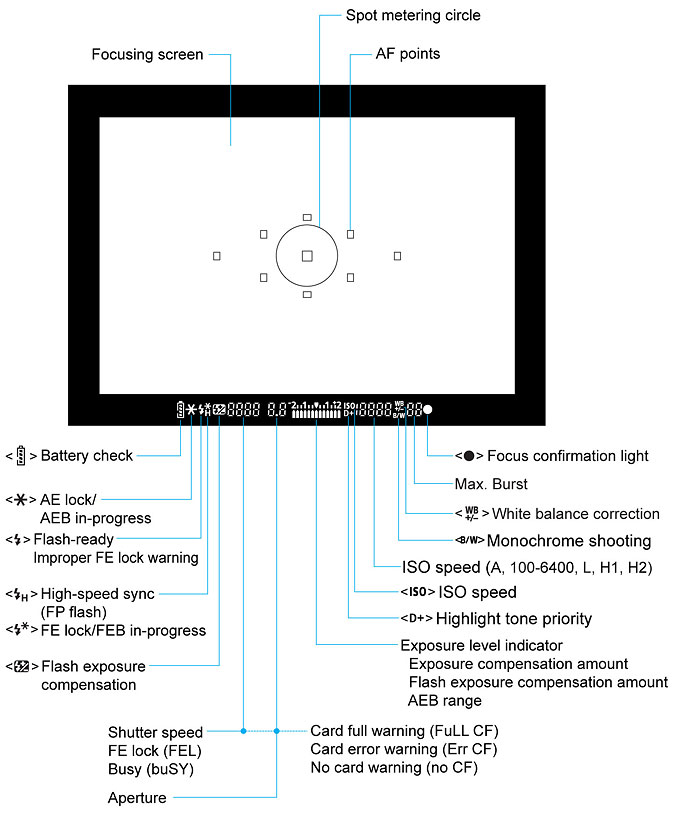
 .
.
 Thanks for all the quick dream-crushing replys guys