I kid GaryJr... just being the smarta$$ I tend to be...
Paul, seriously, you have got photoshop and creative skills that match your ability to photograph youth sports, and that is saying a ton. I am not sure how long it took you to put this tutorial together, but I'm guessing you aren't a guy with tons of free time either at the best of times. So I thank you, and I'm glad we've got this as a sticky for all of us when season year-ends roll around. Great having such a nicely layed-out tutorial available as a reference. CHEERS!
jamesdaniels21 wrote:
did you ever put out the details on how you accomplished the photo team shot?
Thanks.
Guys... you gotta look at the last 4 pages guys! I know what happens because I have made the same mistake. You post to the first page, not realizing there are so many more pages. It's in there! It's so funny how many PMs and emails I have been getting on this.
I will assume that the school district is not commissioning you to do this, so its based on parent sales. With 15 kids or so on the team, even if all purchased an 8x10 or 5x7 that would be a total $300 give or take at market rates in our area. Does that cover the extra editing time? Are my assumptions wrong?
Thats the biggest problem I have run into - making the workflow time make sense.
This is really awesome. I almost cant wait till the end of the season to try this.... I've got 3 different teams my daughter in on and I KNOW this would blow them away.
I think my challenge will be the hair! 10 girls with ponytails will be exciting to cutout :-) I actually saw a demo for a plug-in called Mask Pro- looked pretty awesome for masking hair....
Also, I couldn't tell from your description if you had to BUY the various background images you use?
Thanks again- this post is like looking behind the curtain and seeing the Wizard of OZ at work!
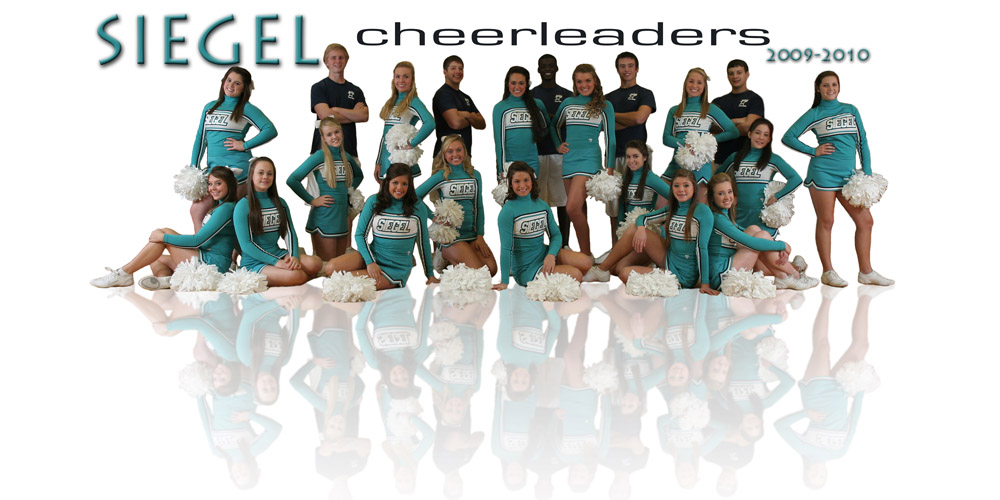
Recently had to shoot a photo of my daughter's high school cheerleading team - wish I would have found this thread before taking the photo. Would have helped to have had all the most forward objects lined up across the photo - but it still turned out pretty good. BTW - this is going to be a 8'x4' banner outside the gymnasium:
Looks good. Just add in a few mirrored poms and I think everything will be well hidden. The mirrored effect doesn't need to be compete from base to top. I'd do away with some of the foreground space. I think the poster will balance better.
Is there a reason why you didn't use green/blue screen background to aid in the selection? A few more minutes setup before shooting would save TONS of time in the post processing (at least it does for me).
Fred... I can't take any time more than necessary in that gym. The kids need to practice and there are three sports going on at once. It has to be in and out. They are very specific about that.