Here's a panorama I made today. Images from 2 or 3 days ago. You can have this for any purpose. It's a gift. No catch. But this is the image before any processing and I would love to see what you guys can do in PP with this. Even just some color balancing or something.
Here it is at 6% scale:
[url=http://tesselator.gpmod.com/Images/_Panoramas/Panorama1_Flat_Scale.jpg]
And you can click for a 24% scale version of it at 5,500x1,200.[/url]
This was kind of a test to see how well PhotoShop, AutoPano Pro, and PTGui Pro could do when handed a set of 14x3 (42 total) 8 megapixel images. Only Photoshop's Photomerge didn't choke completely. The other two misplaced images, left terrible unsmoothed seams, and took many times (3 or 4) longer. Photoshop couldn't figure out the top row or row and a half of clouds so it left it blank and smoothed to a solid color.
hugh wrote:
Maybe not enough recognizable points in the sky? Did you try row at a time, and then the three rows as three large files?
hugh
Yeah, that would probably work. I thought of that but didn't try it. If it's really points and not a memory thing then for sure...
The upper layer of clouds were much more dense and swirly than the lower/farther ones tho.
Mmmm... I think it's interesting. I'm not really "looking" for anything.
I thought the original was kinda drab - being overcast/cloudy and all. It looked like a lot of work to get it to what I saw in my mind while taking the picture so I just gave it away instead. I know anytime I can get big/detailed data for free I grab it so I thought there might be someone out there who would. could, or wanted to save it from wasting away on a hard drive somewhere in Japan.
Bifurcator wrote:
This was kind of a test to see how well PhotoShop, AutoPano Pro, and PTGui Pro could do when handed a set of 14x3 (42 total) 8 megapixel images. Only Photoshop's Photomerge didn't choke completely. The other two misplaced images, left terrible unsmoothed seams, and took many times (3 or 4) longer. Photoshop couldn't figure out the top row or row and a half of clouds so it left it blank and smoothed to a solid color.
Wow, the most I did until now were 42 also! You can see it here. No problem with the sky in that one (for PTGui), but I had sky problems in other stitches. The problem is that reference points can only be found when there is information. How could you find them on a series of pictures of a perfectly white sheet of paper? The Photoshop approach you describe is a good idea. I might give PS a try again, though until now, it never really convinced me for stitching. I always had far better results with PTGui. PS often either couldn't stitch at all for lack off good reference points or it couldn't get smooth transitions when PTGui, with the same images, just happily stitched a nearly perfect pano on full auto ...
No problem with the sky in that one (for PTGui), but I had sky problems in other stitches. The problem is that reference points can only be found when there is information. How could you find them on a series of pictures of a perfectly white sheet of paper?
The Photoshop approach you describe is a good idea. I might give PS a try again, though until now, it never really convinced me for stitching.
I think that if you have to hand manipulate the stitch then PS at least CS3, is probably not the best tool for the job. I have Realviz but I haven't migrated it over to Mac yet so I didn't include it in the test. Looking at your site is inspiring me to do so tho.
I always had far better results with PTGui. PS often either couldn't stitch at all for lack off good reference points or it couldn't get smooth transitions when PTGui, with the same images, just happily stitched a nearly perfect pano on full auto ...
Cool! I'll give it another try next time. I just tried it again (right now) on several 3 and 4 image panos and it didn't seem much better. It was a lot faster than it was on the big one but still a few slight seams and not really the best distortions. Which projection type do you use most [for flat views like above] and what file types are best? In my (limited) tests only JPEGs were available to it.
Bifurcator wrote:
Which projection type do you use most [for flat views like above] and what file types are best? In my (limited) tests only JPEGs were available to it.
First, only the linked pano is from myself. The site is PTGuis', not mine.
As to the projection, I mostly use cynindrical, except for realy wide angle shots. I work either directly from RAWs (PTGui can read my DNGs) or from 16bit TIFFs which I generate from my RAWs and output to 16bit TIFF too. This gives me the maximum leeway for postprocessing without loosing quality.


 No catch. But this is the image before any processing and I would love to see what you guys can do in PP with this. Even just some color balancing or something.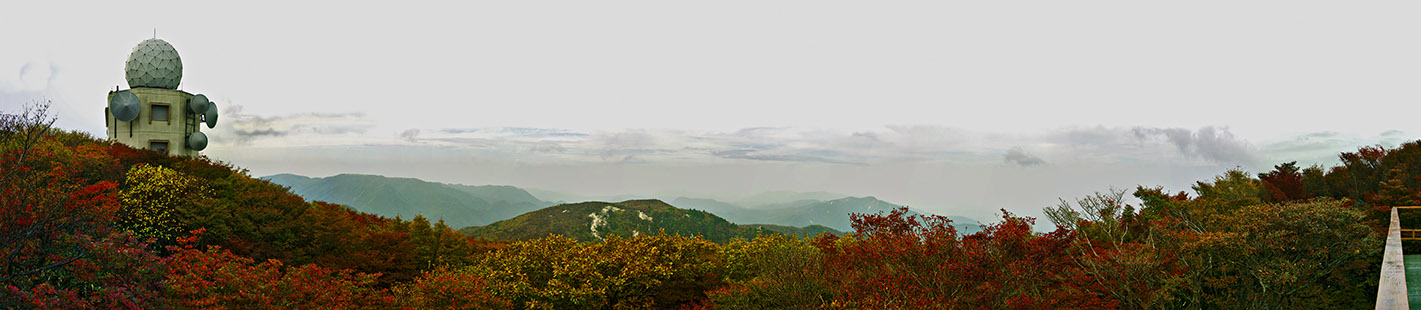

 If it's really points and not a memory thing then for sure...