Register · Software · Search · Image Upload · Buy & Sell · Reviews · Hosting

Moderated by: Tom Hicks
Username   Password

Visit the FM Store · Image Upload · Buy & Sell
FM Forum Rules
Macro World Resource
FM Forums | Macro World | Join Image Upload
1 2
3
end
Go to previous topic Go to next topic
Kyle Yu
Online
Image Upload: Off
p.3 #1 · Don't get caught


Tom Hicks wrote:
Kyle Yu wrote:
Tom,

Thanks for all your great info, I have a question. I tried hand holding my 18-105 lens reversed to test it out, but I cant see anything when i look through the viewfinder. Is this normal or am i doing something wrong? I tried it in bright sunlight. Thanks.

Kyle


If you are trying to use an EF lens. you will need to select an f stop then activate your DOF prewiev button. While the lens is stopped down remove it from the camera and it will stay at that f stop, you can then hold it or attach it to the camera body lens opening and take a shot . f8--- f16 works well but it will be dark , so make sure you are shooting in some good light.

Hope this helps.


Thanks Tom,

Actually, I have a Nikon D90 so its an AF-S lens. I tried removing the lens after pressing the DOF preview button but im not too sure that it works. I ended up manually moving the aperture level and aimed a flash light at my subject and it did work. it was interesting and I will need to look for an old 50mm lens and reversing ring so i play with it some more. Thanks a lot for time and effort to answer questions and share your knowledge.

Kyle

Sep 29, 2008 at 05:04 AM
Terry Munday
Offline
Image Upload: Off
p.3 #2 · Don't get caught


I have tried with my D40 with 55mm ais with PK13 and by itself but have no working distance to speak of,
Makes it really tough unless you have a willing subject!Terry

Oct 08, 2008 at 03:29 AM
rsn48
Offline
Image Upload: Off
p.3 #3 · Don't get caught


You don't need a many hundred dollar macro lens to do the job. You will often hear there is no such thing as a bad macro, and this is true. What I am recommending was recommended by Pop Photo when this lens first came out, now you will have to look for one used, if shooting with an ef canon camera - I own this lens.

The lens I am suggesting you try and obtain is the Vivitar/Phoenix/Cosina 100 f3.5 macro lens. I will add a link to a review of it. I promise that if you take photos with this lens, no one will know it is a "cheapy." You can probably purchase this lens used for around $70 or less.

The lens by itself is 1:2 ratio but when you add the propitiatory supplemental lens (comes with the lens), it becomes a 1:1 ratio. The build is cheap but tough, many have dropped it and it has survived.

If you are a starving student wanting to get into macro, this is the lens to buy.

http://www.photographyreview.com/cat/lenses/35mm-primes/vivitar/PRD_84631_3111crx.aspx

Here are some images with it:

http://www.photosig.com/go/photos/browse?id=18394


Oct 08, 2008 at 07:34 PM
e6filmuser
Offline
Image Upload: Off
p.3 #4 · Don't get caught


While I agree with the sentiments, not least the expense issue, this is really only for seeing whether you like macro, or for occasional macro work.

I have a tiny confession. (Some bigger ones may emerge in other contexts). I purchased reversing rings, and one or two other items for adapting existing equipment, but have not used them).

Having struggled with manual setting of diaphragms, even with that of my Canon (FD) 20mm bellow lens, I have obtained OM autodiaphragm models and other true macro lenses (Tamron 90mm f2.5, OM 50mm macro). As I deal mainly with active subjects such as insects (some close-ups, rather than true macro) this makes image capture (not least framing the subject) much easier and quicker. I have added dedicated macro flash equipment for freezing motion and giving greater depth of field.

What I am saying is, when you have the commitment, and can afford to, remove some of the frustrations and disappointments by using kit designed for the purpose. Having said that, I am now moving some of my activity into the next phase, of seeing what I can do with lenses designed for specialist purposes but not the ones I want to use them for. I have also somewhat stretched the possibilites of the macro lenses, for example hand-held shots with a 38mm bellows lens on extension rings.

Oct 11, 2008 at 12:23 PM
Bifurcator
Offline
Image Upload: Off
p.3 #5 · Don't get caught


Great thread Tom!

I've been totally digging close-up filters for many years now!

For people wanting to get into macro photography think about a $25 close up lens first. There are two basic types. Single element multi-coated ones often designated by an MC printed on the barrel and multi-lens high grade achromatic ones often designated with an AC printed on the barrel and usually containing aspherical elements. The price difference is usually negligible like $25 for the MC and $45 for the AC or something close to that.

Regardless of the focal length of your camera lens (if it's distance reading is set to infinity) focus is obtainable at a point equal to the distance from the tip of the camera's lens to the focal length of the close up attachment. Of course adjusting the focus in from infinity will bring it in closer as well! The various focal lengths available from close up attachments are all about the same price and designated usually by a "No. X" also printed on it's barrel. For example a "No. 1" close up lens is 1,000mm and a "No. 10" is 100mm. This would mean that with a No.1 the farthest you can (typically) focus out to is 1000mm or about 1 yard and with a No.10 100mm (10 cm) or about 1/3 of a foot. Here's a useful table of designate numbers and their typical focal lengths:

Number.........Focal Length............Magnification
No.1............... 1000mm............... 1/20 - 1/6.5
No.2................ 500mm................ 1/10 - 1/5
No.3................ 330mm................ 1/6.7 - 1/4
No.4................ 250mm................ 1/5 - 1/3
No.5................ 200mm................ 1/4 - 1/2.8
No.6................ 160mm................
No.7................ 140mm................
No.8................ 125mm................
No.9................ 115mm................
No.10.............. 100mm................ 1/2.3 - 1/1.7


The AC types are really recommended as there's no fringing or other aberrations that occur with them as opposed to the single lens MC types. At about No. 8 you start seeing some pin cushion (AKA Pillow shaped) distortion on the outer edges for both types. It's usually not too bad though depending on the camera's lens.

I often read people recommending to buy a set comprised of No.1, No.2, and No. 4 only - saying that by combining them you can get a No. 3 (by adding the No.1 atop the No.2), No. 5 (4+1), No. 6 (4+2), and a No.7 (1+2+4) but I dunno if I would recommend that as aberrations (fringe etc.) and distortions are compounded not to mention that these things are thick so with just 2 of them on the front of your lens you've got about a 1 inch black tube which will cause severe vignetting at the lower end of most zoom lenses. I would get a No. 4 (or 5) and a No. 10 (or 9) if I had limited funds and wanted to play with macro. And probably the No. 4 (or 5) is more generally useful than the 10.

Extension tubes are "OK" too but far less convenient IMO, usually more expensive, and now we're exposing our sensor to dust every time we attache or remove it.

Here's some examples of AC grade close-up filters:


This image is copyrighted by the owner
$20 (AC) achromat close-up filter (№ 3) at 200 mm, f/3.5


This image is copyrighted by the owner
$22 (AC) achromat close-up filter (№ 4) at 101 mm, f/5.6


This image is copyrighted by the owner
$22 (AC) achromat close-up filter (№ 4) at 200 mm, f/8.0
(this little guy is about 1cm in length)


This image is copyrighted by the owner
$22 (AC) achromat close-up filter (№ 4) at 200 mm, f/8.0


Ad also the macro in my thread here was created with an #8 achromatic close-up filter on a 200mm macro lens.
http://www.fredmiranda.com/forum/topic/700113


I have many many more examples of AC and non-AC (only MC) close up lenses and various lengths 20 ~ 400 so if anyone wants to see more examples just give a yell.


Oct 27, 2008 at 05:57 AM
Classicam
Offline
Image Upload: On
p.3 #6 · Don't get caught


Tom Hicks wrote:
Don't get caught in the macro photography hype.

Macro is an interesting and challenging style of photography, which is wonderful. We are fortunate that it can be accomplished with a multitude of different shooting styles and equipment. We have here at Fred's a very high number of very very fine Macro shooters all of which bring a lot to the table , Like the Knights at the round table. We are all approachable and are willing to help. I know that many of the newer photographers here that lurk in the shadows ( newbies to the art of macro ) look at the images here and probably scratch most of the hair from your head trying to figure out how this is done.

First I will say to the beginner that you don't need any fancy equipment to do this , if anything it is a poor man's style of photography. All you need is a camera body , a reversed lens and a pop up flash if you feel it is needed.

Don't get caught up in all this hype like megapixels , stacking this on that , 42 flash unites hanging off god knows what. Can it be done this way? Yes . Is it needed? No. Is it fun to play with and use ? Yes, that's what's so good about Macro so many way's to get the same results.

Some of the members here are fortunate enough to have incomes that will support all this craziness, but for all the new people IT IS NOT NEEDED.

Edited by Tom Hicks on Aug 09, 2008 at 11:19 AM GMT

I have a macro lens. It auto focuses quickly--speedy insects don't wait. It can be used as the only lens at a wildlife refuge--nothing has to be removed, reversed, or changed.


Oct 29, 2008 at 01:54 PM
Bifurcator
Offline
Image Upload: Off
p.3 #7 · Don't get caught


In professional ($) film and digital studio photography the use of reflection and refraction (translucent) panels are super common. Just about every kind of shot uses them. Often there are many set up just for one shot. They make a huge amount of difference and it's usually nothing you can achieve through software although if you had a week to do the edit in a package like LightWave3D, Maya, XSI, Houdini, or the another 3D package you could probably pull it off in some cases.

But I guess even though most of the people here are using cary-about cameras and don't have access to a studio and all the goodies found in one, we can still use those techniques. There's all kinds of stuff you can do with a flash or two just using the surfaces in whatever environment you're in.

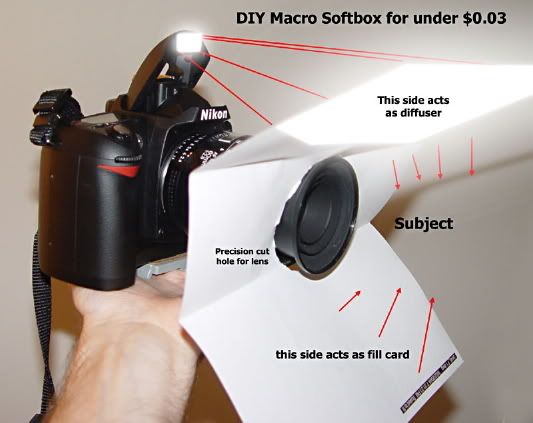
In this mini-tut I'd like to discuss and show you what I've been playing with recently. Most of you by now have probably already read about the paper trick. It's an old trick to be sure - probably the best explanation I've ever seen of it was this image:
This image is copyrighted by the owner


This paper helps and is in keeping with this thread (Macro on the cheap) but as we'll see, it's still not the best solution.

What we're actually attempting to do is to increase the size of the light source that illuminates our subject whether it's an insect, still life, or etc. and also at the same time increase the directions from which it's lit. Larger light source = more angular direction = softer lighting, shading, and shadows.

The problem we're exploring solutions for is of course the hard (sharply defined) shadows and harsh specular reflections typical of flash photography. Those things are OK actually but they're so common and so uniform across practically every rig that people are overdosed you might say, with images that contain those qualities. Here's an example of a flashed macro shot on my camera:

This image is copyrighted by the owner
Straight Flash - No diffusor. (Notice the hard shadows and harsh lighting.)


Let's jump right in and look at some comparative examples. What gave me my idea in the first place was using studio soft-boxes. There are small soft-boxes for macro but I don't own one so I cannot provide examples here to compare. There are some however on the LimiQuest product site here: http://www.lumiquest.com/lq925.htm And here's what that looks like:

This image is copyrighted by the owner
Image Courtesy Of LumiQuest.


We should notice 3 or 4 things right off the bat here.


  1. Its construction implements an extra thick center panel to attempt to combat the hotspot the flash will produce. Such a hotspot will defeat most of it's usefulness. Smart, but now we have to use allot more power to achieve the same quantity of light. Probably not too bad with a professional grade flash though.

  2. It's using extremely inexpensive materials with translucent properties. It looks like vinyl (naugahyde) to me.

  3. And we're still emitting light from the same basic direction - in front of the subject. If you can get real close this is probably not a problem and certainly Daan's (Doenoe's) examples here are a great testament to just how well it can work when fitted on a fairly strong dedicated flash unit.


The paper thing is a good idea but it doesn't incorporate any conventions for hot-spot elimination so allot of the affect is wasted and additionally your flash has to use several times the power. Paper isn't made of a substance wherein much if any subsurface scattering occurs so during flash transmission it's fluorescence will be low causing uneven lighting, that hop-spot, and etc. My biggest problems with the paper are that it's not usable in even the slightest wind and I don't look my coolest with a piece of paper stuck to the front of my camera. And for a man my age who still spends about $1,000 a month on fashion I've come to the conclusion that looks are fairly important to me. Here's an example using the paper method as a diffuser:

This image is copyrighted by the owner
Flash with Paper Rig Diffuser (Notice slightly better shadows, but unevenly lit.)


So I took a trip to the One-Dollar-Shop (hyaku yen shop - in Japanese ) to see what materials I could sabotage from existing products. I found two plastic trays that seemed like they would fit the bill so I plopped down my Y200 (plus tax) and off I went.

Once home I got out my implements of destruction - a soldering iron and a box-knife in this case, and began hijacking the goods. I used the soldering iron to poke a hole and very slowly melt a cut all the way around like you see below. I used the razor knife to cut off the rough lumpy edges that remained.

For the white plastic one I additionally soaked it in scalding hot water for 30 seconds and bent up one end of it to "catch" more light - as I'm intending to lay these down over the subject as flat as possible in order to extend the farthest angle of light transmission - thereby getting the softest falloff and softest shadows possible with this new lighting "tool". Toward the end of the article I'll show how it's being held.

This image is copyrighted by the owner
Notice the clarity or translucent properties of the materials here as they lay on the towels.

This image is copyrighted by the owner
Here's the clearest one looking at the amount of translucent diffusion over a distance of 0 ~ 40cm.


This image is copyrighted by the owner
Here's the whitish one looking at the amount of translucent diffusion over a distance of 0 ~ 40cm.


So with them all cut and ready to use, let's try them out! Here's the clear-ish one first. I was thinking that the rough "frosted" surface texture of this plastic would help to diffuse the light more while requiring less energy and battery draw. I held it extended out over the subject about 10 degrees up from parallel off the lens barrel or "film axis" if you're into the proper terms.

This image is copyrighted by the owner
Flash With Frosted Clear Plastic Diffuser Panel. (Improved shadow softness, slightly hot center)


Well, the results are pretty good. The shadows seem much better than the paper and I look a little less dorky using it. It's not as good as I expected but a step in the right direction I guess. I noticed while using it that it didn't "light up" during flash ignition and become evenly fluorescent-like. It maintained a slight hot-spot. I guess that shows in the exposure. Well, let's try the white plastic one:

This image is copyrighted by the owner
Flash With White Translucent Plastic Diffuser Panel. (Even better shadow softness, better center lighting)


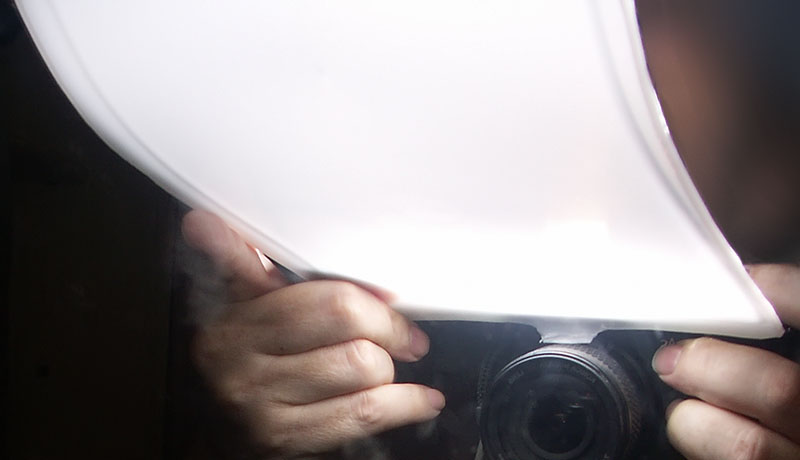
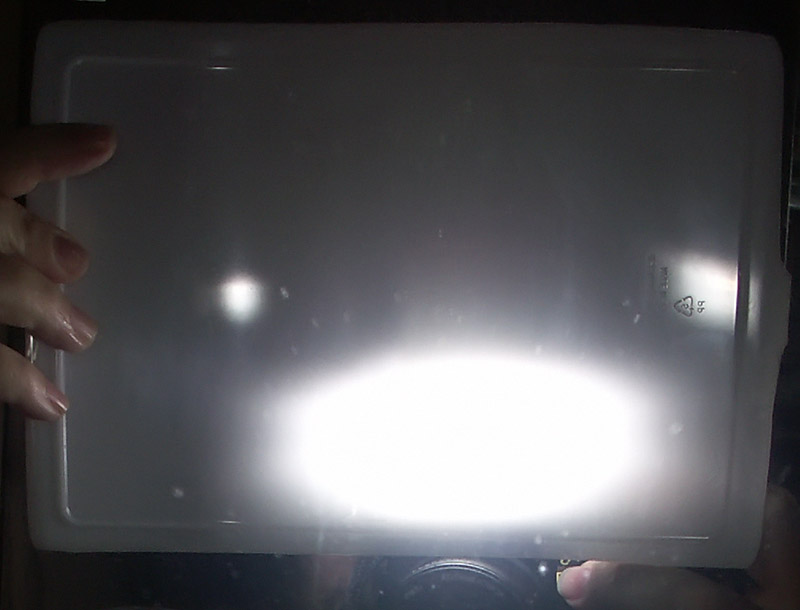
This is more like it! This is what I was expecting pretty much. The angle you hold it at is fairly critical to whether or not it produces soft shadows or acts more like a typical "real" diffuser cap which only softens them slightly. Here's the image I spoke of that shows the position it's held in for the softest shadows. Also notice here how the whole thing "lights up" creating a fairly affective diffuse light source (when held at the lower angle). :thumbup:
This image is copyrighted by the owner
White Plastic Diffuser ~15° off Film Axis - Fluorescent-like Transmission Properties

This image is copyrighted by the owner
White Plastic Diffuser ~90° off Film Axis - Diffuser-cap-like Front Hot Lighting.


In the top image it's actually difficult to tell just how low of an angle it's at. It's 25 cm in length and the angle of the camera & mirror make it look a little steeper than it is - but you get the idea. The curved end is (supposed to be ) for subjects at a distance greater than 30 cm or so. I've not tested that yet. I may in the future I dunno.

I feel I got pretty good value for my $2.00 and 2 hrs spent all total. Placed in the pouch pocket of most camera back-packs it should add an additional layer of protection for the camera equipment inside the main bag too. Anyway, let's take a closer look at a few areas in those shots and compare them side by side to see the differences better.

The Gumby Macro in the following order:
Flash Alone, Flash W/Paper, Flash W/Frosted Plastic Diffuser, Flash W/White Plastic Diffuser


If you maximize your browser window you should be able to see them side by side in a row.

Let's take a look at an area a little farther away from the lens and much more off center. In the same order again; bare, paper, frosted, white:


So what's it like in the real world?

Check it out: http://www.fredmiranda.com/forum/topic/705144/

Have fun and like Tom says "don't get caught".

Nov 06, 2008 at 08:47 AM
Dalantech
Offline
Image Upload: Off
p.3 #8 · Don't get caught


Excellent post Bifurcator! I wish you had made a completely new thread with it so I could easily bookmark it...

Although I agree with what you have to say and the results it's tough to translate it into what I'm doing with a camera. I don't think this guy would sit still if I came at him with a big piece of white plastic on my camera:


This image is copyrighted by the owner


I used gaffers tape on the outside of my Sto-Fen diffuser set (for the MT-24EX) first to keep light from leaking out the side, but also to decrease the white area that I was presenting to the critters:


This image is copyrighted by the owner


Underneath that Sto-Fen diffuser, hot glued directly to the flash heads, are a piece of light weight Bogen diffusion plastic and a 1/8 CTO to make the light a little warmer -and that brings me to a question...

Isn't the material that you use as a diffuser important also from the standpoint of how it is changing the color temperature of the flash?

Nov 06, 2008 at 01:39 PM
Bifurcator
Offline
Image Upload: Off
p.3 #9 · Don't get caught


Dalantech wrote:
Excellent post Bifurcator! I wish you had made a completely new thread with it so I could easily bookmark it...


http://www.fredmiranda.com/forum/topic/675134/2#6352600


Nov 07, 2008 at 12:36 AM
Bifurcator
Offline
Image Upload: Off
p.3 #10 · Don't get caught


Dalantech wrote:

Although I agree with what you have to say and the results it's tough to translate it into what I'm doing with a camera. I don't think this guy would sit still if I came at him with a big piece of white plastic on my camera:


True. Because of the size and desired orientation of my little rig here it won't be optimal in every situation. Still I think it applicable in most.


This image is copyrighted by the owner


This image is copyrighted by the owner


This image is copyrighted by the owner


I mean, we're sticking our lenses in their faces already as it is. It doesn't seem to affect most of the insects I've tried it on. In fact - in the case of some crawlers they stop and pose for me - probably trying to figure out what the heck I am / it is.


I used gaffers tape on the outside of my Sto-Fen diffuser set (for the MT-24EX) first to keep light from leaking out the side, but also to decrease the white area that I was presenting to the critters:

Yup. Your proximity is critical here. There's an inherent ratio between the size of the light source (whatever it is) and its distance from the subject. This ratio is the major determining factor in shadow density; specifically "falloff". Given the same sized light source; a typical flash head with a fitted diffuser cap for example, at 12 inches from the subject it will create much smoother shadow falloff (in ratio) than the same rig at 200 inches away. Here's a lame graphic I just whipped up that show this:


This image is copyrighted by the owner


Here only the flash to subject distance has changed.
The subject size and Subject <--> BG distance remain the same (supposedly ).


Underneath that Sto-Fen diffuser, hot glued directly to the flash heads, are a piece of light weight Bogen diffusion plastic and a 1/8 CTO to make the light a little warmer -and that brings me to a question...

Isn't the material that you use as a diffuser important also from the standpoint of how it is changing the color temperature of the flash?


Mmmm, I think it's negligible in the digital world where color temperature correction is at slider's reach. Everything matters of course and if we take the example to extremes with maybe a shocking pink material then the affects of additive color filtering become very clear. Still if it looks white or very close to whit in noon-time daylight then it's totally safe IMO.

A part of the theme of this thread that I really agree with summarizes just that. You can pay big money for laboratory grade color pure filters and diffusers but for digital photography where critical analysis and scientific discovery is not the intent it just doesn't matter (enough).

Nov 07, 2008 at 01:08 AM
Dalantech
Offline
Image Upload: Off
p.3 #11 · Don't get caught


Bifurcator wrote:
Dalantech wrote:
Excellent post Bifurcator! I wish you had made a completely new thread with it so I could easily bookmark it...


http://www.fredmiranda.com/forum/topic/675134/2#6352600


Sorry -I said that wrong. I know I can bookmark this page, but your post is an interesting one since it centers on lighting, and not all of the general topics covered in this thread. Would be cool to get into a single thread just about light...

Nov 07, 2008 at 06:06 AM
Dalantech
Offline
Image Upload: Off
p.3 #12 · Don't get caught


Bifurcator wrote:
I mean, we're sticking our lenses in their faces already as it is. It doesn't seem to affect most of the insects I've tried it on. In fact - in the case of some crawlers they stop and pose for me - probably trying to figure out what the heck I am / it is.


We're shooting different subjects -a lot of the critters I go after, and at the time of day that I shoot them (very active), won't put up with a large white surface coming at them -I've tried. I noticed a difference in my ability to get close to the subjects I shoot after taping the sides of my Sto-Fen diffusers.

Another reason for not using a large diffusion surface: Shadow control. No offence; I like your insect shots. But the shadows are almost too soft, or maybe just not dirrectional enough for me. By using two small light sources, as opposed to one large light source, I can gain control of where the shadows are to give a 2D image a 3D look...


This image is copyrighted by the owner


...and I can even hide areas of a subject that are out of focus by putting those areas in heavy shadow...


This image is copyrighted by the owner


...so light becomes another compositional tool.

Dalantech wrote: Isn't the material that you use as a diffuser important also from the standpoint of how it is changing the color temperature of the flash?

Bifurcator wrote:
Mmmm, I think it's negligible in the digital world where color temperature correction is at slider's reach.


This is where I have to disagree since the computer will never be smart enough to replace or guess at data that you don't capture with the camera. Although the effects can sometimes be subtle there's no substitute for getting the light right before you press the shutter release.

Bifurcator wrote:
...You can pay big money for laboratory grade color pure filters and diffusers but for digital photography where critical analysis and scientific discovery is not the intent it just doesn't matter (enough).


For me it's not about critical analysis or scientific discovery -it's about producing images that are aesthetically pleasing. Anyone can take a macro photo of an insect, but how many of those photos look so good in their composition and lighting that you'd want to print them large and stick them on the wall?...

If I could find a piece of Tupperware that gives me the light quality that I want then I'd use it in a heart beat...

BTW: Thanks for taking the time to post about light -I think it's one of the most important aspects about photography and all too often overlooked in macro...

Nov 07, 2008 at 06:26 AM
Bifurcator
Offline
Image Upload: Off
p.3 #13 · Don't get caught


Sure, I think we agree on all points, shadow control, lighting as a composition tool, even size as an obstacle. So our only real point of contention is over how much difference is produced from impure materials and those marketed as being specifically for photography. Although one might contend in accordance with the pentagon's own research and successful experiments with marine troops killing sheep with only "mind power" (documented and released into the public record) and by the sheer number of "psychic warriors" they employ to remote sense (also documented), that the disturbance of an insect by the size color and proximity of an object is at least affected by that objet handler's confidence, beliefs, will, and assumptions in disallowing it.

How much information is subdued by photographing an object illuminated by 5000K light filtering through a material which measures about a degree or less thermal radiation on a standard HSL/HSV color wheel and a chromaticity difference of probably less than a few nanometers Euclidean distance or Delta-E of less than about 2.0 or 3.0 in comparison with a product which is marketed as being "good" for such? I dunno but just given the fact that each image sensor model varies more than that from model to model or manufacturer to manufacturer , I'm going to claim "not much" and cross my fingers. If I'm wrong we better never take another picture on a cloudy day, under a canopy of any kind, or with any kind of common lights - even daylight would be out of the question in actuality. So just flash?

We're talking entirely about the visible light spectrum here so with only our cameras we should be able to compile very convincing test results just by setting it up logically and comparing the two results. If either produces a noticeable amount of data loss the results have spoken.

I think the major difference between your shots and mine (posted here) besides the number and size of light sources used, are due almost entirely to the differences in lenses. My lens while exceptionally good for a bridge camera, just doesn't compare to even slightly high grade lenses available for dSLR cameras. The second major difference I would assume to be the lens and bucket density differences between our respective image sensors. I'm using a tiny little 2/3" Interlaced RGBG CCD sensor with 8.3 megapixels crammed on. That's half the area of a common 4/3'rds sensor.


Nov 07, 2008 at 02:38 PM
Dalantech
Offline
Image Upload: Off
p.3 #14 · Don't get caught


Bifurcator wrote:
... that the disturbance of an insect by the size color and proximity of an object is at least affected by that objet handler's confidence, beliefs, will, and assumptions in disallowing it.


That's it -I'll use the Jedi critter trick! "This is not the photographer you're looking for". Brilliant!

Bifurcator wrote:
How much information is subdued by photographing an object illuminated by 5000K light filtering through a material which measures about a degree or less thermal radiation on a standard HSL/HSV color wheel ... lots of stuff here that made my head spin... on a cloudy day, under a canopy of any kind, or with any kind of common lights - even daylight would be out of the question in actuality. So just flash?


Well this kinda gets back to your earlier statement about changing the white balance in post -something I'd like to avoid. It just makes more sense to me to get it right with the camera. I've got nothing against using off the shelf stuff for a diffuser -I've used plenty of assorted household plastics. But a milk jug isn't designed to diffuse light, and from what I've seen a lot of common plastics do more to block the light coming from the flash than to diffuse it. Not a big deal if you only shoot up to life size, of have a very powerful accessory flash. But when shooting with the tiny flash heads on the MT-24EX at 2x and higher magnification I just don't have light to waste...

Bifurcator wrote:
We're talking entirely about the visible light spectrum here so with only our cameras we should be able to compile very convincing test results just by setting it up logically and comparing the two results. If either produces a noticeable amount of data loss the results have spoken.


I think the differences would, in some cases, be subtle and just looking at a histogram wouldn't be enough. You'd have to take identical shots with the camera on a tripod, print then both out, and compare them side by side.Your not going to see differences in glare an diffusion by looking at a histogram. Even resizing images for a web site can cause problems -in the recent MT-24EX Diffusion Test that I did it would be difficult to see the difference between the images if I had turned the highlight warning indicator off...

Bifurcator wrote:
The second major difference I would assume to be the lens and bucket density differences between our respective image sensors. I'm using a tiny little 2/3" Interlaced RGBG CCD sensor with 8.3 megapixels crammed on. That's half the area of a common 4/3'rds sensor.


Honestly if you are shooting in good light, and I'm not (or I don't know the difference between good light and bad light), then your images would look better than mine -the quality of the light in a scene is critical to getting good photos. As for what can be done with a bridge camera look no further than my mentor Professor Mark Plonsky. His macro photography with a Canon G3 has inspired a number of macro shooters. Although he uses a DSLR and the MPE-65mm macro lens now...

Nov 07, 2008 at 04:52 PM
Bifurcator
Offline
Image Upload: Off
p.3 #15 · Don't get caught


Well, you're right that "color balancing" in ACR and others, does cause information loss. It is a linear operation. If it wasn't then the entire hue wheel would rotate. Anyone can test this by sliding the "Temperature" slider all the way over to one end - tint too and sliding it all the way in combination should blow away a LARGE portion of pixels in most images. A true "Hue" adjustment on the other hand is 100% lossless and you can change it as often as you want as much as you want and always be able to rotate it back into place for 100% recovery. My argument is based on the assumption that there's likely less than a few degrees Kelvin (less than 150 for sure!) difference between an "official" piece of plastic and one my eyes tell me is "white". This is not even considering all the chromatic pollution introduced by bounced light and alternate light sources adding into the mix.

Light source color temperature, size, and intensity or "good light" as you call it is also is very important. We can do the "extreme example" thing in order to test this too. Shooting under a 100% red light will kill 100% of your greens and blues resulting in a comparative information loss. Likewise a light source that produces 50% more red will kill a large percentage of greens and blues. etc. etc. And of course we're all aware of how our sensors or film emulsion behaves under low intensity light - or sources that produce intense specular reflections and/or dispersion with some materials.

All of these properties and mechanisms additively factor into the conditions which can indeed affect the quality of a photograph (IQ). How much depends of course on their relative amounts combined with the limits of human perception and the limits of the lenses and sensors being used. If we single out only color temperature difference of the plastics used between you and I my guesstimate is that the differences are not perceivable. Certainly using two light sources would make a VERY big difference as would the lens and sensor being used. For example my lens is just not capable of these kinds of magnification powers without additional attachments:

    Fly Eye
    Bug Head
    Ant on Leaf
    Dragonfly Torso
    Albino Fly


Nov 08, 2008 at 01:02 AM
Roy Morales
Offline
Image Upload: Off
p.3 #16 · Don't get caught


For canon EOS - - EOS reverse lens mount adapter . I just bought a 52 and a 58 off ebay . Mine were 10 dollars each out of texas .
You can do a search on ebay starting with EOS reverse lens and add / change wording to find what you are looking for .

Nov 23, 2008 at 10:51 PM
silvawispa
Offline
Image Upload: Off
p.3 #17 · Don't get caught


Tom Hicks wrote

Get an old minolta, pentax, nikon, takamar, manual focus lens , set f stop , and simply hold it up to the camera body and take a few shots of a static object and see what you get it's that easy . you can use your 60 macro , set f stop , Mash DOF preview button,while removing the lens from the camera and it will stay fixed at that f stop , rev and hold to body face , put camera in AV mode meter and take the shot.
.


Thanks for this Tom. Utter genius! Works a treat with my 50mm 1.8 mk1. Having fun. Results later.

Paul

Dec 03, 2008 at 08:23 PM
Roy Morales
Offline
Image Upload: Off
p.3 #18 · Don't get caught


Yes on ebay . About 10 with s/h
. EOS 58 ADAPTER
EOS 52 ADAPTER
EOS 55 ADAPTER---- EVERYONE WAS OUT LAST WEED
EOS screw adapter .
lens reversing adapter
There are a bunch of names they are listed under .

Dec 03, 2008 at 09:07 PM
ContagiousIdea
Offline
Image Upload: Off
p.3 #19 · Don't get caught


Bifurcators website is down I can't see the examples! Sigh

Dec 05, 2008 at 01:14 AM
Vernon Sampson
Offline
Image Upload: Off
p.3 #20 · Don't get caught


Thanks a lot Tom. I wish to do more macro shooting this year, and I will remember your advise. It's photographers like you who are generous in spirit
and realize there are many photo opportunities out here. Sharing knowledge
improves us all as people first and photographers second.

Jan 06, 2009 at 03:40 AM
Aberdeen Photo
Online
Image Upload: On
p.3 #21 · Don't get caught


Tom-

Really great thread. Don't stop by often enough. Usually hang out in wedding forum. Lots of great tips and inexpensive ways to do macro and make it fun.
My fave is a set of Kenko tubes. I purchased a set in B&S in great shape for $115 and I have seen them go for less. A bit more than your $45 Nikkor zoom, but worth it and attach your fav sharp lens and go! Toobz are your friend for macro-

Btw, I tried the Canon and they are nice too, but not worth the extra, IMO, build is good on the Kenkos and the air inside the Kenko is of equal quality to the Canon.
;-)

Tom

Jan 08, 2009 at 07:28 PM
angiek
Offline
Image Upload: Off
p.3 #22 · Don't get caught


As a Noob, this information is very encouraging and very much appreciated.

BTW - Incredible work!

Jan 09, 2009 at 02:19 AM

FM Forums | Macro World | Join Image Upload
1 2
3
end
  Go to previous topic Go to next topic

You are not logged in. Login or Register

  Username   Password  
Lost password?