Register · Search · Software · Join Upload & Sell · Hosting

Moderated by: Fred Miranda
Username   Password

FM Forum Rules
Nikon SLRs, primes, and zooms lenses reviews
FM Forums | Nikon-mount SLRs | Join Upload & Sell   
Search Used
1
2
3 end
  

Archive 2008 · D300 Custom curve
  
 
R. Francois
Offline
Dedicated FM
Upload & Sell: Off
p.2 #1 · D300 Custom curve


sithbk wrote:
Hmm. I tried to load/save it but the camera tells me that "no picture control file found on memory card". I've followed John's process and no luck. Is it a mac thing because the file name that I down loaded is "piccon02.ncp"


I've noticed you had some trouble loading the picture control. You might want to try to load the picture control in capture NX. Open the picture control utility and load my custom control there. Then export it to your own CF-card. You need the "manage picture control" menu item to import in your camera. It's the one below the set picture control item...

Hope you figure this out..

raymond

Mar 23, 2008 at 12:03 PM
Roland Jenkins
Offline
Upload & Sell: Off
p.2 #2 · D300 Custom curve


How do you "open the picture control utility" in NX ...

It doesn't seem apparent?

Edited on Mar 23, 2008 at 06:48 PM


Mar 23, 2008 at 06:44 PM
sithbk
Offline
Upload & Sell: Off
p.2 #3 · D300 Custom curve


Thanks Raymond, I'll install the nx and try what you suggested.

Mar 23, 2008 at 06:50 PM
Steen DK
Offline
Upload & Sell: On
p.2 #4 · D300 Custom curve


Roland Jenkins wrote:
How do you "open the picture control utility" in NX ...

It doesn't seem apparent?


You are right Roland, we need some illustrations of this interesting NX stuff.
Personally I only understand the beginning of it, if that at all

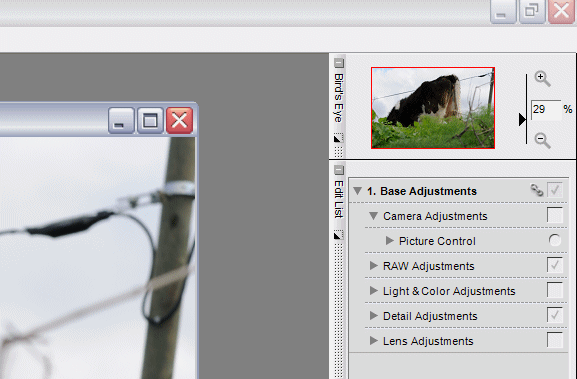
This is - at least I think this is - where it all begins.

With an open picture you find Base Adjustments >> Camera Adjustments >> and Picture Control in the right side of the NX application window. Can anybody else continue the illustrations from here ...


Edited by Steen Bondo on Mar 23, 2008 at 08:50 PM GMT


Edited on Mar 23, 2008 at 07:50 PM


Mar 23, 2008 at 07:36 PM
Steen DK
Offline
Upload & Sell: On
p.2 #5 · D300 Custom curve


.


Mar 23, 2008 at 07:37 PM
Roland Jenkins
Offline
Upload & Sell: Off
p.2 #6 · D300 Custom curve


With you so far Steen....

http://i114.photobucket.com/albums/n253/VmaxDave/1.png

...How do we now "Load" Raymond's Pic Ctrl setting or "Save" our own?

Edited by Roland Jenkins on Mar 23, 2008 at 08:29 PM GMT

Edited by Roland Jenkins on Mar 23, 2008 at 08:30 PM GMT

Edited on Mar 23, 2008 at 08:30 PM


Mar 23, 2008 at 08:27 PM
Chris Noyes
Offline
Upload & Sell: On
p.2 #7 · D300 Custom curve


In the screen shot above, notice the small, inverted black triangle just to the left of the "Reset" button, click on that and you will find three selections . . . one of which is the "Picture Control Utility".

Mar 23, 2008 at 08:28 PM
Roland Jenkins
Offline
Upload & Sell: Off
p.2 #8 · D300 Custom curve


Thanks Chris .... Got it!

Mar 23, 2008 at 08:35 PM
Roland Jenkins
Offline
Upload & Sell: Off
p.2 #9 · D300 Custom curve


Sorry guys ... I just can't get it to work!!

I've successfully "imported" Raymonds Files into NX, using Picture Control Utility... from a formated CF Card.

I then tried...
a) exporting the same files to the same card .... overwriting the original
b) exporting the same files to a seperate CF card....
c) saved them in NX under a different name, before exporting to a different CF card...

... but I cannot load them to the Camera! The camera can definitely read the files because it allows me to "delete" them from the card. But if I choose "Load/Save > "Copy to Camera" it just comes up with: "No Picture Control File found on memory card"


Am I missing something here?


Edited on Mar 23, 2008 at 09:59 PM


Mar 23, 2008 at 09:58 PM
Chris Noyes
Offline
Upload & Sell: On
p.2 #10 · D300 Custom curve


In camera, did you first go to the "SET UP > USB" and Select "Mass Storage"? If not, do that before going through the steps you described above from the SHOOTING menu.

There must be a folder named "NIKON" at the root level of the CF card. The picture control file must be inside the "NIKON" folder.

Mar 23, 2008 at 10:11 PM
Tom Conte
Offline
Dedicated FM
Upload & Sell: On
p.2 #11 · D300 Custom curve


This is really helpful, thank you, R. Francois!

Sadly however I have now Adblocked your avatar. Dang annoying!

Mar 23, 2008 at 10:15 PM
Roland Jenkins
Offline
Upload & Sell: Off
p.2 #12 · D300 Custom curve


Chris Noyes wrote:
In camera, did you first go to the "SET UP > USB" and Select "Mass Storage"? If not, do that before going through the steps you described above from the SHOOTING menu.

There must be a folder named "NIKON" at the root level of the CF card. The picture control file must be inside the "NIKON" folder.


Done that.... still no luck!

...as I say... the camera's definitely reading the files because they're listed when I choose "Delete from card"

-----------------------------------------------------------------------------------
Edit:

Right... back to basics ... I've downloaded the DX2mode l / ll / lll Files from the Nikon Site... They have successfully now copied to the camera.

Upon reflection, & reading the past posts again... It must have been the NCP file extension that the Camera wasn't reading

Anyhow .... I guess all I need to do now is copy Raymond's tweaking instructions @ the beginning of the thread to adjust the picture controls
________________________________________________

Apologies for cluttering the thread with my problems


Edited on Mar 23, 2008 at 11:05 PM


Mar 23, 2008 at 10:37 PM
Quack
Offline
Upload & Sell: Off
p.2 #13 · D300 Custom curve


Roland,

I had the same problems as you.
you will have to create a CUSTOMPC folder in the NIKON folder.
place the NCP files in the CUSTOMPC folder.

this should work.

Mar 24, 2008 at 02:41 AM


NightOwl Cat
Offline
Dedicated FM
Upload & Sell: Off
p.2 #14 · D300 Custom curve


Thanks Raymond for sharing, it looks like at least I'll be able to use it with Capture NX, if not with any of my cameras

Mar 24, 2008 at 10:12 AM
hkgharry
Offline
Upload & Sell: Off
p.2 #15 · D300 Custom curve


NightOwl Cat wrote:
Thanks Raymond for sharing, it looks like at least I'll be able to use it with Capture NX, if not with any of my cameras


Hello NightOwl Cat,

Just wanted to say thanks for mentioning using the modes with other cameras. Just now I put Raymond's two modes onto my D200 then imported into Capture NX to use with my non D3/D300 files. I like the look.

Hello Raymond,

In the picture control utility I can see the changes you made to the default D2X picture controls, but I'm not able to see how the D2Xmode 1, 2 and 3 settings differ from each other. Is there a way to see the setting differences? I'd just like to see what kind of tuning Nikon (or Nik) does between the modes.

Mar 24, 2008 at 01:51 PM
DragonflyDM
Offline
Dedicated FM
Upload & Sell: On
p.2 #16 · D300 Custom curve


I have not figured out custom curves in the D300 yet. I am a little worried about putting some of my old D200 profiles in it though..

Mar 25, 2008 at 01:01 AM
hkgharry
Offline
Upload & Sell: Off
p.2 #17 · D300 Custom curve


Ken has posted an article including a link to a picture control file: http://www.kenrockwell.com/nikon/d300/picture-control.htm. Pretty wild colors.

Edited on Mar 26, 2008 at 01:19 AM


Mar 26, 2008 at 01:18 AM
Mr Pixcel
Offline
Upload & Sell: On
p.2 #18 · D300 Custom curve


Thanks Raymond...

Mar 26, 2008 at 06:01 PM
Chefdaniel
Offline
Upload & Sell: Off
p.2 #19 · D300 Custom curve


This is interesting. Can anyone share some images to this post.

Mar 26, 2008 at 09:39 PM
R. Francois
Offline
Dedicated FM
Upload & Sell: Off
p.2 #20 · D300 Custom curve


Chefdaniel wrote:
This is interesting. Can anyone share some images to this post.


Practice what you preach... so i'll play. i'm using my custom picture controls...

Carlos seems to like it
135mm F3.5 1/1600 ISO200


This image is copyrighted by the owner


a quick macro shot
50mm reverse mounted F11 1/125 ISO200


This image is copyrighted by the owner


nice during easter
165mm F5 1/50 ISO1600


This image is copyrighted by the owner


In the zoo
125mm F4.8 1/50 ISO1250


This image is copyrighted by the owner


Vivid colors (i think)
31mm F4 1/50 ISO400


This image is copyrighted by the owner


Even Dino's look OK
18mm F3.5 1/10 ISO1600


This image is copyrighted by the owner


I like this
500mm F6.3 1/640 ISO200


This image is copyrighted by the owner


Or this
180mm F5.6 1/320 ISO800


This image is copyrighted by the owner


And one from yesterday while i was walking with Carlos
10mm F10 1/250 iso400 (that's a slight mistake, oh well)


This image is copyrighted by the owner


All shot with my D300 and converted with capture NX. I do use the controls on my D80 and D2x files too... I have to tray some portraits too soon.

Best,

Raymond


Edited on Mar 27, 2008 at 07:25 AM


Mar 27, 2008 at 07:00 AM
sithbk
Offline
Upload & Sell: Off
p.2 #21 · D300 Custom curve


Great images Raymond. Didn't have a chance to try to upload curves to NX for my d300 yet but I do hope that I can finally get it install.

Cheers,
sithbk


Mar 27, 2008 at 10:10 AM
R. Francois
Offline
Dedicated FM
Upload & Sell: Off
p.2 #22 · D300 Custom curve


hkgharry wrote:
NightOwl Cat wrote:
Thanks Raymond for sharing, it looks like at least I'll be able to use it with Capture NX, if not with any of my cameras


Hello NightOwl Cat,

Just wanted to say thanks for mentioning using the modes with other cameras. Just now I put Raymond's two modes onto my D200 then imported into Capture NX to use with my non D3/D300 files. I like the look.

Hello Raymond,

In the picture control utility I can see the changes you made to the default D2X picture controls, but I'm not able to see how the D2Xmode 1, 2 and 3 settings differ from each other. Is there a way to see the setting differences? I'd just like to see what kind of tuning Nikon (or Nik) does between the modes.


Just noticed your question hidden in those reactions. To be honest i have no idea, but i also would like to know how they do this. The picture controls from nikon are larger too. I guess they have an "advanced picture control tool" . Maybe it's still in development and maybe we get this tool, either separately or included in capture NX like the utility now.

Any insight on this?

Edited on Mar 28, 2008 at 06:22 AM


Mar 28, 2008 at 06:22 AM
hkgharry
Offline
Upload & Sell: Off
p.2 #23 · D300 Custom curve


Thanks Raymond.

FYI I found some more example curves called Agfa Optima, Fuji Astia and Fuji Velvia. See http://www.flickr.com/groups/nikon_d300_users/discuss/72157604263679013/#comment72157604276458077.

Edited on Mar 28, 2008 at 07:57 AM


Mar 28, 2008 at 07:52 AM
Mr Pixcel
Offline
Upload & Sell: On
p.2 #24 · D300 Custom curve


Here the link for nikon D2x Mode Picture Control option for D300. you can tweak it after you have it loaded to a Nikon file and expand the zip file and copy Nikon file to a CD and you will be able to see the D2X Modes.

http://support.nikontech.com/cgi-bin/nikonusa.cfg/php/enduser/std_adp.php?p_faqid=14459&p_created=1196449158&p_sid=-**klS_i&p_accessibility=0&p_redirect=&p_lva=&p_sp=cF9zcmNoPTEmcF9zb3J0X2J5PSZwX2dyaWRzb3J0PSZwX3Jvd19jbnQ9MjIyLDIyMiZwX3Byb2RzPTAmcF9jYXRzPTAmcF9wdj0mcF9jdj0mcF9zZWFyY2hfdHlwZT1hbnN3ZXJzLnNlYXJjaF9ubCZwX3BhZ2U9MSZwX3NlYXJjaF90ZXh0PWQyeA**&p_li=&p_topview=1

Mar 29, 2008 at 12:35 AM
chickpiper
Offline
Upload & Sell: On
p.2 #25 · D300 Custom curve


The 3 files (Astia, Velvia, Optima) can be found at:

http://www.neebu.net/~khuon/photography/NIKON/CUSTOMPC/

just click the files one at a time and save to your computer.

1.download these files to your computer
2.format your CF card in the camera
3.go to: SHOOTING MENU , Manage Picture Control, Load/Save, Copy to Card, OK
This step creates the correct folders for the other files. You are just copying a current picture control to the card.

4.Turn camera off, Take card out of camera and put into computer card reader
5.navigate to Nikon, CUSTOMPC
6.copy the the files in step 1 to the card (copy/paste - overwrite=yes)
7.Put the card back into the camera
8.SHOOTING MENU, Manage Picture Control, Load/Save, Copy to camera
9.OK to each file one at a time.
10. Happy Shooting


Mar 29, 2008 at 12:53 AM


FM Forums | Nikon-mount SLRs | Join Upload & Sell
1
2
3 end


You are not logged in. Login or Register

  Username   Password  
Lost your password?