I've been trying to improve my Post Processing (What a nightmare). So after some experimenting and trying to improve my skillset with CS3 here are a few shots for some serious critiquing.
You need not be bashful or worried I might find your comments to harsh > These photos are for critiquing for me to improve and nothing more. So please be brutally honest I can take it !!
I am learning myself but one trick to really bring attention to some pictures especially yellow eyed creatures such as image number one. I use the magnetic lasso tool and select just the eye and make it a new layer then in the hue/saturation adjustment bring out the yellow saturation a bit. ive had alot of luck with this. dont know if anyone else does this or if it is good practice but it makes the picture look a little sharper to me.
other then that great series, all look sharp to me and i really like the landscape shot.
Maybe some noise reduction should be run. Although, maybe you've done this and it is just what you've got to work with.
It's an easy critique, but in the landscape the lake water line doesn't appear totally level to me. Then, again.... I'm laying in bed on Sunday morning after St. Patty's.
Good pics though, I especially like the composition in 6.
look really good to me Anthony. Good tonal range, no hot spots, natural saturation.
#4 of hawk looks most problematic, very slight noise and softness.....maybe an underexposed original that you pulled up?
these are quite nice IMO.....oh, and level the landscape
Hey Anthony, I see a few things, mostly in sizing for web, I found this to be one of the most important steps when showing your photos, you want them to look good at a smaller size. Right? You need to add some sharpening when sizing down your images, sometimes more then you think. also when sizing it helps to do this in a two or three stop process. I have a CS3 action set up for Ron and I to do this all in one quick step (takes a few seconds and includes our info at the bottom/side of each photo).
Secondly, you should do some levels adjustments to the first few, you can easily take out the overcast (gray) look. pulling in the left and right arrows ever so little.
If you want me to run a photo of yours thru our action, send me a HR one and I would be happy to show you the results.
Except for the last 3, I think the rest could use a tad more sharpening. The vulture l;ooks fine, sharpening wise, except there are halos along its outline. These can be removed with the history brush after the sharpening step. And what the others said.
It is good practice to take the time to step back and review your post-postprocessing techique every so often.
Well hope you can get vertical today after a long night celebrating
All of these shots were fairly low ISO. 400 or less with the Mark III. I don't see the noise but maybe I'm missing it somewhere.
I never noticed the landscape not being level until you mentioned it. I've never attempted to straighten a landscape before............. OH GREAT now something else I have to figure out how to do Thanks for the critique Josh
I took about 50 or more shots of this hawk all on the same perch. The Mark III absolutely positively WOULD NOT get a Spot ON Focus. It would get close... but all 50 plus shots are just a bit on the soft side.............. I don't get it............. And it's just this Hawk (I believe a rough legged) I came across this species of bird 7 or 8 times on my trip and every shot I took of it was soft. Bald eagles / ducks / geese / etc no problem but for some reason this hawk created havok with my Mark III.
Oh and the exposure was dead on with no adjustments in ACR or PS with regards to brightness. I just think it's a bit soft > But please correct me if I'm wrong
thanks so much for replying Gene............ I don't see any Halos......... I think it's time for a new monitor because I trust yours a heck of a lot more than I trust mine. I've went back a dozen times and there's just not there on this monitor.
OK time to head to the other PC with the CRT and see if i can see it there.....
More sharpening? OK I'll give it a shot !
Anthony, if you want help leveling drop me a PM, two ways to do it, RAW and otherwise. I know because I am notorious for tilted shots if I'm not using a tripod!
You and I have been talking about masks and such lately, one thing I haven't mentioned that I'm starting to do for higher ISO shots is to filter the noise on the background layer and then paste the sharpening layer over it. I shot some widgeons in some very low light on Friday at iso 800 and needed to do that. Just thought I would pass that on.
I don't have any other advice for the above shots that wasn't already given.
I find that pp is a big adventure. Never know what will happen & it's easy to get things go wrong.
Personally I'd like to see # 1 & 4 a tad sharper. Now I wish to point out that I would like to see the birds a tad sharper so selective sharpening would have to be used. Use lasso in Photoshop. Be sure not to sharpen bg as that will cause issues & often ugly bg.
I love # 5 & 6 - - 5 needs to be super sharp with details & you've got that. Then # 6 needs to soft & gentle - - you have that. Beautiful with a lovely "dreamy" effect.
I once tried landscape since I started with my dslr's last year. I posted in one of the forums here & got clobbered. It's not that I don't have the "vision", I just happen to live in Los Angeles & unless I can use a parking lot, landscapes are not on the near horizon.
My only point on your shot is this.... Check your horizon line. It's slightly off.
A very nice series Anthony. I agree with Gene, a touch more sharpening would improve the first three. I really like the rough-legged, it seems tho that your camera tried to focus on the branches, that is almost always the case when I shoot hawks, my camera wants to focus on the most contrasty element. I try stopping down a bit more for the hawks for "insurance". The Phoebe shot is spot on, sharp, balanced and the light was just right.
Anthony,
An easy method for sharpening for the web I've found good results with is as follows.
1. Crop your photo to desired size (4x6, 8x10, 5x7, etc).
2. Make all your PP touchups, except for sharpening/USM.
3. Go to image resizing and select 1000 pixel for the height (I pick this because my usual web images will be 500 pixels high). Give your image two hits with the Sharpen button. It may look oversharpened at this point but don't worry.
4. Go to image resize again and select 500 pixels for height. Resize and evaluate your sharpness. If overdone, go back and undo one of the hits of the sharpen button, if not sharp enough, do a pass with USM (I usually use 45, <2, 0-1).
I use Photoshop Elements 3 and I'm sure there's other/better methods but this works for me.
I haven't mentioned that I'm starting to do for higher ISO shots is to filter the noise on the background layer and then paste the sharpening layer over it.
That sounds interesting Tim > For a couple of these photos I did do a quick selection of the critter > Then INVERSE selection > Noise reduction > Then Inverse again to reselect the critter > then sharpen a bit..................... A little differnt than what you doing but I think the results are pretty similar.
I find that pp is a big adventure. Never know what will happen & it's easy to get things go wrong.
Personally I'd like to see # 1 & 4 a tad sharper. Now I wish to point out that I would like to see the birds a tad sharper so selective sharpening would have to be used. Use lasso in Photoshop. Be sure not to sharpen bg as that will cause issues & often ugly bg.
I love # 5 & 6 - - 5 needs to be super sharp with details & you've got that. Then # 6 needs to soft & gentle - - you have that. Beautiful with a lovely "dreamy" effect.
I once tried landscape since I started with my dslr's last year. I posted in one of the forums here & got clobbered. It's not that I don't have the "vision", I just happen to live in Los Angeles & unless I can use a parking lot, landscapes are not on the near horizon.
My only point on your shot is this.... Check your horizon line. It's slightly off.
All of these images were sharpened using selective sharpening. I used the quick selection tool to select only the critter and then sharpened the critter only. I think I was a bit fearful of going overboard and may need to get a little more aggressive and then decrease the opacity on a layer to decrease the effect. Hmmm I may try that next.
Yes the Horizon is off I didn't even think to check that ........... Or maybe my monitor is slightly tilted at home


 I can take it !!
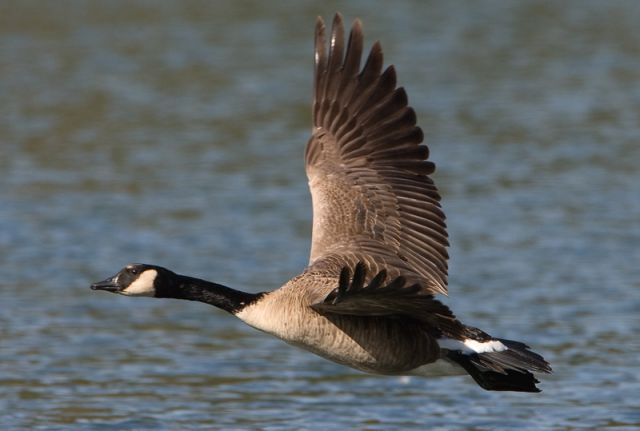

 Thanks for the critique Josh