Folks, I might just have come really close to solving LR's Xtrans 'issue'.
After a couple of hours of experimentation, I have two LR presets that come really, really close to the look of Iridient (arguably the best Fuji RAW decoder, but Mac-only).
For both of these presets:
Basic: Highlights -40
Tone curve: Medium contrast, but then -18 on the highlights
Lens Correction: Remove Chromatic Aberration (checked)
Camera Calibration: Adobe Standard
Noise Reduction: 0 Luminance and 0 Color
Preset 1:
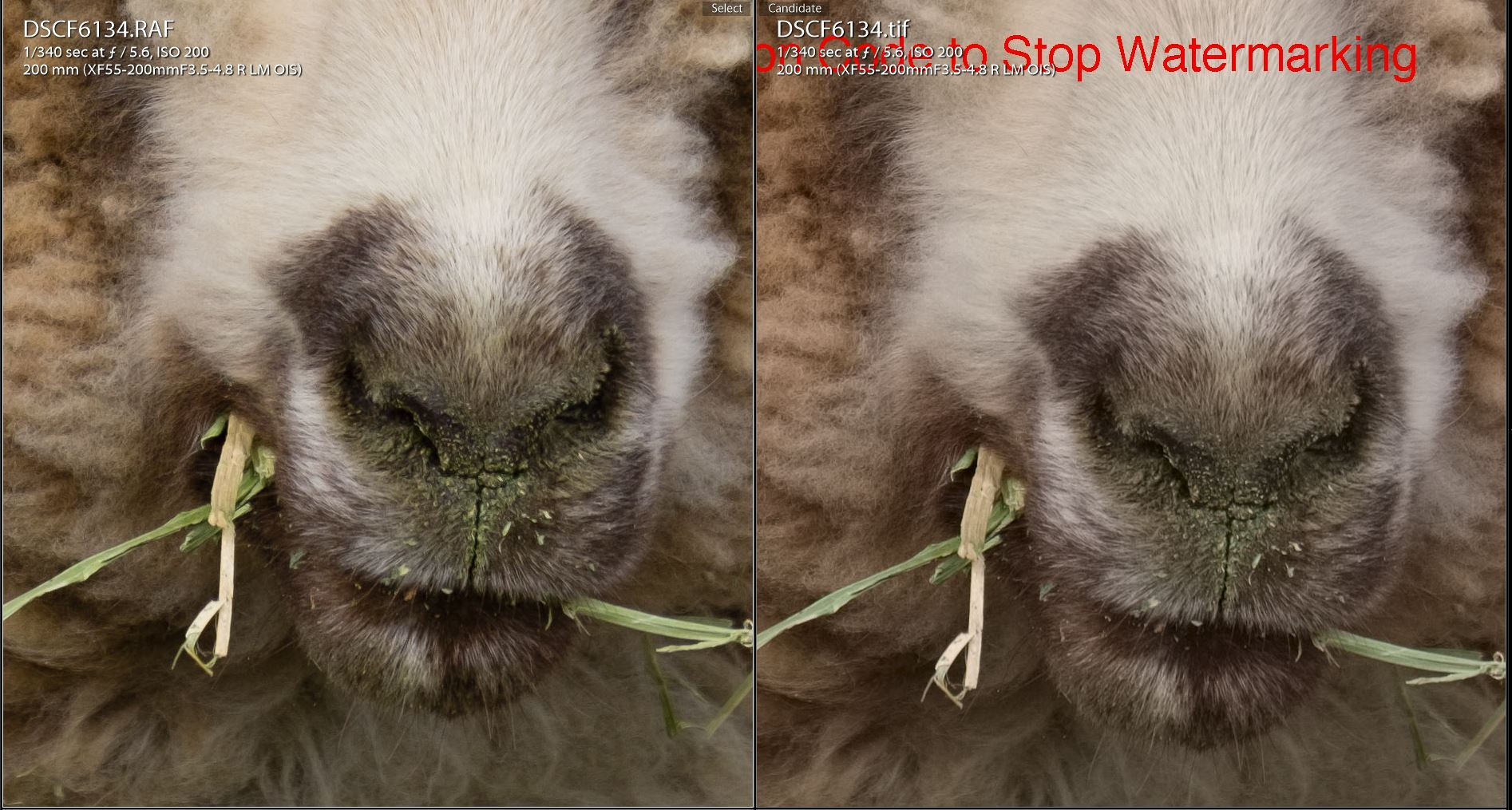
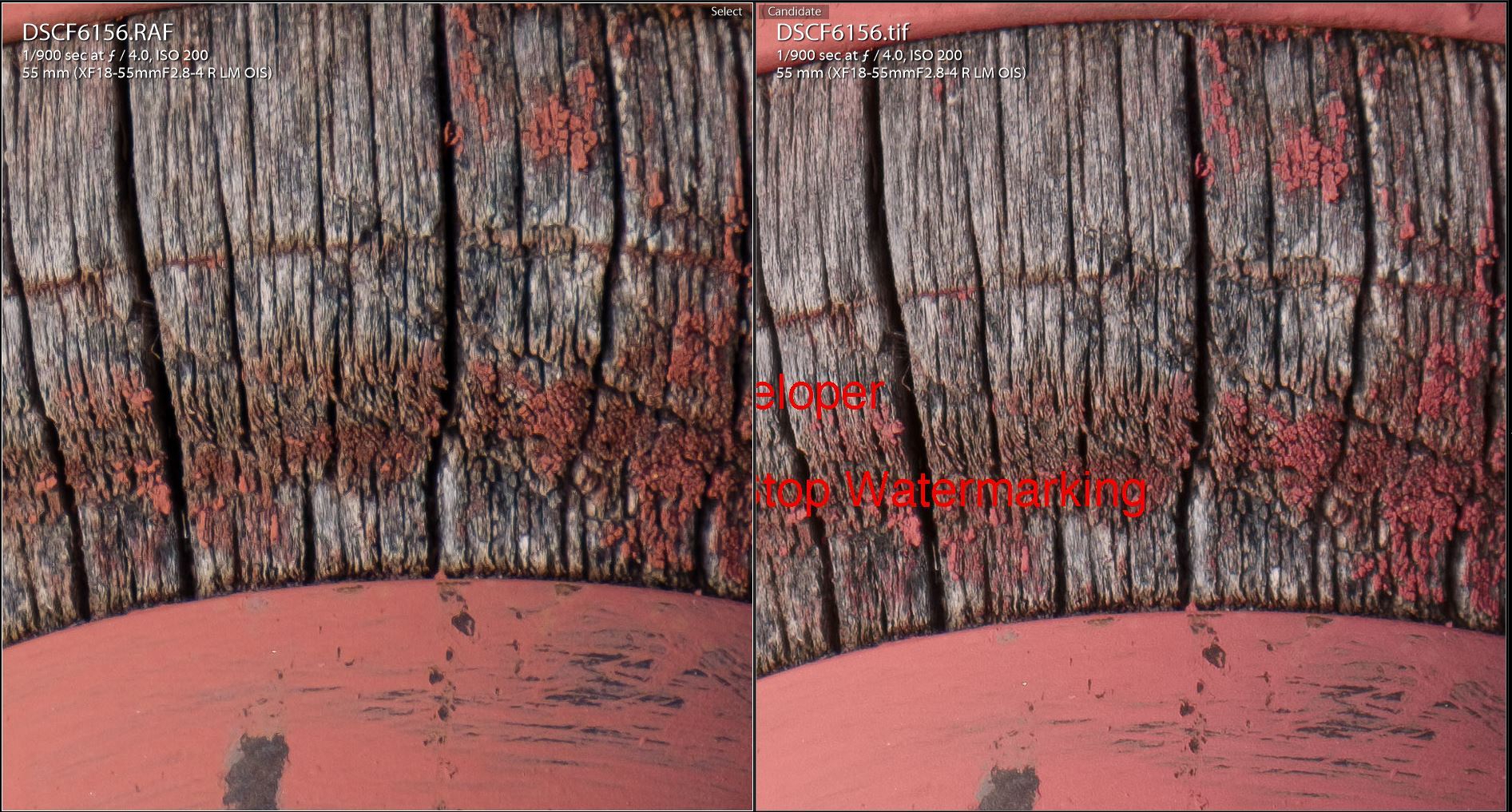
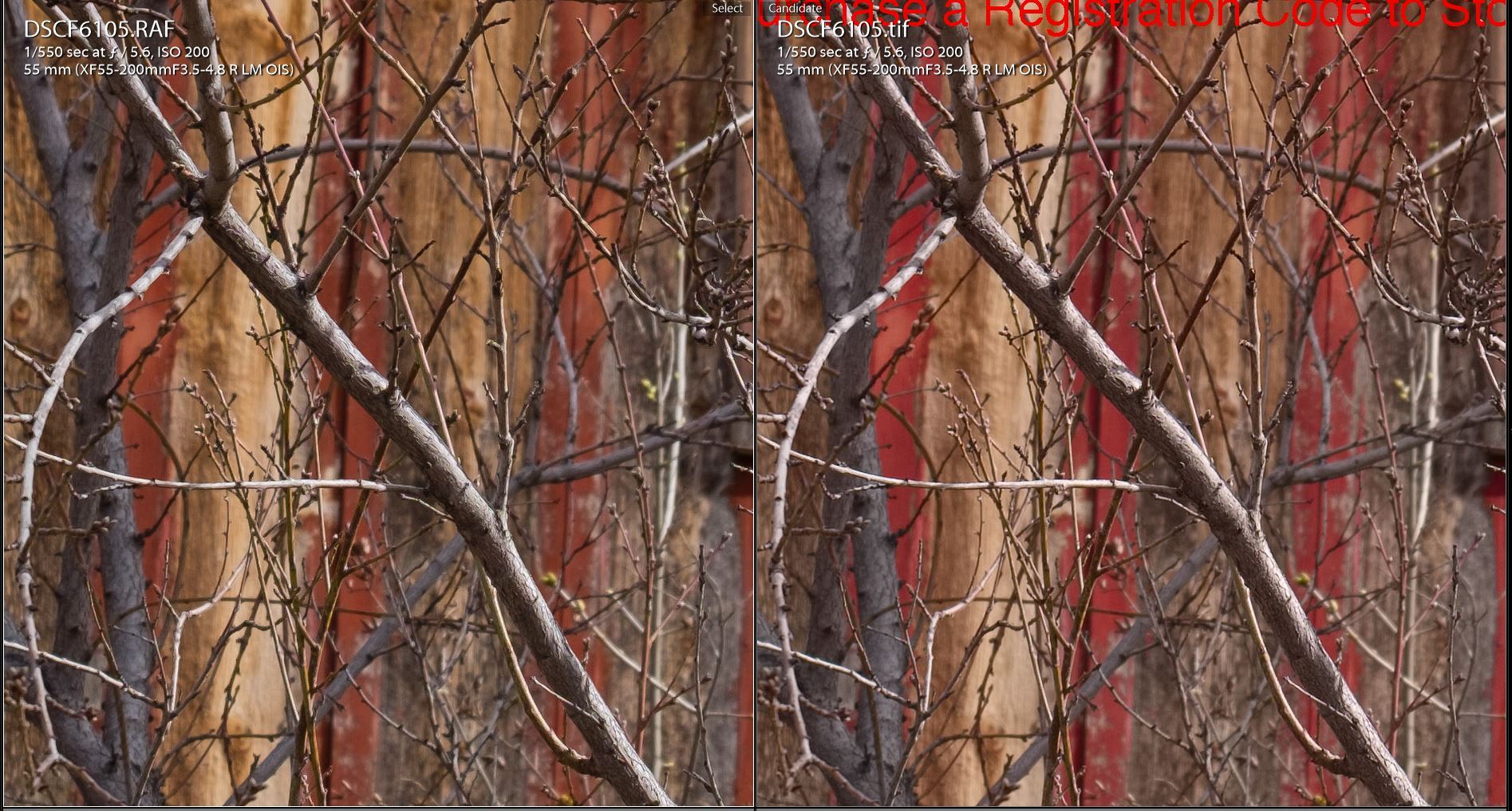
Sharpening Amount 70, Radius 0.5, Detail 20, Masking 0. Good for general high detail stuff. On foliage or other types of shots, it will induce very minor halos at 100% viewing.
If that's the case, swtich to Preset 2:
Sharpening 40, Radius 0.5, Detail 40, Masking 0. This is a very slight change from Preset 1 but helps with minor halos that may appear around very fine detail.
I've read this before but finally just saw it in action - Color noise reduction in LR kills Fuji RAW acuity. It has a serious effect on the image, unlike Bayer sensors. I've gone with 0 in these examples because they're low ISO -- I'll have to test more with higher ISOs.
Screenshots using either of these compared to Iridient TIFF exports:
Never used Iridient, but with Photoninja I allways suspected the good results were related to PN sharpening algorithm. This because in Photoshop I find the standard sharpening and some 3rd party sharpening tools don't work well with X-Trans files.
Actually I stopped using Photoninja, I liked the sharp results but found the colors less pleasing compared to LR. Now I just export the files from Lightroom without any sharpening and then I use Nik Dfine 2 wich, in my experience, is the best sharpening tool for X-Trans. The results are very similar to the ones I got with Photoninja but with better color.
Regarding your color noise reduction tip, I don't remember if I have it on, most likely it's at it's standard value (I belive 25) since it's good for any other camera I've tried. Have to experiment with this too, thanks.
Sr.Cordeiro wrote:
Thanks, I'll try this on the afternoon.
Never used Iridient, but with Photoninja I allways suspected the good results were related to PN sharpening algorithm. This because in Photoshop I find the standard sharpening and some 3rd party sharpening tools don't work well with X-Trans files.
Actually I stopped using Photoninja, I liked the sharp results but found the colors less pleasing compared to LR. Now I just export the files from Lightroom without any sharpening and then I use Nik Dfine 2 wich, in my experience, is the best sharpening tool for X-Trans. The results are very similar to the ones I got with Photoninja but with better color.
Regarding your color noise reduction tip, I don't remember if I have it on, most likely it's at it's standard value (I belive 25) since it's good for any other camera I've tried. Have to experiment with this too, thanks....Show more →
Thanks yeah I've also experimented with Dfine 2, I'll have to test this out from LR using no noise reduction when I export.
Correction -- Output Sharpener (Dfine is the NR tool), but I knew what ya meant
"Now I just export the files from Lightroom without any sharpening and then I use Nik Dfine 2 wich, in my experience, is the best sharpening tool for X-Trans. The results are very similar to the ones I got with Photoninja but with better color."
Typo or have I missed something? I have been using Nik Raw Sharpener and Output Sharpener with X-trans files, and getting pretty good results (IMO), and Define for noise reduction. If there is some alternative way of sharpening using Define I would love to hear more about it
IMO, the difference is immediately evident between the massaged LR version and the Iridient version ... and the result is the same, with LR looking soft (if not as "muddy" as usual) and the Iridient image having crisp detail. I can see this difference whether viewed on a mobile device (where images almost always look inherently sharper) or on my 27" NEC.
And that is really the difference between .RAF raw conversion in Iridient vs. LR/ACR: Detail. It's not about "sharpness", per se. I read so many posts about being able to achieve sharpness levels in LR or via High Pass in PS or using a plug in like Nik Dfine (which is my go-to for final sharpening when doing prints). The problem is detail! If the image doesn't have maximum detail to begin with, then you're just applying sharpening algorithms atop soft detail, which is not unlike trying to make a blurry image sharper through brute force.
I applaud the effort here. Honestly. But the second I opened this thread it was clear (no pun intended) how soft the LR files still are, even after such an attempt to mimic/replicate what Iridient can do without touching a single dial. It's also ironic the amount of energy spent trying to get LR to do what Iridient does, when one of the biggest complaints about using Iridient (or Capture One or Photo Ninja, et al) is the extra step(s) in the workflow. I think having to massage the shit out of a file in LR, and still not get the same level of result, is a bigger PITA than stepping outside of LR for the initial conversion part.
I've posted a number of samples in the past, but will share one again for the sake of this discussion.
Here's an image that's been processed to taste, unlike the 'straight from the camera' comparison I posted in the Fuji X thread. The screen cap shows a 100% crop of the same .RAF file. I've had this printed in a travel publication and book (my own, at 8"x10"). The left side was done using Iridient for initial RAW conversion only, with NO SETTINGS OTHER THAN DETAIL (R-L Deconvolution at the default settings) AND LENS (enable lens profile and auto CA correction). It was then exported as TIFF and run through my normal processing workflow in LR. The version on the right was done fully in LR, with every attempt made to extract the same level of detail and sharpness. Both versions have THE EXACT SAME EDITS/PROCESSING otherwise. There's no comparison; the Iridient version blows the LR version away in terms of detail, sharpness *and* noise. The only discernible difference in the RAW conversion between them was in white balance / color temp, which is more natural in the Iridient version. For the purposes of comparison, I did not go back and attempt to match WB in the LR version since that's secondary to the discussion and easily achieved.
I should note that I don't run *every* RAF file through Iridient first, only those I plan to either license, make available for stock or print. For probably 90% of what I post online, it's overkill ... since 1200px wide images at 72dpi viewed on screen look fine using LR from start to finish (so to speak).
"Now I just export the files from Lightroom without any sharpening and then I use Nik Dfine 2 wich, in my experience, is the best sharpening tool for X-Trans. The results are very similar to the ones I got with Photoninja but with better color."
Typo or have I missed something? I have been using Nik Raw Sharpener and Output Sharpener with X-trans files, and getting pretty good results (IMO), and Define for noise reduction. If there is some alternative way of sharpening using Define I would love to hear more about it
Can't quite understand what you mean I said Nik Dfine sharpener worked the best for X-Trans in my experience... I just don't do it in LR because I prefer to apply sharpening only as a final PP step on Photoshop.
Here's what's weird to me. Files inside Lightroom look sharp and crisp to me when it's doing it's internal render.
When I export it to JPG downsized, everything looks fuzzy again or slightly out of focus.
I wonder if this has something to do with using Retina screens? I'm using high sharpening with no noise reduction. I wonder if in LR export options checking off Standard sharpening does something bad.
FlyPenFly wrote:
Here's what's weird to me. Files inside Lightroom look sharp and crisp to me when it's doing it's internal render.
When I export it to JPG downsized, everything looks fuzzy again or slightly out of focus.
I wonder if this has something to do with using Retina screens? I'm using high sharpening with no noise reduction. I wonder if in LR export options checking off Standard sharpening does something bad.
Retina screens always have the ability to induce "wonkiness" (that's the technical term). I'd try using a downscale sharpen to see if that helps...I guess it depends on what size you're downscaling to?
Frankly the only thing I use my Macbook Pro retina's screen for is "Print preview" -- Looking at an image at native 2880x1800 is almost like looking at a print - EVERYTHING looks good
For editing, though, I run my Macbook to a 24" Dell 1920x1200 monitor, though I admit I do miss the Retina sexiness. I might upgrade to a 4K monitor one day.
Rob_O wrote:
IMO, the difference is immediately evident between the massaged LR version and the Iridient version ... and the result is the same, with LR looking soft (if not as "muddy" as usual) and the Iridient image having crisp detail. I can see this difference whether viewed on a mobile device (where images almost always look inherently sharper) or on my 27" NEC.
Yeah the differences are still there, and I'm trying to minimize as best I can. The strange part about LR is that it's random -- some images translate just fine, and others are wildly better from Iridient, no matter what I try (LR sharpening, Nik Sharpening, etc. etc.) Massaging for hours, indeed.
A really interesting note -- I decided to take a file that LR does badly with and decode it with Iridient, but *not* enable sharpening from Iridient...I just exported the TIFF with everything disabled because I wanted to see if I could then sharpen using LR. My results were not as good as doing all the edits in LR!
So, there is definitely some voodoo going on with Iridient, both decoding the file and sharpening it as well -- certainly better than anything I can possibly eek out of LR.
So yeah I agree, it's the foundational RAW translation that is deficient in LR, but it's also definitely the method of sharpening or whatever else Iridient is doing behind the scenes, at least from my initial testing using the unsharpened Iridient export.
Sr.Cordeiro wrote:
Can't quite understand what you mean I said Nik Dfine sharpener worked the best for X-Trans in my experience... I just don't do it in LR because I prefer to apply sharpening only as a final PP step on Photoshop.
It's all good - just me initially confused, but I am pretty sure we are talking about more or less the same thing I use the same workflow - no sharpening in LR or Photo Ninja, then inital sharpening in Photoshop with Nik Raw Sharpening, any creative sharpening in Nik Output Sharpen, and output sharpening in Nik Output Sharpen. The Nik Define2 module only has Noise Reduction functionality AFAIK
EDIT: Oh - did not see the thread is so old first :-)
I bought Irident many years ago for it's almost mythic sharpening. My mac being a 2010 Mac Mini, processing of Irident with X-Trans II files got very very slow which is why I gave up on Mac (my main system being Windows), but my finding was that what Irident gained in detail (true ROb_O, not sharpness which is more like border acuity) it also added in artefacts.
In terms of detail resolution, I found PhotoNinja to be the best compromise between detail and artefacts, it's Achilles' heel being color which tends to be so... so.
I now compared Fuji's Jpeg OOC with my own Raw settings and Cputeq's suggested workflow. To make it short: Your's (cputeq) is slightly better than several presets I had before, so kudos to your findings, and only very (!) slightly falls short of what PhotoNinja can do. By no means can I see something dramatic. Don't forget we are looking at 100% files here, which is generally far from real worlds use. Go down to 50% and most of it - if not all - is invisible. BTW, in your example shown further up, I see mainly the too strong local contrast or contrast alltogether as the reason why lots of detail is drowned in dark/ black tones.
I may upload the cputeq versus PhotoNinja comparision later, my conclusion would be that this is close enough in order to give up the eternal fighting with converters (which I personally dislike very much). C1 BTQ is somewhere in the middle with X_Trans files: generally good colors, but nothing special in terms of true detail.
I was reading up on the LR issues with Fuji files, and got the idea the latest LR cc is much much better than even 1 year ago, and now alot of guys are back in there. I was working with some XT-2 files and nearly got irident after reading the earlier stuff, but changed my mind with newer reports. LR still not quite as good but now acceptable they said.
Thanks for sharing the settings, they work great for me. They work great on raw files from the four cameras I tried: Olympus E-M1, Olympus E-M5 MKII, Leica M-P 240 and Fuji X-Pro2.
I suspect you may have found that Lightroom goes to an extreme with default settings in their process 2013 version. Cranking LR back to the 2010 process version gives results that are in the same general ball park as what your settings produce. I like yours better.
I had already concluded my sharpening should be where you suggested, so the main change for me was setting highlights to -40. This alone worked wonders on every camera I tried. Since this works on so many cameras, it tells me that LR preferences for lighting on the 2013 process version consistently differ from mine. Yours too, most likely.
I hesitate to say LR is wrong in what they do, their taste just differs from mine. At any rate, I am glad I read your post. Thanks again.






 I said Nik Dfine sharpener worked the best for X-Trans in my experience... I just don't do it in LR because I prefer to apply sharpening only as a final PP step on Photoshop.