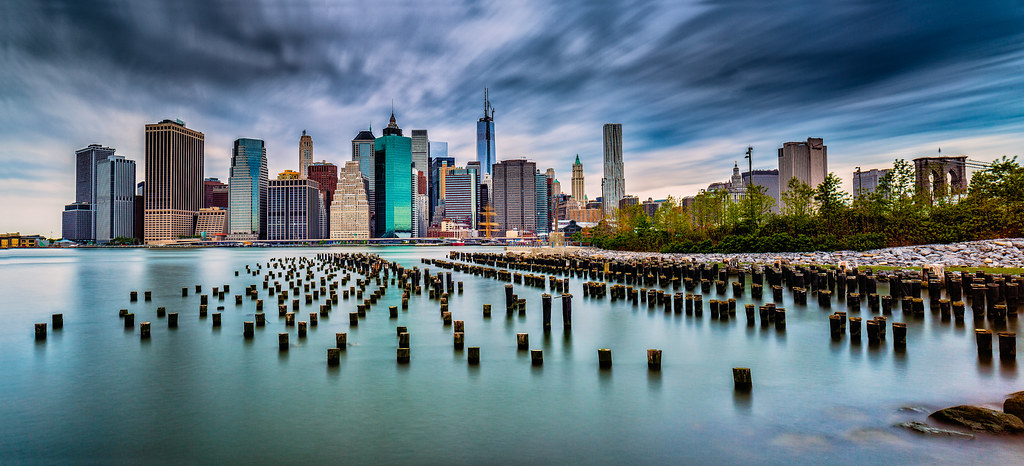
Here are a couple shots I took last weekend during a brief visit to NYC, considering they were taken at mid-day I'm super happy with the results. I'd appreciate any CC.
Technical details: Canon 5D3, Canon 24mm TS-E II, f/11 90 second exposure 2 shots stitched using a Lee Big Stopper and a Lee 4x4 CPL.
I really Like the first one, just be careful of your horizon, The colors are fantastic and your comp is nice in the first photo. #2 and #3 the buildings are tilted to much for me. You almost have a real keeper in the first one just fix your horizon and its real winner and should definitely be hung on a huge wall.
Shane Psaltis wrote:
I really Like the first one, just be careful of your horizon, The colors are fantastic and your comp is nice in the first photo. #2 and #3 the buildings are tilted to much for me. You almost have a real keeper in the first one just fix your horizon and its real winner and should definitely be hung on a huge wall.
Shane
Thanks a lot. I took a look at the horizon in Lightroom and it is very close to level (0.32 degrees) is that what you are talking about? I looked back to the 2 pictures I stitched together for that image and the horizon was nearly perfect on both of them, (a shift pano using the TS-E 24 II).
I'll see what I can do with those tilted buildings, maybe Lightroom 5 will fix them up for me.
I like some of the night shots you took from the same spot on your FB page, I had hoped to go there at night, it must be magnificent to see in person!
Hey Aaron... like these a lot. In regards to horizon, sometimes it can be emprically level, yet awry in the actual visual. I'm not sure what the case is, but I'm seeing some bowing effect going on with horizon that's usually evident when stitching. It's not quite right. On the first shot, it appears to bow upwards in the middle on and on shots #2 and #3, it appears to tilt to the right.
P Alesse wrote:
Hey Aaron... like these a lot. In regards to horizon, sometimes it can be emprically level, yet awry in the actual visual. I'm not sure what the case is, but I'm seeing some bowing effect going on with horizon that's usually evident when stitching. It's not quite right. On the first shot, it appears to bow upwards in the middle on and on shots #2 and #3, it appears to tilt to the right.
Thanks,
I see what you are saying. I've been playing around with it a bit in Lightroom 5. For #1, I can make it look a little straighter but then I lose part of the bottom right hand corner which would make me crop off the bridge so I think I'm going to leave them be for now. I might try to fix them before stitching/use the geometric distortion correction function in Photoshop and see if that helps before I print a large canvas.
I seem to always have issues with leveling horizons so I took some time when taking these to make sure that I got it "right" in camera, I guess I have a little more work to do.
Arob1000 wrote:
Thanks a lot. I took a look at the horizon in Lightroom and it is very close to level (0.32 degrees) is that what you are talking about? I looked back to the 2 pictures I stitched together for that image and the horizon was nearly perfect on both of them, (a shift pano using the TS-E 24 II).
I'll see what I can do with those tilted buildings, maybe Lightroom 5 will fix them up for me.
I like some of the night shots you took from the same spot on your FB page, I had hoped to go there at night, it must be magnificent to see in person!...Show more →
I am not to familiar with the TS lenses, the tilt shift might be the issue, the only way to make the horizon straight is only consider the horizon on the left where the water meets the land. I really like the first shot and after looking at it again I really like the top of the Brooklyn Bridge on the far right, all the elements are there. Horizons are tricky I have the same issues when it comes to sports teams, ask Paul lol,
Tell me more about this LEE filter setup, I have heard a lot about the big stopper but not sure that a 24 mm lens is worth the investment since I can not use it on my 14-24.
Shane Psaltis wrote:
I am not to familiar with the TS lenses, the tilt shift might be the issue, the only way to make the horizon straight is only consider the horizon on the left where the water meets the land. I really like the first shot and after looking at it again I really like the top of the Brooklyn Bridge on the far right, all the elements are there. Horizons are tricky I have the same issues when it comes to sports teams, ask Paul lol,
Tell me more about this LEE filter setup, I have heard a lot about the big stopper but not sure that a 24 mm lens is worth the investment since I can not use it on my 14-24.
I agree with you about the top of the Brooklyn Bridge, I was super happy I was able to get it in the frame, I didn't think I would be able to from that location. I'm going to play around in PS a bit to see if I can fill in some of the area that gets cropped off during the straightening of the horizons but I might just leave it as is at this point.
I used the shift feature for that shot which if anything shouldn't give much geometric distortion/makes it easier to stitch together panoramas.
I'm a huge fan of the Lee filter set-up. It is actually possible to use on the Nikon 14-24 but you need a special adapter that is a bit pricey and they don't offer bit stoppers for it, here's some more info in case you are interested.
Personally I use the Lee Filter set-up mainly for longer exposures using the Big Stopper and their 4x4 CPL. I also have some GND's and a Reverse GND that I use at sunset as well as a 3 stop ND filter that I use during sunset to achieve and exposure that works for the situation. With the Lee Foundation Kit, it allows you to use 3 filters at a time and I'm usually using 2 of the 3, sometimes all 3.
It works for any lens that accepts normal filters, you buy a screw on ring for whatever size your lens's threads are up to 82mm and the filter holder fits onto that adapter and rotates freely from the lens.
I'm a big fan of long exposures so I use mine a lot. Usually you can get away with a 20-30 second exposure at ISO 100 during midday but the effect of an even longer exposure can be really nice if you are looking for a specific look.
The only downside of long exposures is that they do take time and you need to have a sturdy tripod and be patient.
On POTN they have a nice thread that I post in with all 9-10 stop ND photos, it can give you some nice ideas/see some of the possibilities of what can be done.
I've had a chance to update a few of these to make the changes suggested. I also posted updates of my B&W pictures, I can't believe I never realized that there are more basic sliders available besides the main 3 in Silver EFEX Pro 2! Now I need to re-do all my images!
Hey Aaron... sorry to tell you this my friend, but the horizon is still off. Might even be worse. I really see it in the water. Everything is sloping downward to the right.
The color is way over done and this takes a lot away from the first 2 images for me. I like the way you processed the B&W best the first time as it has a bit more pop and is real pritty. Don’t worry about the comments regarding getting the horizon level, the river curves there and it’s not possible. Get the buildings level and be happy.
morris wrote:
The color is way over done and this takes a lot away from the first 2 images for me. I like the way you processed the B&W best the first time as it has a bit more pop and is real pritty. Don’t worry about the comments regarding getting the horizon level, the river curves there and it’s not possible. Get the buildings level and be happy.
Morris
Thanks, I like the color in image 1 but I agree 2 is overdone, I like that one a lot better in B&W, starting to like my original edits a bit more too. I give up with the horizons, I tried using Lightroom 5 and having it "auto level" it and it just never looks good, I think your right and the river curves.
Arob1000 wrote:
Thanks a lot. I took a look at the horizon in Lightroom and it is very close to level (0.32 degrees) is that what you are talking about? I looked back to the 2 pictures I stitched together for that image and the horizon was nearly perfect on both of them, (a shift pano using the TS-E 24 II).
The camera had to be off kilter somehow I assume. The tripod has to be level up to the camera plate. I find Canon TS lenses (especially shift panos by lens only) the easiest to stitch due to ultra low distortion at the edges. Did you possibly have some tilt dialed in by accident ? What's the tripod setup ?
Shaun Nyc wrote:
The camera had to be off kilter somehow I assume. The tripod has to be level up to the camera plate. I find Canon TS lenses (especially shift panos by lens only) the easiest to stitch due to ultra low distortion at the edges. Did you possibly have some tilt dialed in by accident ? What's the tripod setup ?
Hi Shaun,
I made sure to not use any tilt for these, had it locked out. The pano shot (#1) was done via the shift function and is only 2 images. The 3rd shot (B&W) is a single exposure but is dramatically shifted (no tilt). I used my Feisol Tripod and Photoclam ballhead and had a L plate on it. I agree, TS-E's make it super easy to stitch, I love mine!
Not sure what happened but I'm happy with the final shot though. I just tweaked the horizon a little and it looks good. I think the issue here is that the horizon isn't as easy to see due to the park in the mid-ground being angled. The buildings in the distance look sloped but they are really just farther back. I made a metal curve print of the pano, only 5x10 inches but it looks amazing, I'm going to print a large canvas soon!
I use a feisol too but level the tripod first with Acratech leveling base and then the camera plate via rrs camera plate eye. If you're just doing shift stitches just top plate being level should be ok I guess.