Charlie Shugart wrote:
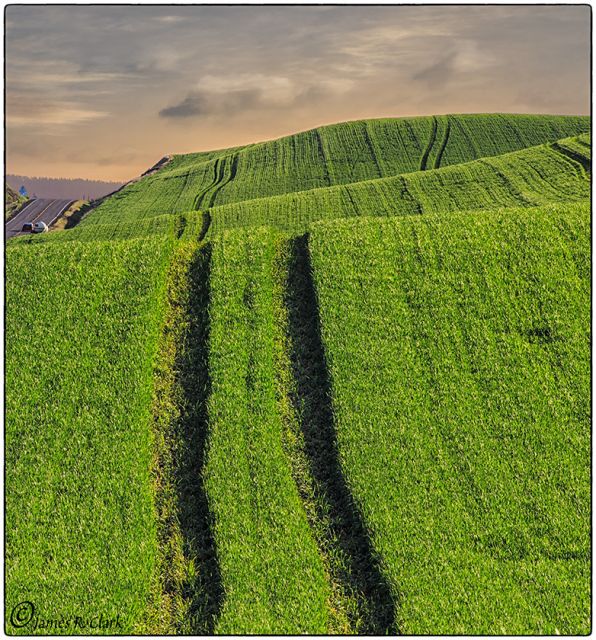
Knock-my-sox-off good, Jim.
The compression of a long lens really makes this extraordinary.
What was the equivalent focal length used, please?
Charlie
Charlie; I was using the "Old" Canon 200 f1.8. It is a great lens for everything, except macro. Thank you, Jim
May 18, 2013 at 06:30 PM
Charlie Shugart Offline • • • • • • • Upload & Sell: Off
oldrattler wrote:
Charlie; I was using the "Old" Canon 200 f1.8. It is a great lens for everything, except macro. Thank you, Jim
Another little thing, Jim.
Having to do with that little band of white on the horizon- especially on the left side of the distant hills.
There's a name for that band- but I don't remember what it is.
If getting rid of it is something you think is worth the time, PM me and I'll explain my basic and simple method on the board.
Charlie
Charlie Shugart wrote:
Another little thing, Jim.
Having to do with that little band of white on the horizon- especially on the left side of the distant hills.
There's a name for that band- but I don't remember what it is.
If getting rid of it is something you think is worth the time, PM me and I'll explain my basic and simple method on the board.
Charlie
Okay, Jim- here's my quick edit.
Note: I'm far from expert at PP, and this may not work for you or others. AND, it's primitive.
Nonetheless, here's what I did:
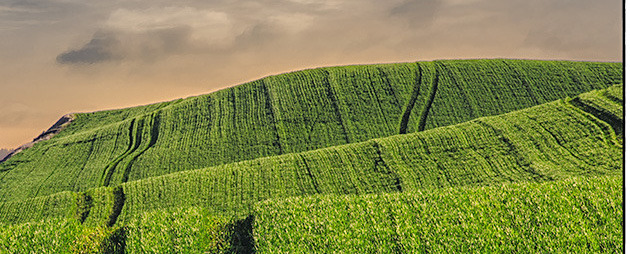
1. Tight crop of the section in question.
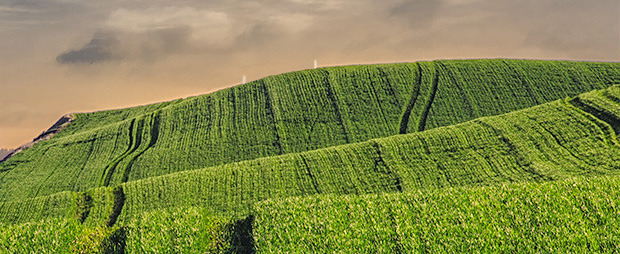
2. My edit of it.
Basically, what I did was expand your image to the max, 1000X..
Then I used the clone tool at a small setting (2 or 3) and at 100%, and cloned in the white band, thereby making it (mostly) disappear. More time would have been better, but I just wanted to demonstrate the process and potential.
It's time consuming and there are probably much better ways to accomplish this- but I don't know the good ways... and this DOES work for me.
Charlie
Note- the worked on area is between the white "towers" I cloned in.
Charlie Shugart wrote:
Okay, Jim- here's my quick edit.
Note: I'm far from expert at PP, and this may not work for you or others. AND, it's primitive.
Nonetheless, here's what I did:
1. Tight crop of the section in question.
2. My edit of it.
Basically, what I did was expand your image to the max, 1000X..
Then I used the clone tool at a small setting (2 or 3) and at 100%, and cloned in the white band, thereby making it (mostly) disappear. More time would have been better, but I just wanted to demonstrate the process and potential.
It's time consuming and there are probably much better ways to accomplish this- but I don't know the good ways... and this DOES work for me.
Charlie
Note- the worked on area is between the white "towers" I cloned in....Show more →