I just replace the print head on my old Canon I9950 printer and printed test pages and head alignment with no problems but the issues stated when I try to print on photo paper.
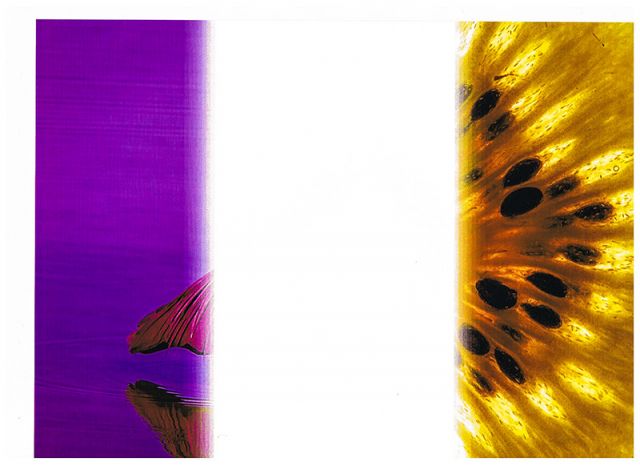
I tried to print a kiwifruit and it printed yellow. A picture of water prints purple. The funny thing is that when I print on plain paper the colours are correct. Printing on plain paper but selecting photo paper it turns to custard again.
Has anyone had similar problem or has any ideas on a fix.
I don't know what program your printing from, but my first thought would be to try another program - anything: paint, picture viewer, etc... (windows)
If I were to assume you're using Photoshop, then I would check whether you're using the correct printer profile and/or whether Photoshop or the printer is handling printer management.
It seems odd that changing a print head would cause a fuss, but it sounds like it a setting somewhere that got changed/reset?
It sounds like a problem when you select 'photo paper'.
I would religiously check every setting but as suggested above first see if the problem occurs when using other programmes.
There is always the fall back position as well.....delete and re-load the printer drivers.
I don't know anything about changing Canon heads...but I do know that when I attempted to replace a head on my Epson R1800 I had to use a software package to 'tune' the head to the printer. However, Canon heads are virtually disposable items so this probably isn't the problem.
Hey Guys thanks for the input.
I have tried printing with easy-photo print and photoshop but when photo paper is selected purple and yellow are the colours. Plain paper prints normal colours.
I have tried reinstalling the drive but no improvement.
Canon support has failed to reply to my email so I guess just keep on trying to get a reply form canon unless anyone has some other ideas.
I'm confused by your words or my understanding of what you are trying to say.
Are you actually using two different types of paper? Plain paper and Photo Paper? What brand/model papers are you using?
When you are preparing to print, have you accidentally clicked on an ADVANCED tab and maybe set photo settings differently? Go through each one of the advanced settings carefully.
When you installed that new print head, you have to run the ink cleaning routine and do a head alignment before use. Did you perform those steps?
It sounds like the paper or non Canon inks or both. Try Canon paper or HP paper which works very well in most Canon's. We are a Canon service center and we see color change with wrong paper and ink.
Just to clarify I am using canon paper with canon ink and have been over the settings many times.
When I have said plain paper is selected I was using plain and all printed fine.
I have uploaded a scan of a attempted print. I cancelled the print and reused the other end of the paper. Been going through a lot of paper lately.
As you can see the yellow is a kiwifruit and the purple is a bird in the water.
Just had a thought could it be a bad ink cartridge? I remember changing a couple of colours when I changed the head.
I don't know if it is even possible on your printer but is seems like the ink cartridges might be mixed up because it's one of the things you changed. They might print the test pattern correctly but with the colors in the wrong places.
To try to sort out what is happening I'd suggest creating a file in Photoshop with small blocks of 100% R, G, B and C, Y, M, K. Also create block of gray tones. Printing on plain and photo paper should give you a clearer idea of where the frigging is in the rigging better than a photo.
What is probably happening is one or more cartridges is not applying ink. The reason of the difference between plain paper and photo paper is that the printer uses different cartridge combos depending on whether you are making a high-quality print (photo paper setting) or low-quality print (plain paper).
Take a look at this thread. If that thread is correct, it sounds like your cyan cartridge is the likely culprit since it is apparently only used in high-quality mode and its absence would make the kiwi yellow (cyan + yellow = green). Could be a plugged, defective, or empty cyan cartridge but also take a look at the last post in the thread that indicates that a circuit board contaminated by waste ink could also be a possibility.
I have just changed both PC and PM cartridges with no improvement. I was originally wondering if is the circuit board.
I guess the next thing is to try cleaning the circuit boards as in the link provided by Eyeball.
Any other ideas im loosing hair rapidly. There are handfuls all around my desk.
beretta wrote:
It prints a nozzle check test page normal. All 8 colours are fine.
Really Wow. Well that makes me think it's not a physical/mechanical problem at all then. If that's the case I would start looking at possible install problems with the printer driver or perhaps a bad printer profile. Can you connect the printer to another PC and try it there?
Eyeball wrote:
Really Wow. Well that makes me think it's not a physical/mechanical problem at all then. If that's the case I would start looking at possible install problems with the printer driver or perhaps a bad printer profile. Can you connect the printer to another PC and try it there?
Yea a real headache.
I have reinstalled the driver several times and tried the printer on another PC but it made no difference.
Im really lost and just about the throw the damn thing in the bin.
Take a look at this, it will be $89 after $300 rebate. I bought 2 since the ink is more than the printer. My rebate only took a couple of weeks to get on my first purchase. It will be much cheaper than repairing yours since it would take some troubleshooting at a service center. If we were to fix it without parts at my service center it would cost a minimum of $79.



 Wow. Well that makes me think it's not a physical/mechanical problem at all then. If that's the case I would start looking at possible install problems with the printer driver or perhaps a bad printer profile. Can you connect the printer to another PC and try it there?