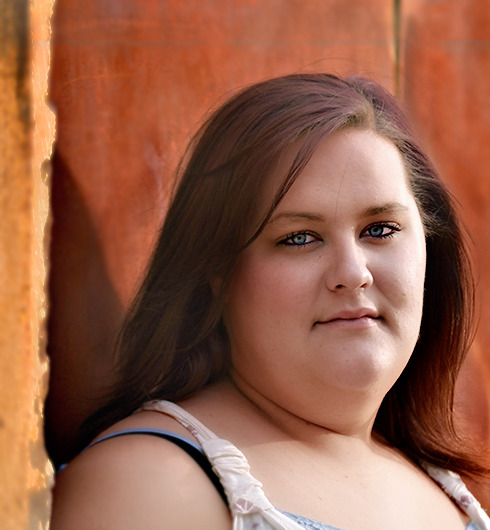
Got my daughter out this weekend and tried a few more. I even got her to smile twice. I still haven't figured out how to show the exif data so I put an album link at the bottom. Thanks.
I was working on some very different things and sometimes it takes a bit to get my head around some perspective @ different images (mental shift), so don't take the response delay too seriously.
Portraits aren't my gig, but #4 stands out from the others ... because she is literally standing out from the background. The thing that strikes me about this set is that the backgrounds are competing for attention with the subject in the form of relatively equal sharpness/focus and colors to draw us toward the background.
I get the background vibe, but there are a lot of horizontal lines that are cutting through your subject ... not helping things a lot. A bit more separation from the bg could help offset that somewhat, either by using more shallow dof, or a bit more distance (see #4) from the bg.
I would have liked for there to be a bit more negative space below her feet in #4. I like the emotive captured in #5, and I'm still pondering the look on #1. The processing looks a bit overcooked for the set as a whole, except in #4, maybe somewhere in between would be a nice balance. There may also be some WB issues. I think the first has the most potential ... curious @ sooc/raw
Took a stab at it ... not my best ( I made some technical blunders and was too lazy to backtrack), but you get the gist. Also, I noticed that your color space is a Nikon space. Not sure if that is playing with browser viewing @ overcooked or not.
What you did in the color is more what I see before I upload into picasa/web. The reds got a lot hotter. I love the crop on #1. Wish I'd have seen it. Thanks
I agree with Kent's comments above. First and foremost, she needs a bit more room. The full-length shots are a bit too tight. Also, I think the photos could be improved by watching the details in the composition. Some, such as the intersecting horizontal lines, can be managed by moving the subject or camera position. Others are just visual clutter, such as the place she's standing on in images 3, 4, and 5.
1) Coordinating clothing and backgrounds: The focal point is the front of the face. A simple way to draw attention to it is to make it contrast well with the clothing and background by making both darker and non-distracting. Similarly, bare shoulders and arms will complete with the skintone of the face for attention so a better choice for portraits on darker backgrounds is long sleeved clothing. In this regard the first closely cropped shot where the clothing isn't a distracting jumble of colors is one of the more effective. The wider the crop the more well coordinated background and clothing will help draw attention to the face.
2) Lighting patterns and facial angles: Here the lighting is either cutting her face in half or is flat and all the facial angles are similar, somewhere between full face and oblique.
To better understand how to effectively model a human face with light I suggest finding a north facing window indoors, turning the face to the window and observing the modeling, then once the face is well modeled to move around it with camera capturing full, precise oblique, and profile views. See: http://photo.nova.org/Window/
From the baseline of your first shot if her face was turned more towards the right into the "key" light the light would have better reached the left side of the face and eye. Outdoors light will often come from so high in the sky that it is usually necessary to have the subject look up to get that "key" light past the brow and into the eyes. Then to get a flattering downward camera angle (i.e. if the nostrils are seen move the camera higher) you'll need a step-stool or step ladder to shoot from.
With older and heavy subjects I'll usually have them look up and then shoot down because it stretches and slims the neck like an "instant facelift". The camera- face angle /-/ stay parallel to each other as in a ground level view |-| so there is no distortion to the face. There is however some foreshortening to the body, which you can control with shooting distance from the subject.
As for the facial angle, if she had turned to the right into better light on the front of the face the facial angle from your camera position would have been more oblique. Full face is one of the least flattering facial angles for most people because of all the possible options it makes the face look round and less 3D. If you move around a face with a camera from full face (camera pointing directly at nose, ears looking similar in size) to profile (face cut exactly in half down the center of the nose) there will be a point where the far side ear and side of the face disappear. You'll see the < notch of the far eye and rounded curve of the ( cheekbone that isn't seen in the full face view.
Because all faces are different there's no "perfect" angle. What I do is move around the face to the point where I see the notch of the far eye < and the cheekbone pop into view, then I look at the chin area for balance on both sides. I'll move the camera an inch or so left and right from that starting point and find the best balance by comparison. See: http://photo.nova.org/Faces/
3) Poses: What make poses seem static or dynamic is how the angles of the eye line, shoulder line and hip line relate to the horizontal and vertical lines of the frame. Poses where the hips, shoulders and eye line are angled come across as more dynamic than those where they are horizonal.
Getting more dynamic poses starts with the feet. If the subject stands "flat footed" with equal weight on both feet the hips/ shoulder/eyes will all be horizontal. But get them to angle the body at 45° to the camera and then shift weight to the front or back foot and that weight shift will tilt the hips, spine and shoulders. See: http://photo.nova.org/PosingZZ/
Subjects by instinct will always move their heads so eyes are level with horizon, which looks "static" in a portrait, so it will be necessary to coach them to tilt their heads either to keep them tilted in the same direction as the shoulders _0_ (i.e., squared with the shoulders) or tilted towards the higher shoulder.
As you manipulate the body angles the subject will project different body language. A person leaning into the camera will seem more confident that one leaning back. As the tilt of the hips / shoulders / eye lines get more aggressive the body language is more dynamic / aggressive. If you see a pose you like in photo you can reverse-engineer it and duplicate it by noting how the feet are placed and how the hip, shoulders and eye lines are tilted relative to the horizon.
4) Smiling vs. Non-smiling: Like many subject's your daughter has a tendency to squint her eyes with forcing a smile and the net result isn't as flattering as the more relaxed shots. Rather than saying "smile" and her forcing it, try to find something in the course of conversation during the shoot to make her laugh and she'll loosen up. I trick I use with kids and uptight subjects is to have them make goofy faces at the camera to loosen them up. Works every time.
Thanks all. More practice and trying to learn to view more critically ahead for me. Good thing I am doing this because I like it, I'm just hoping I can improve. I seem to be stuck in flat lighting - outdoor flash is kicking my tail - and unflattering poses.